Inputs and outputs
This topic describes the basics of inputs and outputs and provides examples.
Flows and steps
Data is often passed between steps in a flow. A step in Flow Definition Language (FDL) is similar to a function in functional programming languages. It accepts an input and returns an output. The output is saved to the local variable of the parent step, which is the caller. The input and output must be in the JSON object format. The type of the local variable varies depending on the step. For example, a task step uses the result of a Function Compute function call as its local variable. A parallel step uses an array of the outputs from all its branches as its local variable. The total size of a step's input, output, and local variables cannot exceed 32 KiB. If this limit is exceeded, the flow execution fails.
If a step contains another step, the outer step is called the parent step and the inner step is called the child step. The parent of the outermost steps is the flow itself. If two steps have the same parent step, they are sibling steps.
Flows and steps both have inputs, outputs, and local variables. The following list describes how they are transformed:
- Step input mappings (
inputMappings) map the input and local variables of a parent step to the input of a child step. - Step output mappings (
outputMappings) map the input and local variables of the current step to the output of the current step. - Flow input mappings (
inputMappings) map the input provided when a user executes a flow to the flow's input. - Flow output mappings (
outputMappings) map the flow's input and local variables to the flow's output.
A parent step's local variable stores the merged outputs of all its child steps. If the outputs contain keys with the same name, the result of the step that executes later overwrites the result of the step that executed earlier. In most cases, you do not need to specify input and output mappings. You can use the default mapping behavior instead. The default transformations are as follows:
- If you do not specify an input mapping, the child step's input is a merge of its parent step's input and local variables. If the local variables and the input have keys with the same name, the values from the local variables overwrite the values from the input.
- If you do not specify an output mapping, all steps except for parallel and foreach steps use their local variables as their output.
To have more control over inputs and outputs, you must understand the detailed mapping rules.
The following figure shows the input and output mappings of an example flow. In this example, step1 is the parent step of step2 and step3. step1 and step4 are the outermost steps.
version: v1
type: flow
steps:
  - type: parallel
    name: step1
    branches:
      - steps:
        - type: pass
          name: step2
      - steps:
        - type: pass
          name: step3
  - type: pass
name: step4 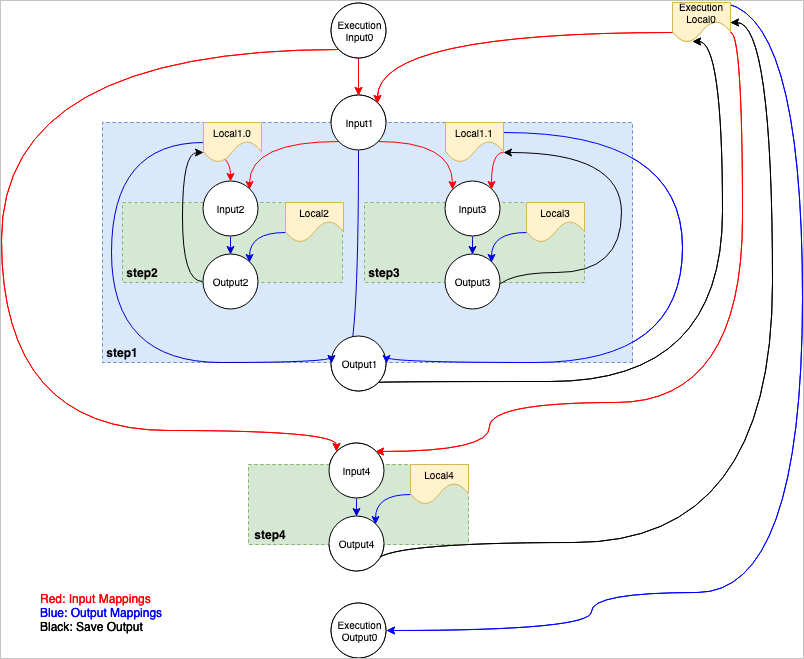
The following code describes these mappings to make them easier to understand.
func flow(input0 Input) (output0 Output) {
  local0 := {}
  input1 := buildInput(step1InputMappings, input0, local0)
  output1 := step1(input1)
  save(local0, output1)
  input4 := buildInput(step4InputMappings, input0, local0)
  output4 := step4(input4)
  save(local0, output4)
  return buildOutput(flowOutputMappings, input0, local0)
}
func step1(input1 Input) (output1 Output) {
  local10 := {}
  input2 := buildInput(step2InputMappings, input1, local10)
  output2 := step2(input2)
  save(local10, output2)
  local11 := {}
  input3 := buildInput(step3InputMappings, input1, local11)
  output3 := step3(input3)
  save(local11, output3)
  return buildOutput(step1OutputMappings, [local10, local11])
}
func step2(input2 Input) (output2 Output) {
}
func step3(input3 Input) (output3 Output) {
}
func step4(input4 Input) (output4 Output) {
}
In this example, the flow contains two child steps: step1 and step4. step1 is a parallel step that contains two child steps: step2 and step3.
- When the system starts to execute the flow, it transforms the
StartExecutioninput into the flow input (input0) based on the flow's input mapping. - When the
flowstarts, its local variablelocal0is empty. - The system prepares the input
input1forstep1based on its input mapping (step1InputMappings). The source for the mapping is theflow's inputinput0and local variablelocal0. - The system calls
step1, passes the inputinput1, andstep1returns the outputoutput1.- When
step1local0starts, its local variable is empty. Becausestep1is a parallel step, each branch has its own local variable to prevent concurrent access issues. - The system prepares the input
input2forstep2based on its input mapping (step2InputMappings). The source for the mapping is thestep1inputinput1and local variablelocal10. - The system calls
step2, passes the inputinput2, andstep2returns the outputoutput2. - The system saves the output of
step2to the local variablelocal10ofstep1. - Similarly, the system calls
step3and saves the result to the local variablelocal11ofstep1.
- When
- The system saves the output of
step1to the local variablelocal0of theflow. - Similarly, the system prepares the input
input4forstep4based on its input mapping. The source for the mapping is theflow's inputinput0and local variablelocal0.Note At this point, the local variablelocal0may already contain the output ofstep1. This is how data is passed betweenstep1andstep4. - The system calls
step4, passes the inputinput4, andstep4returns the outputoutput4. - The system saves the output of
step4to the local variablelocal0of theflow. - Finally, the system transforms
local0into the flow output based on the flow's output mapping.
Type definitions
Input mappings and output mappings are both arrays composed of target and source pairs. The source defines where a parameter's value comes from, and the target defines the name of the destination parameter. If a source value starts with $, it is a JSON Path expression that the system parses to retrieve a specific value. Otherwise, the value is treated as a constant. For example, $input.key indicates that the parameter value is the value of key within the input object. You can use this tool to test JSON Path expressions.
- Source
The
sourcefield supports constant values. These can be of thenumber,string,boolean,array,object, ornulltype.The following example shows a mapping that uses different types of constants and the resulting output.
outputMappings:
  - target: int_key
    source: 1
  - target: bool_key
    source: true
  - target: string_key
    source: abc
  - target: float_key
    source: 1.234
  - target: null_key
    source: null
  - target: array1
    source: [1, 2, 3]
  - target: array2
    source:
      - 1
      - 2
      - 3
  - target: object1
    source: {a: b}
  - target: object2
    source:
      a: b
{ "array1": [1, 2, 3], "array2": [1, 2, 3], "bool_key": true, "float_key": 1.234, "int_key": 1, "null_key": null, "object1": { "a": "b" }, "object2": { "a": "b" }, "string_key": "abc" } - Target
The target must be a string constant.
Input mapping
An input mapping transforms the parent step's input ($input), the parent step's local variables ($local), or constants into the child step's input. If you do not specify an input mapping, the parent step's input and local variables are merged and used as the child step's input. If the parent step's input and local variables have keys with the same name, the value from the local variables overwrites the value from the input.
inputMappings:
  - target: key1
    source: $input.key1
  - target: key2
    source: $local.key2
  - target: key3
    source: literal
Input $input | Local variable $local | Input mapping | Child step input |
| | | |
| | None | |
| | None | |
Output mapping
An output mapping transforms the current step's input ($input), local variables ($local), or constants into the step's output. If you do not specify an output mapping, the local variables of choice and loop steps are used as their outputs. Task steps use the result of the task execution as their output. Because the local variables of parallel and foreach steps are arrays, you must define an output mapping to transform the array result into a JSON object. By default, their local variables are not included in the output. For more information, see the descriptions of the steps.
outputMappings:
  - target: key1
    source: $input.key1
  - target: key2
    source: $local.key2
  - target: key3
    source: literal
Input $input | Local variable $local | Output mapping | Step output |
| | | |
| | | |
| | None | |
How outputs are saved to parent step local variables
The child step's output ($output) is merged into the parent step's local variables. If both have keys with the same name, the value from the output overwrites the corresponding value in the local variables.
Output $output | Parent step local variable $local | Parent step local variable after change |
| | |
| | |