Create a new project
SOFABoot supports creating two types of projects: Web and Core.
Web Project
Web projects are for applications that require a web interface. Developing a web project is similar to building a Spring Boot-based web application with SOFA middleware.
Web projects work with the SOFAREST service to provide a frontend-backend separation solution based on the Java API for RESTful Web Services (JAX-RS) standard.
Core project: Core projects are for backend services that do not have a user interface. Developing a core project is similar to building a Spring Boot-based non-web application (without servlet dependencies) with SOFA middleware.
This topic describes how to create a project and explains its structure.
Create a project
This section describes how to use the Maven tool to create SOFABoot Web and Core projects on your local machine. Before you start, complete the steps in Prerequisites.
Prerequisites
To run the code examples in this topic, you must first set up the SOFABoot runtime environment. For more information, see Set up the environment.
Procedure
Open the command line interface as a system administrator. Navigate to the folder where you want to create the project and run one of the following commands:
If you use the
settings.xmlfile in the default Maven installation folder and have overwritten the originalsettings.xmlfile as described in Set up the environment, you can use the following Maven commands.Web project:
mvn archetype:generate -DarchetypeGroupId=com.alipay.sofa -DarchetypeArtifactId=sofaboot-web-archetype -DarchetypeVersion=1.0-SNAPSHOT -DarchetypeCatalog=internalCore project:
mvn archetype:generate -DarchetypeGroupId=com.alipay.sofa -DarchetypeArtifactId=sofaboot-core-archetype -DarchetypeVersion=1.0-SNAPSHOT -DarchetypeCatalog=internal
If you use the
settings.xmlfile in a custom Maven installation folder and have overwritten the originalsettings.xmlfile as described in Set up the environment, you can use the following Maven commands.Web project:
mvn -s "custom_settings_path" archetype:generate -DarchetypeGroupId=com.alipay.sofa -DarchetypeArtifactId=sofaboot-web-archetype -DarchetypeVersion=1.0-SNAPSHOT -DarchetypeCatalog=internalCore project:
mvn -s "custom_settings_path" archetype:generate -DarchetypeGroupId=com.alipay.sofa -DarchetypeArtifactId=sofaboot-core-archetype -DarchetypeVersion=1.0-SNAPSHOT -DarchetypeCatalog=internalImportantWhen you use a
settings.xmlfile from a custom path, do not copy the Maven command directly. You must replace "custom_settings_path" with the actual file path. For example:"C:\apache-maven-3.3.3\conf\settingsXXX.xml".
During the process, you are prompted to enter the following information. You can configure them as needed:
groupId: The unique identifier for the project in the Maven repository. This is usually the reverse of your company or organization's domain name, such ascom.yourCompanyName.sofa.ImportantYou must create your groupId according to development standards to prevent issues during configuration scans.
artifactId: The project or application name, such asweb-apporcore-app.version: The version number. The default is1.0-SNAPSHOT. A SNAPSHOT is an unstable version of a project that is still in development. You can keep the default value.package: The application package name. You can leave this field blank.NoteThe groupId, artifactId, and version elements form the basic coordinates of a Maven project.
After you complete the configuration, you are asked to confirm the information.
Enter Y to confirm and continue the installation.
Enter N to cancel and redefine the properties.
After you define the properties, the project creation process continues. When you see the following output, the project is created.
[INFO]------------------------------------------------------------------------
[INFO] BUILD SUCCESS
[INFO]------------------------------------------------------------------------
[INFO]Total time:28.298 s
[INFO]Finished at:2018-01-10T23:36:19+08:00
[INFO]FinalMemory:15M/163M
[INFO]------------------------------------------------------------------------
Go to the Version Guide to find the latest SOFABoot version. In the folder from Step 1, find the new project folder, which is named after the `artifactId`. Then, in the main `pom.xml` file in the project's root directory, change the version number in the
<parent>tag. The following example shows this process: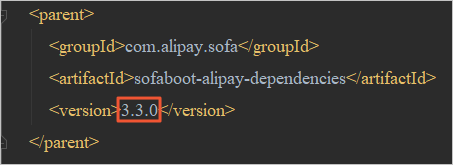
Project structure
The following sections explain the directory structures for the two types of SOFABoot projects.
This topic uses an example to help you understand the directory structure. The example project uses the following dependency information:
groupId: com.alipay.sofaartifactId: APPNAME
Web project archetype directory
The Web project model creates two modules by default: endpoint and web.
endpointmodule: The service module for SOFAREST. It provides SOFAREST services to external clients.webmodule: The startup module that contains the `main` function and can be run directly. It also includes global configuration files, test modules, and static resources.
The following code shows the directory structure of a Web project created with a Maven command:
├── app
│├── endpoint
││├── pom.xml
││└── src
││└── main
││├── java
│││└── com
│││└── alipay
│││└── APPNAME
│││└── endpoint => SOFAREST practice code
│││├── constants
││││├──RestConstants.java
││││└──URLConstants.java
│││├── exception
││││├──CommonException.java
││││└──SofaRestExceptionHandler.java
│││├── facade
││││└──SampleRestFacade.java
│││├── filter
││││└──CommonContainerResponseFilter.java
│││├── impl
││││└──SampleRestFacadeRestImpl.java
│││├── model
││││└──DemoUserModel.java
│││└── response
│││├──AbstractFacadeResp.java
│││└──RestSampleFacadeResp.java
││└── resources
││└── META-INF
││└── APPNAME
││└── APPNAME-endpoint.xml
│└── web
│├── pom.xml
│└── src
│├── main
││├── java
│││└── com
│││└── alipay
│││└── APPNAME
│││└──Slite2WebSpringBootApplication.java => Startup function
││└── resources
││├── META-INF
│││└── APPNAME => Location for Spring configuration files. Place them in the specified APPNAME folder.
│││└── APPNAME-web.xml
││├── config => Configuration folder. For more information, see "Configuration Solutions".
│││└── application.properties => Application log configuration file
│││└── application-dev.properties
│││└── application-test.properties
││├── logback-spring.xml => Application log configuration file
││└──static=> Location for static pages of the web project
││└── index.html
│└── test => Application test module. It has a built-in Spring Boot starter for easy business testing.
│└── java
│└── com
│└── alipay
│└── APPNAME
│└── web
│└── test
│├──base
││└──AbstractTestBase.java
│└── usercases
│└──SofaRestServiceTest.java
└── pom.xml => Application's Maven configuration fileBy default, all static pages are stored in the
src/main/resources/staticfolder for unified management.For information about SOFABoot's global property configuration and log configuration solutions, see the Technology Stack User Guide for the SOFABoot technology stack.
The application's test module is in the
src/test/javafolder of thewebmodule. The use cases include a test base class (base) and a test class (usecases). The test class starts Spring Boot to perform simple functional testing of SOFAREST.
Core project archetype directory
The Core project model creates two modules by default, based on the application name: {APPNAME}-facade and {APPNAME}-service.
facademodule: Defines the application's interface dependency package.servicemodule: The startup module that contains the `main` function and can be run directly. It also includes global configuration files and test modules. The following code shows the directory structure of a Core project created with a Maven command, usinggroupId=com.alipay.sofaandartifactId=APPNAME:
├── APPNAME-facade
│├── pom.xml
│└── src => Interface dependency package for distribution to other applications
│└── main
│└── java
│└── com
│└── alipay
│└── APPNAME
│└── facade
│└──SampleService.java
├── APPNAME-service
│├── pom.xml
│└── src
│├── main
││├── java
│││└── com
│││└── alipay
│││└── APPNAME
│││├──Slite2SpringBootAPPNAMEApplication.java => Startup function
│││└── service
│││└──SampleServiceImpl.java
││└── resources
││├── META-INF
│││└── APPNAME => Location for Spring configuration files. Place them in the specified APPNAME folder.
│││└── APPNAME-service.xml
││├── config => Configuration folder. For more information, see "Configuration Solutions".
│││├── application-dev.properties
│││├── application-test.properties
│││└── application.properties
││└── logback-spring.xml => Application log configuration file
│└── test => Application test module. It has a built-in Spring Boot starter for easy business testing.
│├── java
││└── com
││└── alipay
││└── APPNAME
││└── test
││├──base
│││└──AbstractTestBase.java
││└── usercases
││└──BeanTest.java
│└── resources
│└── test
│└── META-INF
│└── APPNAME
│└── test.xml
└── pom.xml => Application's Maven configuration fileFor information about SOFABoot's global property configuration and log configuration solutions, see the Technology Stack User Guide for the SOFABoot technology stack. The application's test module is in the src/test/java folder of the service module. The use cases include a test base class (base) and a test class (usecases). The test class starts Spring Boot to perform simple functional testing of the bean.