Isolation feature extension
SOFABoot supports modular isolation. In actual usage scenarios, beans in one module sometimes need to open some portals for another module to extend. SOFABoot draws on and extends from Nuxeo Runtime projects and Nuxeo projects, integrating with Spring to provide extension point capabilities.
The concepts involved in the following are described as follows:
Extension point: refers to a bean that is exposed to other modules and can be used for extension.
Contribution point: A variable in an extension point bean whose value can be overridden by custom variables in other modules.
Contribution point description class: A class that describes a contribution point and exposes it to other modules.
XMap: is a library that implements mapping between XML elements and Java objects by using annotations on Java objects. This library is currently available through the Nuxeo Runtime, which makes it easier to use extended contribution points. At the same time, the library is completely independent of Nuxeo Runtime and can also be used by any type of Java application.
The following contents mainly include the following two aspects:
Enables extended capabilities
An instance of advanced scalability. There are two main implementation methods:
XML configuration implementation
Client programming API implementation.
Enables extended capabilities
The following section describes how to implement the extension capabilities of SOFABoot through XML configuration. The main logic for implementing extensions through XML is as follows:
The extension point bean MyExtensionImpl describes the class ContributionDescriptor and its XML configuration through the contribution point, and is registered into the runtime of SOFABoot as a component.
When the program parses the XML configuration,
MyExtensionImplthe contribution pointwordvariable in this Bean is overwritten with the new value of the<value>correspondingKhotyn Huangin the<sofa:content>.
XML configuration implementation extension diagram 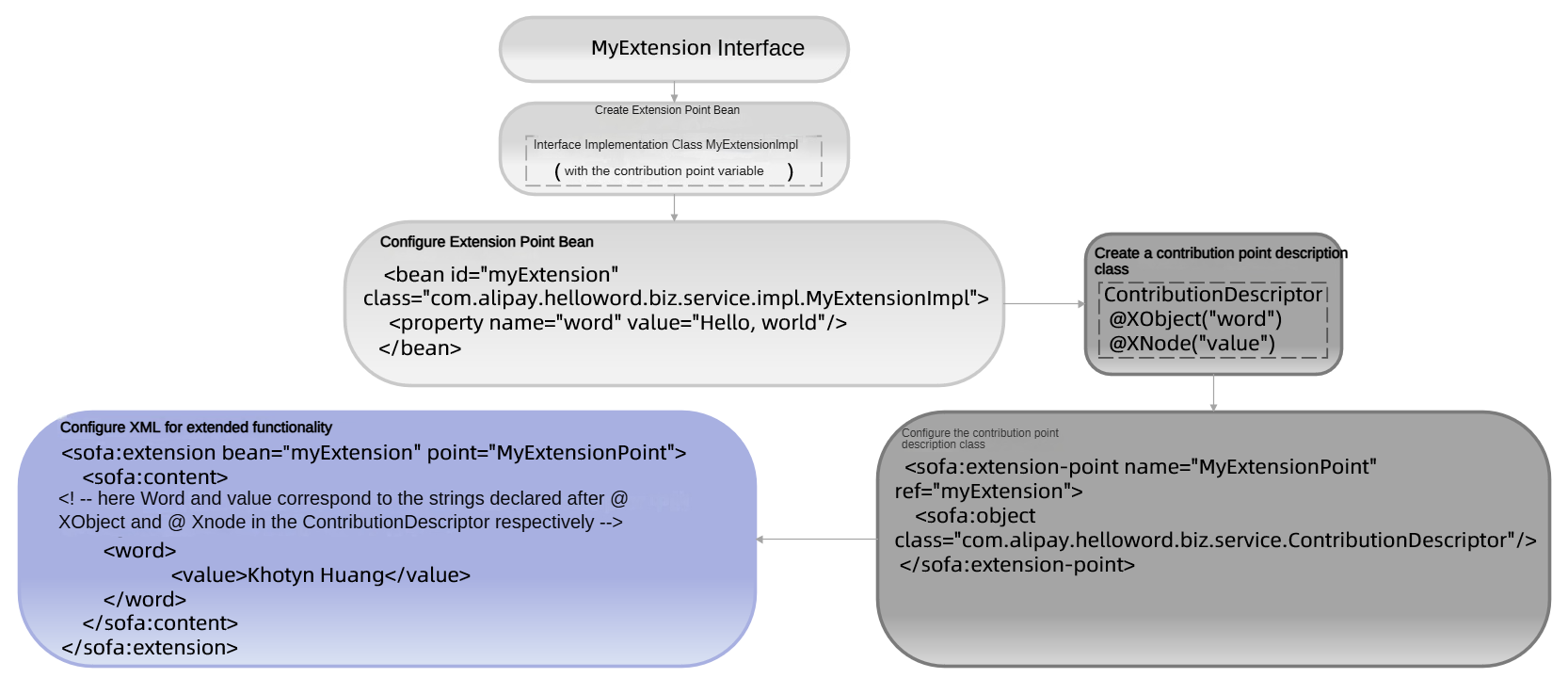
The implementation of the extension capability includes the following three steps:
Defining extension point Bean
Define a contribution point description class
Configure extensions
Defining extension point Bean
The following example defines a bean and exposes its private variable word as a contribution point so that it can be overwritten by other module custom variables.
The following example shows how to define a step:
Create an interface:
public interface MyExtension{
   String say();
}
Create an implementation of the interface:
public class MyExtensionImpl implements MyExtension {
    private String word;

    @Override
    public String say() {
        return word;
    }

    public void setWord(String word) {
        this.word = word;
    }

    /**
     * Only one contribution point is set, and the method is relatively simple. As the number of contribution points increases, the method becomes more complex.
     */
    public void registerExtension(Extension extension) {
        Object[] contributions = extension.getContributions();
        String extensionPoint = extension.getExtensionPoint();

        setWord(((ContributionDescriptor) contributions[0]).getValue());
    }
}
Method description
The method
registerExtension()are described as follows:It is a component method, and the SOFABoot framework will call this method to set the extension point, which is essential.
The passed parameter Extension describes the class for the extension point provided by SOFABoot.
In the module's xml configuration file, configure this bean:
<bean id="myExtension" class="com.alipay.helloword.biz.service.impl.MyExtensionImpl">
     <property name="word" value="Hello, world"/>
</bean>
Define a contribution point description class
The following example shows how to define a step:
Create a contribution point description class:
@XObject("word")
public class ContributionDescriptor{
    @XNode("value")
    private String value;

    public String getValue(){
        return value;
    }
}
Configure this contribution point description class in XML:
<sofa:extension-point name="MyExtensionPoint" ref="myExtension">
        <sofa:object class="com.alipay.helloword.biz.service.ContributionDescriptor"/>
</sofa:extension-point>
Field Description:
name: The name of the extension point.ref: is the id of the extension point bean.<sofa:object> sub-element: defines the contribution point of an extension point. You can define multiple contribution points.classattribute: corresponding to the contribution point description class, is the description of the contribution point, this description is carried out by XMap, Java objects and XML files can be mapped.
Configure extensions
Through the configuration of xml to achieve the extension of the isolation function. Example:
<sofa:extension bean="myExtension" point="MyExtensionPoint">
    <sofa:content>
        <! -- here word corresponds to the string declared after @ XObject in the ContributionDescriptor -->
        <word>
            <! -- where value corresponds to the string declared after @ XNode in the ContributionDescriptor -->
            <value>Khotyn Huang</value>
        </word>
    </sofa:content>
</sofa:extension>
Field description:
word: Corresponds to the string declared after @ XObject in the ContributionDescriptor.value: Corresponds to the string declared after @ XNode in the ContributionDescriptor.bean: Is an extension point bean.point: The name of the extension point.<sofa:content>: The content inside is the definition of the extended content, which parses the content into an extended description class object through XMap, which is thecom.alipay.sofa.boot.test.extension.ExtensionDescriptorobject here.
Advanced scalabilityinstance
SOFABoot's extended capabilities include:
Supports the native description capabilities of XMap, including:
List
Map
Extends Spring integration capabilities to include:
Through the
XNodeextended out of theXNodeSpringThrough the
XNodeListextended out of theXNodeListSpringThrough the
XNodeMapextended out of theXNodeMapSpring
This part of the extension capabilities, so that the ability of extension points more rich, description object can directly point to a Spring Bean. The user configures the name of the bean. SOFABoot obtains the bean from the Spring context based on the name.
The following uses a XNodeListSpring as an example to describe the advanced extension function. There are two ways to implement:
XML configuration implementation
Client Programming API Implementation
XML configuration implementation
The main steps are as follows:
Defining Extension Point Beans
Define a contribution point description class
Configure extensions
Define extension point Bean
The following example shows how to define a step:
Create an interface:
package com.alipay.sofa.boot.test; public interface IExtension{ List<SimpleSpringListBean> getSimpleSpringListBeans(); }NoteThis interface returns a list, the goal is that this list can be filled by extension;
SimpleSpringListBeancan be defined according to requirements, it is assumed here that an empty implementation is defined.
Create the interface implementation class:
public class IExtensionImpl implements IExtension { private List<SimpleSpringListBean> simpleSpringListBeans = new ArrayList<>(); @Override public List<SimpleSpringListBean> getSimpleSpringListBeans() { return simpleSpringListBeans; } public void registerExtension(Extension extension) throws Exception { Object[] contributions = extension.getContributions(); String extensionPoint = extension.getExtensionPoint(); if (contributions == null) { return; } for (Object contribution : contributions) { if ("testSpringList".equals(extensionPoint)) { simpleSpringListBeans.addAll(((SpringListContributionDescriptor) contribution) .getValues()); } } } }NotesimpleSpringListBeansas a contribution point.In the module's Spring configuration file, configure this bean:
<bean id="iExtension" class="com.alipay.sofa.runtime.integration.extension.bean.IExtensionImpl"/>
Define a contribution point description class
The definition steps are as follows:
Create a contribution point description class:
@XObject("testSpringList") public class SpringListContributionDescriptor { @XNodeListSpring(value = "value", componentType = SimpleSpringListBean.class, type = ArrayList.class) private List<SimpleSpringListBean> values; public List<SimpleSpringListBean> getValues() { return values; } }Note@XNodeListSpring: When configuring the name of the corresponding bean in the XML, SOFABoot will get the corresponding bean instance from the Spring context.Define this contribution point description class in XML:
<sofa:extension-point name="testSpringList" ref="iExtension">
<sofa:object class="com.alipay.sofa.runtime.integration.extension.descriptor.SpringListContributionDescriptor"/>
</sofa:extension-point>
Configure extensions
Through the configuration of xml to achieve the extension of the isolation function.
<bean id="simpleSpringListBean1" class="com.alipay.sofa.runtime.integration.extension.bean.SimpleSpringListBean"/>
<bean id="simpleSpringListBean2" class="com.alipay.sofa.runtime.integration.extension.bean.SimpleSpringListBean"/>

<sofa:extension bean="iExtension" point="testSpringList">
    <sofa:content>
        <testSpringList>
            <value>simpleSpringListBean1</value>
            <value>simpleSpringListBean2</value>
        </testSpringList>
    </sofa:content>
</sofa:extension>The configuration content is described as follows:
Two beans are defined and placed in the extension definition.
Call the
getSimpleSpringListBeansmethod of theiExtensionand you will see that it contains the two beans added by extension.
Client programming API implementation
The following steps are done mainly by com.alipay.sofa.runtime.api.client.ExtensionClient:
Get extension client Bean
Set extension point parameters
Definition extension
Get extension client Bean
You need to implement the interface com.alipay.sofa.runtime.api.aware.ExtensionClientAware provided in SOFABoot, as shown in the following example:
public class ExtensionClientBean implements ExtensionClientAware {

    private ExtensionClient extensionClient;

    @Override
    public void setExtensionClient(ExtensionClient extensionClient) {
        this.clientFactory = extensionClient;
    }

    public ExtensionClient getClientFactory() {
        return extensionClient;
    }
}
Set extension point parameters
ExtensionPointParam extensionPointParam =new ExtensionPointParam();
extensionPointParam.setName("clientValue");
extensionPointParam.setTargetName("iExtension");
extensionPointParam.setTarget(iExtension);
extensionPointParam.setContributionClass(ClientExtensionDescriptor.class);
extensionClient.publishExtensionPoint(extensionPointParam);
Defining an extension point through the client is consistent with the meaning of each parameter when it is defined through XML:
name: The name of the extension point.targetName: The name of the bean on which the extension point is applied.target: The bean on which the extension point is applied.contributionClass: A specific description of the contribution points for extension points. The following example describes the definition here:
@XObject("clientValue")
public class ClientExtensionDescriptor{
    @XNode("value")
    private String value;

    public String getValue(){
        return value;
    }
}
Extension points are defined by com.alipay.sofa.runtime.api.client.ExtensionClient publishExtensionPoint.
Definition extension
DocumentBuilderFactory dbFactory =DocumentBuilderFactory.newInstance();
DocumentBuilder dBuilder = dbFactory.newDocumentBuilder();
Document doc = dBuilder.parse(new File(Thread.currentThread().getContextClassLoader()
.getResource("META-INF/extension/extension.xml").toURI()));
ExtensionParam extensionParam =new ExtensionParam();
extensionParam.setTargetName("clientValue");
extensionParam.setTargetInstanceName("iExtension");
extensionParam.setElement(doc.getDocumentElement());
extensionClient.publishExtension(extensionParam);
The meaning of each parameter is maintained through the client-side definition extension as it is through XML:
targetInstanceName: The bean on which the extension acts.targetName: The name of the extension point.The content in the
elementis the definition of the extension. Here, you need to pass in theElementobject and read it from the XML. The sample content is as follows:
<clientValue>
    <value>SOFABoot Extension Client Test</value>
</clientValue>
Extensions can be defined by com.alipay.sofa.runtime.api.client.ExtensionClient publishExtension.
Client limits
Because the definition of the extension is strongly dependent on XML, although the extension point and extension are published through the client here, the content of the extension itself still needs to be described in XML, and it is not really only the client.