Send normal messages (three methods)
SOFAStack MSMQ provides three methods to send normal messages: synchronous sending, asynchronous sending, and one-way sending. This topic describes the principles, scenarios, and sample code of each sending method, and compares the three sending methods.
Comparison of Three Sending Methods
The characteristics and main differences of the three are as follows:
Sending Method | Send TPS | Send Result Feedback | Reliability | Scenario |
Synchronous | High | Supported | No message loss | You can use the synchronous transmission mode in scenarios in which you want to send important notifications to emails, notification messages for registration, and promotional messages. |
Asynchronous | High | Supported | No message loss | This mode is generally used in time-consuming links for business scenarios that are sensitive to the response time. For example, after a user uploads a video, a notification is sent immediately to enable transcoding. After transcoding is completed, a notification is sent to push transcoding results. |
One-way | Highest | None. | Possible message loss | The one-way transmission mode is suitable for scenarios in which messages are transmitted in a short time but with low requirements on reliability. For example, this mode can be used for log collection. |
Synchronous transmission
Description
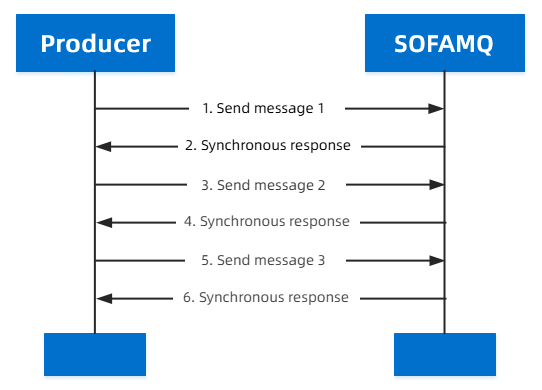
In synchronous transmission mode, the sender sends another message only after it receives a response from the Message Queue for Apache RocketMQ broker for the previous message.
Sample code
import java.util.Properties;

import com.alipay.sofa.sofamq.client.PropertyKeyConst;

import io.openmessaging.api.OMS;
import io.openmessaging.api.Producer;
import io.openmessaging.api.SendResult;

public class SomeClass {

    public static void main(String[] args) {
        Properties properties = new Properties();
        properties.setProperty(PropertyKeyConst.GROUP_ID, "GID_XXX");
        Producer producer = OMS.builder().driver("sofamq").endpoint("$END_POINT")
            .build().createProducer(properties);
        producer.start();

        String msgBody = "Message Body";
        Message message = new Message("YOUR_TOPIC","$YOUR_TAGS", msgBody.getBytes());
        SendResult sendResult = producer.send(message);
        System.out.println(sendResult);
    }
}
Asynchronous sending
Principle
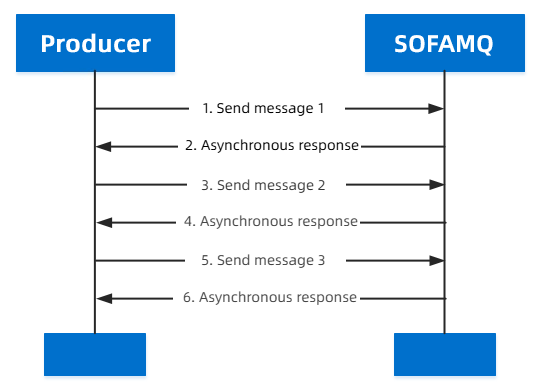
Asynchronous sending refers to the communication method in which the sender sends a message and then sends the next message without waiting for the server to return a response. To send MSMQ asynchronously, you must implement the SendCallback operation. After a message is sent, the message sender can send a second message without waiting for a response from the server. The sender receives the server response through the callback interface and processes the response result.
Sample code
import java.util.Properties;

import com.alipay.sofa.sofamq.client.PropertyKeyConst;

import io.openmessaging.api.OMS;
import io.openmessaging.api.OnExceptionContext;
import io.openmessaging.api.Producer;
import io.openmessaging.api.SendCallback;
import io.openmessaging.api.SendResult;

public class SomeClass {

    public static void main(String[] args) {
        Properties properties = new Properties();
        properties.setProperty(PropertyKeyConst.GROUP_ID, "GID_XXX");
        Producer producer = OMS.builder().driver("sofamq").endpoint("$END_POINT")
            .build().createProducer(properties);
        producer.start();

        String msgBody = "Message Body";
        Message message = new Message("YOUR_TOPIC","$YOUR_TAGS", msgBody.getBytes());
        producer.sendAsync(message, new SendCallback() {
                @Override
                public void onSuccess(SendResult sendResult) {
                    System.out.println("send success: " + sendResult);
                }

                @Override
                public void onException(OnExceptionContext context) {
                    System.out.println("send fail: " + context);
                }
            });

    }
}
One-way sending
Principle
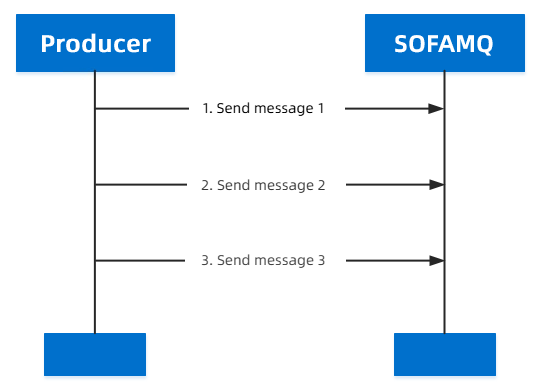
The sender is only responsible for sending messages without waiting for the server to return a response and no callback function is triggered, that is, only sending requests without waiting for responses. The process of sending messages in this mode takes a very short time, generally in microseconds.
Sample code
import java.util.Properties;

import com.alipay.sofa.sofamq.client.PropertyKeyConst;

import io.openmessaging.api.OMS;
import io.openmessaging.api.Producer;

public class SomeClass {

    public static void main(String[] args) {
        Properties properties = new Properties();
        properties.setProperty(PropertyKeyConst.GROUP_ID, "GID_XXX");
        Producer producer = OMS.builder().driver("sofamq").endpoint("$END_POINT")
            .build().createProducer(properties);
        producer.start();

        String msgBody = "Message Body";
        Message message = new Message("YOUR_TOPIC","$YOUR_TAGS", msgBody.getBytes());
        producer.sendOneway(message);

    }
}