View the subscription relationship
In the SOFAStack MSMQ console, you can view the subscriptions between group IDs and topics in real time. This topic describes how to view subscriptions in the MSMQ console.
From the topic perspective, you can view which group IDs have subscribed to several topics.
From the group perspective, you can view the topics to which a group ID has subscribed.
View which group IDs subscribe to a topic
Prerequisites
At least one group ID that subscribes to the topic is online.
Procedure
Log on to the SOFAStack console.
In the left-side navigation pane, choose Middleware > MSMQ > Topics.
Click the target topic to go to the details page. All online group IDs that subscribe to the topic and their consumption patterns are displayed.
You can also click Consumption Status in the Actions column of a group ID to view the message consumption details of the group ID. For more information, see View consumer status.
Unitization description
In the LDC unit architecture, you can switch units to view the group IDs that have subscribed to the topic in a specific unit, as shown in the following figure. 
View the topics to which a group ID subscribes
Prerequisites
The group ID that you want to query is online.
Procedure
In the left-side navigation pane, choose Middleware > MSMQ > Group Management.
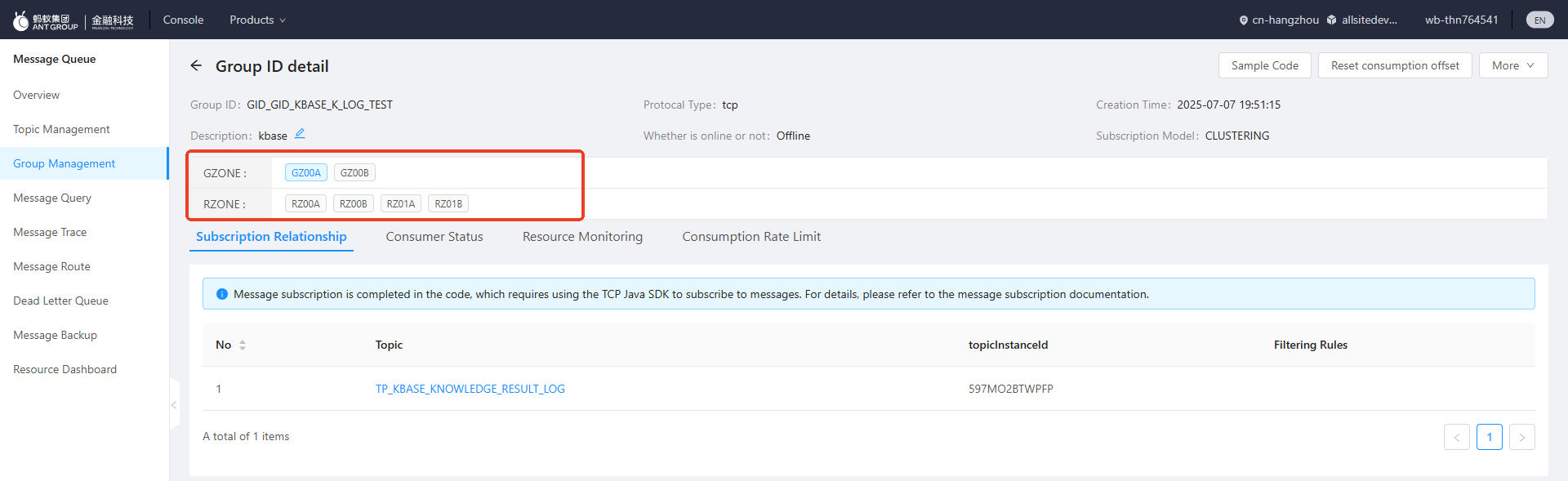
Click the group ID to go to the details page. You can view all the topics to which the group ID subscribes and the message filtering rules of these topics.
Unitization description
In the LDC unit architecture, you can switch units to view the topics to which the group ID subscribes in a specific unit, as shown in the following figure.