On-page SEO
Every web page needs a unique name, summary, and description to create a positive first impression. This topic describes how to access and configure on-page Search Engine Optimization (SEO) settings and provides best practices to make your site more friendly to search engines.
For more information, see SEO-related questions.
1. Where can you configure the SEO settings for a product?
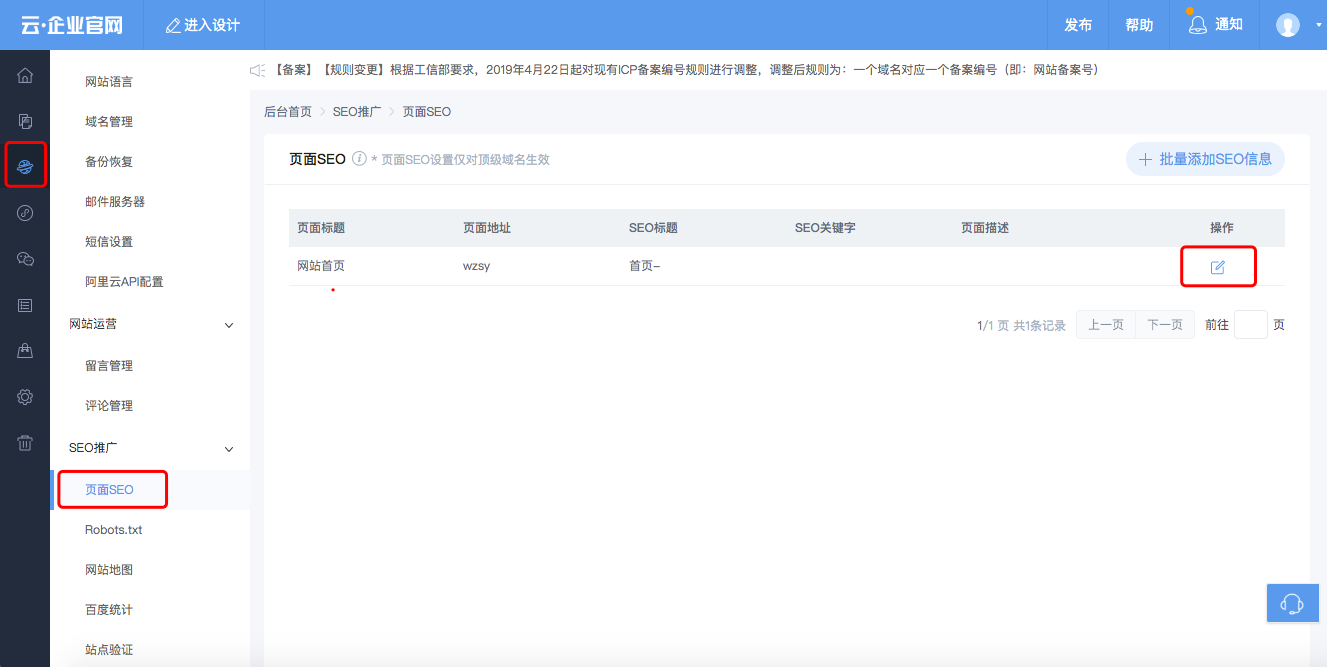
On the website admin home page, in the navigation pane on the left, click . Then, click the blue edit icon.
In the designer, click the current page title in the upper-left corner to switch pages. Hover over a page and click to set the SEO title, SEO keywords, and page description.
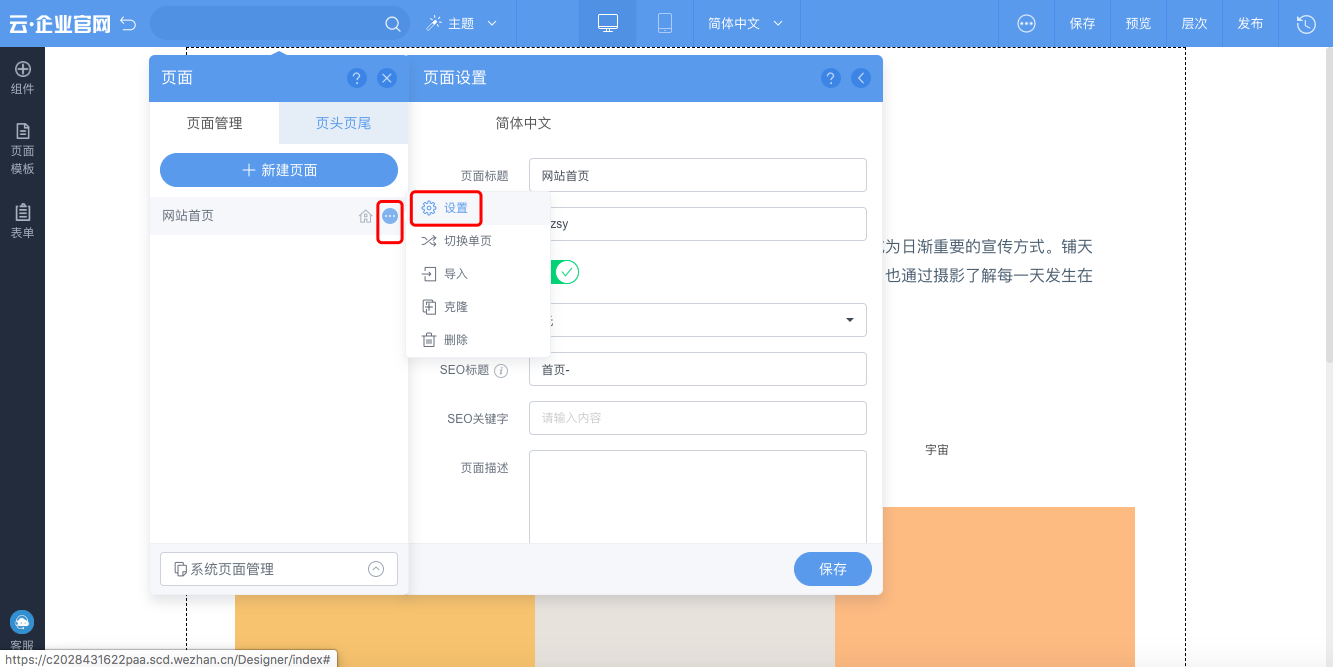
For best results, optimize your page by configuring the SEO title, SEO keywords, and page description.
Set the SEO title.
Purpose: A Search Engine Optimization (SEO) title is the title that appears for a webpage in search engine results. For users, the title is the most direct way to understand a webpage's content. A good SEO title helps users quickly identify the page's content and its relevance to their search query. The SEO title carries significant weight in search rankings, so it is important to configure it correctly.
Guidelines for writing SEO titles:
The title should accurately and concisely describe the webpage content. Avoid vague or irrelevant descriptions. Avoid keyword stuffing.
Ensure every page on your site has a unique and specific title.
Include keywords in the SEO title. The core keyword should appear one to three times. Keep the title length to a maximum of 56 bytes (28 Chinese characters). You can use a space or a hyphen (-) to separate parts of the title. For more information, see the following table.
Page type
Page type description
Recommended title format
Title format description
Example
Home page
The home page is the entry point to the entire site.
Site Name/Brand Name - Home Page/Official Site/Slogan
The keyword for this page type is the brand name or site name. Modifiers can include terms such as Official Site, Official Website, Home Page, Homepage, or Home. You can also use the site's slogan or parent brand name as a modifier.
Youku Home Page
Taobao - Tao! I like it
JD.com - Genuine products, low prices, quality assurance, timely delivery, easy shopping!
List page
A list page displays multiple lists of data.
List/Channel Name - Parent Channel (optional) - Site Name
The keyword for this page type is the name of the list or channel. Modifiers can include the site name and the parent channel name. If you use the site name as a modifier, place it at the end of the title.
Men's Channel - Vipshop
Youku Finance - Youku
Topic aggregation page
A topic aggregation page is a collection of content related to a specific subject, aggregated based on various properties.
Subject - Property 1 - Property 2 - Site Name
The keyword for this page type is the main subject. Modifiers can include the subject's properties, the parent channel name, and the site name. If you use the site name as a modifier, place it at the end of the title.
Chengdu Travel Guide - Itineraries - Independent Travel Guide - Ctrip Travel
Content page
A content page is a specific page that displays content, such as an article, a product page, or a video playback page.
Content Title - List/Channel Name (optional) - Site Name
The keyword for this page type is the main title or name of the content, such as the article title, video name, or product name. Modifiers can include the parent channel name and the site name. If you use the site name as a modifier, place it at the end of the title.
How to Make Braised Pork - Recipes - Xiangha.com
Typhoon Talim (No. 18) Forms, May Become This Year's "King of Typhoons"! - China News Service
Do not use misleading content or repetitive keywords in titles. Search engines may penalize your site for such practices.
Use correct punctuation in page titles. You can use a hyphen (-) as a separator and brackets, such as 「」 or []. Ensure that paired punctuation marks are used correctly. Replace periods with a single space. Use Chinese punctuation for Chinese titles and English punctuation for English titles. Do not use emojis or add spaces around punctuation marks.
Setting SEO keywords
Purpose: Setting SEO keywords helps complete the page's metadata and increases the keyword density in the code.
Guidelines for setting SEO keywords: Set three to five keywords for each page. Choose root words for your keywords. Individual keywords should not be overly descriptive. Place core keywords first. Use a comma (,) to separate multiple keywords.
ImportantSEO keywords appear in the summary of search results. Using the same keywords on multiple pages can lower your search engine weight. To ensure proper indexing, modify the keywords for each page to match its specific content.
Set the page description.
Write a description of 60 to 70 Chinese characters. Prioritize the most important information and include your keywords one to five times. Weave the keywords naturally into the text and ensure the description accurately reflects the page content.
NoteTo ensure the full description is displayed in search results, limit the length to 78 Chinese characters. However, the description should not be too short. A well-written description can improve your site's indexing.
Site logo
A site logo is an icon that appears below your site title in Baidu search results when a user searches for your site's name. It increases your site's visibility and helps attract users. An example is shown below.
Search engines typically capture a site logo automatically. After your site gains sufficient indexing weight, you can customize your site logo on the Baidu Search Resource Platform. Clear images that meet the search engine's size and dimension requirements are more likely to be selected as the site logo.
NoteThe Baidu search engine has the following requirements: The image size must be under 200 KB. The dimensions must be 121 × 75 pixels for PC and 200 × 133 pixels for mobile. For more information about the review guidelines for site logos, see Baidu Site Logo Review Principles.