Ark Biz lifecycle
Ark Biz states and operations
In a SOFAArk merged deployment, all Biz modules except the host application support dynamic deployment and uninstallation at runtime. A Biz can be in one of the following states:
unresolved: The Biz package is not registered and has not been parsed by the runtime.
resolved: The Biz package is parsed and registered. The Biz package is not yet installed or is in the process of being installed.
activated: The Biz package has started and is active. It can provide external services.
deactivated: The Biz package has started but is not active. When a module has multiple versions, only one version can be active at a time.
ImportantThis state applies only to JVM services. It does not apply to other middleware, such as RPC.
broken: The state of a Biz package after it fails to start.
SOFAArk provides three ways to operate a Biz:
Programming API
Zookeeper dynamic configuration
Telnet instructions
Zookeeper and Telnet instructions both operate a Biz through the programming API. This topic describes how to control the Biz lifecycle using the programming API. SOFAArk provides the ArkClient client to operate a Biz. It includes three main instructions:
install: Installs a Biz. Although this instruction has multiple overloaded methods, it essentially accepts a bizFile file as an input parameter.switch: Activates a Biz. SOFAArk lets you deploy multiple Biz versions with the same name. However, only one Biz can be active at runtime, which makes its JVM services available externally. When you use theswitchinstruction to activate a different version, the currently active Biz switches to a deactivated state. This instruction also requires bizName and bizVersion as input parameters.ImportantWhen you deploy a Biz version that has the same name as an existing active version, the newly deployed version is automatically set to a deactivated state.
uninstall: Uninstalls a Biz. At runtime, a Biz is uniquely identified by its bizName and bizVersion. Therefore, these two parameters are required.
Install a Biz
For Spring Boot and SOFABoot applications, the module installation includes the following steps:
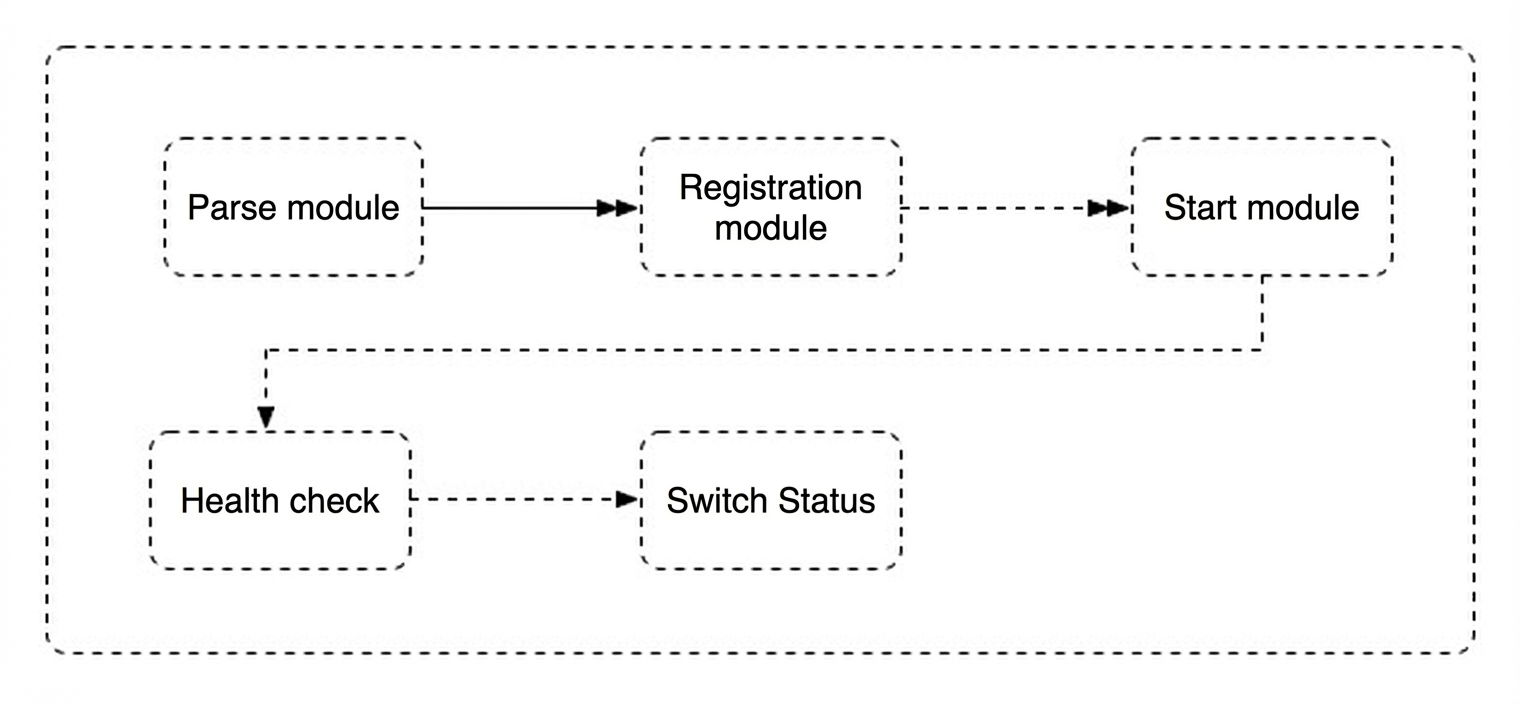
Parse the module.
The SOFAArk container generates a runtime model of the Biz. This process involves parsing the file stream, reading the Biz configuration, and creating a BizClassLoader.
Registration module
Register the parsed Biz model and set its state to resolved.
Start the module.
Execute the entry method of the Biz to refresh the context. If an error occurs, an exception is thrown.
Perform a health check.
After startup, the Biz does not immediately switch to the next state. Instead, an application health check is performed. If the health check fails, an exception is thrown. If the application does not have the SOFABoot health check dependency, this step is skipped. For more information about health checks, see Import health checks.
Switch the state.
After a successful health check, the Biz state is switched. If no other version of the Biz is active, the state is switched to activated. Otherwise, the state is switched to deactivated.
ImportantAny exception thrown during module startup causes the Biz to fail to start. For details, view the
sofa-ark/common-error.logfile.
Activate a Biz
Activating a Biz sets its state to activated. If another version of the Biz is already active, it is first set to deactivated before the specified Biz is activated. The activated state is relative to JVM services. Only the JVM services published by an activated Biz can be referenced by other Biz modules.
Uninstall a Biz
The module uninstallation includes the following steps:

Switch the Biz state to deactivated.
This deactivates the Biz to prevent traffic from entering the Biz that is being uninstalled.
Close the ApplicationContext.
Close the Spring context of the Biz. To define custom uninstallation operations, you can listen for the
ContextClosedEventevent.Unregister JVM services.
The SOFAArk runtime unregisters the JVM services published by the Biz.
Send an uninstall event.
This notifies all Ark Plugins and Ark Biz modules that a Biz is being uninstalled.
Purge the cache.
The SOFAArk runtime purges all caches related to the Biz.
Switch the Biz state to unresolved.
After all uninstallation operations are complete, the Biz state is set to unresolved.
Notes on uninstallation
The biggest challenge in uninstalling a Biz is the uninstallation of its ClassLoader. If the ClassLoader is not completely uninstalled, it can lead to a metaspace out-of-memory (OOM) error.
The Java Development Kit (JDK) has strict conditions for class garbage collection, which include the following:
All instances of the class have been garbage collected.
The ClassLoader that loaded the class has been garbage collected.
The corresponding
java.lang.Classobject for the class is no longer referenced anywhere. Its methods cannot be accessed through reflection.
Each Biz is loaded by an independent BizClassLoader. If a class, object, or the ClassLoader itself that was loaded by the Biz is referenced by another Biz or Plugin, the Biz cannot be successfully uninstalled.