Ark container startup process
The following figure describes the overall startup process of an Ark application.
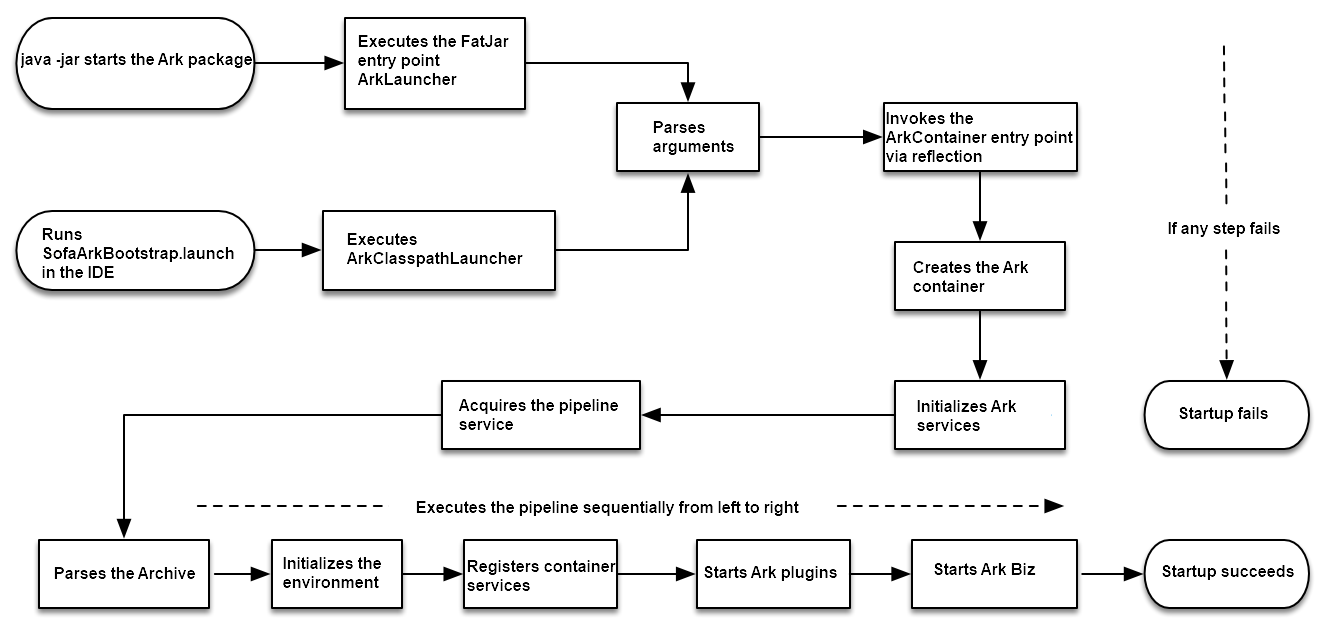
When an Ark package is started with a java -jar command or an Ark application is started by SofaArkBootstrap.launch in the IDE, the corresponding Launcher entry is responsible for starting the application. The entry of the call ArkContainer is reflected, the ArkService is initialized, and then the pipeline is executed in sequence to complete the startup of the entire Ark application.
ArkService
Ark Serivce is a service in an Ark container. The underlying layer uses Guice to manage the service. It also provides lifecycle interface com.alipay.sofa.ark.spi.service.ArkService for services.
    public interface ArkService{

/**
 * Ark Service init
 * @throws ArkException
 */
        void init() throws ArkException;

/**
 * Ark Service dispose
 * @throws ArkException
 */
        void dispose() throws ArkException;

    }
If the service implements the preceding interfaces, the corresponding lifecycle interfaces are called when the Ark Serivce container starts and stops.
Pipeline service
Pipeline is also a service registered in the Ark Service container. The service itself has no order or priority. In Pipeline, some services are assembled and the entire Ark container is started. The process is as follows:
Parse Archive.
At the beginning of the pipeline, the running fatjar is parsed into the models required by the run time, including the Ark plug-in model and the Ark business model, and these models are registered with the
PluginManagerServiceandBizManagerServicein the Ark Service.Initialize the environment.
Set some default parameters that run time need. For example, set the
log4j.ignoreTCLtotrueto initialize thelog4j/log4j2so that the log does not look for configuration files from theThreadContextClassloader. For more information, see Proper way to switch TCCL.Register Container Service.
Some services are published in the Ark container for other plug-ins to use. For example, in the release
BizDeployer, SOFAArk official plug-in sofa-jarslink complete the dynamic loading and unloading of Biz.Deploy the Ark plug-in.
Obtain all Ark plug-ins from the
PluginManagerServiceand follow the plug-in priority order:ClassloaderServiceprepare a map of plug-in export classes.PluginDeployServicethecom.alipay.sofa.ark.spi.service.PluginActivatorto start the plug-in.
Start the Ark business.
Obtain all Ark services from the
BizManagerServiceand execute the entry main function provided in theMANIFEST.MFpropertyMain-Classfor service configuration.