Ark container class loading mechanism
Ark containers manage plug-ins and services. The following figure describes the overall class loading mechanism.
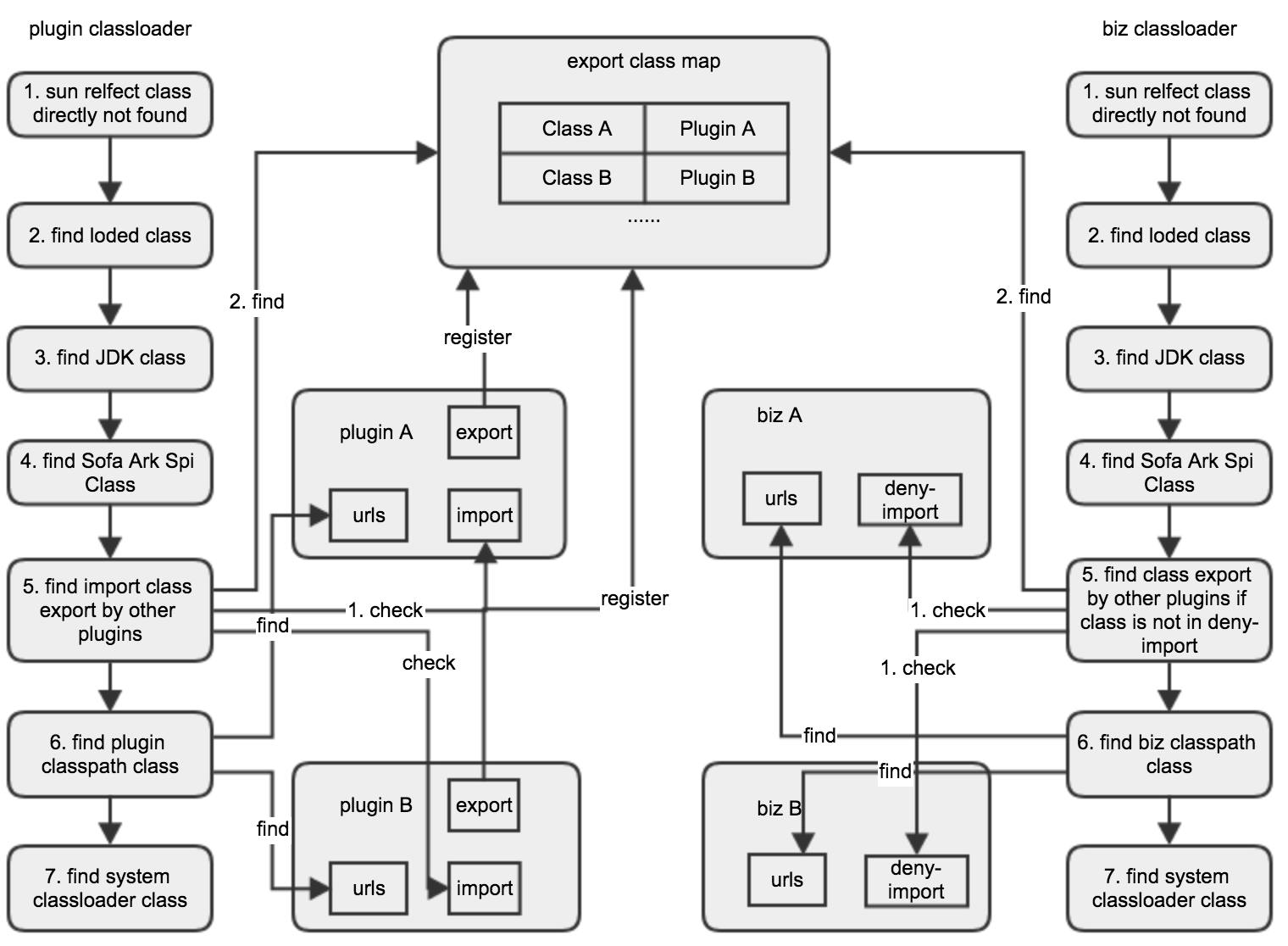
Ark plug-in class loading mechanism
Each Ark plug-in has a separate class loader whose classes are loaded in the following order:
If the bytecode generated by reflection is loaded, the ClassNotFoundException is thrown directly to terminate the class load. This part is mainly derived from our engineering practice to avoid long search paths for classes that must not be found.
Find classes that have already been loaded.
Looking for classes in JDK, this block mainly includes two parts: the first part is the class that ExtClassloader is responsible for loading; The second part is the class provided by JDK but cannot be loaded from ExtClassloader, but it will run time be added to SystemClassloader classpath locally. At the same time, these classes may be put into some three-party toolkits, which are typically
sun.tools.attach.BsdVirtualMachineintool.jar. This part also mainly comes from our engineering practice. Avoid classes that are loaded more than once and cause errors.See if the class is an interface class provided by Sofa Ark. Typical examples are:
com.alipay.sofa.ark.spi.service.PluginActivator. If so, the class will be loaded by the class loader of the Ark container.See if it is in the import of the plug-in (including import-classes and import-package). If it is, it will be delegated to the plug-in class loader that exports the class.
is loaded in the plug-in's own
classpath.If all of the above fails, it will try to load in the SystemClassloader. This step is mainly to solve the situation when using the agent.
If the above steps fail to load, an ClassNotFoundException is thrown.
Ark business class loading mechanism
Each Ark service has an independent class loader. The Ark service class loading mechanism is basically the same as that of the Ark plug-in. Among the above 7 steps, step 5 is mainly different.
For Ark business, it does not provide import configuration, but considers that all plug-in exported classes are imported by default. However, for some special business scenarios, we provide Deny-import configuration so that the business can exclude some plug-in exported classes.
Ark plug-in resource loading mechanism
The Ark plug-in supports importing and exporting resources, and the relevant import and export configurations need to be configured in the sofa-ark-plugin-maven-plugin. When using ClassLoader to load resources, there are two ways to find resources, ClassLoader.getResource(String) and ClassLoader.getResources(String).
ClassLoader.getResource(String): When searching for a single resource, Ark Plugin will first delegate the loading of Ark Plugin that exported the resource. If multiple plug-ins are exported at the same time, the plug-in with higher priority will be exported first. If the loading fails or there is no other Ark Plugin to export, try to find the loading in this Ark Plugin.ClassLoader.getResources(String): When an Ark Plugin looks for more than one resource, it loads from all the Ark Plugins that exported the resource, and it also loads the resource from this Ark Plugin.
Ark business resource loading mechanism
By default, Ark Biz will load resources exported by Ark Plugin first; if developers want to find only within the engineering application, they can configure the denyImportResources through the sofa-ark-maven-plugin. In this way, Ark Biz does not look for the resource from the Ark Plugin, only within Ark Biz.