Push audiences to Brand Databank
You can push the ID field of an audience to Brand Databank on a recurring or one-time basis.
Procedure:
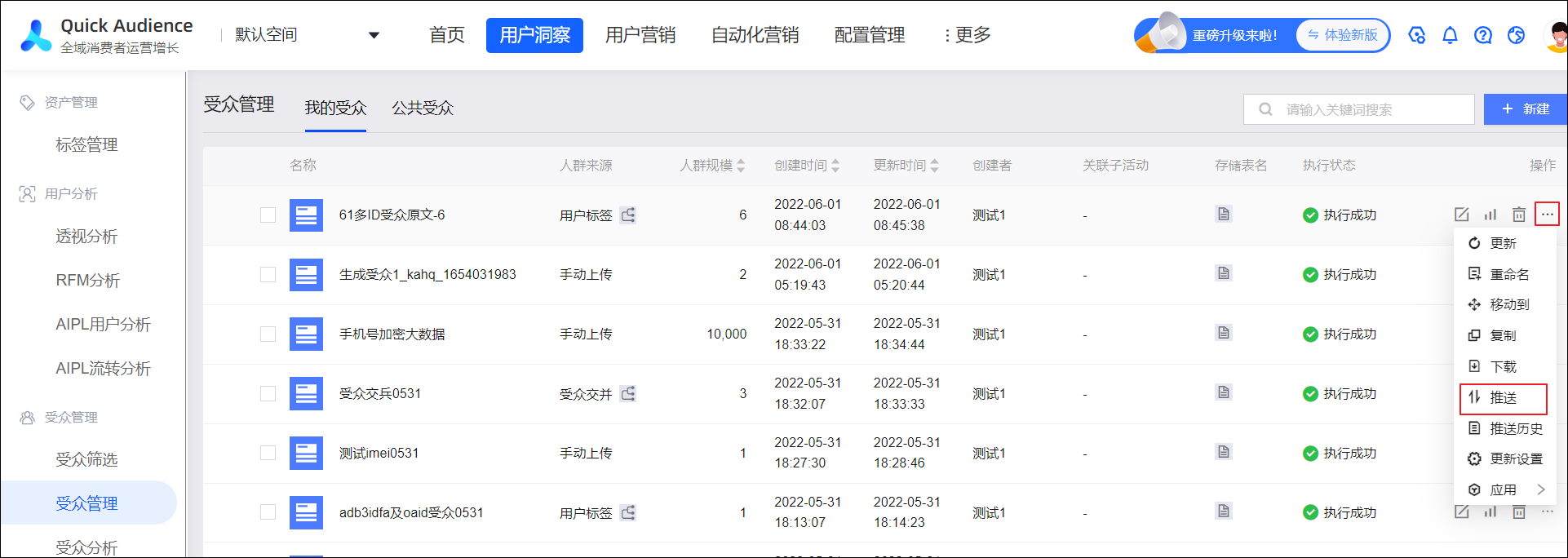
Go to Workspace > User Insights > Audience Management > Audience Management. On the My Audiences tab, click the
 icon for an audience and select Push.
 Note
NoteThe audience size must be between 5,000 and 200 million.
After Brand Databank matches the IDs, the audience size must be between 2,000 and 50 million.
In the dialog box that appears, select Data Bank and a Brand Databank brand from the Push to drop-down list.
NoteDue to a Brand Databank limitation, a single brand can receive audience pushes no more than 5,000 times per year.
Set the push schedule.
For a Recurring Push, turn on the Enable Push switch. Then, set the Push Time (daily, weekly, or monthly), Start Time, and End Time.
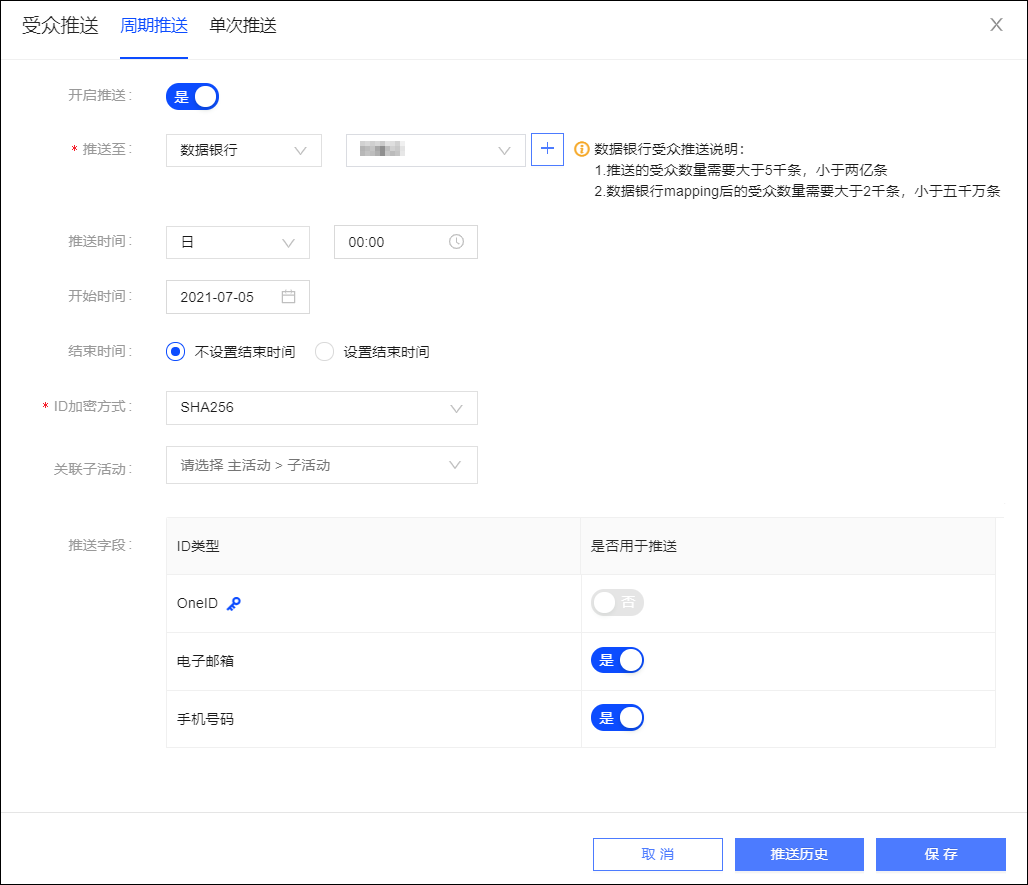
If a recurring push is already configured for the audience, a Remove Configuration button appears in the lower-right corner. Click it to delete the existing configuration and cancel the scheduled push.
For a One-time Push, you do not need to set a schedule. The push runs immediately.
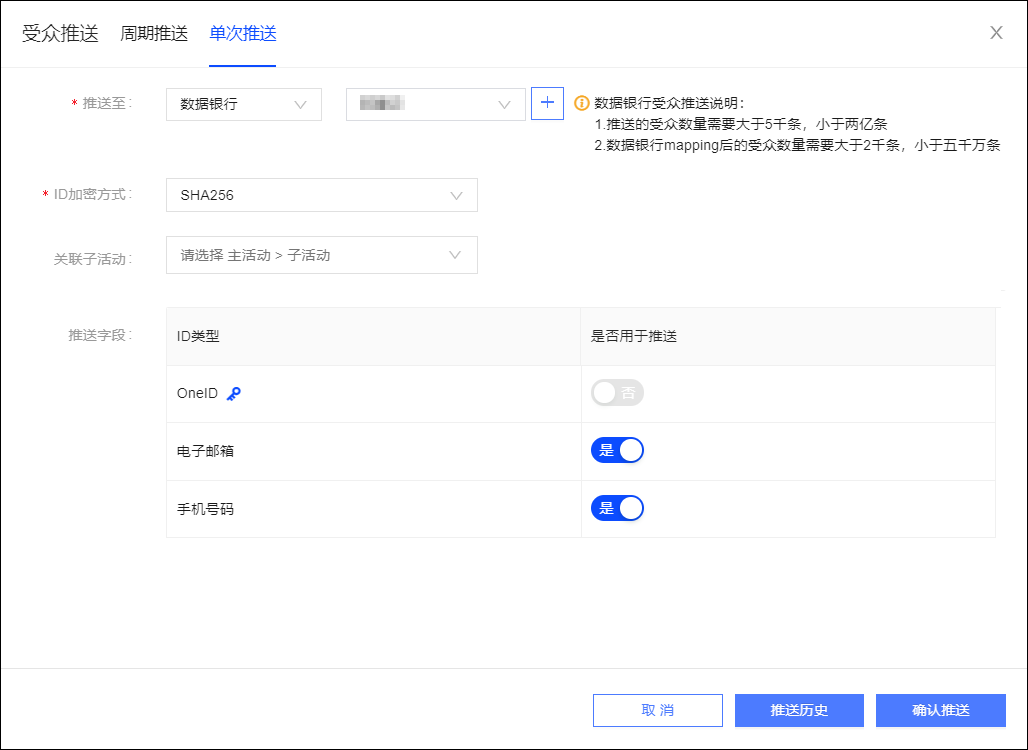
ID Encryption Method: Select whether the ID field is encrypted. If it is, select the corresponding encryption method.
NoteIf the ID field is encrypted, select the encryption method that was used. Options include MD5, SHA256, and AES. If the ID field is not encrypted, select Not Encrypted. If the ID type to be pushed is Taobao OUID, set the encryption method to Taobao OUID. Then, select the destination store below. You must configure your store information in Brand Databank.
If you select AES, the AES-encrypted ID is decrypted during the push process for subsequent use. You must configure an AES key because it is required for decryption. For more information, see Organization Settings.
For the omnichannel audience, you can only select MD5 because all audience IDs are encrypted and the encryption method is fixed to MD5.
If you select MD5 or SHA256, note that only some marketing channels support encrypted IDs for subsequent campaigns. For more information, see the documentation for the specific marketing channel.
Associate sub-campaigns: Select a main campaign and its sub-campaigns. Independent sub-campaigns are displayed under - at the end of the main campaign list. You can associate multiple sub-campaigns. For more information about campaigns, see Marketing Campaign document.
Push Field: From the list, select the ID field to push.
NoteThe
 icon indicates that the ID type is the user identity from the audience's source dataset.
IDs of the type OneID, UnionID, OpenID, Weibo ID, or Alipay ID cannot be pushed to Brand Databank.
For omnichannel audiences, the MAC address, IMEI, and IDFA are always pushed and cannot be modified.
Click Save or Confirm Push. The data is then pushed to Brand Databank.
NoteIf you set the Data Bank push concurrency in the Management Center, audiences that exceed the limit are queued for the push. For more information, see Space System Settings.
Click Push History to view the push results.
As shown in the following figure, the total number of people in the list represents the total count of all pushed IDs. The audience size is the count of pushed user identities. These two values may differ if no user identities are pushed, or if other ID fields are pushed in addition to user identities.
If a push fails, click Push Again. If a push succeeds, click Enter Data Bank to use the pushed data.