Solution features
The DingTalk Enterprise solution provides exclusive security, design, and open capabilities.
Exclusive security
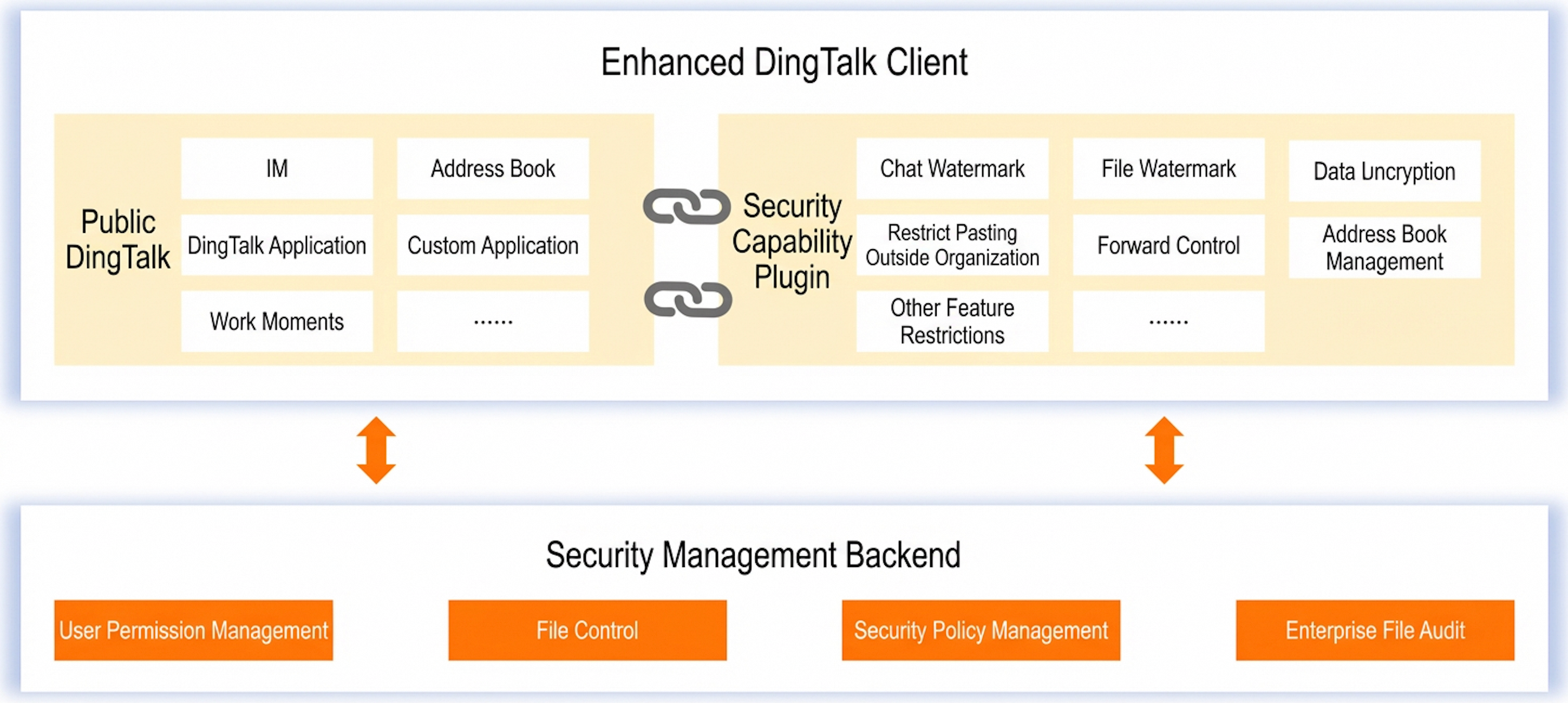
Mobile work improves efficiency, but it also increases the risk of data leaks from business communications and data assets. The DingTalk Enterprise solution mitigates these risks with control policies for terminal operations. You can implement security hardening measures, such as disabling message and file forwarding, and adding watermarks to previews. This keeps all communication within your organization. You can store files directly in your Apsara Stack or a self-built Internet Data Center (IDC). This method provides exclusive data storage and ensures your enterprise retains data ownership. DingTalk Enterprise helps protect your business as it grows.
You can use an enhanced authentication mode with a mobile number/password and a domain account to improve logon security.
You can control internal data and files. This prevents internal chat records, files, and images from being sent externally or downloaded to local devices.
You can set global security watermarks from the backend and apply them to the enterprise address book, employee information, chat windows, and file previews.
You can delete all data generated by an employee when they leave the company.
You can audit file operations such as uploads, forwards, and deletions. This enables file log output and comprehensive file monitoring.
You can purchase Alibaba Cloud's data storage service. Then, you can configure the exclusive storage settings in the Office Automation (OA) backend to enable the Exclusive Data Storage Service with one click.
The innovative "data unitization" technology connects public and private data, balancing security and efficiency.
Exclusive design
Developing a custom communication and collaboration app is difficult, time-consuming, and expensive. Off-the-shelf software often fails to reflect a company's unique culture. You can use DingTalk Enterprise to create your own app by customizing the logo, interface, skin, and text to match your corporate identity.
You can customize the app name, app logo, logon page, welcome screen, home page logo, personalized workbench, employee profile picture tags, theme colors, the "My" page, and the address book.
You can use one-click configuration to make DingTalk your own. You can configure the applications on the "My" tab of the mobile client and choose which content to receive from Push Accounts.
DingTalk provides a management backend for the Interactive Service Window, and you can use open APIs to integrate your own content. You can use the Interactive Service Window to promote your company's brand, culture, policies, and regulations to employees and connect with ecosystem partners, such as customers and suppliers.
Exclusive openness
Even after digitizing business systems, cross-department and cross-region collaboration can remain inefficient. DingTalk provides unified portal customization to bring all your business operations online. It integrates communication features, such as DING and Livestream, directly into your business processes. This makes business collaboration more efficient and quickly connects you with your upstream and downstream ecosystem partners.
You can integrate your enterprise OA system with DingTalk Calendar and use DING Calendar as the main entry point to create a unified calendar center for users.
You can integrate process forms with instant messaging. This lets you start conversations anytime and anywhere, embedding communication directly into your business operations.
You can integrate with your existing enterprise Official Accounts.
You can integrate the handwriting signature and full-text annotation SDKs to support connections with your enterprise OA products.