Conditional Control - Multi-Branch Result Component
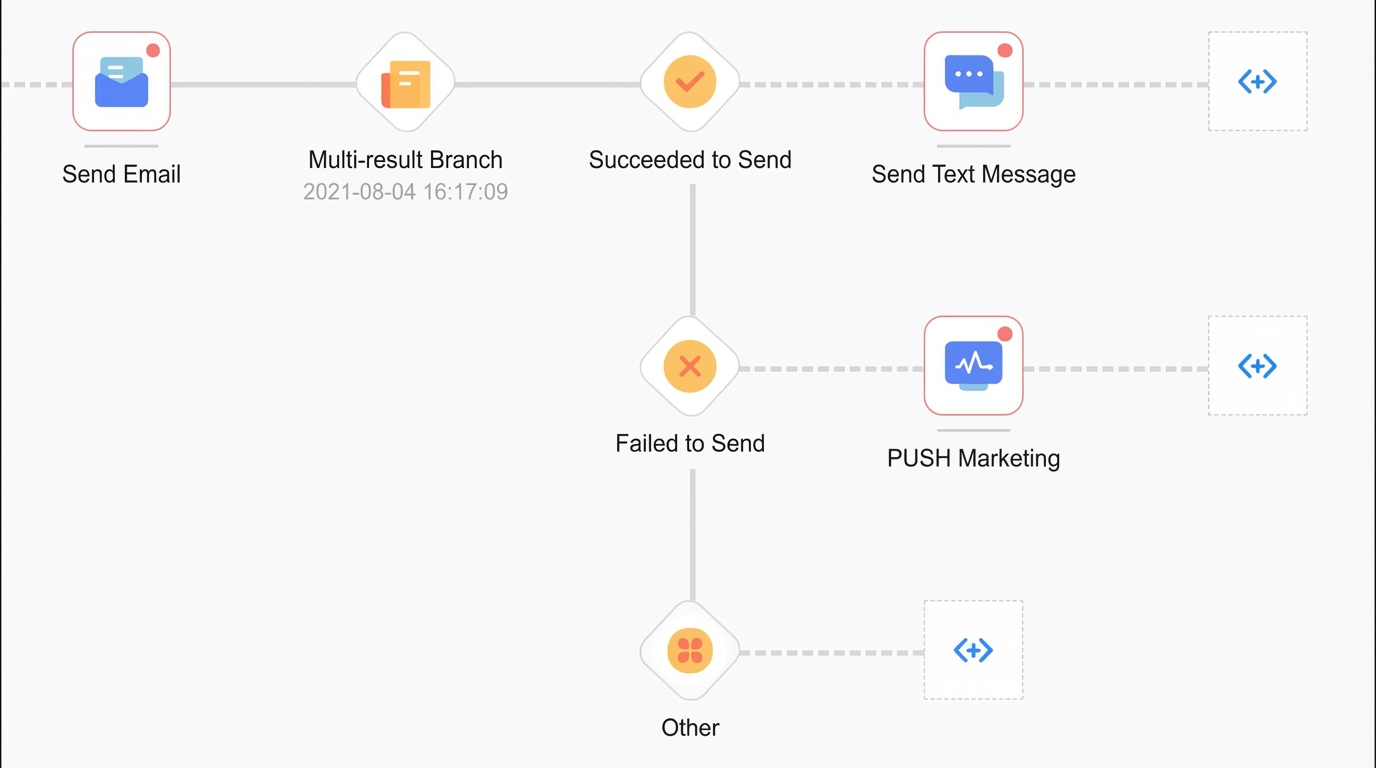
The result multi-branch component lets you perform different actions for different user groups. These actions are based on the delivery results of a preceding component, such as a text message, email, WeChat message, webhook. For example, you can send a text message to users who received an email successfully, and send a push notification to users for whom the email failed.
For a webhook, the available results are the status values defined in Webhook Management. An external system sends a delivery receipt that contains the corresponding data. The receipt must be sent within the defined data collection period. Otherwise, it will not be accepted.
Steps:
Drag the result multi-branch component onto the canvas. Make it a descendant node of a text message, email, WeChat message, webhook node.
Click the result multi-branch node and configure it in the panel that appears on the right.
Wait Time: (For tasks triggered for specific user groups only) Set a wait duration. The flow pauses for this duration before proceeding to the next component. This is because the preceding component needs time to return a result.
NoteA result multi-branch node that follows a WeChat message component does not have a wait time.
Exact Time:
Specific time: Specify a fixed date and time.
Next occurrence: Specify a time of day. When the flow reaches the component, the wait ends at the next occurrence of the specified time within 24 hours.
Relative time: Set a wait duration in weeks, days, hours, or minutes. The wait starts after the preceding component finishes. The flow proceeds to the next component after the specified duration. The maximum duration is 30 days.
Select Result: Select Success or Failed. You can select one or both options.
Click OK. The corresponding result branches are generated on the canvas, as shown in the following figure.
NoteFor tasks triggered for specific user groups, users who do not match any result option (Success/Failed) are routed to the Others branch.