Service circuit breaking
If a server-side interface becomes unstable and causes frequent timeouts or errors, it can lead to a service invocation avalanche. You can enable the service circuit breaking feature for an application. This feature allows a faulty server to return an error promptly and release system resources, which improves user experience and system performance.
Feature overview
You can perform the following operations to keep faults under control:
Identify services with high latency or error rates using monitoring or the service topology, and then perform service administration.
Select an abnormal service and configure automatic circuit breaking. You can define custom conditions. For example, a circuit breaks if the number of requests, the error rate, or the latency reaches a specific value within a time window (such as 10 s).
If the conditions are met, the circuit breaks. After a circuit breaks, the service is continuously tested for automatic recovery. The rule publishing flow for service circuit breaking is as follows:
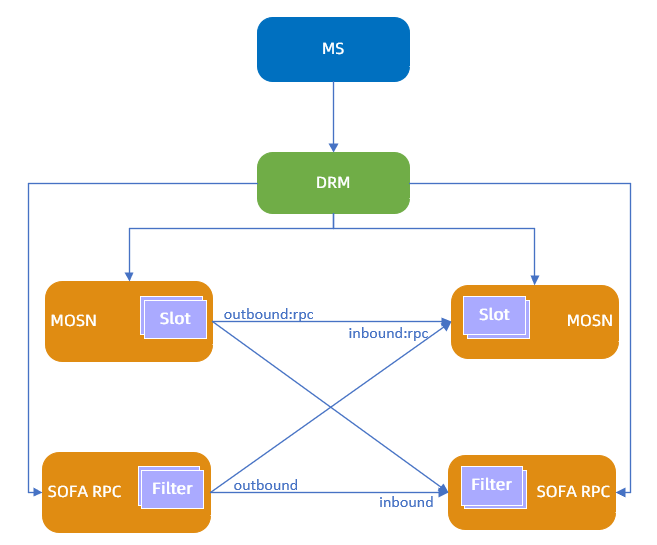
The microservice console (MS) sends the dynamic configuration for circuit breaking to the distributed configuration center (DRM).
DRM sends the dynamic configuration for circuit breaking to MOSN.
MOSN triggers circuit breaking based on the average response time (RT) and error rate.
Circuit breaking can take effect on the client or the server-side.
Create a circuit breaking rule
Log on to the SOFAStack console.
In the navigation pane on the left, choose Middleware > Microservice Platform > Microservice > Service Administration, and then click the Service Circuit Breaking tab.
Click Add Circuit Breaking Rule, and then configure the following parameters:
Parameter
Description
Rule Name
The name of the service circuit breaking rule.
Application
The target application to monitor.
Enter the name manually or select it from the drop-down list.
Circuit Breaking Direction
The direction of service circuit breaking. Valid values:
Client-side circuit breaking: The rule takes effect on the client. The client collects metrics for requests sent to the server. The application is the client application. The service and method are the referenced server-side service and method.
Server-side circuit breaking: The rule takes effect on the server. Each server collects request metrics independently. The application is the server-side application. The service and method are the server-side service and method.
Circuit Breaking Service
The service to apply circuit breaking to. Click Switch Input Mode to toggle between manual entry and drop-down selection.
Method
The method name of the service to apply circuit breaking to.
Circuit Breaking Type
The type of circuit breaking. Valid values:
Error ratio: The circuit breaks when the request error rate within the time window exceeds the error rate threshold.
Average RT: The circuit breaks when the average response time (RT) of requests within the time window exceeds the RT threshold.
Operating Mode
The operating mode for circuit breaking. Valid values:
Block Mode: Requests that meet the conditions trigger the circuit breaking rule.
Observer Mode: The circuit breaking rule is not triggered. It only prints logs in MOSN.
Circuit Breaking Configuration
The parameters that trigger circuit breaking:
Circuit breaking metric window: Used with the request count threshold. If the number of requests within this window reaches the request count threshold, the requests are included in the circuit breaking metrics. The unit is seconds.
Request count threshold: Used with the circuit breaking metric window. The unit is requests.
Error rate threshold: The circuit breaks when the average error rate of requests reaches this threshold. This is configured when Circuit Breaking Type is set to Error ratio.
Average RT threshold: The circuit breaks when the request response time exceeds this threshold. The unit is milliseconds. This is configured when Circuit Breaking Type is set to Average RT.
Circuit breaking period: The duration for which the circuit remains open after being triggered. Requests within this period return an error directly. After this period, the system attempts to call the server again. If the call fails, the circuit breaks again.
RPC timeout: Used in classic microservice scenarios. The unit is milliseconds. This is configured when Circuit Breaking Type is set to Error ratio.
Exact traffic match (Optional)
Only traffic that meets these conditions uses this rule. If left empty, the rule applies to all traffic.
You can configure multiple match conditions. The conditions are combined with a logical AND and are matched in order. The parameters are as follows:
Field: Select a system field or a request header.
Field name: The value varies based on the field type.
System field: Includes traffic type, caller application name, caller IP, and callee application name.
Request header: The request header of the protocol. For the Dubbo protocol, this is the attachment. For the HTTP protocol, this is the Request Header. You can define custom request header parameters and values in your application.
Logic: Includes equals, not equals, belongs to, does not belong to, and regex.
Field value: The value corresponding to the field name.
Click Submit, and then click OK.
In the list of circuit breaking rules, set the status of the rule you just created to Enabled.
Edit a circuit breaking rule
You can edit created circuit breaking rules at any time. Changes take effect immediately after you submit them.
On the Service Circuit Breaking tab, click the plus sign (+) to the left of the target application.
Click Edit to the right of the target circuit breaking rule.
Edit the rule as needed, and then click Submit.
Delete a circuit breaking rule
You can delete created circuit breaking rules. The deletion takes effect immediately. Proceed with caution.
On the Service Circuit Breaking tab, click the plus sign (+) to the left of the target application.
Click Delete to the right of the target circuit breaking rule.
Click OK.