SDK user guide
To use the C3S service, you must first write your business logic as a trusted computing application (TAPP) by creating a WebAssembly (WASM) smart contract. After you create the TAPP, you can use the MYCDT compiler tool to compile the TAPP into WASM bytecode. Then, you can use the MYTF software development kit (SDK) to install and upload the TAPP to the MYTF trusted computing engine. Finally, you can call the TAPP interface to execute the TAPP and retrieve the result. This topic describes how to use the SDK to call a TAPP and provides sample code for reference. For more information about how to create a TAPP, see Trusted computing application development.
Calling a TAPP involves the following four steps:
Set up the development environment
To use the SDK, you must first configure the dependencies for the development environment. Check and configure the following four dependencies:
JDK 1.8 or later. You can run
java -versionin the terminal to check the current Java version.Maven 3.5.4 or later. You can run
mvn -vin the terminal to check the current Maven version.The Java runtime environment must support BouncyCastle.
Reference the SDK JAR package and configure the transitive dependencies of the SDK.
The transitive dependencies for the SDK are as follows:
<dependency>
    <groupId>org.apache.httpcomponents</groupId>
    <artifactId>httpclient</artifactId>
    <version>4.5.2</version>
</dependency>

<dependency>
    <groupId>org.apache.commons</groupId>
    <artifactId>commons-lang3</artifactId>
    <version>3.5</version>
</dependency>

<dependency>
    <groupId>org.bouncycastle</groupId>
    <artifactId>bcpkix-jdk15on</artifactId>
    <version>1.61</version>
</dependency>

<dependency>
    <groupId>com.alibaba</groupId>
    <artifactId>fastjson</artifactId>
    <version>1.2.83</version>
</dependency>
Initialize configuration information
AccessKey pair
You can obtain an AccessKey pair for your Alibaba Cloud account, which includes an AccessKey ID and an AccessKey Secret, to access C3S interfaces.
// Simulate user accessId and accessPrivateKey
String userAccessId = "A...L";
String userAccessPrivateKey = "z...x";
Configuration information
AliCloudClientConfig config = new AliCloudClientConfig();

config.setAccessId(accessId);
config.setAccessPrivateKey(accessPrivateKey);
config.setMytfTrustLevel(0);
// Optional. Required for data authorization and upgradable TAPP features. You must generate a key and encrypt it with a password.
// The DID identity bound to the user's identity key
config.setIdentityPrivateKeyDIDIndex(userDID);
// The user's identity key. Enter the full text of the encrypted private key.
config.setIdentityPrivateKey(userIdentityPriKey);
// The password for the user's identity key
config.setIdentityPrivateKeyPW(password);
// Optional. SecretPrivateKey ensures end-to-end encryption for user requests. If you do not specify this, the client generates it automatically.
// If automatically generated, the key is discarded when the SDK restarts. This might prevent you from decrypting previous request results. Note this issue.
// The user's encryption key. Enter the full text of the encrypted private key.
config.setSecretPrivateKey(userSecretPriKey);
// The password for the user's encryption key
config.setSecretPrivateKeyPW(password2);
IAS root certificate
String trustedIASCert = "-----BEGIN CERTIFICATE-----\n"
+ "MIIFSzCCA7OgAwIBAgIJANEHdl0yo7CUMA0GCSqGSIb3DQEBCwUAMH4xCzAJBgNV\n"
+ "BAYTAlVTMQswCQYDVQQIDAJDQTEUMBIGA1UEBwwLU2FudGEgQ2xhcmExGjAYBgNV\n"
+ "BAoMEUludGVsIENvcnBvcmF0aW9uMTAwLgYDVQQDDCdJbnRlbCBTR1ggQXR0ZXN0\n"
+ "YXRpb24gUmVwb3J0IFNpZ25pbmcgQ0EwIBcNMTYxMTE0MTUzNzMxWhgPMjA0OTEy\n"
+ "MzEyMzU5NTlaMH4xCzAJBgNVBAYTAlVTMQswCQYDVQQIDAJDQTEUMBIGA1UEBwwL\n"
+ "U2FudGEgQ2xhcmExGjAYBgNVBAoMEUludGVsIENvcnBvcmF0aW9uMTAwLgYDVQQD\n"
+ "DCdJbnRlbCBTR1ggQXR0ZXN0YXRpb24gUmVwb3J0IFNpZ25pbmcgQ0EwggGiMA0G\n"
+ "CSqGSIb3DQEBAQUAA4IBjwAwggGKAoIBgQCfPGR+tXc8u1EtJzLA10Feu1Wg+p7e\n"
+ "LmSRmeaCHbkQ1TF3Nwl3RmpqXkeGzNLd69QUnWovYyVSndEMyYc3sHecGgfinEeh\n"
+ "rgBJSEdsSJ9FpaFdesjsxqzGRa20PYdnnfWcCTvFoulpbFR4VBuXnnVLVzkUvlXT\n"
+ "L/TAnd8nIZk0zZkFJ7P5LtePvykkar7LcSQO85wtcQe0R1Raf/sQ6wYKaKmFgCGe\n"
+ "NpEJUmg4ktal4qgIAxk+QHUxQE42sxViN5mqglB0QJdUot/o9a/V/mMeH8KvOAiQ\n"
+ "byinkNndn+Bgk5sSV5DFgF0DffVqmVMblt5p3jPtImzBIH0QQrXJq39AT8cRwP5H\n"
+ "afuVeLHcDsRp6hol4P+ZFIhu8mmbI1u0hH3W/0C2BuYXB5PC+5izFFh/nP0lc2Lf\n"
+ "6rELO9LZdnOhpL1ExFOq9H/B8tPQ84T3Sgb4nAifDabNt/zu6MmCGo5U8lwEFtGM\n"
+ "RoOaX4AS+909x00lYnmtwsDVWv9vBiJCXRsCAwEAAaOByTCBxjBgBgNVHR8EWTBX\n"
+ "MFWgU6BRhk9odHRwOi8vdHJ1c3RlZHNlcnZpY2VzLmludGVsLmNvbS9jb250ZW50\n"
+ "L0NSTC9TR1gvQXR0ZXN0YXRpb25SZXBvcnRTaWduaW5nQ0EuY3JsMB0GA1UdDgQW\n"
+ "BBR4Q3t2pn680K9+QjfrNXw7hwFRPDAfBgNVHSMEGDAWgBR4Q3t2pn680K9+Qjfr\n"
+ "NXw7hwFRPDAOBgNVHQ8BAf8EBAMCAQYwEgYDVR0TAQH/BAgwBgEB/wIBADANBgkq\n"
+ "hkiG9w0BAQsFAAOCAYEAeF8tYMXICvQqeXYQITkV2oLJsp6J4JAqJabHWxYJHGir\n"
+ "IEqucRiJSSx+HjIJEUVaj8E0QjEud6Y5lNmXlcjqRXaCPOqK0eGRz6hi+ripMtPZ\n"
+ "sFNaBwLQVV905SDjAzDzNIDnrcnXyB4gcDFCvwDFKKgLRjOB/WAqgscDUoGq5ZVi\n"
+ "zLUzTqiQPmULAQaB9c6Oti6snEFJiCQ67JLyW/E83/frzCmO5Ru6WjU4tmsmy8Ra\n"
+ "Ud4APK0wZTGtfPXU7w+IBdG5Ez0kE1qzxGQaL4gINJ1zMyleDnbuS8UicjJijvqA\n"
+ "152Sq049ESDz+1rRGc2NVEqh1KaGXmtXvqxXcTB+Ljy5Bw2ke0v8iGngFBPqCTVB\n"
+ "3op5KBG3RjbF6RRSzwzuWfL7QErNC8WEy5yDVARzTA5+xmBc388v9Dm21HGfcC8O\n"
+ "DD+gT9sSpssq0ascmvH49MOgjt1yoysLtdCtJW/9FZpoOypaHx0R+mJTLwPXVMrv\n"
+ "DaVzWh5aiEx+idkSGMnX\n"
+ "-----END CERTIFICATE-----";
Install the trusted application
Installing a TAPP deploys its bytecode to the MYTF trusted computing engine. You must specify a TappId and TappVersion to uniquely identify the TAPP.
// Starting the client retrieves C3S platform information. You must call the startup() interface before installing and executing a TAPP.
AliCloudMytfClient client = new AliCloudMytfClient(config);
Boolean ifSuccess = client.startup();
Assert.assertTrue(ifSuccess);

// Get MYTFInfo information
MYTFInfo mytfInfo = client.getMYTFInfo();
Assert.assertNotNull(mytfInfo);

// Before installing the TAPP, prepare the TAPP information. TEST_CONTRACT_FILE is the path to the compiled TAPP file.
String tappId = "example"+ new Random().nextInt(1000000);
Integer tappVersion = 2;
byte[] bytecodes = FileUtils.readFileToByteArray(new File(TEST_CONTRACT_FILE));

// Construct the TAPP installation request
TappInstallRequest tappInstallRequest = TappInstallRequest.builder()
    .newTapp(tappId, tappVersion, bytecodes)
    .build();

// Send the TAPP installation request
TappInstallResponse tappInstallResponse = client.installTapp(tappInstallRequest);
System.out.println(tappInstallResponse);
Assert.assertTrue(tappInstallResponse.isSuccess());

// Query the installed TAPP information and save it locally. You must call the getTappInfo() interface before executing the TAPP.
TappInfo tappInfo = client.getTappInfo(tappId, tappVersion);
Assert.assertNotNull(tappInfo);
Execute the trusted application
The following examples show how to use the SDK to execute a TAPP. You can use these examples as a reference to develop applications as needed.
Normal execution request
TAPP interface example
INTERFACE std::string TestSayHi() {
    return "hi";
}

INTERFACE std::string TestRepeat(const std::string& msg) {
    return msg;
}

INTERFACE uint32_t TestAdd(const uint32_t& num1, const uint32_t& num2) {
    return num1 + num2;
}

INTERFACE std::vector<std::string> TestStringVector(const std::string& data) {
    std::vector<std::string> ret;
    int err_code = 2;
    ret.push_back("OK");
    ret.push_back("FAIL");
    ret.push_back(data);
    ret.push_back(std::to_string(err_code));
    return ret;
}

INTERFACE std::string TestOutput(const std::string& data) {
    std::string log_buffer = "log buffer";
    log_buffer.append("1234");
    log_buffer.append("abc");
    Require(false, log_buffer.c_str());
    return data;
}
SDK usage example
// Construct the TAPP execution contract interface "TestSayHi" to call a TAPP interface with no parameters.
String testReqMethod = "TestSayHi";
TappExecuteRequest tappExecuteRequest = TappExecuteRequest.builder()
    .defaultRequest(tappId, tappVersion, testReqMethod)
    .build();

// Send the TAPP execution request
TappExecuteResponse tappExecuteResponse = client.executeTapp(tappExecuteRequest);

// Parse the TAPP execution result
Assert.assertTrue(tappExecuteResponse.isRequestSuccess());
Assert.assertTrue(tappExecuteResponse.isExecuteSuccess());
System.out.println("result : " + tappExecuteResponse.getReturnValue().toUtf8String());

// Construct the TAPP execution contract interface "TestAdd" to call a TAPP interface with parameters.
testReqMethod = "TestAdd";
tappExecuteRequest = TappExecuteRequest.builder()
    .defaultRequest(tappId, tappVersion, testReqMethod)
    .addUint32(BigInteger.valueOf(12))
    .addUint32(BigInteger.valueOf(11))
    .build();

// Send the TAPP execution request
tappExecuteResponse = client.executeTapp(tappExecuteRequest);

// Parse the TAPP execution result
Assert.assertTrue(tappExecuteResponse.isRequestSuccess());
Assert.assertTrue(tappExecuteResponse.isExecuteSuccess());
System.out.println("result : " + tappExecuteResponse.getReturnValue().toUint32());

// Construct the TAPP execution contract interface "TestStringVector" to call a TAPP interface with parameters.
testReqMethod = "TestStringVector";
tappExecuteRequest = TappExecuteRequest.builder()
    .defaultRequest(tappId, tappVersion, testReqMethod)
    .addString("{hello mytf!}")
    .build();

// Send the TAPP execution request
tappExecuteResponse = client.executeTapp(tappExecuteRequest);

// Parse the TAPP execution result
Assert.assertTrue(tappExecuteResponse.isRequestSuccess());
Assert.assertTrue(tappExecuteResponse.isExecuteSuccess());
System.out.println("result : " + tappExecuteResponse.getReturnValue().toUtf8StringList().toString());

// Construct the TAPP execution contract interface "TestOutput" to call a TAPP interface with parameters.
String testOutputData = "abc";
testReqMethod = "TestOutput";
tappExecuteRequest = TappExecuteRequest.builder()
    .defaultRequest(tappId, tappVersion, testReqMethod)
    .addString(testOutputData)
    .build();

// Send the TAPP execution request
tappExecuteResponse = client.executeTapp(tappExecuteRequest);

// TAPP execution is abnormal. View the exception information.
System.out.println("responseCode: " + tappExecuteResponse.getResponseCode());
System.out.println("output: " + tappExecuteResponse.getOutputString());
End-to-end encrypted request
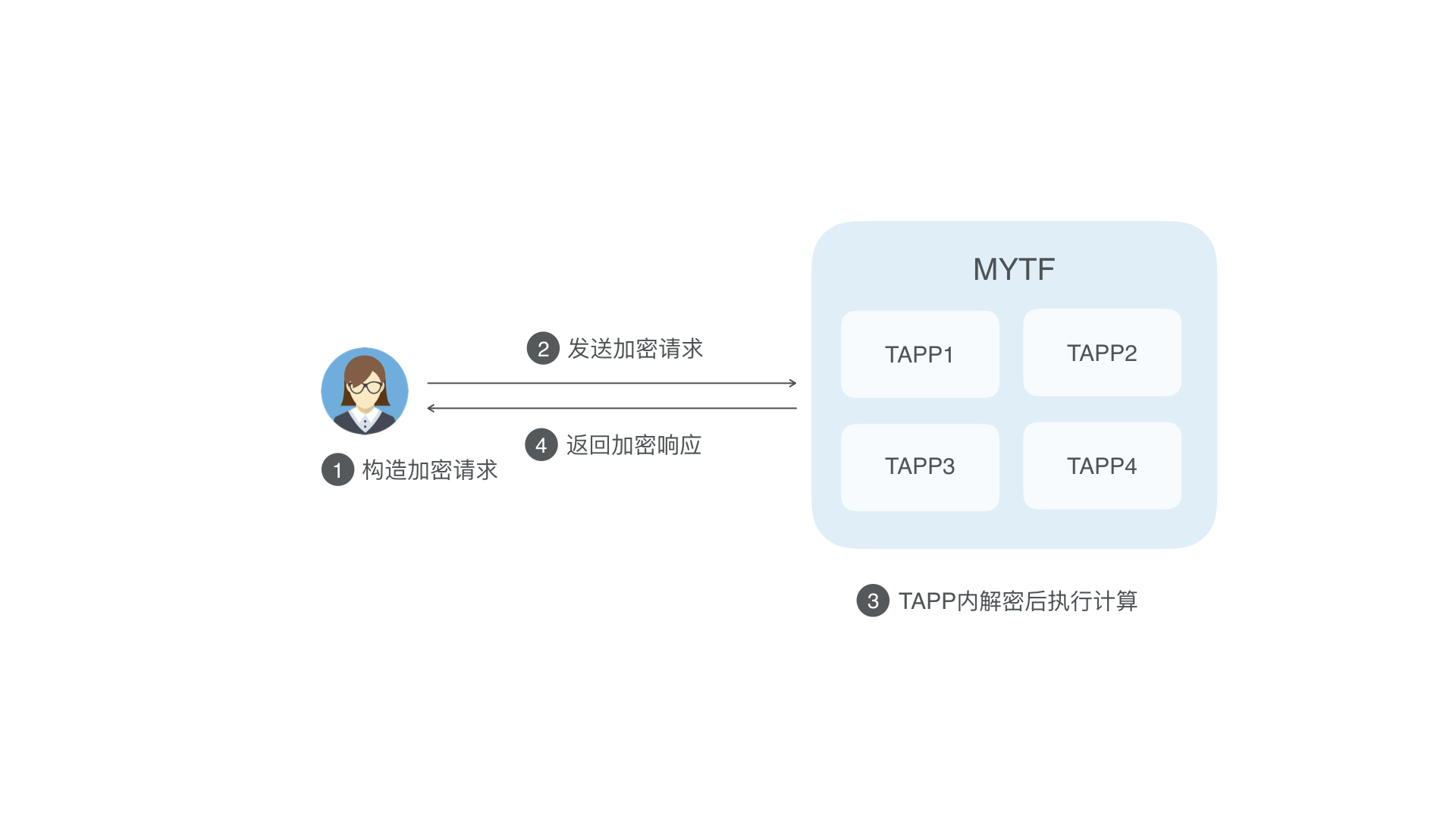
When you submit a TAPP execution task, you can choose to use end-to-end encryption. The SDK locally encrypts the execution request that you construct using the ECIES algorithm and sends the encrypted request to MYTF. After MYTF receives the request, it decrypts the ciphertext and performs the computation within the trusted execution environment. After the computation is complete, MYTF encrypts the result using the ECIES algorithm and returns it to the client. The client then decrypts the ciphertext locally to obtain the computation result. This process provides end-to-end privacy protection.
SDK usage example
// Construct the TAPP execution request
testReqMethod = "TestRepeat";
tappExecuteRequest = TappExecuteRequest.builder()
    .defaultRequest(tappId, tappVersion, testReqMethod)
    .addString("hello mytf!")
    .build();

// Send the end-to-end encrypted execution request
tappExecuteResponse = client.executeTappPrivately(tappExecuteRequest);

// Check if the execution was successful
Assert.assertNotNull(tappExecuteResponse);
Assert.assertTrue(tappExecuteResponse.isRequestSuccess());
Assert.assertTrue(tappExecuteResponse.isExecuteSuccess());

// Get the execution result
Assert.assertEquals("hello mytf!", tappExecuteResponse.getReturnValue().toUtf8String());
Format conversion tool
TAPP interface example
// Use the third-party rapidjson library to construct and parse JSON
INTERFACE std::string TestJson() {
     using namespace::rapidjson;
     std::vector<std::string> ret;

     std::string stringFromStream = R"({
    "dictVersion": 1,
    "content":
    [
        {"key": "word1", "value": "word1_value"} ,
        {"key": "word2", "value": "word2_value"} ,
        {"key": "word5", "value": "word3_value"}
    ]
    })";

    // ---------------------------- read json --------------------
    // parse json from string.
    using rapidjson::Document;
    Document doc;
    doc.Parse<0>(stringFromStream.c_str());
    if (doc.HasParseError()) {
        rapidjson::ParseErrorCode code = doc.GetParseError();
        Require(code == kParseErrorNone, "parse from string");
    }

    // use values in parse result.
    using rapidjson::Value;
    Value& v = doc["dictVersion"];
    if (v.IsInt()) {
        print("%d\n", v.GetInt());
    }

    Value& contents = doc["content"];
    if (contents.IsArray()) {
        for (size_t i = 0; i < contents.Size(); ++i) {
            Value& v = contents[i];
            Require(v.IsObject(), "parse error");
            if (v.HasMember("key") && v["key"].IsString()) {
                print("%s\n", v["key"].GetString());
            }
            if (v.HasMember("value") && v["value"].IsString()) {
                print("%s\n", v["value"].GetString());
            }
        }
    }

    // ---------------------------- write json --------------------
    print("add a value into array\n");

    Value item(Type::kObjectType);
    item.AddMember("key", "word2", doc.GetAllocator());
    item.AddMember("value", "word2_value", doc.GetAllocator());
    contents.PushBack(item, doc.GetAllocator());

    // convert dom to string.
    StringBuffer buffer;                  // in rapidjson/stringbuffer.h
    Writer<StringBuffer> writer(buffer);  // in rapidjson/writer.h
    doc.Accept(writer);

    print("%s\n", buffer.GetString());
    ret.push_back(buffer.GetString());

    // ---------------------------- add member to new json --------------------

    rapidjson::Document doc1;
    doc1.SetObject();
    rapidjson::Document::AllocatorType &allocator = doc1.GetAllocator();

    rapidjson::Value data_a_json;
    rapidjson::Value data_b_json;

    std::string a = "abc";
    std::string b = "bcd";

    data_a_json.SetString(a.c_str(), (int) a.size(), allocator);
    data_b_json.SetString(b.c_str(), (int) b.size(), allocator);

    doc1.AddMember("new_member_a", data_a_json, allocator);
    doc1.AddMember("new_member_b", data_a_json, allocator);

    // add item to array
    rapidjson::Value items(rapidjson::kArrayType);
    int item_count = 10;
    std::string item = "cde";
    for(int i = 0; i < item_count; ++i) {
        rapidjson::Value value;
        value.SetString(item.c_str(), item.length(), allocator);
        items.PushBack(value, allocator);
    }
    doc1.AddMember("items", items, allocator);

    StringBuffer buffer2;
    Writer<StringBuffer> writer2(buffer2);
    doc1.Accept(writer2);
    ret.push_back(buffer2.GetString().c_str());
    ret.push_back("OK");

    return ret;
}

INTERFACE std::string TestBase64Encode(std::string data) {
    std::string out;
    CryptoErrorCode err = Base64Encode(data, out);
    if (err != CryptoErrorCode::kSuccess) {
        print("failed to base64encode: %d", err);
        return std::to_string(err);
    }
    return out;
}

INTERFACE std::string TestBase64Decode(std::string data) {
    std::string out;
    CryptoErrorCode err = Base64Decode(data, out);
    if (err != CryptoErrorCode::kSuccess) {
        print("failed to base64decode: %d", err);
        return std::to_string(err);
    }
    return out;
}
SDK usage example
// Test Base64 encoding and decoding
// Construct a TAPP execution request to call the "TestBase64Encode" TAPP interface
String plaindata = "this is test for Base64Encode & Base64Decode";
testReqMethod = "TestBase64Encode";
tappExecuteRequest = TappExecuteRequest.builder()
    .defaultRequest(tappId, tappVersion, testReqMethod)
    .addString(plaindata)
    .build();

// Send the TAPP execution request
tappExecuteResponse = client.executeTapp(tappExecuteRequest);

// Parse the TAPP execution result
Assert.assertTrue(tappExecuteResponse.isRequestSuccess());
Assert.assertTrue(tappExecuteResponse.isExecuteSuccess());
String base64String = tappExecuteResponse.getReturnValue().toUtf8String();
System.out.println("plaindata: " + new String(Base64.decode(base64String)));

// Construct a TAPP execution request to call the "TestBase64Decode" TAPP interface
testReqMethod = "TestBase64Decode";
tappExecuteRequest = TappExecuteRequest.builder()
    .defaultRequest(tappId, tappVersion, testReqMethod)
    .addString(base64String)
    .build();

// Send the TAPP execution request
tappExecuteResponse = client.executeTapp(tappExecuteRequest);

// Parse the TAPP execution result
Assert.assertTrue(tappExecuteResponse.isRequestSuccess());
Assert.assertTrue(tappExecuteResponse.isExecuteSuccess());
System.out.println("plaindata: " + tappExecuteResponse.getReturnValue().toUtf8String());
Hash functions
TAPP interface example
INTERFACE std::vector<std::string> TestHash(std::string msg) {
    std::vector<std::string> result;
    std::string sha256hash;
    CryptoErrorCode err = Sha256(msg, sha256hash);
    if (err != CryptoErrorCode::kSuccess) {
        print("failed to sha256: %d", err);
        result.push_back(std::to_string(err));
        return result;
    }
    result.push_back(Bin2Hex(sha256hash));

    std::string sm3hash;
    err = Sm3_256(msg, sm3hash);
    if (err != CryptoErrorCode::kSuccess) {
        print("failed to SM3_256: %d", err);
        result.push_back(std::to_string(err));
        return result;
    }
    print("sm3_256 hash: %s", Bin2Hex(sm3hash).c_str());
    result.push_back(Bin2Hex(sm3hash));
    return result;
}

INTERFACE std::vector<std::string> TestHMAC(std::string msg, std::string secret) {
    std::vector<std::string> result;
    std::string hmac_sha256_out;
    CryptoErrorCode err = Hmac(MdType::kSha256, msg, secret, hmac_sha256_out);
    if (err != CryptoErrorCode::kSuccess) {
        print("failed to do hmac: %d", err);
        result.push_back(std::to_string(err));
        return result;
    }
    result.push_back(Bin2Hex(hmac_sha256_out));

    std::string hmac_sha1_out;
    err = Hmac(MdType::kSha1, msg, secret, hmac_sha1_out);
    if (err != CryptoErrorCode::kSuccess) {
        print("failed to do hmac: %d", err);
        result.push_back(std::to_string(err));
        return result;
    }
    result.push_back(Bin2Hex(hmac_sha1_out));
    return result;

}
SDK usage example
// Test hash algorithms
// Locally calculate Sha256hash and Sm3hash
String plaindata = "this is test for hash";
byte[] expectedSha256hash = Hash.sha256(plaindata.getBytes());
byte[] expectedSm3hash = Hash.sm3_256(plaindata.getBytes());

// Construct a TAPP execution request to call the "TestHash" TAPP interface
testReqMethod = "TestHash";
tappExecuteRequest = TappExecuteRequest.builder()
    .defaultRequest(tappId, tappVersion, testReqMethod)
    .addBytes(plaindata.getBytes())
    .build();

// Send the TAPP execution request
tappExecuteResponse = client.executeTapp(tappExecuteRequest);

// Parse the TAPP execution result
Assert.assertTrue(tappExecuteResponse.isRequestSuccess());
Assert.assertTrue(tappExecuteResponse.isExecuteSuccess());
System.out.println("plaindata: " + Hex.toHexString(plaindata.getBytes()));
System.out.println("expectedSha256hash: " + Hex.toHexString(expectedSha256hash));
System.out.println("sha256Hash: " + tappExecuteResponse.getReturnValue().toUtf8StringList().get(0));
System.out.println("expectedSm3hash: " + Hex.toHexString(expectedSm3hash));
System.out.println("sm3256hash: " + tappExecuteResponse.getReturnValue().toUtf8StringList().get(1));

// Test the HMAC algorithm
plaindata = "this is a test for hmac";
String secret = "12345678";

// Locally calculate HmacSha256 and HmacSha1
byte[] expectedHmacSha256 = Hash.hmac_sha256(plaindata.getBytes(), secret.getBytes());
byte[] expectedHmacSha1 = Hash.hmac_sha1(plaindata.getBytes(), secret.getBytes());

// Construct a TAPP execution request to call the "TestHMAC" TAPP interface
testReqMethod = "TestHMAC";
tappExecuteRequest = TappExecuteRequest.builder()
.defaultRequest(tappId, tappVersion, testReqMethod)
.addBytes(plaindata.getBytes())
.addBytes(secret.getBytes())
.build();

// Send the TAPP execution request
tappExecuteResponse = client.executeTapp(tappExecuteRequest);

// Parse the TAPP execution result
Assert.assertTrue(tappExecuteResponse.isRequestSuccess());
Assert.assertTrue(tappExecuteResponse.isExecuteSuccess());
System.out.println("Hmacsha256 : " + tappExecuteResponse.getReturnValue().toUtf8StringList().get(0));
System.out.println("expectedHmacsha256: " + Hex.toHexString(expectedHmacSha256));
System.out.println("Hmacsha1 : " + tappExecuteResponse.getReturnValue().toUtf8StringList().get(1));
System.out.println("expectedHmacsha1: " + Hex.toHexString(expectedHmacSha1));
RSA signing and signature verification
A TAPP can use this function internally to perform RSA signing and signature verification.
TAPP interface example
INTERFACE std::string TestRsaSign(std::string prikey, std::string digest_name, std::string data) {
    std::string signature;
    int res_code = RsaSign(prikey, digest_name, data, signature);
    if(res_code != 1){
    print("Failed to sign data by RSA: %d", res_code);
    }
    return signature;
}

INTERFACE int TestRsaVerify(std::string pubkey, std::string digest_name, std::string data, std::string signature) {
  return RsaVerify(pubkey, digest_name, data, signature);
}
SDK usage example
// Test RSA signing and signature verification
String plainData = "this is test for rsaSign & rsaVerify";
UserKeyPair userKeyPair = UserKeyFactory.generateKeyPair(KeyTypeEnum.RSA_4096_KEY);
byte[] sig = RSATool.RSASign(plainData.getBytes(), userKeyPair.getPrivateKey().getEncoded());
Assert.assertTrue(RSATool.RSAVerify(plainData.getBytes(), sig, userKeyPair.getPublicKey().getEncoded()));
String priKey = Base64.toBase64String(userKeyPair.getPrivateKey().getEncoded());
String pubKey = Base64.toBase64String(userKeyPair.getPublicKey().getEncoded());
String RSAPriKeyPEM = CryptoUtils.priKey2PemString(userKeyPair.getPrivateKey());

//Construct a TAPP execution request to test the "TestRsaSign" TAPP interface
String testReqMethod = "TestRsaSign";
TappExecuteRequest tappExecuteRequest = TappExecuteRequest.builder()
    .defaultRequest(tappId, tappVersion, testReqMethod)
    .addString(RSAPriKeyPEM)
    .addString("SHA256")
    .addString(plainData)
    .build();

//Send the TAPP execution request
TappExecuteResponse tappExecuteResponse = client.executeTapp(tappExecuteRequest);

//Parse the TAPP execution response
Assert.assertTrue(tappExecuteResponse.isRequestSuccess());
Assert.assertTrue(tappExecuteResponse.isExecuteSuccess());
String signature = tappExecuteResponse.getReturnValue().toUtf8String();
System.out.println("signature: " + signature);
Assert.assertEquals(Base64.toBase64String(sig), signature);

//Construct a TAPP execution request to test the "TestRsaVerify" TAPP interface
testReqMethod = "TestRsaVerify";
tappExecuteRequest = TappExecuteRequest.builder()
    .defaultRequest(tappId, tappVersion, testReqMethod)
    .addString(pubKey)
    .addString("SHA256")
    .addString(plainData)
    .addString(Base64.toBase64String(sig))
    .build();

//Send the TAPP execution request
tappExecuteResponse = client.executeTapp(tappExecuteRequest);

//Parse the TAPP execution response
Assert.assertTrue(tappExecuteResponse.isRequestSuccess());
Assert.assertTrue(tappExecuteResponse.isExecuteSuccess());
Assert.assertEquals(1, tappExecuteResponse.getReturnValue().toInt32());
TAPP ECDSA signing
TAPP interface example
INTERFACE std::vector<std::string> TestTappEcdsaSign(std::string data) {
    std::vector<std::string> ret;
    std::string signature;
    int err_code = 1;
    err_code = TappEcdsaSign(data, signature, KEY_ALGO_TYPE::ECDSA_RAW_SECP256K1_KEY);
    if(err_code != 1){
        ret.push_back(std::to_string(err_code));
        return ret;
    }
    std::string base64_sig;
    err_code = Base64Encode(signature, base64_sig);
    if(err_code != 1){
        ret.push_back(std::to_string(err_code));
        return ret;
    }

    ret.push_back(std::to_string(err_code));
    ret.push_back(base64_sig);
    return ret;
}
SDK usage example
//Construct a TAPP execution request to test the "TestTappEcdsaSign" TAPP interface
String plainData = "this is test for TappECDSASign";
testReqMethod = "TestTappEcdsaSign";
tappExecuteRequest = TappExecuteRequest.builder()
    .defaultRequest(tappId, tappVersion, testReqMethod)
    .addString(plainData)
    .build();

//Send the TAPP execution request
tappExecuteResponse = client.executeTapp(tappExecuteRequest);

//Parse the TAPP execution response
Assert.assertTrue(tappExecuteResponse.isRequestSuccess());
Assert.assertTrue(tappExecuteResponse.isExecuteSuccess());
String errorCode = tappExecuteResponse.getReturnValue().toUtf8StringList().get(0);
Assert.assertTrue(errorCode.equals("1"));

String ecdsaSignature = tappExecuteResponse.getReturnValue().toUtf8StringList().get(1);
byte[] tappSignPK = tappInfo.getVerificationKeys().get(KeyTypeEnum.ECDSA_RAW_SECP256K1_KEY);
System.out.println("signature: " + Hex.toHexString(Base64.decode(ecdsaSignature)));
System.out.println("verify ret: "+ ECDSATool.ECDSAVerify(plainData.getBytes(), tappSignPK, Base64.decode(ecdsaSignature)));
Envelope encryption and decryption
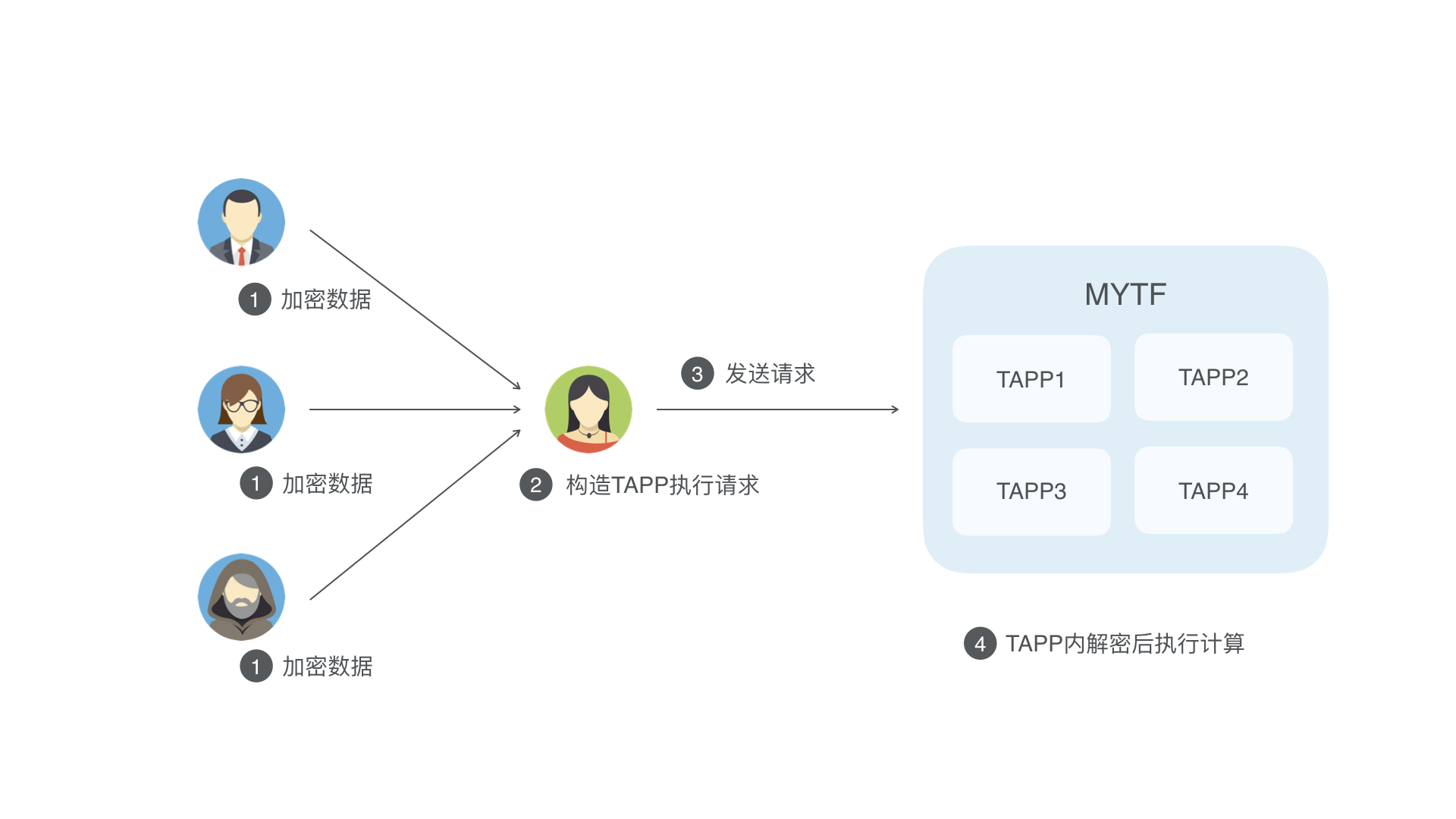
A TAPP can use this function internally to perform encryption and decryption based on the ECIES-SECP256K1 algorithm. This function supports scenarios where multiple parties encrypt their data. A third-party service platform can then merge the encrypted data from multiple parties and submit a TAPP execution request without accessing the users' private data.
TAPP interface example
INTERFACE std::string TestEnvelopeOpen(const std::string& enc_data) {
    std::string plain_data;
    int res_code = EnvelopeOpen(enc_data, plain_data);
    if(res_code != 1){
        print("Failed to open envelope: %d", res_code);
        plain_data = "Failed";
    }

    return plain_data;
}

INTERFACE std::string TestEnvelopeBuild(const std::string& plain_data, const std::string& pk) {
    std::string ret_envelope;
    int res_code = EnvelopeBuild(pk, plain_data, ret_envelope);
    if(res_code != 1){
        print("Failed to open envelope: %d", res_code);
        ret_envelope = "Failed";
    }

    return ret_envelope;
}
SDK usage example
// Get TAPP information
TappInfo tappInfo = client.getTappInfo(tappId, tappVersion);

// Regenerate a new EC public-private key pair locally to construct the ciphertext envelope
String plainData = "this is test for envelopeOpen & envelopeBuild";
UserKeyPair eciesKey = UserKeyFactory.generateKeyPair(KeyTypeEnum.ECIES_SECP256K1_KEY);
byte[] tappEnvelope = EnvelopeUtils.buildTappEnvelope(tappInfo.getEncryptionKeys().get(KeyTypeEnum.ECIES_SECP256K1_KEY), eciesKey.getPrivateKey().getEncoded(), plainData.getBytes());

// Construct a TAPP execution request to test the 'TestEnvelopeOpen' TAPP interface
String testReqMethod = "TestEnvelopeOpen";
TappExecuteRequest tappExecuteRequest = TappExecuteRequest.builder()
    .defaultRequest(tappId, tappVersion, testReqMethod)
    .addBytes(tappEnvelope)
    .build();

// Send the TAPP execution request. The TAPP envelope is decrypted within the contract.
TappExecuteResponse tappExecuteResponse = client.executeTapp(tappExecuteRequest);
Assert.assertTrue(tappExecuteResponse.isRequestSuccess());
Assert.assertTrue(tappExecuteResponse.isExecuteSuccess());

// Verify that the local plaintext is the same as the plaintext decrypted in the contract
Assert.assertEquals(plainData, tappExecuteResponse.getReturnValue().toUtf8String());

// Construct the ciphertext envelope
tappEnvelope = EnvelopeUtils.buildTappEnvelope(tappInfo, eciesKey, plainData.getBytes()).tlvEncode();

// Construct a TAPP execution request to test the 'TestEnvelopeOpen' TAPP interface
tappExecuteRequest = TappExecuteRequest.builder()
    .defaultRequest(tappId, tappVersion, testReqMethod)
    .addBytes(tappEnvelope)
    .build();

// Send the TAPP execution request. The TAPP envelope is decrypted within the contract.
tappExecuteResponse = client.executeTapp(tappExecuteRequest);
Assert.assertTrue(tappExecuteResponse.isRequestSuccess());
Assert.assertTrue(tappExecuteResponse.isExecuteSuccess());
Assert.assertEquals(plainData, tappExecuteResponse.getReturnValue().toUtf8String());

// Use the private key generated by the local SDK to construct the ciphertext envelope
tappEnvelope = client.getKeyStore().buildTappEnvelope(tappInfo, plainData.getBytes());

// Construct a TAPP execution request to test the 'TestEnvelopeOpen' TAPP interface
tappExecuteRequest = TappExecuteRequest.builder()
    .defaultRequest(tappId, tappVersion, testReqMethod)
    .addBytes(tappEnvelope)
    .build();

// Send the TAPP execution request
tappExecuteResponse = client.executeTapp(tappExecuteRequest);
Assert.assertTrue(tappExecuteResponse.isRequestSuccess());
Assert.assertTrue(tappExecuteResponse.isExecuteSuccess());
Assert.assertEquals(plainData, tappExecuteResponse.getReturnValue().toUtf8String());

// Construct a TAPP execution request to test the 'TestEnvelopeBuild' TAPP interface
testReqMethod = "TestEnvelopeBuild";
tappExecuteRequest = TappExecuteRequest.builder()
    .defaultRequest(tappId, tappVersion, testReqMethod)
    .addBytes(plainData.getBytes())
    .addBytes(eciesKey.getPublicKey().getEncoded())
    .build();

// Send the TAPP execution request
tappExecuteResponse = client.executeTapp(tappExecuteRequest);

// Parse the TAPP execution result
Assert.assertTrue(tappExecuteResponse.isRequestSuccess());
Assert.assertTrue(tappExecuteResponse.isExecuteSuccess());
byte[] tappExecutedEnvelope = tappExecuteResponse.getReturnValue().toBytes();
byte[] envelopeRecoverPlainData = EnvelopeUtils.openTappEnvelope(tappInfo.getEncryptionKeys().get(KeyTypeEnum.ECIES_SECP256K1_KEY), eciesKey.getPrivateKey().getEncoded(), tappExecutedEnvelope);
Assert.assertTrue(Arrays.equals(plainData.getBytes(), envelopeRecoverPlainData));

// Construct a TAPP execution request to test the 'TestEnvelopeBuild' TAPP interface
tappExecuteRequest = TappExecuteRequest.builder()
    .defaultRequest(tappId, tappVersion, testReqMethod)
    .addBytes(plainData.getBytes())
    .addBytes(client.getKeyStore().getSecretKeypair().getPublicKey().getEncoded())
    .build();

// Send the TAPP execution request
tappExecuteResponse = client.executeTapp(tappExecuteRequest);

// Parse the TAPP execution result
Assert.assertTrue(tappExecuteResponse.isRequestSuccess());
Assert.assertTrue(tappExecuteResponse.isExecuteSuccess());
tappExecutedEnvelope = tappExecuteResponse.getReturnValue().toBytes();
envelopeRecoverPlainData = client.getKeyStore().openTappEnvelope(tappInfo, tappExecutedEnvelope);
Assert.assertTrue(Arrays.equals(plainData.getBytes(), envelopeRecoverPlainData));
ECElgamalEnvelope decryption
A TAPP can use this function internally to perform decryption based on the ECElgamal-SECP256K1 algorithm. This function supports scenarios where data is encrypted by one party and decrypted by multiple parties.

TAPP interface example
INTERFACE std::string TestEcElgamalEnvelopeOpen(std::string prikey, std::string cipher_data) {
    uint32_t curve_type = 0;
    std::string plain_data;
    int res_code = ECElgamalEnvelopeOpen(curve_type, prikey, cipher_data, plain_data);
    if(res_code != 1){
        print("Failed to open envelope: %d", res_code);
        plain_data = "Failed";
    }

    return plain_data;
}

INTERFACE uint32_t TestEcElgamalEnvelopeBatchOpen(std::string enc_prikey, std::vector<std::string> cipher_data_batch) {
    uint32_t curve_type = 0;
    uint32_t success_count = 0;
    std::string plain_data;
    std::string plain_prikey;

    int res_code = EnvelopeOpen(enc_prikey, plain_prikey);
    if(res_code != 1){
        print("Failed to open prikey envelope: %d", res_code);
        return 0;
    }

    for(auto cipher_data: cipher_data_batch) {

        if(cipher_data==""){
            continue;
        }

        int res_code = ECElgamalEnvelopeOpen(curve_type, plain_prikey, Hex2Bin(cipher_data), plain_data);
        if(res_code != 1){
            print("Failed to ecelgamal open envelope: %d", res_code);
            success_count++;
        }
    }

    return success_count;
}
SDK usage example
// Locally construct a public-private key pair and the plaintext plainBytes
byte[] plainBytes = "this is test for ecElgamalEnvelopeOpen".getBytes();
int pkSize = 3;
String[] publicKeys = new String[pkSize];
UserKeyPair user1Keypair = UserKeyFactory.generateKeyPair(KeyTypeEnum.ECELGAMAL_SECP256K1_KEY);
UserKeyPair user2Keypair = UserKeyFactory.generateKeyPair(KeyTypeEnum.ECELGAMAL_SECP256K1_KEY);
UserKeyPair user3Keypair = UserKeyFactory.generateKeyPair(KeyTypeEnum.ECELGAMAL_SECP256K1_KEY);

publicKeys[0] = Base64.toBase64String(user1Keypair.getRawPublicKey());
publicKeys[1] = Base64.toBase64String(user2Keypair.getRawPublicKey());
publicKeys[2] = Base64.toBase64String(user3Keypair.getRawPublicKey());

// Locally encrypt the plaintext data using ECElgamalEncrypt
byte[] ciphertext = ECElgamalTool.ECElgamalEncrypt(CryptoSuiteTypeEnum.SECP256K1, publicKeys, plainBytes);
System.out.println("ciphertext: " + Hex.toHexString(ciphertext));
byte[] plaintext = ECElgamalTool.ECElgamalDecrypt(CryptoSuiteTypeEnum.SECP256K1, user3Keypair.getRawPrivateKey(), ciphertext);
System.out.println("recovered plaintext:" + Hex.toHexString(plaintext));

// Construct the TAPP execution request
String testReqMethod = "TestEcElgamalEnvelopeOpen";
tappExecuteRequest = TappExecuteRequest.builder()
    .defaultRequest(tappId, tappVersion, testReqMethod)
    .addBytes(user3Keypair.getRawPrivateKey())
    .addBytes(ciphertext)
    .build();

// Send the TAPP execution request
TappExecuteResponse tappExecuteResponse = client.executeTapp(tappExecuteRequest);

// Parse the TAPP execution result
Assert.assertTrue(tappExecuteResponse.isRequestSuccess());
Assert.assertTrue(tappExecuteResponse.isExecuteSuccess());
assertEquals(plainBytes, tappExecuteResponse.getReturnValue().toBytes());
TAPP log
In a TAPP, you can use APIs such as LOG_DEBUG to print log messages. The caller can then view these log messages. The related SDK operations include specifying the log level for the TAPP during installation and viewing the TAPP log after execution. Each line in the TAPP log is limited to 512 characters. Longer lines are truncated.
String testReqMethod = "TestLog";
byte[] bytecodes = FileUtils.readFileToByteArray(new File(TEST_CONTRACT_FILE));
// Install the TAPP and set the log level to INFO
// During TAPP execution, logs below the INFO level, such as LOG_DEBUG, will not take effect
TappInstallRequest tappInstallRequest = TappInstallRequest.builder()
    .newTapp(tappId, tappVersion, bytecodes)
    .setTappLogLevel(TappLogLevelEnum.TAPP_LOG_INFO)
    .upgradeable()
    .build();

TappInstallResponse tappInstallResponse = client.installTapp(tappInstallRequest);
System.out.println(tappInstallResponse);
Assert.assertTrue(tappInstallResponse.isSuccess());

// Verify that tappInfo contains the set log level: info
TappInfo tappInfo = client.getTappInfo(tappId, tappVersion);
Assert.assertNotNull(tappInfo);
Assert.assertEquals(tappInfo.getTappProperty().getTappLogLevel(), TappLogLevelEnum.TAPP_LOG_INFO);

// Execute again to get logs at the INFO level
TappExecuteRequest tappExecuteRequest = TappExecuteRequest.builder()
    .defaultRequest(tappId, tappVersion, testReqMethod)
    .build();
TappExecuteResponse tappExecuteResponse = client.executeTapp(tappExecuteRequest);
Assert.assertTrue(tappExecuteResponse.isExecuteSuccess());
String logs = tappExecuteResponse.getTappLog();