Demo Center
The SOFAStack Demo Center provides a simulated e-commerce environment. It helps you quickly understand and experience the one-stop, application-centric cloud-native services that SOFAStack offers. This topic guides you through different scenarios to explore features such as version rollback, service governance, and canary traffic shifting.
This release features two core products: Microservice Platform (MS Platform) and App Service on ACK (AKS).
Data in the Demo Center is read-only, and other operations are not permitted.
The search feature is not currently supported.
Prerequisites
You have registered an Alibaba Cloud account.
You have activated the SOFAStack service.
Demo URLs
The Demo Center has Gold and non-Gold environments. To avoid redirection errors, ensure you log on with the correct account for your environment:
Non-Gold environment: https://sofa.console.aliyun.com/?SOFAStackDemoCenter=true.
Gold environment: https://sofa4finance.console.aliyun.com/?SOFAStackDemoCenter=true.
Scenario overview
This section describes three typical e-commerce scenarios in the Demo Center and covers the core SOFAStack capabilities used in each scenario.
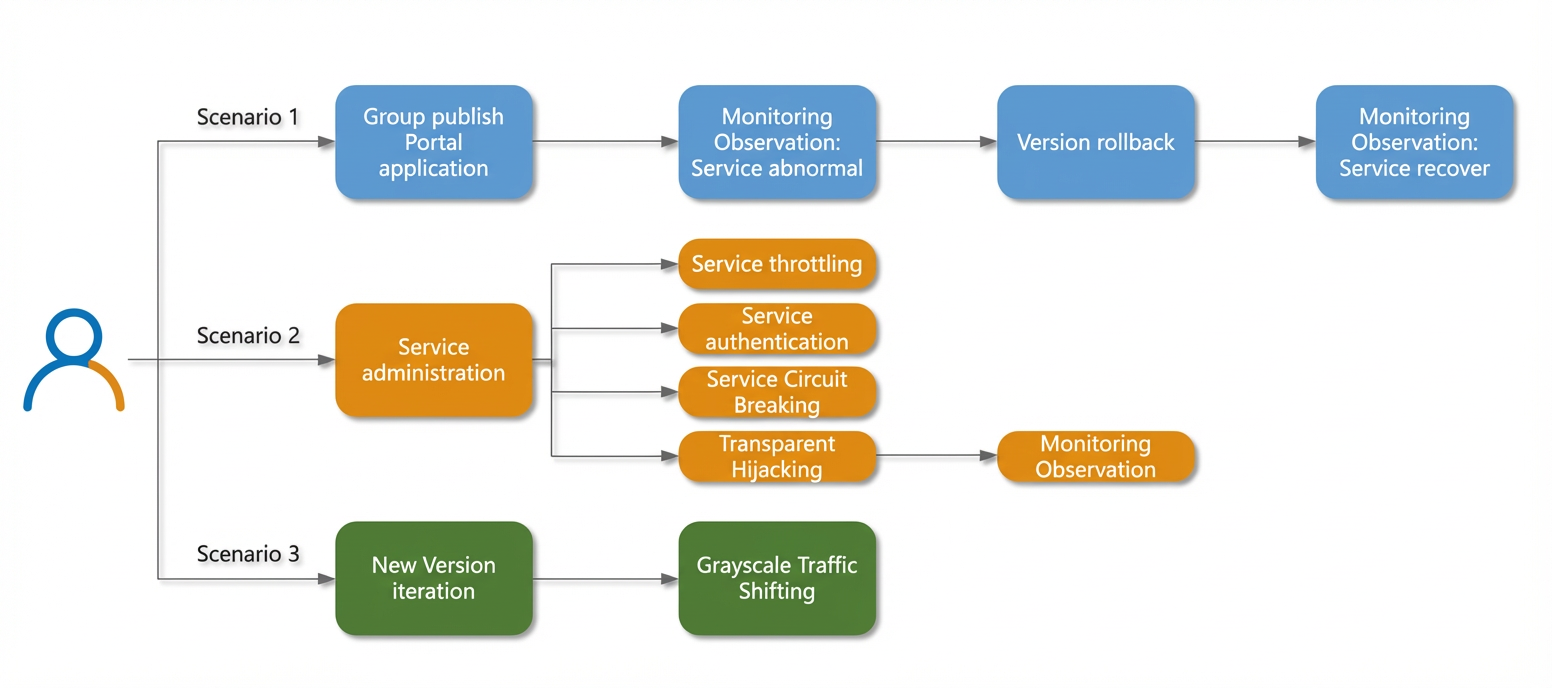
The scenarios are described as follows:
Scenario 1: Before the Double 11 sales promotion, a new version of the Portal application is released. After deployment, the release team observes business anomalies. They immediately roll back to the previous version. After the rollback, they check real-time monitoring data to confirm that the service is back to normal.
Scenario 2: During the Double 11 sales promotion, the e-commerce system faces a rapid increase in traffic. To prevent traffic peaks from overwhelming the system and to avoid issues such as server downtime, service timeouts, and cascading failures, the following service governance operations are performed:
Service throttling: A throttling rule is added to the high-traffic Order service to control the number of requests.
Service authentication: A whitelist authentication rule is added to the critical Pay service. This allows invocations only from services on the whitelist.
Circuit breaking: A circuit breaking rule is added to the Bills service. This prevents long-running blockages from affecting other services and avoids cascading failures.
Transparent proxy: Non-intrusive governance is applied to the Price system. This includes limiting the maximum number of requests for the service.
Scenario 3: As the Double 11 sales promotion approaches, developers need to ensure the product list is accurate and accessible. They perform a grouped release for a new version of the Product service, which is part of the Portal application. Then, they use service routing for fine-grained traffic control, gradually shifting traffic from the old version to the new one. This process enables a smooth rollout using canary traffic shifting.
Implementation paths
This section describes the service invocation path for each scenario to help you better understand the logic behind service governance. In the following figure, the arrows indicate invocation relationships.
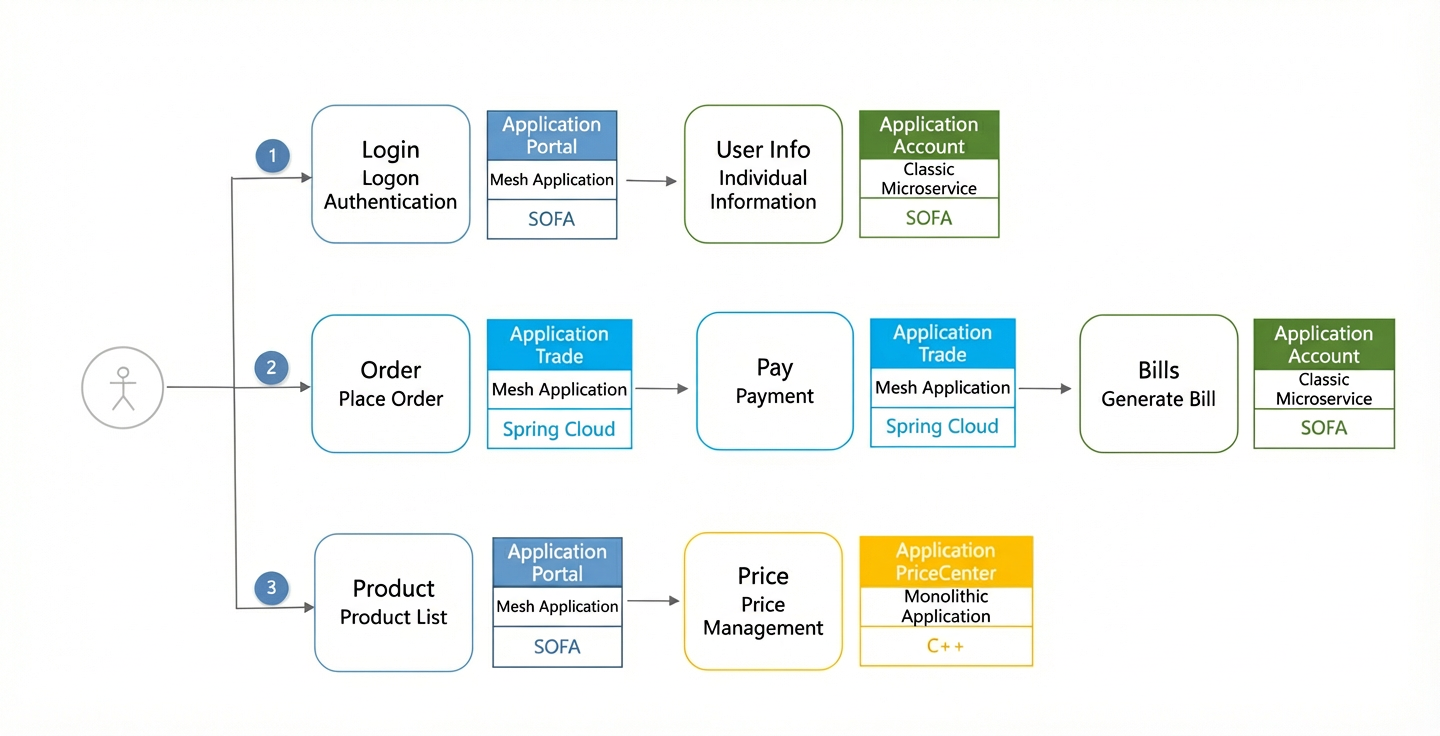
The invocation sequence is as follows:
When an e-commerce platform user logs on, the Login service is called for authentication. After a successful logon, the User Info service is called to display personal information.
When a user places an order, the Order service is called to create the order. After the order is created, the Pay service is called for payment. After a successful payment, the Bills service is called to generate a user bill.
When a user browses a store, the Product service is called to display the product list. When the user navigates to a product details page, the Price application is called to return price information.
The details of the applications and services are as follows:
Portal application: A portal website. It is a mesh application based on the SOFA framework and includes the following two microservices:
Login: An authentication service for user logon.
Product: Retrieves the product list.
Trade application: A transaction system. It is a mesh application based on the Spring Cloud framework and includes the following two microservices:
Order: The order service.
Pay: The payment service. This is a critical service. When service authentication is enabled, it can only be called by the Order service.
Account application: A user system. It is a standard microservice application based on the SOFA framework and includes the following two microservices:
User Info: Returns user information after logon.
Bills: The bill service.
PriceCenter application: A price management system. It is a monolithic application developed in C++.
Walkthroughs
This section provides a walkthrough for each scenario to help you quickly explore the core feature modules of SOFAStack.
Scenario 1: Version rollback
During a grouped release of the new Portal application, after the first group of service instances is deployed, the release team observes business anomalies in the service monitoring dashboard of the Microservice Platform. The user logon error rate increases rapidly. Analysis indicates a problem with the new service version. The team immediately initiates a rollback in AKS to restore the previous application version. They then continue to check real-time monitoring data to verify that the service has returned to normal.
This scenario involves the Portal application and the Login service.
Follow this path to explore the grouped release and version rollback features of AKS:
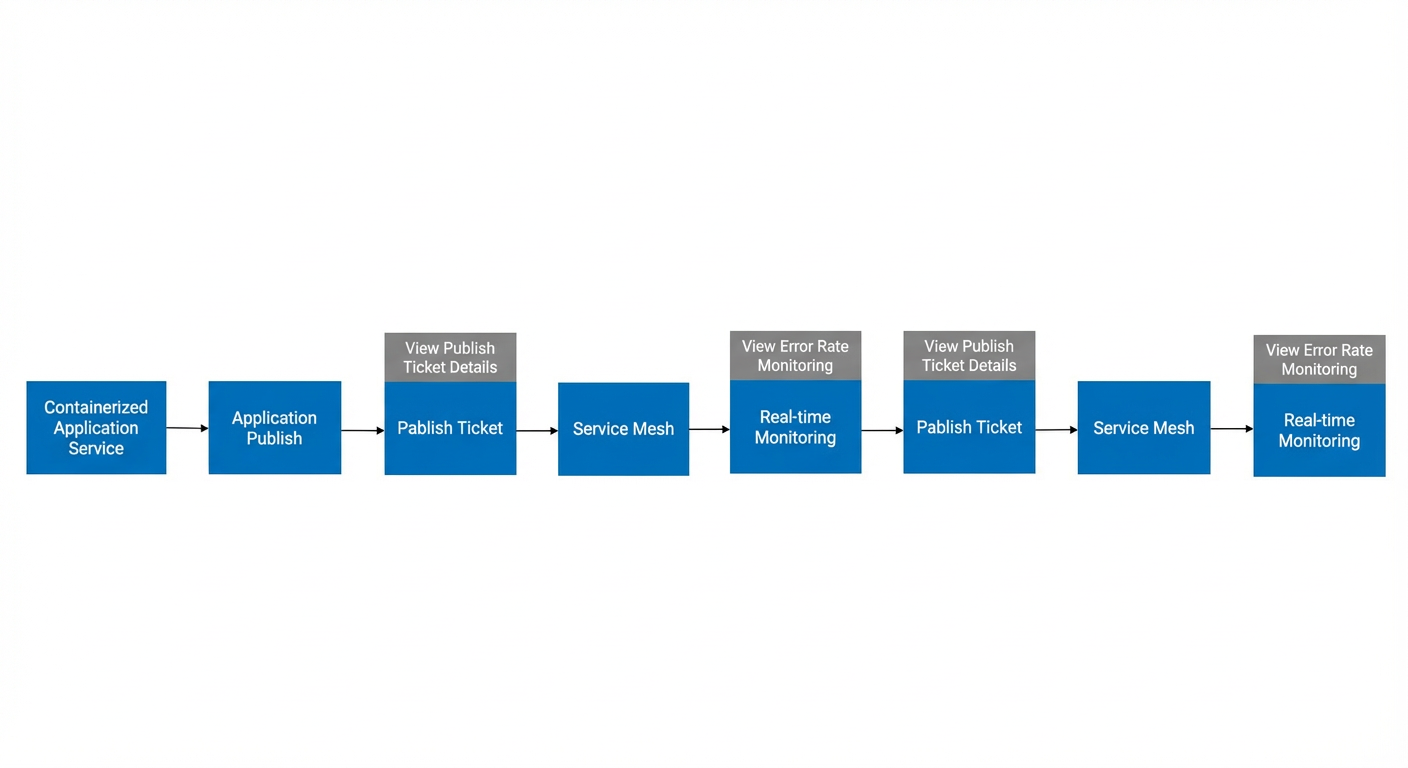
On the App Service on ACK > Application Release > Release Orders page, click the new release order named portal-v1-deployment to view its details. You can see that only one service instance of the Portal application was deployed in this release, as shown in the following figure:
On the Microservice Platform > Service Mesh > Real-time Monitoring page, view the monitoring details for the Portal application service. Select V2 from the application service version drop-down list. You will find that the error rate of the new service version has increased.
NoteDue to limitations in the Demo Center, dynamic data cannot be displayed, and only the final state is shown. Therefore, you cannot view the monitoring data for this step.
On the App Service on ACK > Application Release > Release Orders page, click the rollback release order named portal-v2-deployment to view its details. You can see that the rollback was completed for the new application service instance, as shown in the following figure:
NoteDue to limitations in the Demo Center, there is no field dependency between pages. The release order details use a shared dataset for this demonstration.
On the Microservice Platform > Service Mesh > Real-time Monitoring page, view the monitoring details for the Portal application service. You can see that the error rate of the application service has returned to zero after the rollback to the previous version, as shown in the following figure:
NoteAfter the rollback, you can only select V1 from the application service version drop-down list on the monitoring page.
Scenario 2: Service governance
During the Double 11 sales promotion, an e-commerce system must handle a rapid increase in traffic and a massive influx of users. This high-concurrency scenario puts immense pressure on the system. Server resources and the traffic they can handle are limited. As a result, traffic peaks can easily cause server downtime, service timeouts, and user access failures. To solve these problems, developers can use Microservice Platform (MS Platform) to perform the following governance operations. These operations improve service stability and availability.
Use service throttling to add a throttling rule to the high-traffic Order service to control the number of requests.
Use service authentication to add a whitelist rule to the critical Pay service. This allows invocations only from services on the whitelist.
Use circuit breaking to add a rule to the Bills service. This prevents long-running blockages from affecting other services and avoids cascading failures.
Use a transparent proxy to apply non-intrusive governance to the Price system, such as limiting the maximum number of requests.
This scenario involves the Order and Pay services of a mesh application, the Bills service of a standard microservice, and the Price monolithic application written in C++.
Follow this path to explore the service throttling, service authentication, circuit breaking, and transparent proxy features of MS Platform:
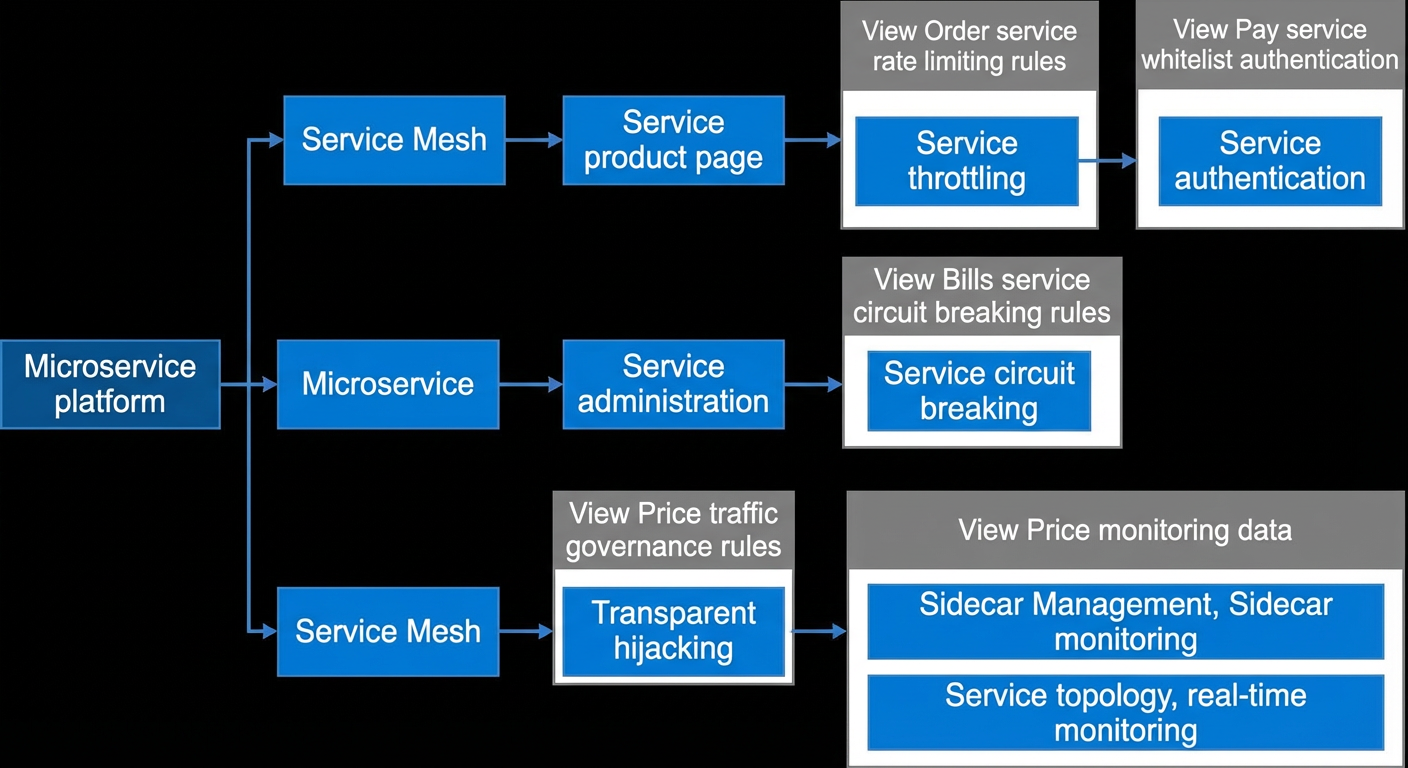
Service throttling
Go to the Microservice Platform > Service Mesh > Service Management page. In the service list, find the Order service and click its service ID to open the details page.
On the details page, switch to the Service Throttling tab. You can see a throttling rule named double_11_order_throttling.
Click the rule name to view its configuration in the window on the right. This rule throttles the Order service based on the Queries Per Second (QPS) counting method.
Service authentication
Go to the Microservice Platform > Service Mesh > Service Management page. In the service list, find the Pay service and click its service ID to open the details page.
On the details page, switch to the Service Authentication tab. You can see an enabled whitelist rule named access_control_rule_1. This rule allows calls only from services where the caller application name is Trade, as shown in the following figure.
Circuit breaking
Go to the Microservice Platform > Microservice > Service Governance page and switch to the Circuit Breaking tab.
In the circuit breaking rule list below, click the expand icon next to the Account application. You can see a circuit breaking rule named double_11_promotion_circuit_breaking_policy.
Click the rule name to view its configuration in the window on the right. This rule breaks the circuit for the Bills service based on the configured matching conditions.
The circuit is broken for 10,000 ms if the number of requests reaches 10,000 within 5 s and the error rate reaches 30%, or if the server-side timeout reaches 500 ms.
This rule is in observer mode, which means it only logs circuit breaking events and does not actually intercept requests.
Transparent Hijacking
Go to the Microservice Platform > Service Mesh > Transparent Proxy page. In the application list, click the Price application name to open its details page.
On the details page, you can see that Transparent Proxy is enabled for two IP addresses for this application, as shown in the following figure.
Click Parameter Settings in the upper-right corner to view the detailed transparent proxy rules in a pop-up window. TCP traffic outside the blacklisted CIDR block range and port range is proxied.
Click Application Governance in the upper-right corner to view the traffic governance rules for this application in the window on the right. As shown in the following figure, traffic on port 80 is proxied and governed by a limit of 100 for the maximum number of requests.
Go to the Service Mesh > Sidecar Management page. You can see the Sidecar information and status for the Price application, as shown in the following figure.
Go to the Service Mesh > Service Topology page. Find and click the Price application in the topology graph. In the window on the right, you can view the monitoring data for the application. The number of requests per second (RPS) complies with its application governance rule, as shown in the following figure.
Go to the Service Mesh > Real-time Monitoring page. In the application service list below, you can see that the number of requests per minute for the Price application is consistent with its application governance rule, as shown in the following figure.
Scenario 3: Canary traffic shifting
In a scenario such as the Double 11 sales promotion, backend systems such as e-commerce transaction services are under immense pressure. The e-commerce portal, which aggregates and displays content from various sources such as products, inventory, and prices, also handles massive traffic and is a critical entry point for transactions. Therefore, as the promotion approaches, developers must ensure the product list is accurate and user access is stable. They can use AKS to perform a grouped release of a new version for the Product service within the Portal application. This creates two versions: an old version and a new version. Then, they use the service routing feature for fine-grained traffic control, gradually shifting traffic from the old version to the new one. This process is known as canary traffic shifting.
This scenario involves the Portal application and the Product service.
Follow this path to explore the application release feature of AKS and the service routing feature of MS Platform:
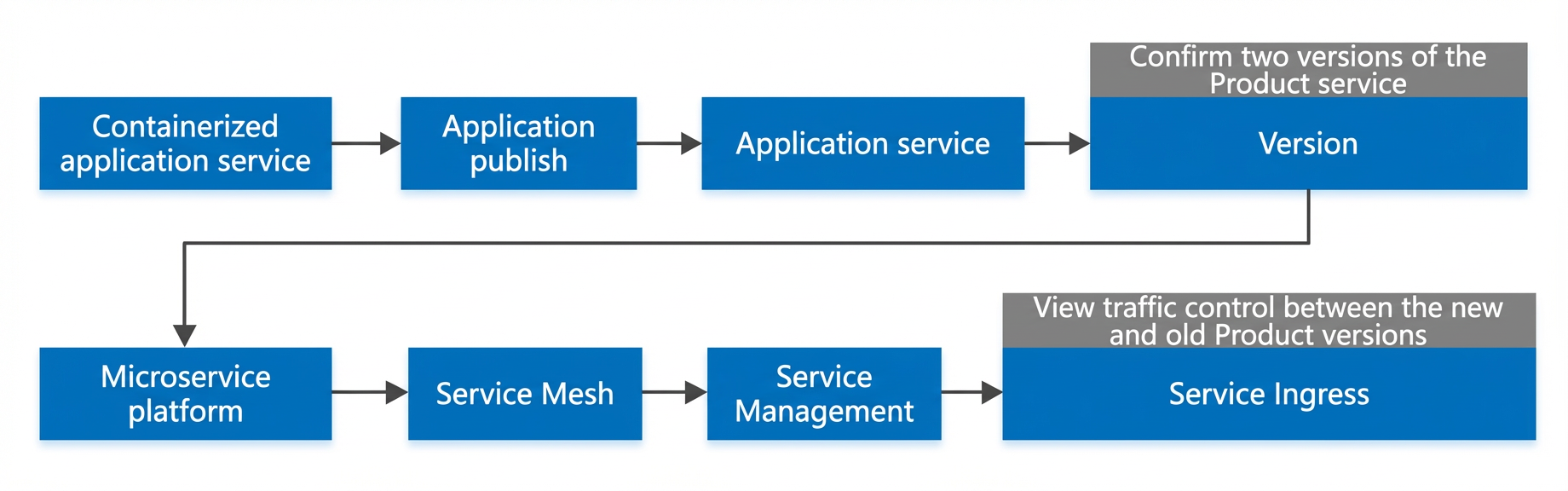
This path demonstrates the grouped release feature of AKS and the service routing feature of the MS Platform:
Go to the App Service on ACK > Application Release > Application Services page and click the portal application to open its details page. On the Versions tab, you can see two versions in the list, as shown in the following figure:
Go to the Microservice Platform > Service Mesh > Service Management page. In the service list, find the Product service and click its service ID to open the details page.
On the details page, switch to the Service Routing tab. You can see a rule named portal_new_version_release_routing_rule.
Click the rule name to view its configuration in the window on the right. This rule controls traffic for the Product service using version-based routing.