Scenario: Database migration for enterprises
Scenario description
Migrating business databases is a major challenge for enterprises moving to the cloud. Often, database domain names or IP addresses are hardcoded into application clients. When you migrate a self-managed database to ApsaraDB RDS, you must modify the client code. This process is complex and high-risk.
Solution
Use Alibaba Cloud DNS PrivateZone to create a database domain name that is identical to your original on-premises domain name. Then, use a CNAME record to point the domain name to the internal endpoint assigned by RDS. This way, you do not need to modify the client code during the database migration. This reduces application refactoring and lowers migration risks.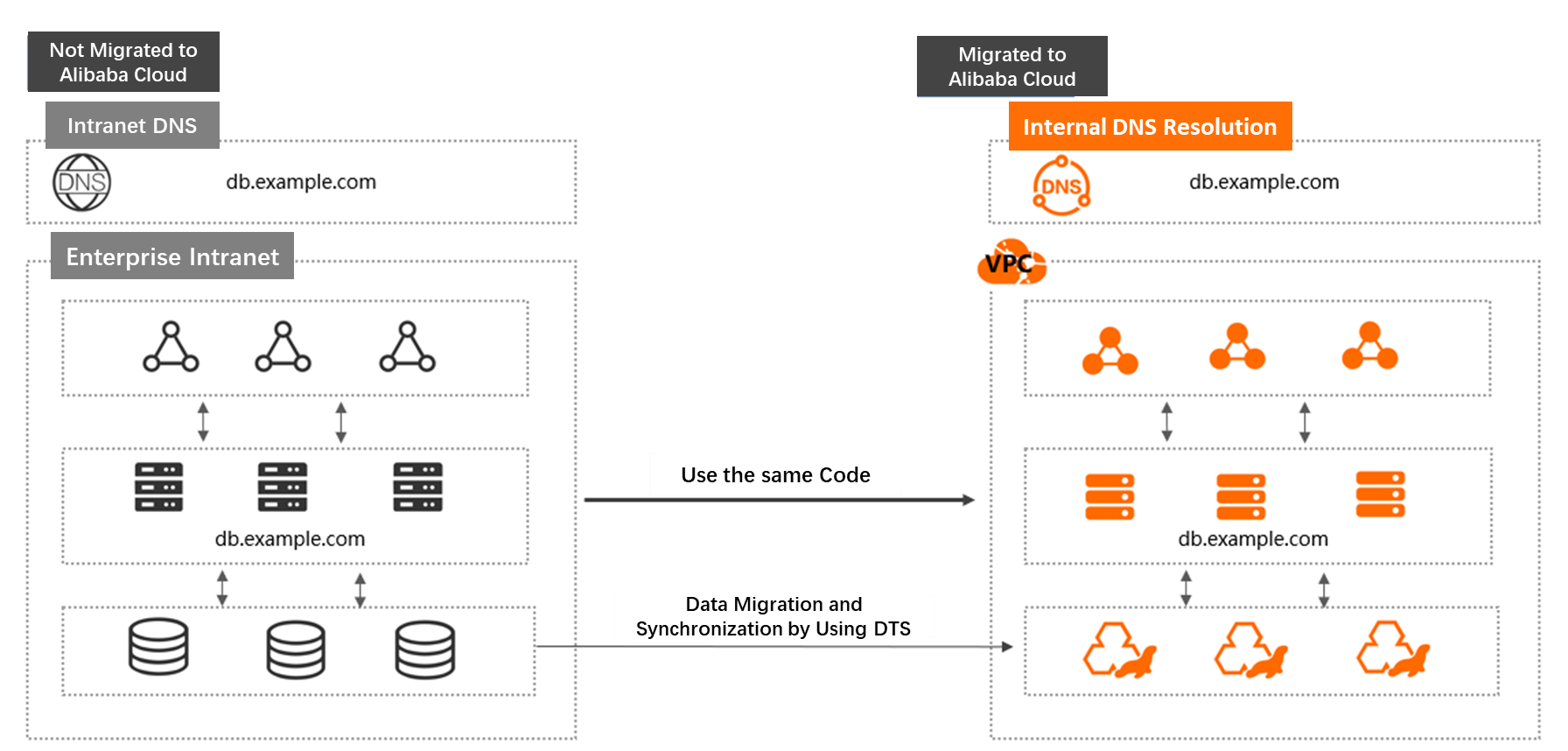
Prerequisites
Before you begin, prepare the resources listed in the following table.
Resource |
Quantity |
Example value |
On-premises database connection domain name |
1 |
db.example.com |
ECS server |
1 or more |
1.1.1.1, 2.2.2.2 |
RDS database instance |
1 |
rm-2ze44q293vs56l9po125010.mysql.rds.aliyuncs.com |
Activate the service
Log on to the Alibaba Cloud DNS console.
Go to the PrivateZone page and click Activate Now.
On the Product Activation page, read and agree to the Alibaba Cloud DNS PrivateZone (Pay-As-You-Go) Service Agreement, and then click Activate Now.
After the service is activated, you can use the service in the console.
Procedure

1. Add a zone and a PrivateZone DNS record
In the Add PrivateZone dialog box, enter a Zone Name and click OK.
After the zone is added, it appears in the Zone List.
Go to the ApsaraDB RDS console to view the internal endpoint of the RDS database instance.
Return to the Alibaba Cloud DNS console. On the PrivateZone page, click the zone name to go to the DNS Records page. Add a PrivateZone DNS record.
Configure the DNS record and click OK. Set Type to CNAME, Host to @, and Value to `rm-2ze44q293vs56l9po125010.mysql.rds.aliyuncs.com`. Note: This is a test domain name. Use your actual domain name.

The created record is shown in the following figure.

Return to the PrivateZone page to associate a VPC. Find the zone that you want to associate with a VPC and click Associate VPC in the Actions column. Note: Before you associate a VPC, make sure that you have added a PrivateZone DNS record for the zone. For more information, see Add a PrivateZone DNS record.
In the Associate VPC dialog box, select the VPC to associate from the list of VPCs in the corresponding region. For example, if your client source code is deployed on an ECS instance i-2zegrm**t0phtxtk in the China (Beijing) region, select the corresponding VPC, such as cn-beijing-vpc-tl.
After the configuration is complete, click OK to finish the association.

2. Test the result
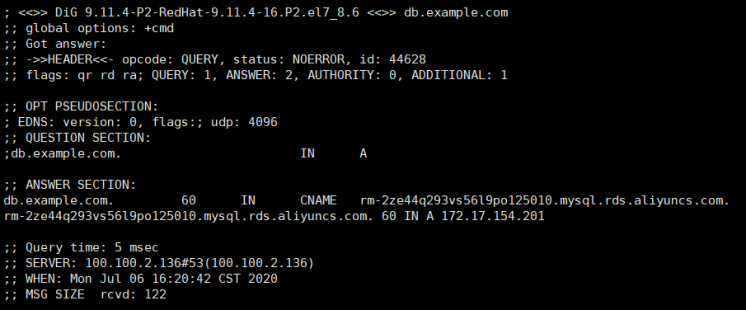
Test the DNS resolution. Log on to an ECS server in the associated VPC and run a test to verify that DNS resolution works. A successful result is shown in the following figure. If the result is abnormal, check your DNS record configuration.
dig db.example.com
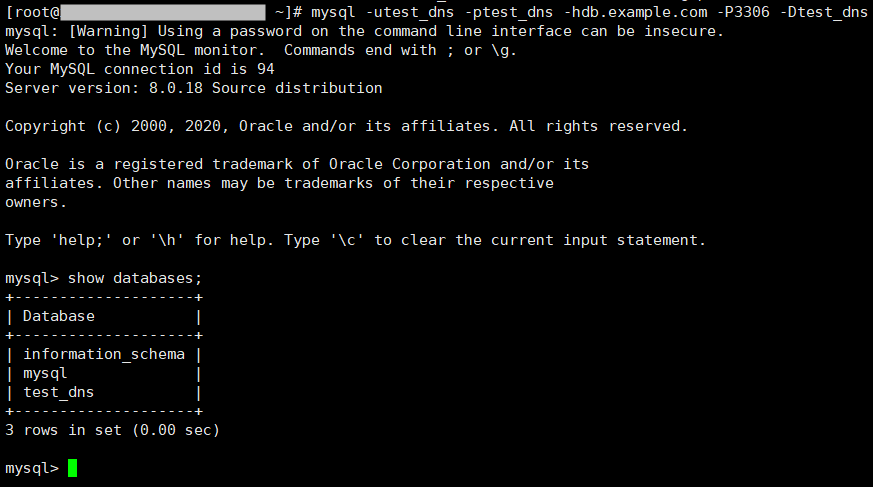
Test the RDS connection. Log on to an ECS server in the associated VPC and run a remote command to test the connection. A successful result is shown in the following figure.
mysql -utest_dns -ptest_dns -hdb.example.com -P3306 -Dtest_dns
3. Common errors
ERROR 2003 (HY000): Can’t connect to MySQL server on ‘db.example.com’ (110). To resolve this error, check the database whitelist settings and add the IP address of the ECS instance to the whitelist.
