Immediate backup
In addition to scheduled backups, you can create data backups on demand. On-demand backups are independent of any backup policy. Use physical backups for clusters and logical backups for tables.
Background information
Physical backup: A physical backup backs up the physical files of OceanBase, such as baseline data and log archive data. You can use these files to recover the database if a failure occurs.
Logical backup: A logical backup is an object-level backup that supports backups for tables and databases. The supported database objects vary by database mode:
MySQL mode: tables, views, triggers, sequences, synonyms, types, packages, functions, and stored procedures.
Oracle mode: tables, views, functions, and stored procedures.
NoteWhen you back up tables, limit the number of tables to 200 or fewer.
By default, OceanBase performs a merge once a day. However, a high volume of write operations may trigger multiple merges.
For OceanBase versions earlier than V4.0.0.0, you can perform a successful cluster data backup only once after each merge. If a cluster data backup has already succeeded, any subsequent attempts to back up the cluster before the next merge will fail. The system returns an error indicating that a backup set for the current data version already exists.
NoteThis check does not apply to OceanBase V4.x clusters.
Notes
If the log backup status of an instance is abnormal, start a data backup manually. This prevents log breakpoints that would otherwise make point-in-time recovery impossible.
A manual backup only backs up data. It does not affect log backup tasks.
Procedure
Log on to the OceanBase Management Console .
In the navigation pane on the left, click Instance List.
In the instance list, find the target cluster instance and click its name to go to the Cluster Instance Workspace.
In the navigation pane on the left, click Backup and Recovery.
In the upper-right corner of the page, click Back Up Now to open the backup page. You can choose between Physical Backup and Logical Backup.
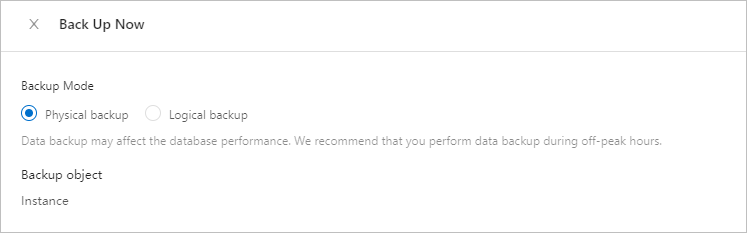
Physical backup
To back up a cluster instance, select Physical Backup in the Back Up Now dialog box and click OK.
Logical backup
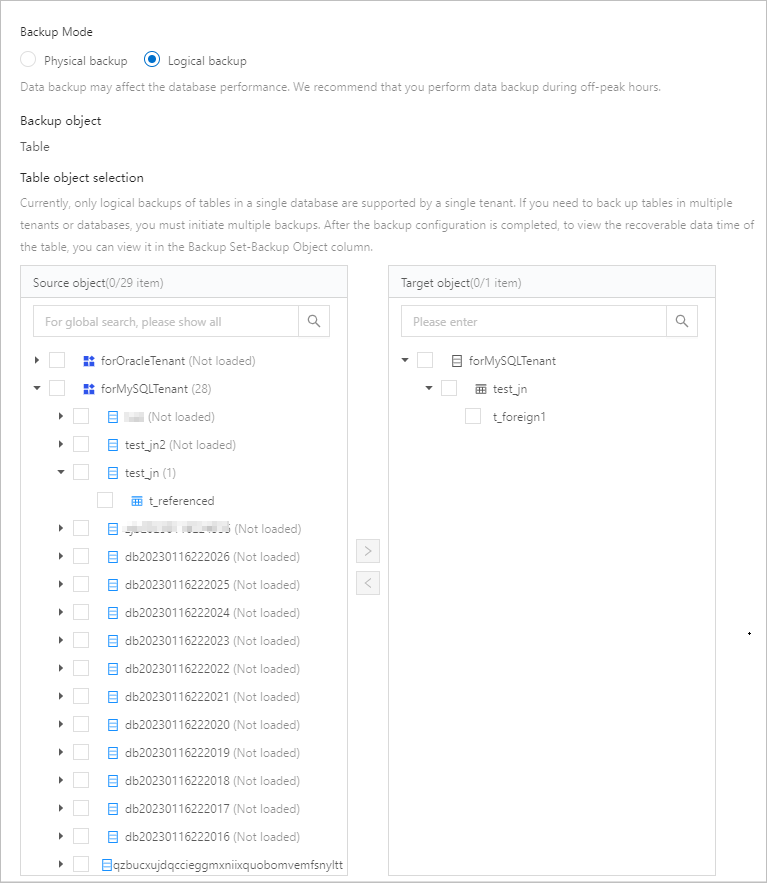
To back up tables and databases, select Logical Backup.
For Backup Object, select Table or Database.
Under Source Objects, select the objects to back up. Click the
 button to add them to the Target Objects list.
Click OK.
A logical backup ensures data consistency for tables without service interruption.
Data Definition Language (DDL) operations are not supported during a logical backup.
To enable logical backup, contact OceanBase technical support.
What to do next
You can view the manual backup task on the Data Backups tab. For more information, see Data backups.