Manage product tag datasets
You can manage product tag datasets. Available operations include editing, tag category management, updating, update settings, renaming, moving, removing, and setting permissions.
Edit: Click the
 icon or click the dataset name to open the details page and then click Edit. The dataset editing page opens.
The page displays the data source and data table name. Click Next to navigate to the tag configuration page.
On the tag configuration page, you can edit the tag alias, tag type, tag category, and tag description.
Tag category management: Click Tag Category Management to manage the public tag categories in the workspace. For more information, see the tag category management section in Manage user tag datasets.
Click the
 icon and select one of the following options: Update, Rename, Move to, Remove, Set Permissions, or Update Settings.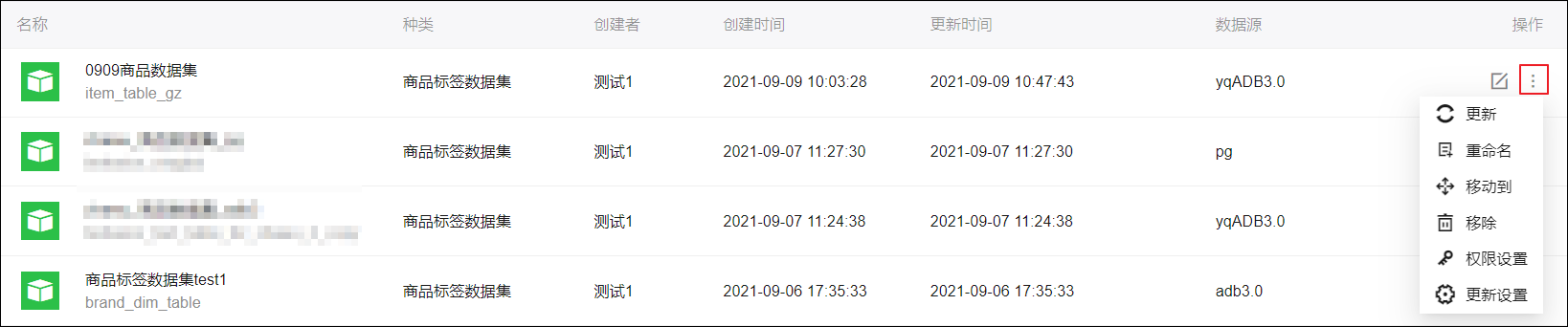
Update: Synchronizes the dataset with the latest data from the data source. For automatic updates, see Update Settings.
Rename: Changes the name of the dataset.
Move to: Moves the dataset to a specified folder.
Remove: Deletes the current dataset.
NoteYou cannot delete a dataset if it is associated with an algorithm model.
Set Permissions: Grants management and usage permissions for the dataset.
NoteFor more information, see Set dataset permissions.
Update Settings: Sets a schedule for automatic daily updates. You can specify up to two update times. After you configure automatic updates, the
 icon appears next to the update time in the dataset list.Note
To cancel a configured automatic update, select Do not update.