Service Mesh FAQ
This topic lists frequently asked questions (FAQs) and provides solutions for common issues encountered when using Service Mesh.
What microservice frameworks does Service Mesh support?
Service Mesh supports mainstream microservice frameworks such as Dubbo and Spring Cloud.
XDS configuration is not delivered
Cause: Pilot is not running or the network connection between Pilot and MOSN is unavailable.
Solution:
Check whether MOSN is connected to Pilot.
Enter the MOSN container and run the following command. If a connection to Pilot does not exist, check whether the Pilot address is correct.
netstat -na | grep 15050Enter the MOSN container and check the
/home/admin/logs/mosn/default.logfile to see whether the XDS client was initialized.If a log similar to the following appears, the XDS client failed to connect. This may be because the Pilot address is incorrect or Pilot is not running.
2020-12-07 16:02:50,791 [INFO] fail to create stream client: rpc error: code = Unavailable desc = connection error: desc = "transport: Error while dialing dial tcp 11.**.**.206:15050: connect: connection refused"
2020-12-07 16:02:50,791 [INFO] [xds] [ads client] stream client reconnect failed, retry after 4s
2020-12-07 16:02:50,973 [INFO] [xds] [ads client] stream client closed, sleep 1s and wait for reconnect
Check whether MOSN received the configuration.
If the Pilot pod is not running, wait for it to start. MOSN has an automatic reconnection mechanism, so no changes are required.
Wait for a log entry similar to the following to appear. This indicates that the connection is restored.
[xds] [sds subscriber] stream client reconnected
Version number of the registered provider is missing
On the Kubernetes service, check whether the application YAML file has the app.kubernetes.io/version: 1.0.0 label.
Service throttling does not take effect
The service throttling flow is DsrConsole > DRM > MOSN.
Log on to the microservice console and check whether the throttling rule is configured correctly.
If you set the throttling direction to client-side, you must specify the client application to throttle traffic on the client. If you set the throttling direction to server-side, you must specify the server application to throttle traffic on the server.
Check whether DRM pushed the throttling rule.
The following figure shows that the throttling rule was pushed.

Check whether MOSN and DRM are connected.
For client-side throttling, run the following command:
kubectl exec -it crpc-client-2-5747cf49db-q9mnn -c mosn-sidecar-container bash
netstat -nalp |grep 9880
Output similar to the following figure indicates that MOSN and DRM are connected.

Check whether MOSN received the throttling rule.
Open the MOSN log file at
/home/admin/logs/mosn/drm.access.logand search for the keywordRateLimit:grep -irn "RateLimit" *.log
If the throttling rules are not received, verify the connection between DsrConsole and DRM.
netstat -nalp |grep 9880If the connection is normal but the rule was not received, check whether the tenant information configured in MOSN matches the tenant information in DsrConsole. If they do not match, update the information to match the tenant in MOSN.
Service circuit breaking does not take effect
The service circuit breaking flow is DsrConsole > DRM > MOSN.
Log on to the microservice console and check whether the circuit breaking rule is configured correctly.
If you set the circuit breaking direction to client-side, you must specify the client application to enable circuit breaking on the client. If you set the direction to server-side, you must specify the server application to enable circuit breaking on the server.
Check whether DRM pushed the circuit breaking rule.
The following figure shows that the circuit breaking rule was pushed.
Check whether MOSN and DRM are connected.
For client-side circuit breaking, run the following command:
kubectl exec -it crpc-client-2-5747cf49db-q9mnn -c mosn-sidecar-container bash
netstat -nalp |grep 9880
Output similar to the following figure indicates that MOSN and DRM are connected.
Check whether MOSN received the circuit breaking rule.
Open the MOSN log file at
/home/admin/logs/mosn/drm.access.logand search for the keywordcircuitBreakerRules:grep -irn "circuitBreakerRules" *.log
If you do not receive the circuit breaking rules, check the connection between DsrConsole and DRM.
netstat -na | grep 9880If the connection is normal but the rule was not received, check whether the tenant information configured in MOSN matches the tenant information in DsrConsole. If they do not match, update the information to match the tenant in MOSN.
Service degradation does not take effect
The service degradation flow is DSRConsole > DRM > MOSN.
Log on to the microservice console and check whether the service degradation rule is configured correctly.
Service degradation occurs on the client. Check whether the configuration items, such as application, service, and method, are correct.
Check whether DRM pushed the degradation rule.
A message similar to the one in the following figure indicates that a connection has been established between MOSN and DRM.

Check whether MOSN and DRM are connected.
kubectl exec -it crpc-client-2-5747cf49db-q9mnn -c mosn-sidecar-container bash
netstat -nalp |grep 9880
Output similar to the following figure indicates that MOSN and DRM are connected.
Check whether MOSN received the degradation rule.
Open the MOSN log file at
/home/admin/logs/mosn/drm.access.logand search for the keyworddowngradeRule:grep -irn "downgradeRule" *.logThe following figure shows that MOSN received the degradation rule.
If downgrade rules are not received, check the connection between DsrConsole and DRM.
netstat -na | grep 9880If the connection is normal but the rule was not received, check whether the tenant information configured in MOSN matches the tenant information in DsrConsole. If they do not match, update the information to match the tenant in MOSN.

Fault injection does not take effect
Fault injection can occur on the client or the server. It is typically used to inject an exception for a specific period or to inject an exception directly. If a fault injection rule does not take effect, first check whether the rule is configured correctly. For example, client-side injection requires the client application name, and server-side injection requires the server application name.
The fault injection flow is DSRConsole > DRM > MOSN.
Log on to the microservice console and check whether the fault injection rule is configured correctly.
Check whether DRM pushed the fault injection rule.
The following figure shows that DRM pushed the rule.
Check whether MOSN and DRM are connected.
kubectl exec -it crpc-client-2-5747cf49db-q9mnn -c mosn-sidecar-container bash
netstat -nalp |grep 9880
Output similar to the following figure indicates that MOSN and DRM are connected.
Check whether MOSN received the fault injection rule.
Open the MOSN log file at
/home/admin/logs/mosn/drm.access.logand search for the keywordfaultInjectRules:grep -irn "faultInjectRules" *.logIf you do not receive a fault injection rule, verify that the connection between DsrConsole and DRM is working correctly.
netstat -na | grep 9880If the connection is normal but the rule was not received, check whether the tenant information configured in MOSN matches the tenant information in DsrConsole. If they do not match, update the information to match the tenant in MOSN.
Fault isolation does not take effect
The fault isolation flow is DSRConsole > DRM > MOSN.
Log on to the microservice console and check whether the fault isolation rule is configured correctly.
For example, the following figure shows an incorrect configuration. The Abnormal Ratio Threshold multiplied by the Abnormal Ratio Multiplier is 200, but the maximum error limit is 100.
Check whether DRM pushed the fault isolation rule.
The following figure shows that the rule was pushed.
Check whether MOSN and DRM are connected.
kubectl exec -it crpc-client-2-5747cf49db-q9mnn -c mosn-sidecar-container bash
netstat -nalp |grep 9880
Output similar to the following figure indicates that MOSN and DRM are connected.
Check whether MOSN received the fault isolation rule.
Open the MOSN log file at
/home/admin/logs/mosn/drm.access.logand search for the keywordfaultToleranceRules:grep -irn "faultToleranceRules" *.logThe following figure shows that MOSN received the fault isolation rule.
If a fencing rule is not received, verify the connection between DsrConsole and DRM.
netstat -na | grep 9880If the connection is normal but the rule was not received, check whether the tenant information configured in MOSN matches the tenant information in DsrConsole. If they do not match, update the information to match the tenant in MOSN.

Service routing does not take effect
Routing rules are delivered in the following order:
After you complete the configuration in the console, DsrConsole is called to send the rule to Cloudmesh OpenAPI.
OpenAPI writes the configuration to the Kubernetes APIServer.
Pilot listens for configuration changes in the Kubernetes APIServer and sends the configuration to the client's MOSN.
You can check the process in reverse order:
Check whether the routing rule was delivered to MOSN.
Enter the MOSN container and run the following command to view the log file and check whether the routing rule was delivered.
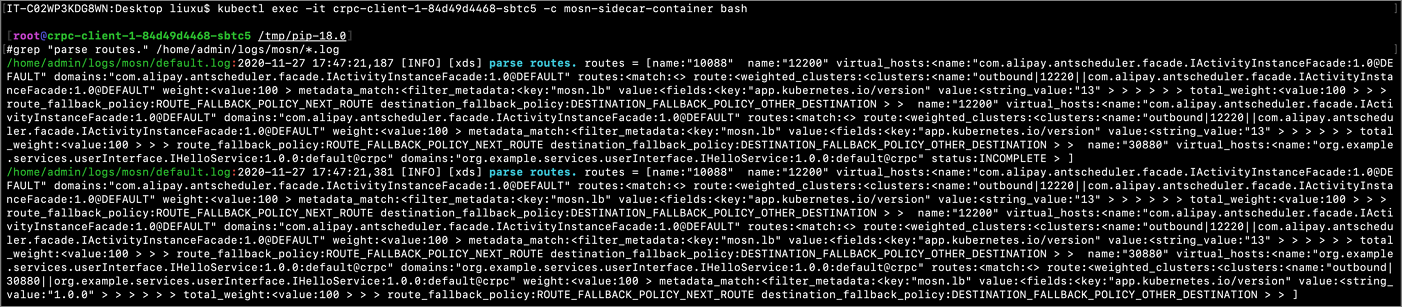
kubectl exec -it crpc-client-1-84d49d4468-sbtc5 -c mosn-sidecar-container bashNotecrpc-client-1-84d49d4468-sbtc5is the name of the client pod. Replace it with the actual name of your client pod when you run the command.The following figure shows that the routing rule has been delivered.
Run the
kubectl get virtualservice -n defaultcommand to check whether the routing rule was delivered to theKubernetes APIServer.Notevirtualserviceis a custom value. Modify it as needed when you run the command.The following figure shows that the content has been delivered.
Run the
netstat -an|grep 15050command to check whether a persistent connection is established between MOSN and Pilot.The following figure shows that a persistent connection is established.
Run the
kubectl get pod -n cloudmesh -o widecommand to check whether the IP addresses of the Pilot and APIServer applications are correct.In the following figure, check the IP configurations of
openapi-7b794d6796-x2wp4andpilot-fb4777d78-f9nml.The OpenAPI address must be configured in DsrConsole, as shown in the following figure:The
openApiUrlproperty specifies the address of OpenAPI and is used to deliver routing rules. The Pilot address must be configured in the application's YAML file as a MOSN environment variable. The configuration is as follows:- name: PILOT_SERVER_ADDRESS value: 192.**.**.144View the list of all services.
Enter the client's MOSN container and run the
curl localhost:13330/servicesnapshotcommand to view the list of all services.If the list of services you see is different from the list in the console, the list in the MOSN container prevails.



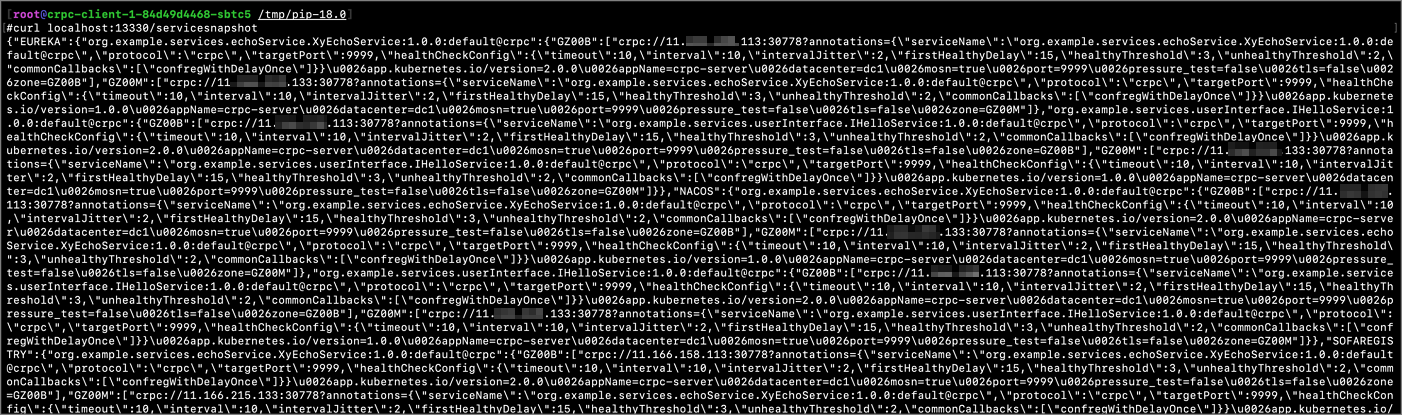 If the list of services you see is different from the list in the console, the list in the MOSN container prevails.
Note the following when you configure service routing:
If you configure multiple routing rules, rules with higher priority are matched first.
If traffic splitting is enabled and the destination group has no service instances, the traffic is forwarded to other groups.
If degradation is enabled and no service instance matches the current rule, other rules are matched.
If no rules match, the routing rule becomes invalid. A service instance in the local zone is selected by default. The zone information is in the application's YAML file.
If you delete an enabled routing rule, the client randomly selects a server to call.
For exact traffic matching, traffic is first filtered based on service instance properties. The filtered traffic is then routed based on the traffic destination.
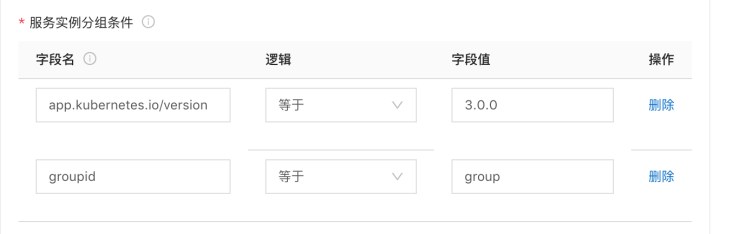
Multiple service instance group conditions are combined with a logical AND. All conditions must be met.
If you configure multiple rules for the same application and the same interface service, the rules are displayed together on the page.
If you set the routing granularity to the application level, you can enter an asterisk (*) in manual mode or select all services in selection mode.
Service authentication does not take effect
The service authentication flow is DSRConsole > Cloudmesh OpenAPI > Write to APIServer > Pilot listens for CR resource changes > Deliver authentication rule to MOSN.
You can troubleshoot by tracing the effective path in reverse order:
To troubleshoot, check the flow in reverse order:
Enter the
DSRConsolemachine and run theenv | grep auth.dispatch.target.sigmacommand to view the environment variable.If the environment variable does not exist, add
-Dauth.dispatch.target.sigma=true.Run the following command to enable DEBUG logging for
default.log.curl -X POST \ http://127.0.0.1:34901/api/v1/update_loglevel \ -d '{ "log_level":"DEBUG", "log_path":"./logs/mosn/default.log" }'Go to the
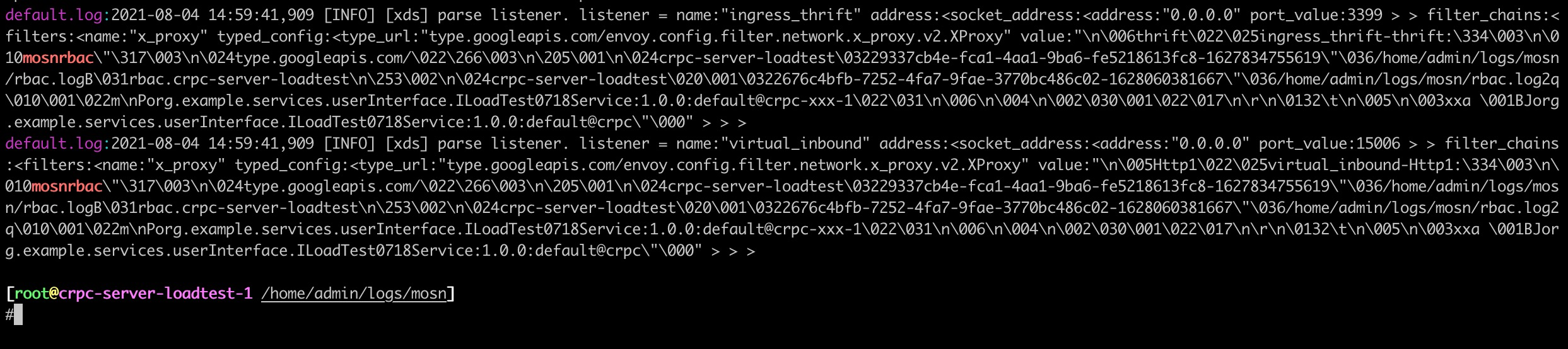
/home/admin/logs/mosndirectory and run thegrep 'mosnrbac' *.logcommand.If a log entry similar to the following appears, the authentication rule has been delivered to MOSN. If authentication still does not take effect, check whether your rule is configured correctly.
If MOSN did not receive the authentication rule, continue to the next step.Check whether the connection to Pilot is normal.
If output similar to the following figure appears, the connection to Pilot is normal.
If the connection to Pilot is not normal, check whether the Pilot address is correct.
If the Pilot address is incorrect, correct it.
If the Pilot address is correct, continue to the next step.
In the console, run the following command to view the
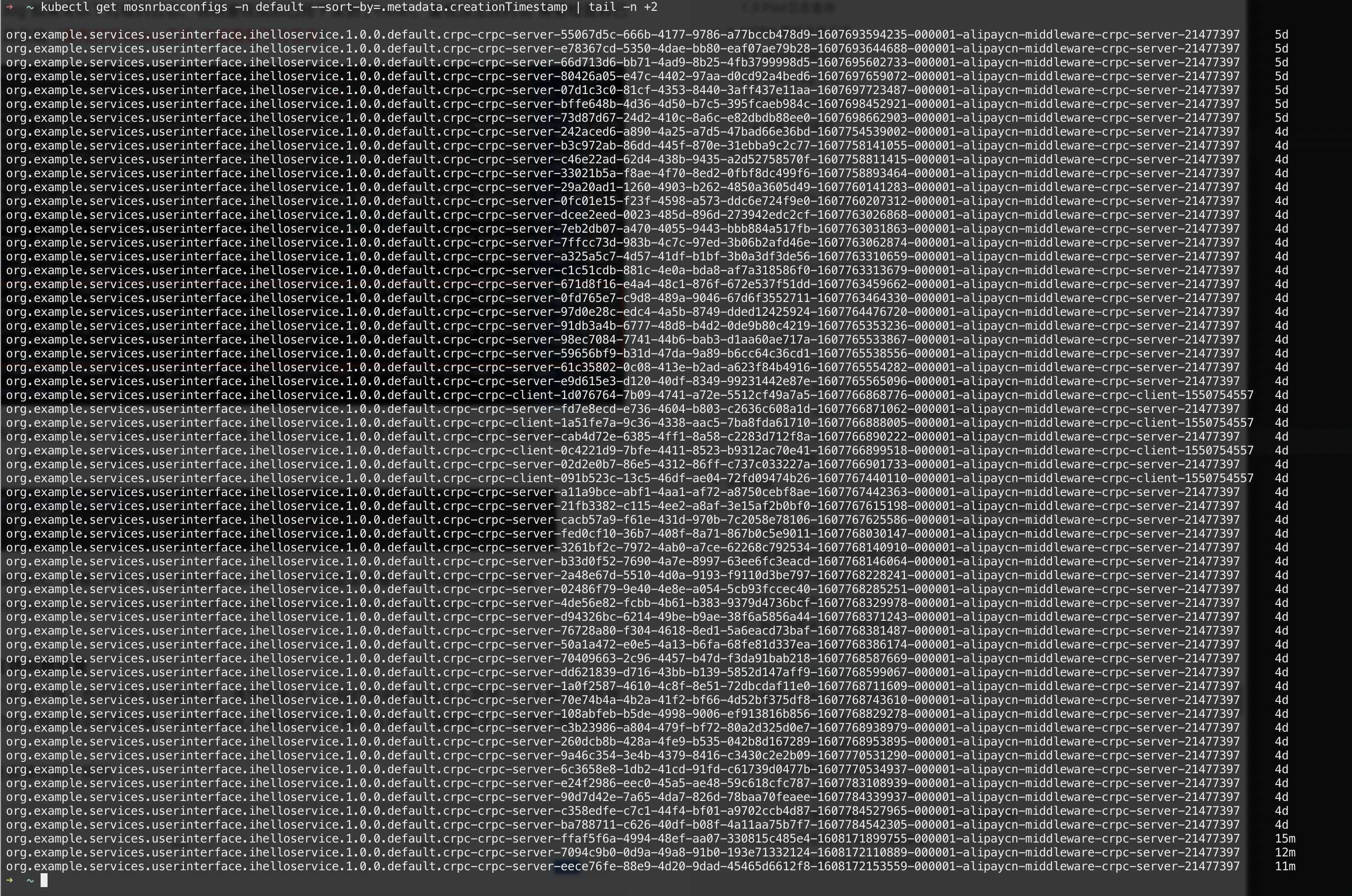
MOSN RbacConfigresource. Check whether the custom resource (CR) was delivered to theKubernetes APIServer.kubectl get mosnrbacconfigs -n default --sort-by=.metadata.creationTimestamp | tail -n +2If output similar to the following figure appears, the resource has been delivered to the
Kubernetes API Server. Note the timestamp.If the resource is not in Kubernetes, continue to the next step.
Check whether the OpenAPI address is correctly configured in the
DSRConsoledynamic configuration.If the OpenAPI address is incorrect, correct it.
If the OpenAPI address is correct, continue to the next step.
Enter the
Cloudmesh OpenAPIcontainer and view the logs in/home/admin/logs/cloudmesh.openapi.log: Error logs are printed to this file.request.log: Call request logs are printed to this file.
Send a request and check whether the request reaches OpenAPI and whether any errors are logged.
 If MOSN did not receive the authentication rule, continue to the next step.

Trace is not displayed
In MOSN, check whether the TRACING_SWITCH environment variable is set to a valid value, either SkyWalking or Zipkin.
env | grep TRACING_SWITCHIf TRACING_SWITCH=SkyWalking, check whether SKY_WALKING_ADDRESS and SKY_WALKING_PORT are correctly configured with the SkyWalking address.
If TRACING_SWITCH=Zipkin, check whether ZIPKIN_ADDRESS and ZIPKIN_PORT are correctly configured with the Zipkin address.
Metric data is not collected
Check whether the business collection address is correctly configured in
Prometheus.Run
kubectl get po -o yamlto check whether the corresponding annotations are applied.Run
curl podip:34903/metricsto check whether there is any metric output.
How to view services published in a container
Enter the MOSN container locally:
docker exec -it mosn-container bashInside the MOSN container, run the following command to view the current MOSN Pub service host address:
curl localhost:34901/api/v1/config_dump?allclusters= | python -m json.tool
How to check if a plugin loaded successfully
Run the following command to check:
grep codec /home/admin/logs/mosn/default.log  --col

load go plugin codec succeed: /go/src/mosn.io/extensions/go-plugin/build/codecs/bolt/codec-bolt.so
How to adapt to Apple M1 chips
Install Rosetta.
Computers with M1 chips need to have Rosetta installed. The command is as follows:
softwareupdate --install-rosetta --agree-to-licenseInstall Docker for Mac.
For the download link, see Mac with Apple chip.
Restart your computer or Docker.
Pull the scaffold code again.
In the
go-plugindirectory, run the following command:git pull
Open source Mesh demo compilation issues
When you compile sofastack-mesh-demo, you may fail to pull a JAR file and receive an error similar to the following:
[ERROR] Non-resolvable import POM:
Could not transfer artifact com.alipay.sofa:sofaboot-enterprise-dependencies:pom:3.2.2
from/to maven-default-http-blocker (http://0.0.0.0/): Blocked mirror for repositories:
[alipay-cloud-server@public (http://mvn.cloud.alipay.com/nexus/content/groups/open,
default, releases)] @ line 23, column 25
Place the settings.xml file in the ~/.m2/ directory and compile again.