Connect Spring Batch to an OceanBase database
Updated at:
This topic provides an example of a Spring Batch connection.
Environment configuration
JDK 1.8.
OceanBase 3.x (MySQL mode).
Spring Batch integrated with Spring Boot.
Configure dependencies
<dependency>
	<groupId>org.springframework.boot</groupId>
	<artifactId>spring-boot-starter-batch</artifactId>
</dependency>
<!--Database driver-->
<dependency>
	<groupId>mysql</groupId>
	<artifactId>mysql-connector-java</artifactId>
<version>8.0.25</version>
</dependency>
<!--Connection pool-->
<dependency>
	<groupId>com.alibaba</groupId>
	<artifactId>druid</artifactId>
<version>1.1.22</version>
</dependency>
<!--Automatically create tables based on entity classes-->
<dependency>
	<groupId>org.springframework.boot</groupId>
	<artifactId>spring-boot-starter-data-jpa</artifactId>
</dependency>

<!--Other dependencies such as the Spring Boot core are omitted.-->
Configuration file
# yml file:
spring:
  datasource:
    url: jdbc:oceanbase://xxx.xxx.xxx.xxx:3306/test
    driver-class-name: com.mysql.cj.jdbc.Driver
    username: a****
    password: ******
  jpa:
    hibernate:
      ddl-auto: update
Sample code
You can write data by calling the method of the database writer class. Follow these steps:
Create the required classes.
Entity classes:
PeopleandPeopleDESC.// Basic People class @Entity @Table(name = "PEOPLE") public class People { @Id @GeneratedValue private int id; private String lastName; private String firstName; // Omitted }// Processed PeopleDESC class (with an added desc property) @Entity @Table(name = "OK_PEOPLE") public class PeopleDESC { @Id @GeneratedValue // The AUTO, IDENTITY, and SEQUENCE primary key generation strategies are not supported. private int id; private String lastName; private String firstName; private String desc1; // Omitted }Batch processing classes:
AddPeopleDescProcessorandAddDescPeopleWriter.// A processor that adds a desc property to a People object and returns a PeopleDESC object. public class AddPeopleDescProcessor implements ItemProcessor<People, PeopleDESC> { public PeopleDESC process(People item) throws Exception { return new PeopleDESC(item.getId() , item.getLastName(), item.getFirstName(), Thread.currentThread().getName()); } }This class writes peopledesc to the database.
// The class that writes PeopleDESC objects to the database.

public class AddDescPeopleWriter implements ItemWriter<PeopleDESC> {
    private JdbcTemplate jdbcTemplate;
    public void setDataSource(DataSource dataSource) {
        this.jdbcTemplate = new JdbcTemplate(dataSource);
    }

    public JdbcTemplate getJdbcTemplate() {
        return jdbcTemplate;
    }

    public void write(List<? extends PeopleDESC> items) throws Exception {
        for (PeopleDESC peopleDESC : items) {
            this.jdbcTemplate
                .update("insert into ok_people (id,first_name,last_name,desc1) values (?, ?, ?, ?)",
                        peopleDESC.getId(), peopleDESC.getFirstName(),
                        peopleDESC.getLastName(), peopleDESC.getDesc());
        }
    }
}
Start the project.
spring-data-jpaautomatically creates tables based on thePeopleandPeopleDESCentity classes. The following figure shows the result.
Add test data to the
peopletable in batches.public void addData(){ jdbcTemplate = new JdbcTemplate(dataSource); StringBuilder stringBuilder = new StringBuilder(""); for (int i = 1 ; i<=100 ; i++){ stringBuilder.append("insert into people values ("+i+",'first_test"+i+"','last_test"+i+"');"); jdbcTemplate.execute(stringBuilder.toString()); stringBuilder.delete(0, stringBuilder.length()); } }The following are the test results:
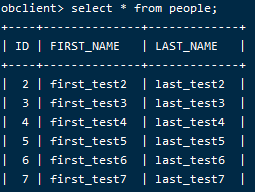
Execute the batch processing method.
public void writerTest() throws Exception {
    // Get the result set from the people table.
    String sql = "select * from people;";
    preparedStatement = dataSource.getConnection().prepareStatement(sql);
    ResultSet resultSet = preparedStatement.executeQuery();
    List list = new ArrayList<PeopleDESC>();
    // Process the result set using the processor that adds the desc property, and encapsulate the result into a List<PeopleDESC>.
    while (resultSet.next()){
        People people = peopleRowMapper.mapRow(resultSet, resultSet.getRow());
        PeopleDESC desc = addPeopleDescProcessor.process(people);
        list.add(desc);
    }
    // Call the method of the database writer class to write data.
    addDescPeopleWriter.setDataSource(dataSource);
    addDescPeopleWriter.write(list);
}
Is this page helpful?