Implement semantic search with Vector Retrieval Service DashVector and TextEmbedding
This tutorial shows how to use Vector Retrieval Service DashVector and the Embedding API from Alibaba Cloud Model Studio to build a semantic search feature from scratch. You will perform a real-time semantic search on the QQ Browser Query Title Corpus (QBQTC) to find the most similar titles.
What is an embedding
An embedding is a multi-dimensional vector represented as an array of numbers. Embeddings can represent any type of data, such as text, audio, images, and videos. Using embeddings, you can encode various types of unstructured data into multi-dimensional vectors that contain semantic information. You can then perform operations on these vectors, such as calculating similarity, clustering, classification, and recommendation.
Process overview
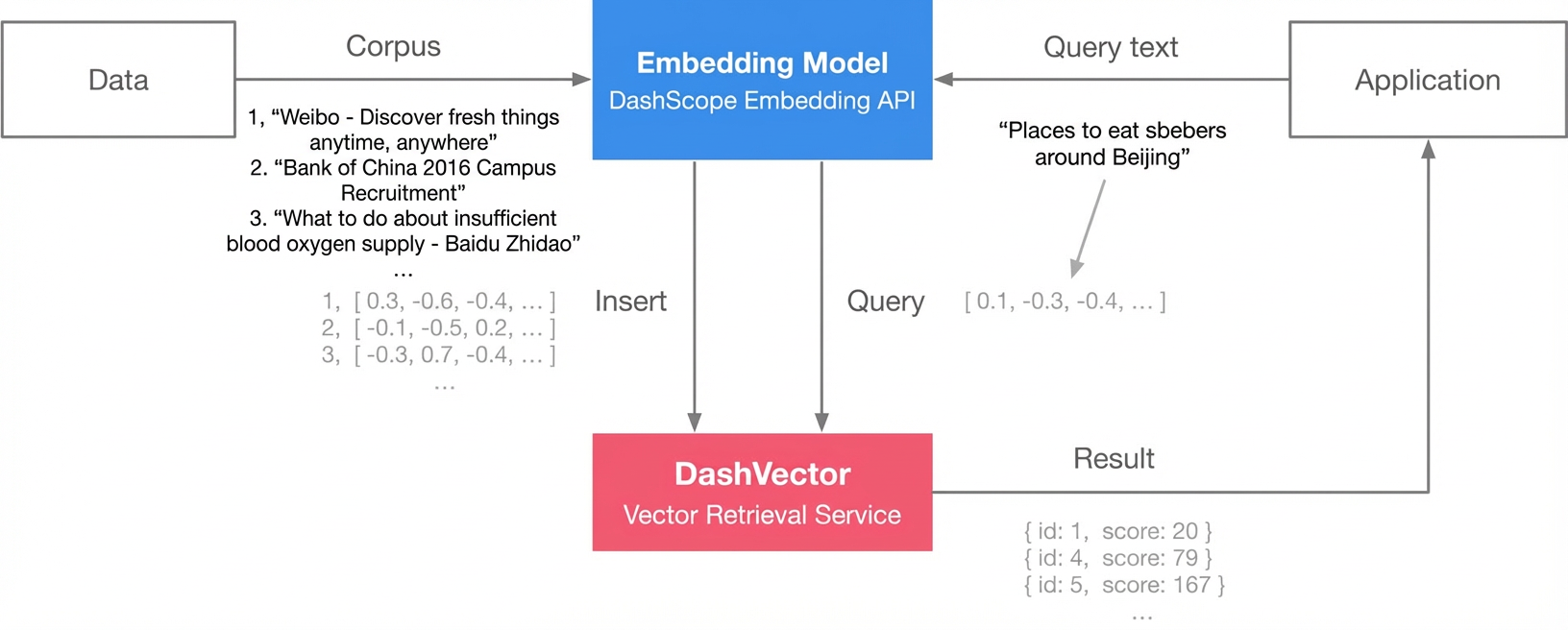
Embedding: Use the general-purpose text embedding model provided by DashScope to generate embedding vectors for all titles in the corpus.
Index building and query:
Use DashVector to build an index for the generated embedding vectors.
Use the embedding vector of a query as input to search for similar titles in DashVector.
Procedure
Prerequisites
Activate Alibaba Cloud Model Studio and obtain an API key. For more information, see Get an API key and Configure an API key as an environment variable.
Activate Vector Retrieval Service DashVector and obtain an API key. For more information, see Manage API keys.
1. Install the environment
Ensure that you have Python 3.7 or a later version installed.
pip3 install dashvector dashscope2. Prepare the data
The QQ Browser Query Title Corpus (QBQTC) is a Learning to Rank (LTR) dataset created by the QQ Browser search engine for general search scenarios. It incorporates annotations for dimensions such as relevance, authority, content quality, and timeliness. It is widely used in search engine business scenarios. As part of the CLUE benchmark, you can download the QBQTC dataset directly from GitHub. The path to the training set is dataset/train.json.
git clone https://github.com/CLUEbenchmark/QBQTC.git
wc -l QBQTC/dataset/train.json
The training set (train.json) is in JSON format:
{
  "id": 0,
  "query": "Child cough and cold",
  "title": "What medicine to give for a child's persistent cough after a cold Parenting Q&A BabyTree",
  "label": "1"
}
You will extract the title from this dataset to create embeddings and build the retrieval service.
import json

def prepare_data(path, size):
    with open(path, 'r', encoding='utf-8') as f:
        batch_docs = []
        for line in f:
            batch_docs.append(json.loads(line.strip()))
            if len(batch_docs) == size:
                yield batch_docs[:]
                batch_docs.clear()

        if batch_docs:
            yield batch_docs
3. Generate embedding vectors with DashScope
Alibaba Cloud Model Studio provides various model services through standard APIs. The model for text embedding is text-embedding-v1, and you can obtain an embedding vector for an input text segment by making a DashScope API call.
Replace your-dashscope-api-key with your API key to run the code.
import dashscope
from dashscope import TextEmbedding

dashscope.api_key='{your-dashscope-api-key}'


def generate_embeddings(text):
    rsp = TextEmbedding.call(model=TextEmbedding.Models.text_embedding_v1,
                             input=text)

    embeddings = [record['embedding'] for record in rsp.output['embeddings']]
    return embeddings if isinstance(text, list) else embeddings[0]


# Check the dimension of the embedding vector. This is required for the DashVector service. The current dimension is 1536.
print(len(generate_embeddings('hello')))
4. Build the index with DashVector: Ingest vectors
Data in Vector Retrieval Service DashVector is stored in collections. Before writing vectors, you must create a collection to manage the dataset. When creating a collection, you need to specify the vector dimension. Each input text processed by the text-embedding-v1 model in DashScope produces a vector with a uniform dimension of 1536.
In addition to vector retrieval, DashVector also provides inverted index filtering and a schema-free feature. For this demo, we can write the title content into DashVector for easy retrieval. You also need to specify an ID when writing data. We can use the id from the QBQTC dataset.
Replace your-dashvector-api-key with your API key and your-dashvector-cluster-endpoint with your cluster endpoint to run the code.
from dashvector import Client, Doc


# Initialize the DashVector client
client = Client(
  api_key='{your-dashvector-api-key}',
  endpoint='{your-dashvector-cluster-endpoint}'
)

# Specify the collection name and vector dimension
rsp = client.create('sample', 1536)
assert rsp

collection = client.get('sample')
assert collection

batch_size = 10
for docs in prepare_data('QBQTC/dataset/train.json', batch_size):
    # Batch embedding
    embeddings = generate_embeddings([doc['title'] for doc in docs])

    # Batch insert data
    rsp = collection.insert(
        [
            Doc(id=str(doc['id']), vector=embedding, fields={"title": doc['title']})
            for doc, embedding in zip(docs, embeddings)
        ]
    )
    assert rsp
5. Perform semantic search: Query vectors
After you write all the title content from the QBQTC training dataset into the DashVector collection, you can perform fast vector retrieval to enable semantic search. For example, to find titles related to 'Fresh graduate recruitment', you can query DashVector with that phrase. The query quickly retrieves semantically similar content and the corresponding similarity scores.
# Perform semantic search based on vector retrieval
rsp = collection.query(generate_embeddings('Fresh graduate recruitment'), output_fields=['title'])

for doc in rsp.output:
    print(f"id: {doc.id}, title: {doc.fields['title']}, score: {doc.score}")
id: 0, title: Intern Recruitment - yingjiesheng.com, score: 2523.1582
id: 6848, title: yingjiesheng.com Campus Recruitment yingjiesheng.com China's leading job search website for college students, score: 3053.7095
id: 8935, title: Beijing Recruitment and Job Search - 51job.com, score: 5100.5684
id: 5575, title: Baidu Intern Recruitment Beijing Internship Recruitment, score: 5451.4155
id: 6500, title: Zhonggong Education Recruitment Information Network - Job Postings - Recent Job Information - Zhonggong Education Network, score: 5656.128
id: 7491, title: Zhangjiakou Recruitment and Job Search - 51job.com, score: 5834.459
id: 7520, title: 51job.com Beijing 51job.com Recruitment, score: 5874.412
id: 3214, title: Township Health Center Recruitment Information - 58.com, score: 6005.207
id: 6507, title: Ganji.com Intern Recruitment Beijing Internship Recruitment, score: 6424.9927
id: 5431, title: Internship Content Arrangement Baidu Wenku, score: 6505.735