Manage the recycle bin
Background information
The recycle bin temporarily stores deleted database objects. OceanBase Developer Center (ODC) helps you query and restore deleted database objects.
The recycle bin is a data dictionary table that stores information about deleted database objects. In this context, "delete" refers to the DROP operation. Data deleted by the DELETE operation does not go to the recycle bin. Therefore, objects deleted by the DROP operation are not completely removed from the database and still occupy storage space. You can perform a PURGE operation or purge the recycle bin in ODC to release the space.
Query the recycle bin
This example shows how to query database objects in the mysql420 data source from the SQL Developer window.
In the SQL Developer window, click Operations Management > Recycle Bin.
Select the mysql420 data source and click OK.
The Recycle Bin page lists all deleted database objects in the mysql420 data source.
Information
Description
Original Name
The name of the deleted object. This is the custom name assigned when the object was created. Click Original Name to sort in ascending or descending order.
Object Name
The name assigned to the object by the system. Unlike the original name, the object name is system-assigned and unique. It serves as the unique identifier for the object.
Object Type
The type of the deleted object.
Time Moved to Recycle Bin
The timestamp when the object was deleted. This helps you track when the object was deleted.
Manage items in the recycle bin
This example shows how to manage the ccc table object in the mysql420 data source from the SQL Developer window.
Item |
Example Value |
Data Source |
mysql420 |
Database Table |
ccc |
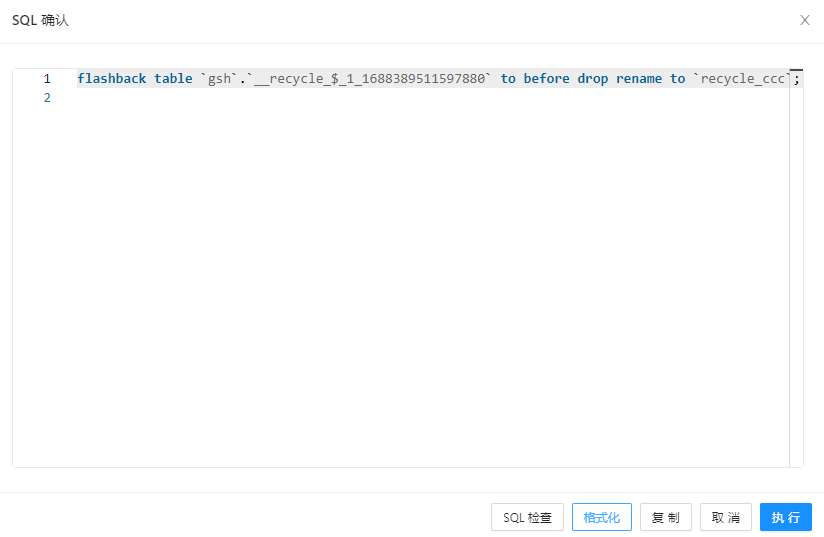
In the recycle bin list, select the ccc table object, and then click Restore.
On the Restore Database Object page, rename the table object, and then click Restore.
The navigation bar on the Recycle Bin page also provides the following features:
Action key
Description
Delete
Click
 to immediately delete the selected object from the recycle bin and release its storage space.
Restore
Click
 to restore the selected object from the recycle bin to its original location.
Purge
Click
 to purge all deleted objects from the recycle bin and release their storage space.
Search
Enter an object name in the search box to find a deleted object.
Settings
Click
 to choose whether to enable the recycle bin and whether to enable Truncate Table. * Enable recycle bin: Deleted objects are moved to the recycle bin. * Enable Truncate Table: Retains object data.
Refresh
Click
 to refresh the list of deleted objects in the recycle bin.
Select all objects
Click the check box icon
 to select or deselect all objects.
In the SQL Confirmation dialog box, review the SQL statement, and then click Execute.
 to select or deselect all objects.