Create a PostgreSQL data source
You need a data source to create a data migration or data synchronization task. This topic describes how to create a PostgreSQL data source in Data Transmission Service.
Security risks
When you use OceanBase Data Transmission Service, you can add its public CIDR blocks automatically or manually. This action can create security risks. Using this product, you acknowledge and accept these potential risks. You must implement basic security protections, such as using complex passwords, restricting open ports for CIDR blocks, requiring authentication for internal APIs, and regularly reviewing and limiting unnecessary IP address ranges.
OceanBase Data Transmission Service may adjust the automatically added whitelists or security groups by adding or deleting entries based on factors such as business requirements and security risks. Do not use the IP address segments in these whitelists or security groups for services other than OceanBase Data Transmission Service. If you use them for other business requirements, any resulting issues are not covered by the OceanBase Data Transmission Service SLA. For more information about the whitelists and security groups that are automatically or manually added by OceanBase Data Transmission Service, see Add a whitelist.
Prerequisites
You have created an RDS PostgreSQL instance. For more information, see Create an RDS PostgreSQL instance.
Data Transmission Service does not support Serverless mode instances or read-only instances.
Procedure
Log on to the OceanBase Management Console .
In the navigation pane on the left, click Data Transmission > Data Source Management.
On the Data Source List page, click Create Data Source in the upper-right corner.
In the Create Data Source dialog box, set the Data Source Type to PostgreSQL and configure the other parameters.
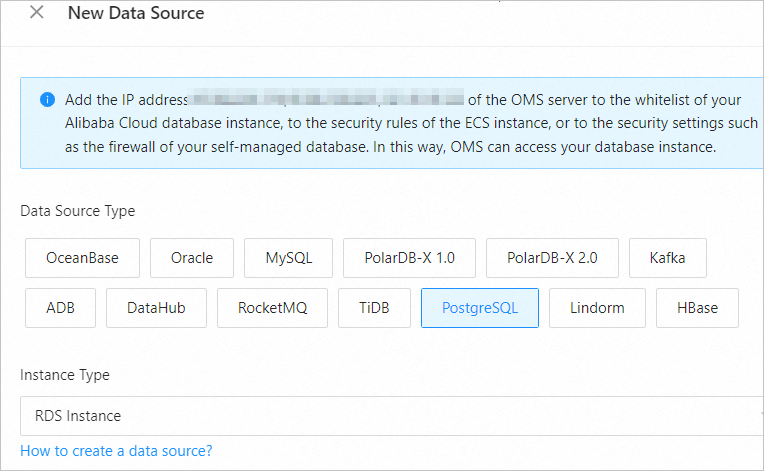
Parameter
Description
Instance Type
Only RDS Instance is supported.
Data Source Identity
A unique name for the data source. The name can be a combination of Chinese characters, digits, and letters. The name cannot contain spaces and must be no more than 32 characters long.
Cross-Alibaba Cloud Account
Data Transmission Service supports the configuration of data migration or data synchronization tasks for instances that belong to different Alibaba Cloud accounts.
You can choose whether to select this option as needed. If you select this option, enter the other party's Alibaba Cloud account. If you do not have permissions for that account, request authorization first. For more information about authorization, see Request cross-account authorization.
RDS Instance ID
Select the ID of the target RDS instance from the drop-down list.
Username
The username for the RDS PostgreSQL instance that is used for data migration or data synchronization.
We recommend that you create a separate privileged account for data migration or data synchronization tasks. For more information, see PostgreSQL data source.
Password
The password of the database user.
Database Name
The name of the RDS PostgreSQL database.
NoteWhen the data source is used as the source, migration or synchronization tasks can select only objects within the specified database.
Notes (Optional)
The notes for the data source.
Click Test Connection to verify the network connectivity between Data Transmission Service and the data source, and to validate the username and password.
After the connection test is successful, click OK.