Delete a DashVector collection and all its data permanently through the console, SDKs, or the HTTP API.
Warning
Deleting a collection removes all data in it. This action is irreversible. Proceed with caution.
Prerequisites
Before you begin, make sure that you have:
A DashVector cluster with at least one collection
Delete a collection in the console
Log on to the DashVector console.
In the left-side navigation pane, click Clusters.
Find the target collection and click Delete in the Operation column.

Click Delete Collection, and then click OK to confirm.
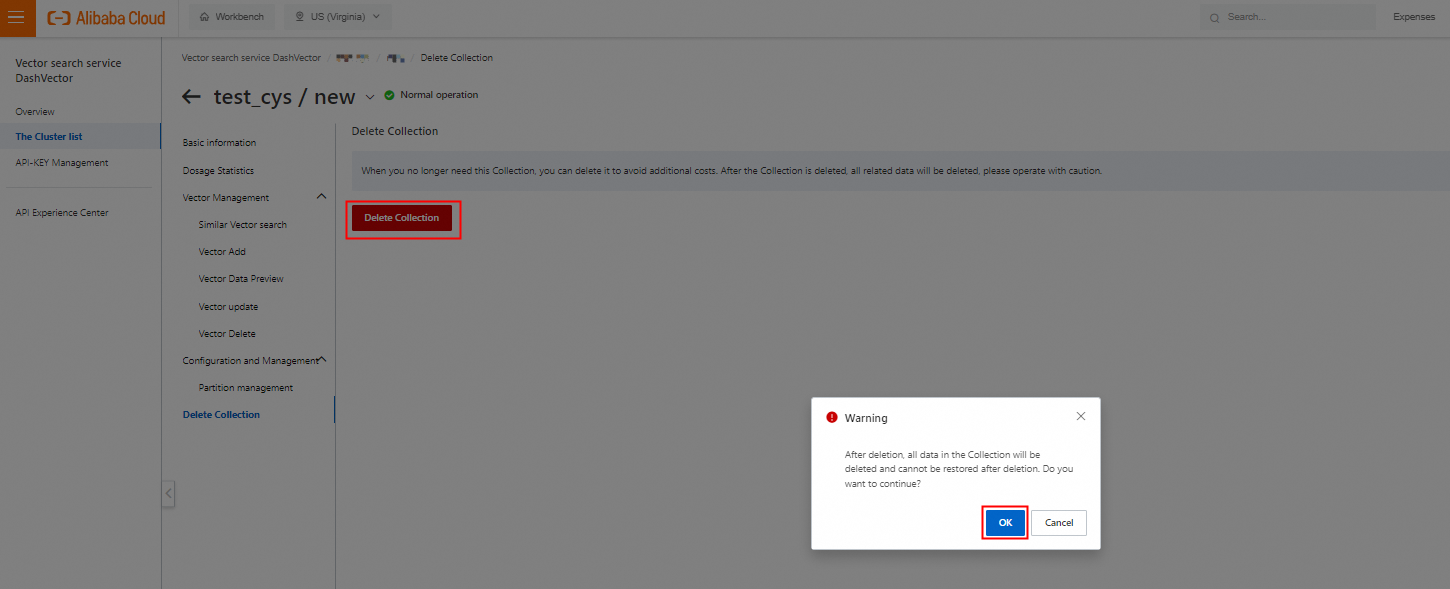
Delete a collection by using an SDK
DashVector provides SDKs for Python and Java. For complete code examples and parameter details, see the following topics:
| SDK | Reference |
|---|---|
| Python | Delete a collection (Python SDK) |
| Java | Delete a collection (Java SDK) |
Delete a collection by using the HTTP API
For the API endpoint and request format, see Delete a collection.
What's next
该文章对您有帮助吗?