SMTP error when sending email: Could not connect to SMTP host
Troubleshoot the "Could not connect to SMTP host" error when sending emails through Alibaba Mail SMTP.
Problem description
Connecting to the SMTP server to send an email returns the error "Could not connect to SMTP host".
Cause
The program fails to connect to the mail server at the start of the sending process. The server has no incoming email record or sending logs at this point. Start troubleshooting from the client running the SMTP code.
Solutions
Troubleshoot and resolve the issue as follows.
1. Event analysis
Determine whether the process worked before. Does the error occur on every call, or intermittently?
If it worked before, check for recent code changes or component upgrades. Roll back any such changes to recover.
If the error is reproducible, it is easier to troubleshoot.
2. Connectivity analysis
Run the following commands (using port 465 as an example) and capture screenshots of the results.
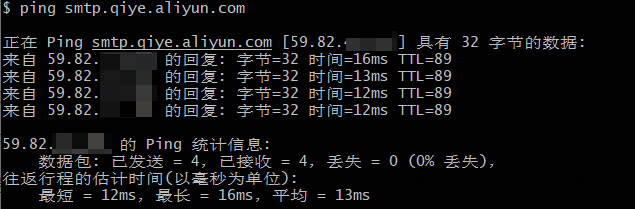
Command 1: Check the server IP address. The IP address varies by region.
ping smtp.qiye.aliyun.comA failed ping or high latency may indicate a local ping block or network connectivity issue.
Successful result:
Command 2: Test port and network connectivity to the SMTP server.
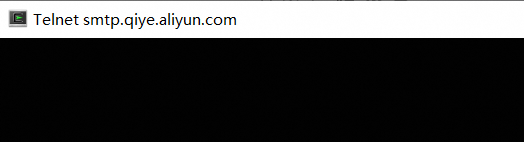
telnet smtp.qiye.aliyun.com 465Successful result:

or
Command 3: Check the routing path.
# Linux or Mac command:
mtr -n -i 1 -c 100 smtp.qiye.aliyun.com
traceroute smtp.qiye.aliyun.com
# Windows command:
tracert smtp.qiye.aliyun.com
pathping smtp.qiye.aliyun.com
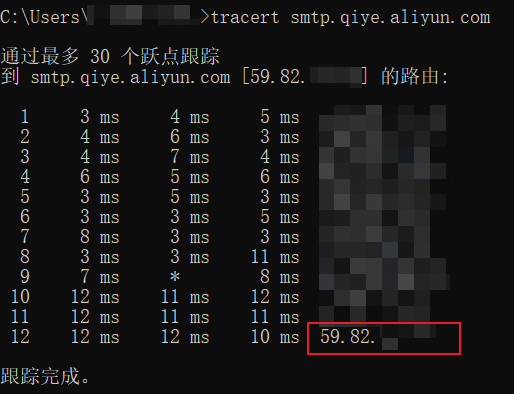
View the routing path and identify the hop where the problem begins.
By default, tracert displays up to 30 hops. The last IP address should be the mail server IP.
pathping takes a few minutes to generate statistics.
You can also use open source visualization tools, such as WinMTR.
Successful result:
Command 4: For port 465 only.
# Do not specify a TLS version
openssl s_client -connect smtp.qiye.aliyun.com:465
# Specify a TLS version
openssl s_client -connect smtp.qiye.aliyun.com:465 -tls1_2
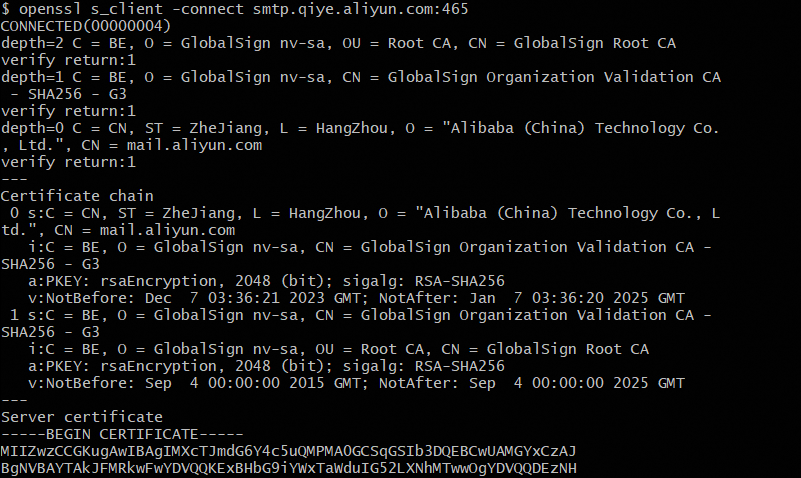
Test the encrypted connection to determine whether the TLS version causes the handshake failure.
Successful result:
CONNECTED
3. Elimination analysis
-
Test sending emails on other ports, such as port 25 or 80. Port 25 is disabled by default on ECS instances, so try port 80. These ports do not use SSL, so comment out SSL-related code.
-
If other ports work but 465 does not: Port 465 requires SSL to be enabled.
final Properties props = new Properties();
props.setProperty("mail.smtp.ssl.enable", "true");
-
-
Send a test email using a separate script or sample code to rule out interference from other business logic.
Alibaba Mail product example:
Alibaba Mail SMTP sending examples
Direct Mail product example (for reference only):
-
Test port 465 with other mail servers, such as Tencent Mail (smtp.qq.com), NetEase Mail (smtp.163.com), or Alibaba Cloud Direct Mail (smtpdm.aliyun.com).
4. Packet capture analysis
If port 25 or 80 is not disabled, capture and analyze packets on these ports. Port 465 traffic is encrypted and cannot be inspected.
Capture procedure:
-
Start capturing on the sending client. Specify the mail server IP and port.
-
Linux: By default, the file saves to the root directory. Specify a different path such as /tmp/capture.pcap.
sudo tcpdump -i eth0 host xx.xx.xx.xx and port 80 -w capture.pcap -
On Windows, you can use Wireshark.
-
-
Test sending an email to reproduce the problem.
-
Stop capturing packets.
-
On Linux, press Ctrl+C in the terminal where the command is running to stop capturing packets.
-
On Windows, click the stop button in the application.
-
-
Open the capture file with Wireshark for analysis.
Other possible solutions
-
Mismatched encryption algorithm during the handshake phase
In Java, newer JRE versions disable algorithms such as SSLv3, TLSv1, and TLSv1.1. Try specifying a version or removing the disabled entries.
final Properties props = new Properties(); props.put("mail.smtp.ssl.protocols", "TLSv1.2"); -
Enforce SSL without fallback
If the server does not support SSL, the connection fails instead of falling back to an unencrypted method.
final Properties props = new Properties(); prop.put("mail.smtp.socketFactory.class", "javax.net.ssl.SSLSocketFactory"); prop.put("mail.smtp.socketFactory.fallback", "false"); -
Download and import the server certificate
Download the certificate:
echo | openssl s_client -servername smtp.qiye.aliyun.com -connect smtp.qiye.aliyun.com:465 | openssl x509 -outform PEM > smtp.qiye.aliyun.comImport the certificate with keytool. Replace the Java path with your actual path.
/usr/lib/jvm/java-1.8.0-openjdk-1.8.0.412.b08-1.el7_9.x86_64/jre/bin/keytool -importcert -alias smtp.qiye.aliyun.com -keystore /usr/lib/jvm/java-1.8.0-openjdk-1.8.0.412.b08-1.el7_9.x86_64/jre/lib/security/cacerts -file smtp_mail.pem
Other analysis methods
Enable debug mode to print the server interaction process. This helps analyze errors in later stages but may not apply to this scenario.
Java example:
// Enable debug mode:
Session mailSession = Session.getInstance(props, authenticator);
mailSession.setDebug(true);