Usage statistics
Updated at:
The usage statistics feature allows you to query the usage overview data and usage distribution data under a specified AppID. This topic describes how to query usage statistics.
Procedure
- Log on to the Real-Time Communication RTC console.
- In the left-side navigation pane, choose .
- Optional:Click the Usage Overview tab, and then select a time range to view the usage overview data.
- Check the call duration.
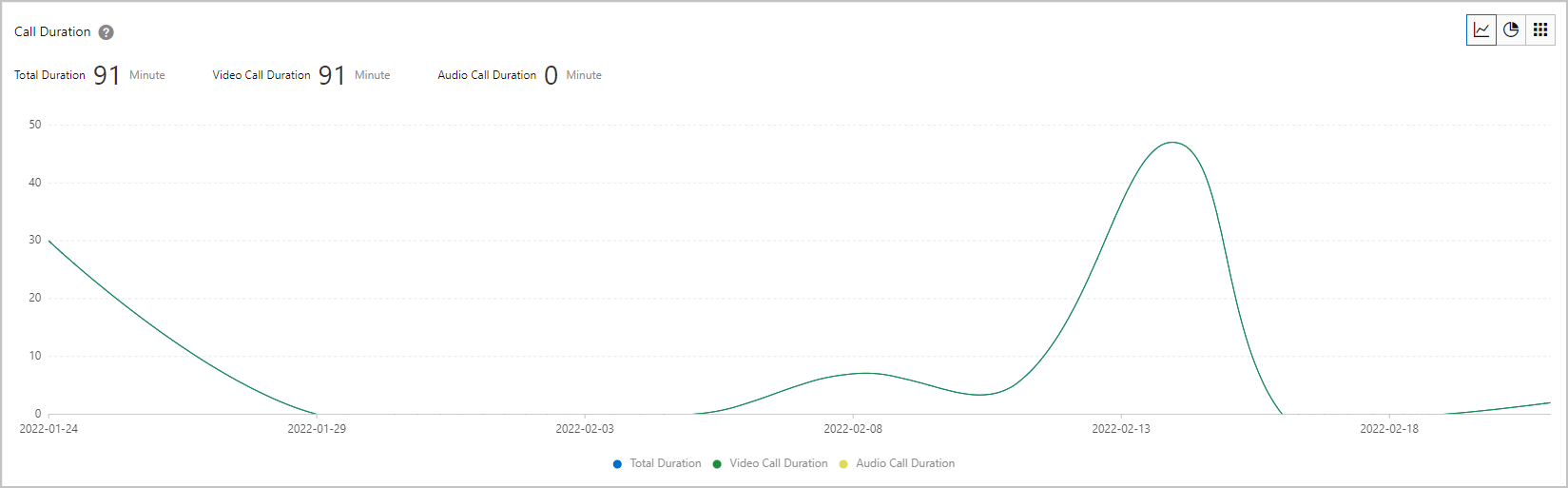
metric Description Total duration The total call duration of all users. Unit: minutes. Video call duration The duration of the video call for all users. Unit: minutes. Note Statistics by video only when audio is included in a video call.Audio-only call duration Audio-only call duration for all users. Unit: minutes. Note- The vertical axis of the graph is the call duration (in minutes) and the horizontal axis is the time.
- By default, the call duration is displayed in a graph. You can click
 in the upper-right corner to display the call duration as a pie chart or a list.
 - You can view the percentage of video calls and audio-only calls in a pie chart or list.
- View the number of channels.
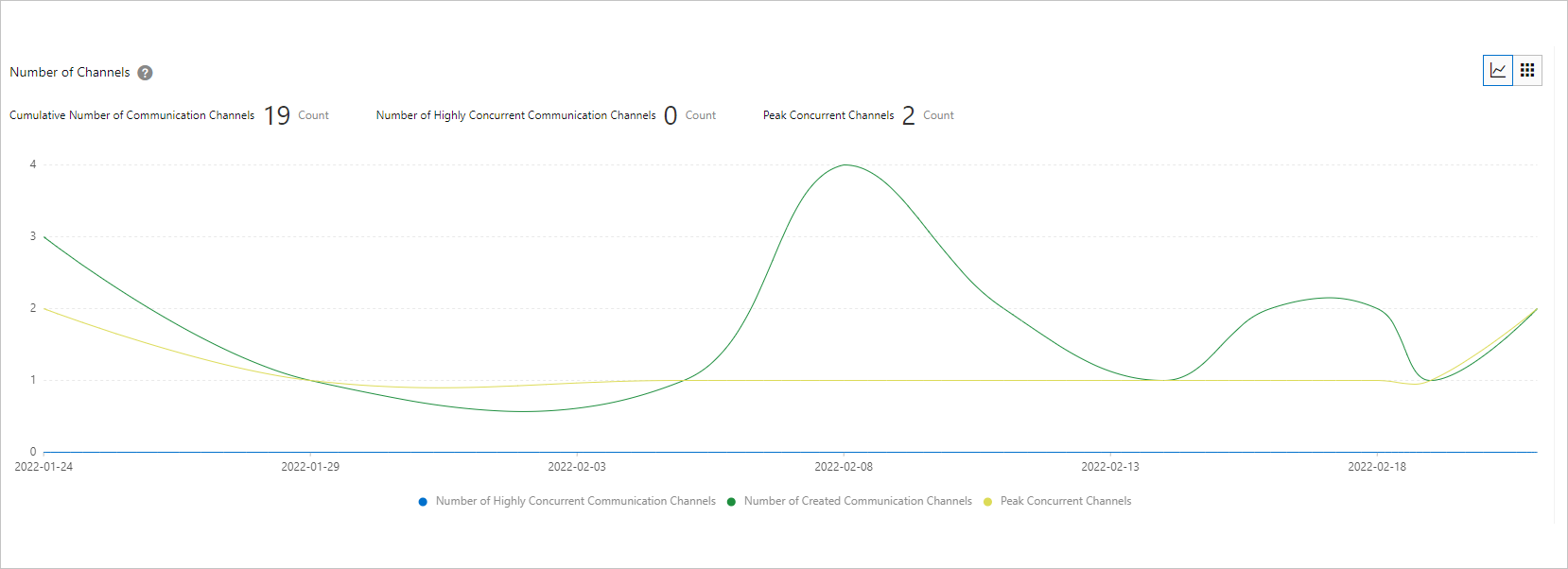
metric Description Cumulative number of communication channels The cumulative number of channels created (from when a user enters the channel to when all users exit, recorded as one communication channel). Number of high concurrent communication channels Channel with a peak number of online users greater than 50. Peak channels The peak of the channel is also present. Note- The vertical axis in the graph is the number of channels and the horizontal axis is the time.
- By default, the number of channels is displayed in a graph. You can click
 in the upper-right corner to switch to a list.
 - In the list, you can view the proportion of high concurrent communication channels.
- View the number of users.
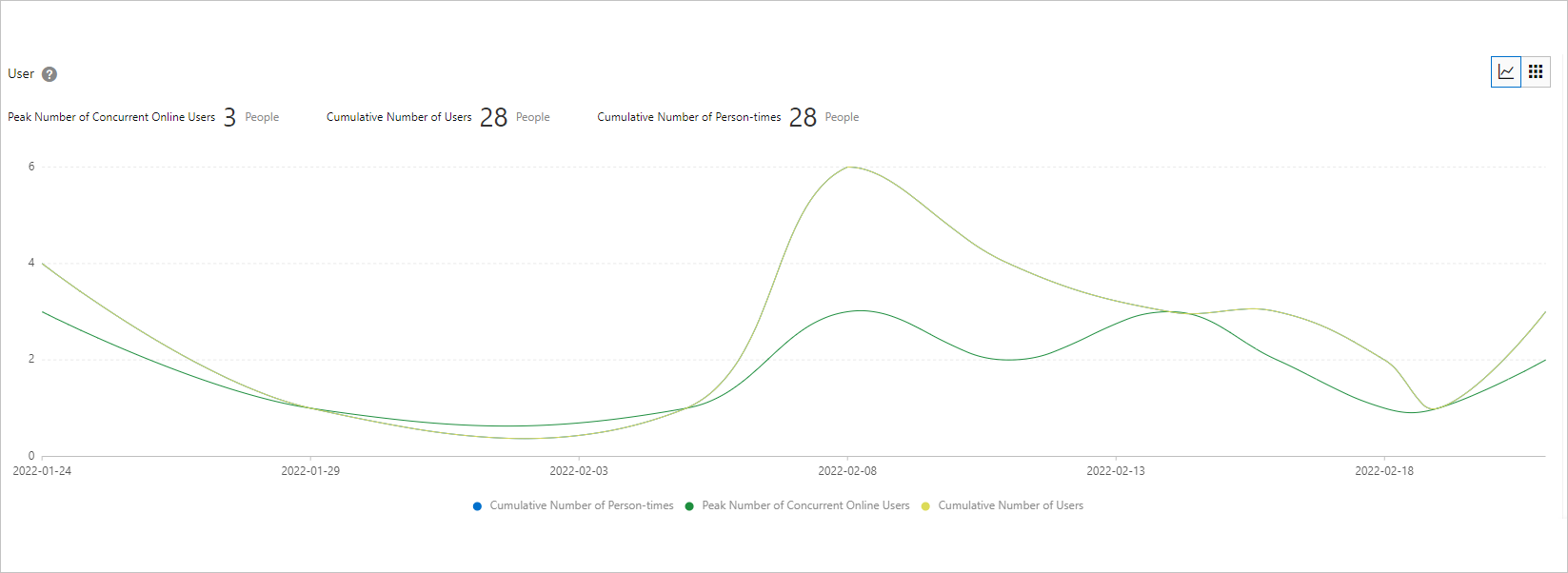
metric Description Peak number of people online at the same time Peak in the number of people online for all calls. Cumulative Number of Calls The total number of calls that are involved after the user ID and channel ID are removed. Cumulative number of people entering and leaving The number of times the user joined the channel. Note- The vertical axis in the graph is the number of users and the horizontal axis is the time.
- By default, the number of users is displayed in a graph. You can click
 in the upper-right corner to switch to a list.
- Check the call duration.
- Optional:Select the ID of the app to be queried, click the Usage Distribution tab, and then select a time range to view the usage distribution.
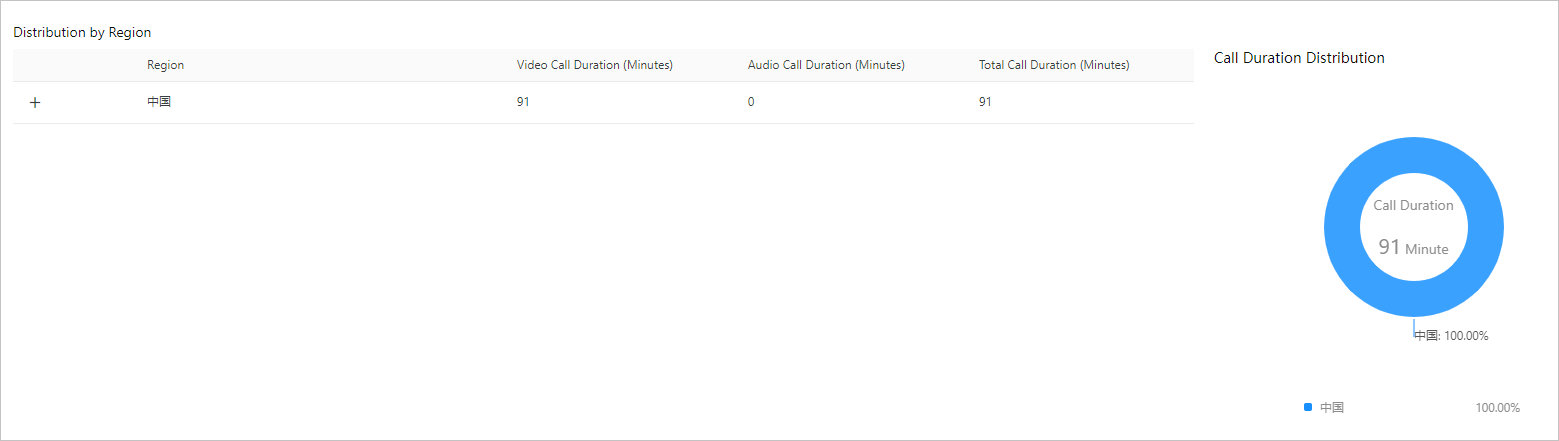
- View the region distribution.
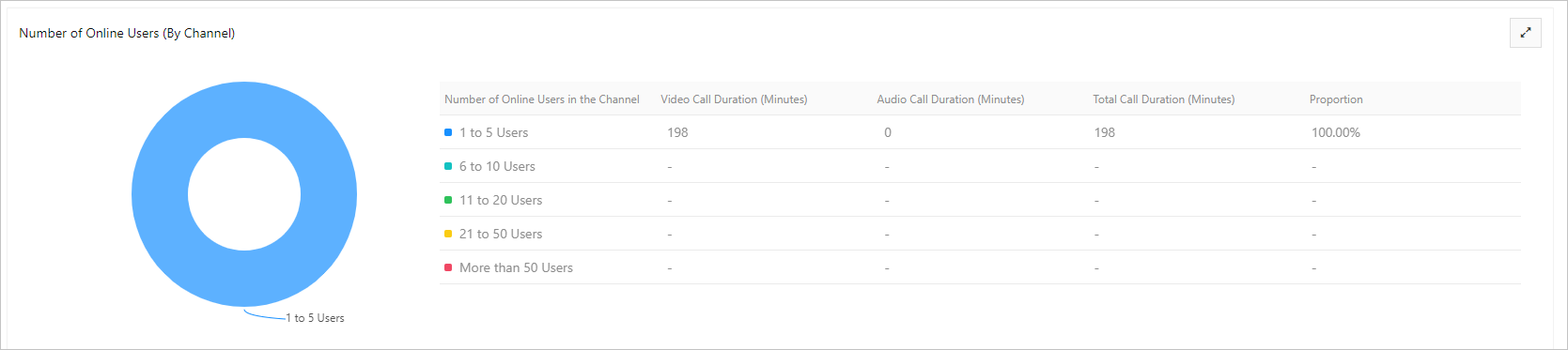
metric Description Region You can click + to view different dimensions. Video call duration The video call duration of the user in the corresponding region. Unit: minutes. Audio-only call duration The audio-only call duration of the user in the corresponding region. Unit: minutes. Total call duration The total call duration of users in the corresponding region. Unit: minutes. - Check the distribution of the number of people online at the same time on the channel.
metric Description Number of simultaneous channel online The range of the number of simultaneous online users on the channel. Valid values: - 1~5 people
- 6~10 people
- 11~20 people
- 21~50 people
- More than 50 people
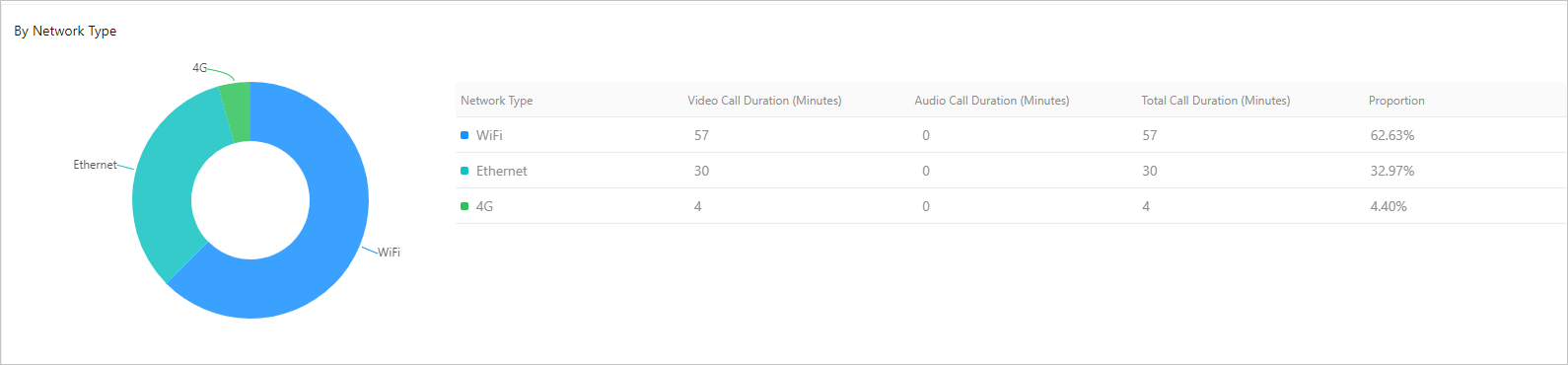
Video call duration The duration of the video call for all people in a specified interval. Unit: minutes. Audio-only call duration The audio-only call duration of all people in an interval. Unit: minutes. Total call duration The total call duration of all people in an interval. Unit: minutes. Percentage The proportion of people in a certain interval. - View the network type distribution.
metric Description Network Type The network type of the SLB instance. Valid values: - WLAN
- WiFi
- 4G
- Unknown
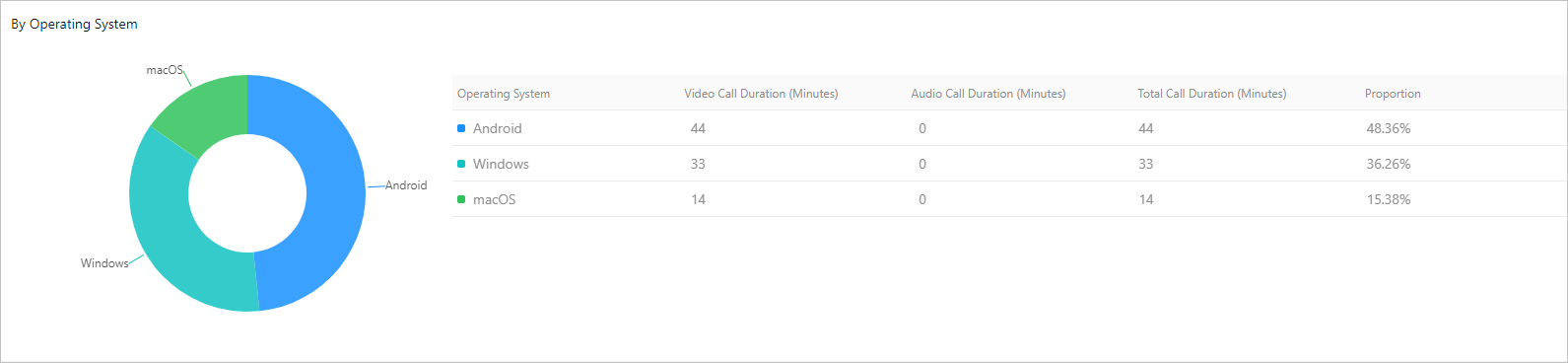
Video call duration The video call duration of all users of the corresponding network type. Unit: minutes. Audio-only call duration The duration of audio-only calls for all users of the corresponding network type. Unit: minutes. Total call duration The total call duration of all users of the corresponding network type. Unit: minutes. Percentage The proportion of the call time of users of the corresponding network type. - View the operating system distribution.
metric Description OS The ten operating systems with the highest number of users, such as Android, iOS, and macOS. Video call duration The video call duration of all users of the corresponding operating system. Unit: minutes. Audio-only call duration The audio-only call duration of all users of the corresponding operating system. Unit: minutes. Total call duration The total call duration of all users of the corresponding operating system. Unit: minutes. Percentage The proportion of the call time of the corresponding operating system users. - View the SDK version distribution.
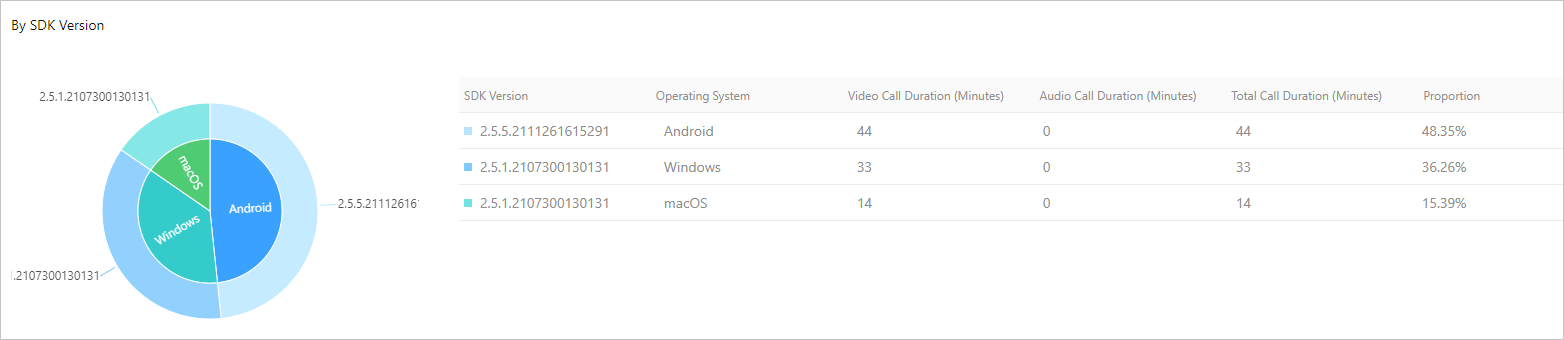
metric Description SDK version The version number of the RTC SDK. Platforms The SDK corresponds to the system platform. Video call duration The video call duration of all users of the corresponding SDK version. Unit: minutes. Audio-only call duration The audio-only call duration of all users of the corresponding SDK version. Unit: minutes. Total call duration The total call duration of all users of the corresponding SDK version. Unit: minutes. Percentage The proportion of the call time of users of the corresponding SDK version.
- View the region distribution.
Is this page helpful?