Create an ADB data source
You must configure a data source before you can create a data migration or data synchronization task. This topic describes how to create an AnalyticDB for MySQL (ADB) data source in Data Transmission Service.
Security risk notice
Data Transmission Service lets you add its public CIDR blocks automatically or manually. This operation can introduce security risks. Using this product, you acknowledge and accept the potential security risks and are responsible for implementing basic security measures. These measures include, but are not limited to, using complex account passwords, restricting open ports for each CIDR block, using authentication for internal API communication, and regularly checking and restricting unnecessary IP address CIDR blocks.
Data Transmission Service adjusts (adds or deletes) automatically added whitelists or security groups based on business requirements and security risks. Do not use the IP address CIDR blocks in these whitelists or security groups for purposes unrelated to Data Transmission Service. Issues that arise from using these CIDR blocks for other purposes are not covered by the Service-Level Agreement (SLA) for Data Transmission Service. For more information, see the Add to whitelist document.
Background information
For an introduction to ADB, see Basic data types.
For more information about creating tables, partitioned tables, and distributed tables in ADB, see CREATE TABLE.
For the data type mapping rules between OceanBase Database MySQL tenants and ADB, see the Data type mapping table.
Procedure
Log on to the OceanBase Management Console .
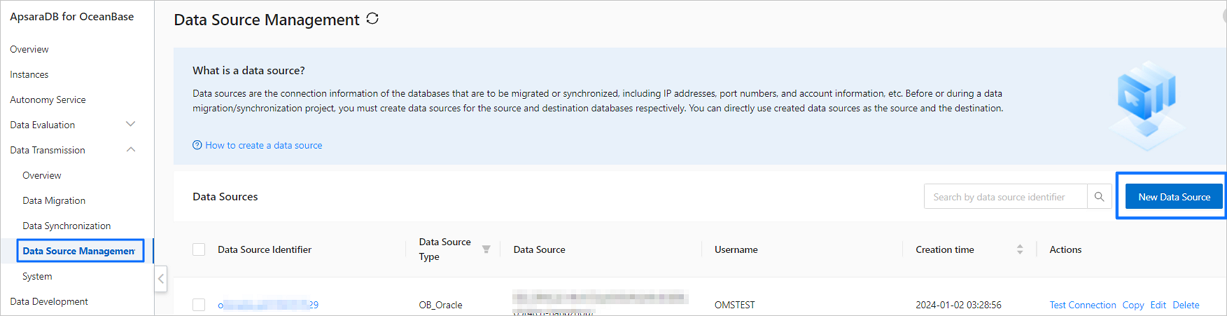
In the navigation pane on the left, click Data Transmission > Data Source Management.
On the Data Source List page, click New Data Source in the upper-right corner.
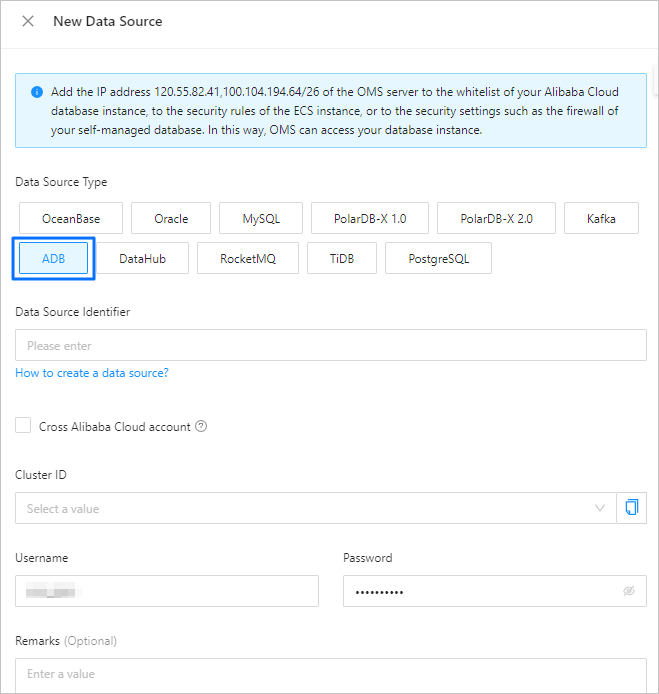
In the New Data Source dialog box, set Data Source Type to ADB and configure the parameters.
Parameter
Description
Data Source Identity
The name for the data source. A combination of Chinese characters, digits, and letters is recommended. The name cannot contain spaces and is limited to 32 characters.
Cross-Alibaba Cloud Account
Data Transmission Service supports configuring data migration or data synchronization tasks for instances under different Alibaba Cloud accounts. This enables cross-account data migration or data synchronization.
Select this option as needed. If you select this option, enter the other Alibaba Cloud account. If you do not have the required permissions for that account, request authorization first. For more information about authorization, see Request cross-account authorization.
Cluster ID
Select the ID of the destination cluster from the drop-down list.
Username
The username for the cluster.
Password
The password for the cluster.
Notes (Optional)
The notes for the data source.
Click Test Connection to verify the network connectivity to the data source and validate the username and password.
After the connection test is successful, click OK.