Advanced use
Vector Retrieval Service (VRS) represents BM25 scores as sparse vectors so you can run keyword-based searches alongside dense vector searches in the same index. The built-in BM25 model is trained on a general corpus, but domain-specific scenarios benefit from a custom model trained on your own data.
This topic explains how BM25 scoring maps to sparse vectors and walks through training a custom BM25 model with DashText.
How BM25 works
BM25 (Best Match 25) scores the relevance of a document to a query by summing the weighted relevance of each query term:

Where:
_q_ and _d_ — the query and document
_q_i_ — the ith term in the query
_R(q_i, d)_ — relevance of term _q_i_ to document _d_
_W_i_ — weight of term _q_i_
_score(q, d)_ — final relevance score; a higher score means higher relevance
_W_i_ and _R(q_i, d)_ expand to:



Where:
_N_ — total number of documents
_N(q_i)_ — number of documents containing term _q_i_
_tf(q_i, d)_ — frequency of term _q_i_ in document _d_
_L_d_ — length of document _d_
_L_avg_ — average length of all documents
_k_1_ and _b_ — hyperparameters that control how term frequency and document length affect the score
Sparse vectors and BM25
BM25 decomposes cleanly into two sparse vectors — one for the document and one for the query. DashText generates each with a dedicated API:
| API | Purpose |
|---|---|
encode_document | Encodes a document into a sparse vector |
encode_query | Encodes a query into a sparse vector |
The following diagram shows how the two vectors are generated from BM25 scoring components:
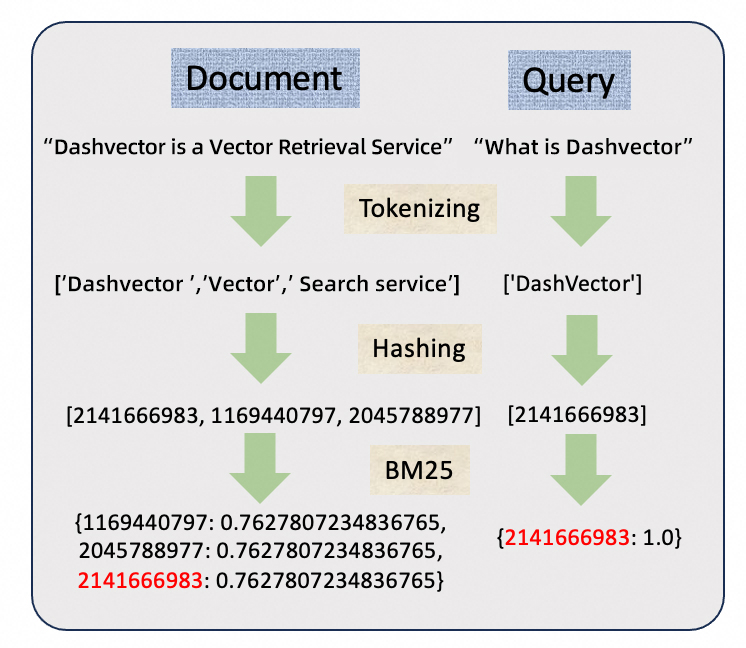
The resulting sparse vectors take the form:


Distance calculation
Relevance between a document sparse vector _d_ and query sparse vector _q_ is computed as their dot product — the sum of products of values for matching terms:

A higher score means higher relevance.
When both dense and sparse vectors are used, only the dot product metric is supported for distance calculation.
Train a custom BM25 model
DashText ships with a general-purpose BM25 model. For domain-specific workloads, train a custom model to improve recall.
Training involves six steps: defining your scenario, preparing a corpus and tokenizer, training, and optionally fine-tuning parameters and updating the model incrementally.
Step 1: Determine the scenario
Identify where your queries and documents come from. Prepare documents related to your business domain — these will form your corpus.
Step 2: Prepare the corpus
The corpus determines the BM25 model parameters. Follow these guidelines:
The source of the corpus should reflect your scenario, so that _N(q_i)_ captures real-world term distribution.
Include a substantial number of long texts and adjust chunk sizes accordingly.
In most cases, the documents prepared in Step 1 can serve directly as the corpus.
Step 3: Prepare a tokenizer
The tokenizer directly affects word segmentation and, in turn, sparse vector quality. DashText supports two approaches to using a custom tokenizer:
Method 1: Pass a custom vocabulary to the built-in Jieba tokenizer
The Java SDK does not support this method.
from dashtext import TextTokenizer, SparseVectorEncoder

my_tokenizer = TextTokenizer.from_pretrained(model_name='Jieba', dict='dict.txt')
my_encoder = SparseVectorEncoder(tokenize_function=my_tokenizer.tokenize)
Method 2: Provide a custom tokenizer function of type `Callable[[str], List[str]]`
from dashtext import SparseVectorEncoder
from transformers import BertTokenizer

my_tokenizer = BertTokenizer.from_pretrained('bert-base-uncased')
my_encoder = SparseVectorEncoder(tokenize_function=my_tokenizer.tokenize)
import com.aliyun.dashtext.common.DashTextException;
import com.aliyun.dashtext.common.ErrorCode;
import com.aliyun.dashtext.encoder.SparseVectorEncoder;
import com.aliyun.dashtext.tokenizer.BaseTokenizer;
import java.util.Arrays;
import java.util.List;
import java.util.stream.Collectors;
public class Main {
public static class MyTokenizer implements BaseTokenizer {
@Override
public List<String> tokenize(String s) throws DashTextException {
if (s == null) {
throw new DashTextException(ErrorCode.INVALID_ARGUMENT);
}
// Split by whitespace and punctuation, then convert to lowercase.
return Arrays.stream(s.split("\\s+|(?<!\\d)[.,](?!\\d)"))
.map(String::toLowerCase)
.filter(token -> !token.isEmpty())
.collect(Collectors.toList());
}
}
public static void main(String[] args) {
SparseVectorEncoder encoder = new SparseVectorEncoder(new MyTokenizer());
}
}Step 4: Train the model
Call SparseVectorEncoder.train with your corpus. Training runs tokenization and hashing across the entire corpus, so it may take some time depending on corpus size.
Step 5 (optional): Fine-tune parameters
After training, prepare a validation dataset and adjust _k_1_ and _b_ to improve recall:
| Parameter | Range | Effect |
|---|---|---|
| _k_1_ | 1.2 < _k_1_ < 2 | Controls the impact of term frequency on the score. A larger value reduces the impact. |
| _b_ | 0 < _b_ < 1 | Controls the impact of document length on the score. A larger value increases the impact. |
For most use cases, the default values work well and no fine-tuning is required.
Step 6 (optional): Update the model incrementally
To incorporate new data, pass the additional corpus to SparseVectorEncoder.train. The API natively supports incremental updates.
After an incremental update, vectors encoded by the previous model become invalid. Re-vectorize all documents before running searches.
Sample code
The following examples walk through all six steps: creating an encoder, training on a corpus, fine-tuning parameters, saving the model, loading it, and running an incremental update.
All examples use SparseVectorEncoder and compute relevance scores with a dot product of the query and document sparse vectors.
from dashtext import SparseVectorEncoder
from pydantic import BaseModel
from typing import Dict, List


class Result(BaseModel):
    doc: str
    score: float


def calculate_score(query_vector: Dict[int, float], document_vector: Dict[int, float]) -> float:
    score = 0.0
    for key, value in query_vector.items():
        if key in document_vector:
            score += value * document_vector[key]
    return score


# Create an empty SparseVectorEncoder. You can set a custom tokenizer.
encoder = SparseVectorEncoder()


# Step 1. Prepare the corpus and documents
corpus_document: List[str] = [
    "The quick brown fox rapidly and agilely leaps over the lazy dog that lies idly by the roadside.",
    "Never jump over the lazy dog quickly",
    "A fox is quick and jumps over dogs",
    "The quick brown fox",
    "Dogs are domestic animals",
    "Some dog breeds are quick and jump high",
    "Foxes are wild animals and often have a brown coat",
]


# Step 2. Train the BM25 model
encoder.train(corpus_document)


# Step 3. Fine-tune the parameters
query: str = "quick brown fox"
print(f"query: {query}")
k1s = [1.0, 1.5]
bs = [0.5, 0.75]
for k1, b in zip(k1s, bs):
    print(f"current k1: {k1}, b: {b}")
    encoder.b = b
    encoder.k1 = k1
    query_vector = encoder.encode_queries(query)
    results: List[Result] = []
    for idx, doc in enumerate(corpus_document):
        doc_vector = encoder.encode_documents(doc)
        score = calculate_score(query_vector, doc_vector)
        results.append(Result(doc=doc, score=score))
    results.sort(key=lambda r: r.score, reverse=True)

    for result in results:
        print(result)


# Step 4. Select the optimal parameters and save the model
encoder.b = 0.75
encoder.k1 = 1.5
encoder.dump("./model.json")


# Step 5. Load the model for subsequent use
new_encoder = SparseVectorEncoder()
bm25_model_path = "./model.json"
new_encoder.load(bm25_model_path)


# Step 6. Incremental update: add new corpus data and save the updated model
extra_corpus: List[str] = [
    "The fast fox jumps over the lazy, chubby dog",
    "A swift fox hops over a napping old dog",
    "The quick fox leaps over the sleepy, plump dog",
    "The agile fox jumps over the dozing, heavy-set dog",
    "A speedy fox vaults over a lazy, old dog lying in the sun"
]

new_encoder.train(extra_corpus)
new_bm25_model_path = "new_model.json"
new_encoder.dump(new_bm25_model_path)import com.aliyun.dashtext.encoder.SparseVectorEncoder;
import java.io.*;
import java.util.*;
public class Main {
public static class Result {
public String doc;
public float score;
public Result(String doc, float score) {
this.doc = doc;
this.score = score;
}
@Override
public String toString() {
return String.format("Result(doc=%s, score=%f)", doc, score);
}
}
public static float calculateScore(Map<Long, Float> queryVector, Map<Long, Float> documentVector) {
float score = 0.0f;
for (Map.Entry<Long, Float> entry : queryVector.entrySet()) {
if (documentVector.containsKey(entry.getKey())) {
score += entry.getValue() * documentVector.get(entry.getKey());
}
}
return score;
}
public static void main(String[] args) throws IOException {
// Create an empty SparseVectorEncoder. You can set a custom tokenizer.
SparseVectorEncoder encoder = new SparseVectorEncoder();
// Step 1. Prepare the corpus and documents
List<String> corpusDocument = Arrays.asList(
"The quick brown fox rapidly and agilely leaps over the lazy dog that lies idly by the roadside.",
"Never jump over the lazy dog quickly",
"A fox is quick and jumps over dogs",
"The quick brown fox",
"Dogs are domestic animals",
"Some dog breeds are quick and jump high",
"Foxes are wild animals and often have a brown coat"
);
// Step 2. Train the BM25 model
encoder.train(corpusDocument);
// Step 3. Fine-tune the parameters
String query = "quick brown fox";
System.out.println("query: " + query);
float[] k1s = {1.0f, 1.5f};
float[] bs = {0.5f, 0.75f};
for (int i = 0; i < k1s.length; i++) {
float k1 = k1s[i];
float b = bs[i];
System.out.println("current k1: " + k1 + ", b: " + b);
encoder.setB(b);
encoder.setK1(k1);
Map<Long, Float> queryVector = encoder.encodeQueries(query);
List<Result> results = new ArrayList<>();
for (String doc : corpusDocument) {
Map<Long, Float> docVector = encoder.encodeDocuments(doc);
float score = calculateScore(queryVector, docVector);
results.add(new Result(doc, score));
}
results.sort((r1, r2) -> Float.compare(r2.score, r1.score));
for (Result result : results) {
System.out.println(result);
}
}
// Step 4. Select the optimal parameters and save the model
encoder.setB(0.75f);
encoder.setK1(1.5f);
encoder.dump("./model.json");
// Step 5. Load the model for subsequent use
SparseVectorEncoder newEncoder = new SparseVectorEncoder();
newEncoder.load("./model.json");
// Step 6. Incremental update: add new corpus data and save the updated model
List<String> extraCorpus = Arrays.asList(
"The fast fox jumps over the lazy, chubby dog",
"A swift fox hops over a napping old dog",
"The quick fox leaps over the sleepy, plump dog",
"The agile fox jumps over the dozing, heavy-set dog",
"A speedy fox vaults over a lazy, old dog lying in the sun"
);
newEncoder.train(extraCorpus);
newEncoder.dump("./new_model.json");
}
}API reference
For the full DashText API reference, see the DashText package on PyPI.