General API operations
This page describes the OpenAPI operations for your website.
The General API of the Cloud Dream API Open Platform is based on the Cloud Dream website builder. It provides easy-to-use API services for Cloud Dream users and partners. You can use the API to perform Create, Retrieve, Update, and Delete (CRUD) operations on articles and products for Cloud · Quick Web and Cloud · Corporate Website. This helps you quickly add articles and products to your website.
The OpenAPI for this product (Cloud · Quick Web and Cloud · Corporate Website) uses RESTful requests. For more information about the request method, see the details provided with the API. Before you use the API, log on to your product's backend and go to Website Management > AccessKey Management to create a new AccessKey. After you create the AccessKey, you can call the API directly. Alternatively, you can go to the Cloud Dream API Open Platform (https://open-api.clouddream.net/), and paste your site's domain name, AccessId, and AccessKey to authenticate and access the API.
Integration guide
The Cloud Dream Smart OpenAPI lets you transmit data using API operations. Third-party developers can easily integrate these operations into their applications or systems to efficiently share data. The following example shows how to integrate the OpenAPI with a WeChat Official Account.
1. Preparations
Get your website's AccessKey
Log on to your product's backend and choose Website Management > AccessKey Management.
On the AccessKey Management page, click New AccessKey. Then, click the Call API icon to go to the Cloud Dream API Open Platform. Your site's domain name, AccessId, and AccessKey are automatically pasted to authenticate your API access.
Obtain identity authentication for your WeChat Official Account
Obtain the WeChat AppID and AppSecret
You can obtain the AppID and AppSecret on the WeChat Official Account Platform > Development > Basic Configuration page. You must be a developer and your account must be in good standing.
Before you call the API operation, log on to the WeChat Official Account Platform > Development > Basic Configuration page and add your server's IP address to the IP whitelist. Otherwise, the call will fail.
Obtain the access token
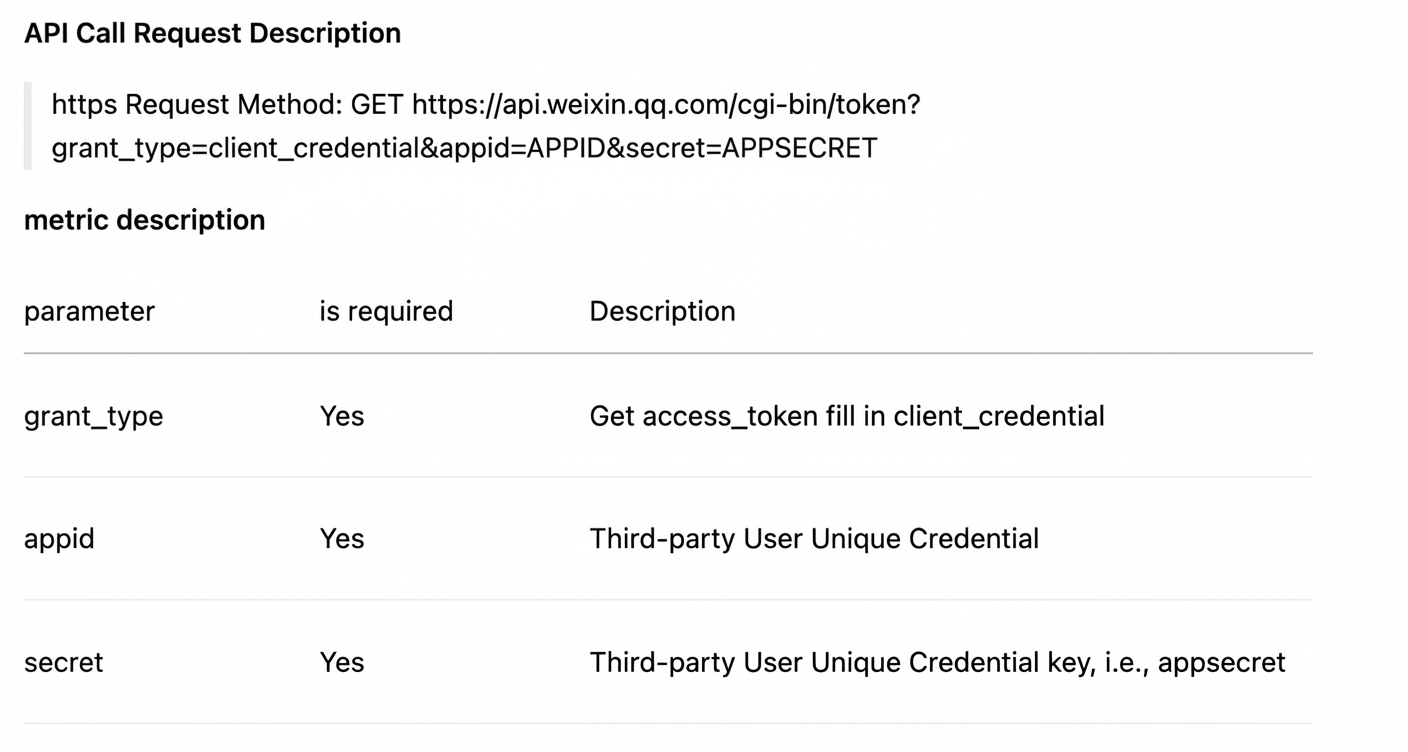
The access_token is the global, unique credential required for all API calls to the official account.
Call this API operation with your AppID and AppSecret to obtain an access_token.
For more information, see the WeChat documentation on how to use and generate an access_token.
2. Call instructions
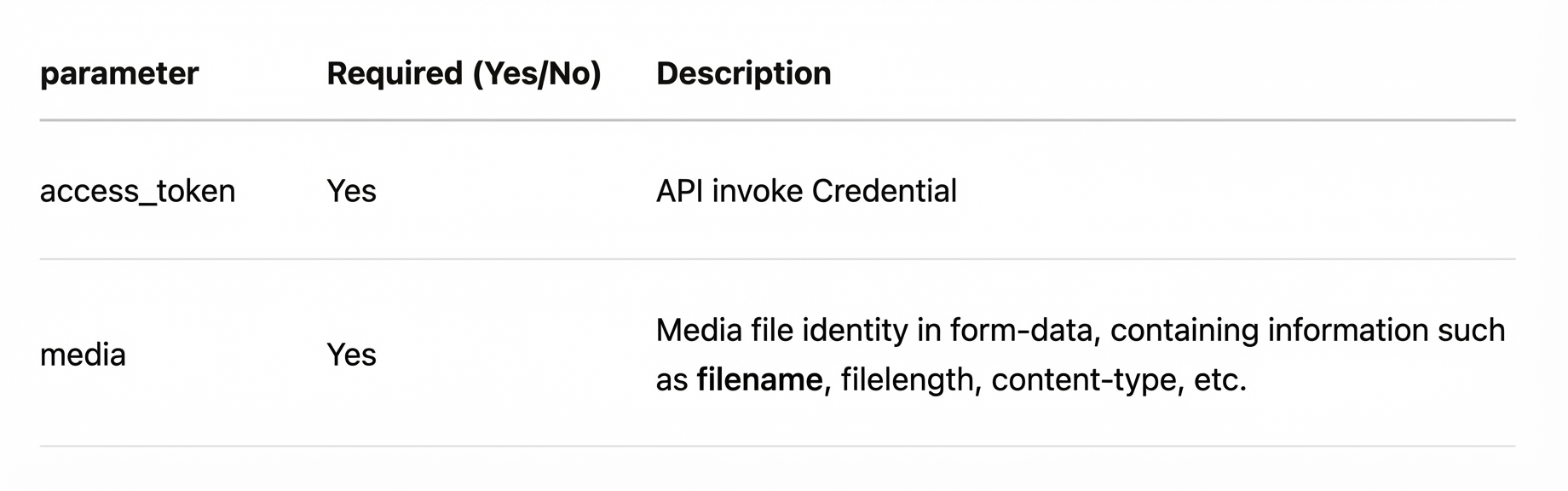
Import micro-site images to WeChat as permanent image assets
You can directly sync images from your micro-site to your WeChat Official Account to easily manage rich media messages. The images are stored permanently. You can find and manage the new permanent assets in the Material Management module on the official platform's website.
Method:
For the specific steps, see the demo example below.
Use the WeChat access_token to call the API operation for adding permanent assets. For more information, see Adding Permanent Assets.
Import and publish micro-site articles on WeChat
You can also sync articles from your micro-site directly to your WeChat Official Account to manage rich media messages. You can also insert links in the article body to posts that have already been published by your account or other official accounts.
Method:
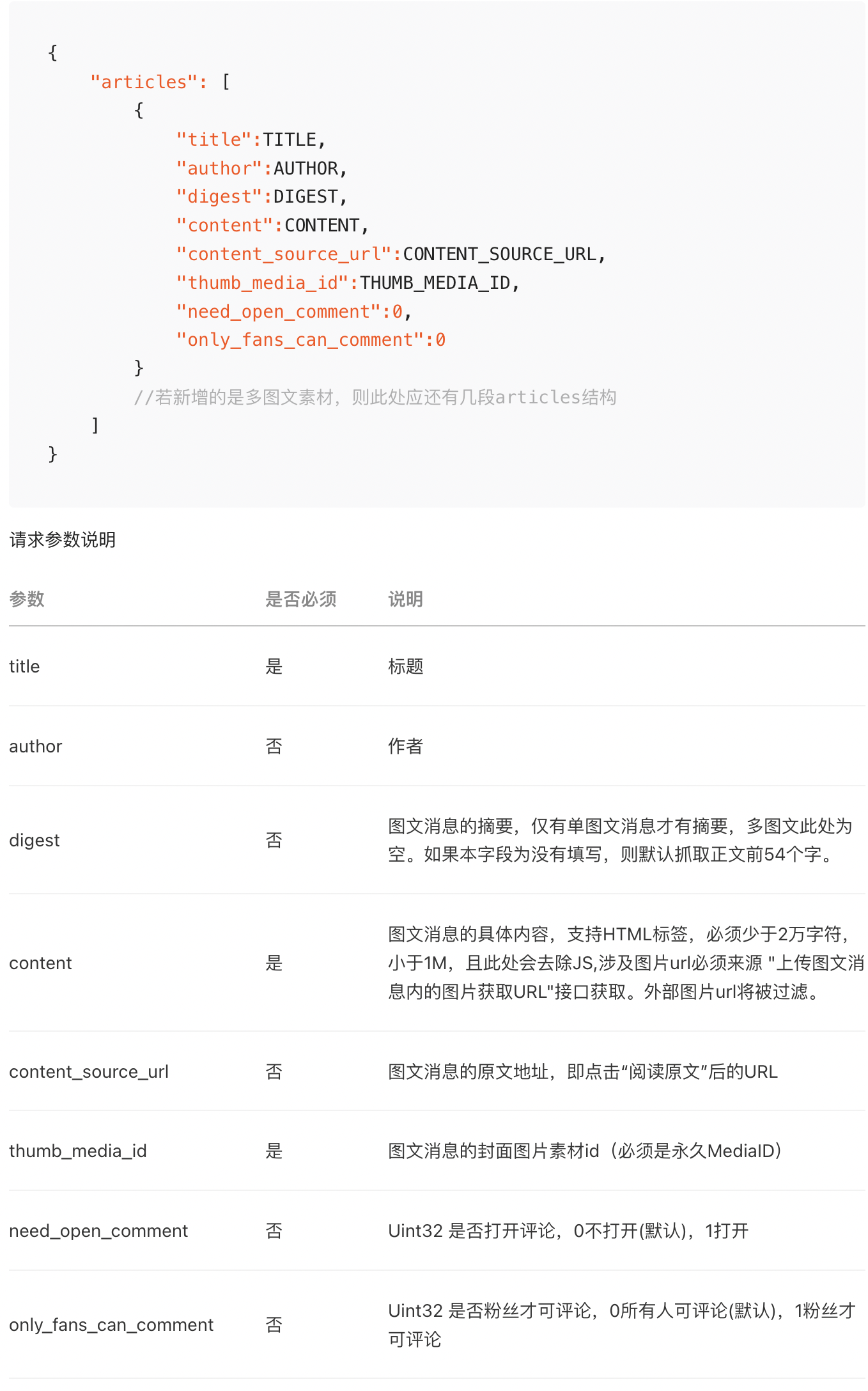
Add an article to WeChat drafts
For the specific steps, see the demo example below.
Use the WeChat access_token to call the API operation for adding a draft. For more information, see Add draft.
Publish a WeChat draft
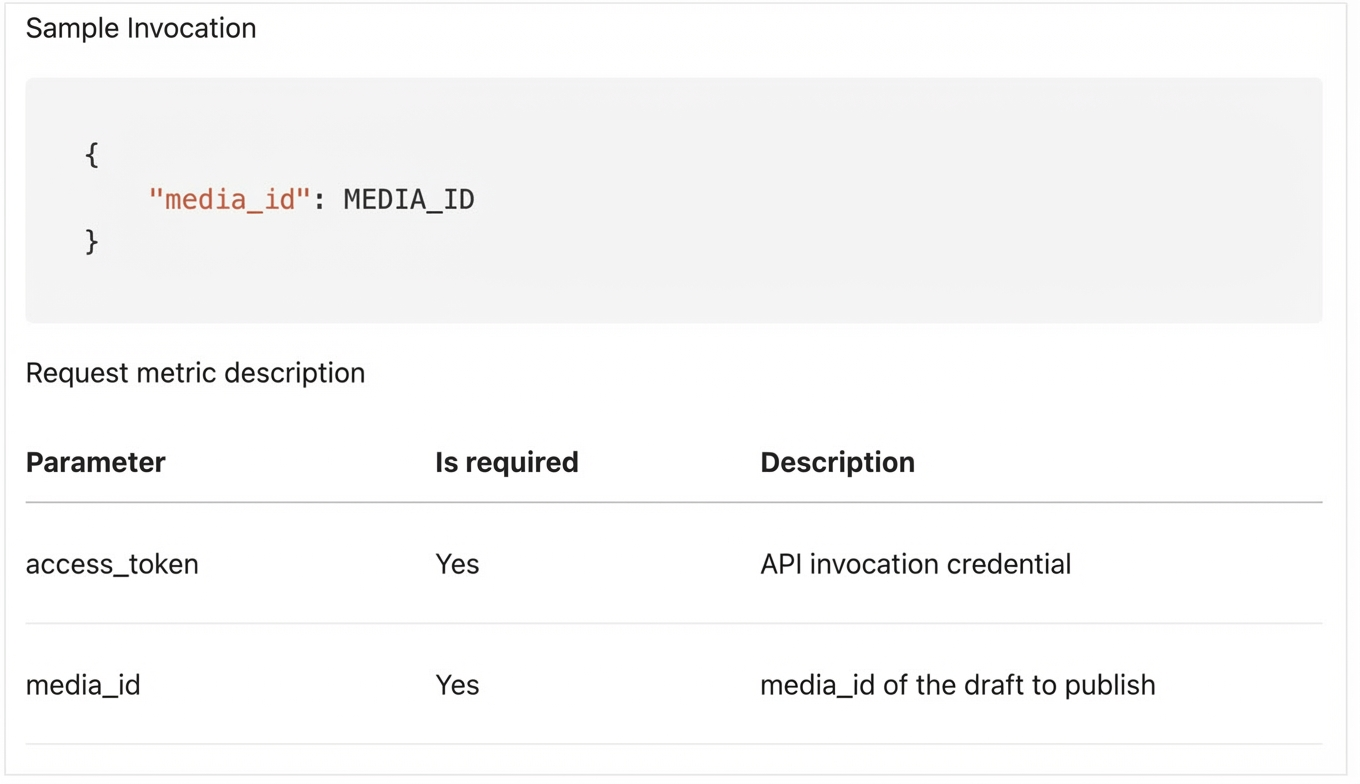
First, save the rich media material as a draft using the Draft Box > New Draft operation. To retrieve a list of saved drafts, use the Draft Box > Get Draft List operation. Then, select the media_id of the draft that you want to publish. For more information, see the Publish API operation guide.
3. Demo summary
For the complete example, see the GitHub link below.
using ApiCallerDemo.Logic;
using ApiCallerDemo.Models.WeChat;

namespace ApiCallerDemo
{
    internal class Program
    {
        private static void InitArg(ref string arg, string argName)
        {
            while (string.IsNullOrWhiteSpace(arg))
            {
                Console.WriteLine($"Please enter {argName} and press Enter to confirm");
                arg = Console.ReadLine() ?? string.Empty;
            }
        }

        static async Task Main(string[] args)
        {

            var weZhanAccessId = "";
            var weZhanAccessKey = "";
            var weZhanDomain = "";
            var weChatAppId = "";
            var weChatSecret = "";
            #region Check if parameters are filled. If not, prompt for input.
            InitArg(ref weZhanAccessId, $"Micro-site AccessId (e.g., {Guid.NewGuid():N})");
            InitArg(ref weZhanAccessKey, $"Micro-site AccessKey (e.g., {Guid.NewGuid()})");
            InitArg(ref weZhanDomain, "Micro-site domain name (e.g., https://1234abcd.scd.wezhan.cn)");
            InitArg(ref weChatAppId, "WeChat AppId (e.g., wxda4bxxxxxxxxxxxx)");
            InitArg(ref weChatSecret, "WeChat Secret (e.g., d3ff739088698daxxxxxxxxxxxxxxxxx)");
            #endregion

            //Initialize a micro-site API call instance
            var weZhanApiCaller = new WeZhanApiCaller(weZhanAccessId, weZhanAccessKey, weZhanDomain);
            //Initialize a temporary WeChat access token
            var accessToken = await WeChatApiCaller.InitTokenAsync(weChatAppId, weChatSecret);
            //Initialize a WeChat API call instance
            var weChatApiCaller = new WeChatApiCaller(accessToken);

            //Get a batch of micro-site article IDs and traverse them
            foreach (var articleId in await weZhanApiCaller.GetArticleIdListAsync(1, 10))
            {
                try
                {
                    //Get article details
                    var article = await weZhanApiCaller.GetArticleDetailAsync(articleId);
                    //Download the article's main image. If there is no main image, it cannot be published as a WeChat draft because WeChat requires a main image for drafts.
                    var imgBytes = await weZhanApiCaller.DownloadImgAsync(article.PictureUrl);
                    //Upload the main image and get the material ID
                    var mediaId = await weChatApiCaller.UploadImage2WeChatAsync(imgBytes);
                    //Generate an article draft based on the article content and main image material ID
                    var draftId = await weChatApiCaller.AddDraftAsync(new DraftRequest()
                    {
                        author = "Editor",
                        title = article.Title,
                        digest = article.Summary,
                        content = article.ContentDetail,
                        thumb_media_id = mediaId,
                        need_open_comment = 0,
                        only_fans_can_comment = 0,
                    });

                    //Publish the article draft. All done!
                    await weChatApiCaller.PublishDraftAsync(draftId);
                    Console.WriteLine($"Article [{article.Title}] synced to WeChat successfully.");
                }
                catch (Exception e)
                {
                    Console.WriteLine($"Failed to sync article Id [{articleId}] to WeChat. {e.Message}\n{e.StackTrace}");
                }
            }

        }
    }
}
4. Download sample code
We provide a .NET sample for API calls that you can download and use. Download link: https://github.com/woxieao/WeZhanApiCallerDemo