View and modify synchronization parameter settings
This topic describes how to view and modify the parameter settings of a data synchronization task.
View parameter settings
You can view the parameter settings of a data synchronization task if it is in the Upgrading/Downgrading, Running, Modifying, Merging, Completed, Stopping, or Stopped state.
Log on to the OceanBase Management Console .
In the navigation pane on the left, click Data Transmission Service > Data Synchronization.
On the Synchronization Task List page, click ... next to the target task and choose View Parameter Settings.

Alternatively, click the name of the target task to open its details page. In the upper-right corner, click ... and choose View Parameter Settings.

In the View Parameter Settings panel, review the parameter settings of the current task.
Modify parameter settings
You can modify the parameter settings of a data synchronization task if it is in the Not Started, Paused, or Failed state.
Log on to the OceanBase Management Console .
In the navigation pane on the left, click Data Transmission Service > Data Synchronization.
On the Synchronization Task List page, click ... next to the target task and choose Modify Parameter Settings.

Alternatively, click the name of the target task to open its details page. In the upper-right corner, click ... and choose Modify Parameter Settings.

In the Modify Parameter Settings panel, modify the parameter settings as needed.
Full synchronization
These parameters are available only if you selected Full Synchronization on the Select Synchronization Type page.
Parameter
Description
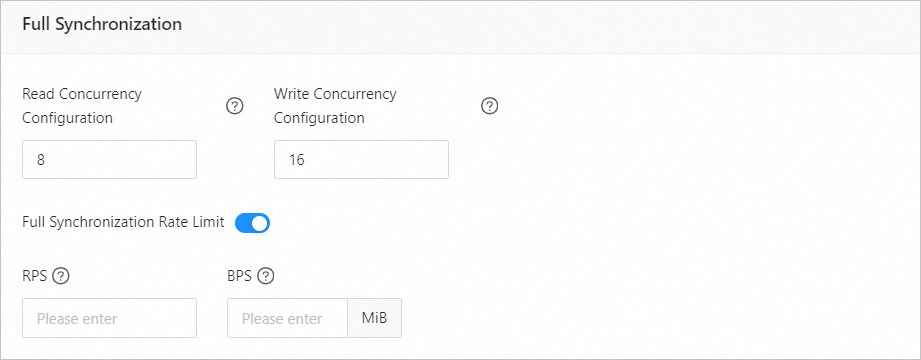
Read concurrency configuration
This parameter specifies the number of concurrent threads for reading data from the source during full synchronization. The maximum value is 512. A high concurrency may overload the source and affect your business.
Write concurrency configuration
This parameter specifies the number of concurrent threads for writing data to the destination during full synchronization. The maximum value is 512. A high concurrency may overload the destination and affect your business.
Full synchronization rate limit
You can enable a rate limit for full synchronization as needed. If you enable this feature, set the RPS (maximum number of data rows synchronized to the destination per second) and BPS (maximum data volume in bytes synchronized to the destination per second).
NoteThe RPS and BPS settings only serve as rate limits. The actual performance of full synchronization is affected by factors such as the source, the destination, and the instance specifications.
Incremental synchronization
These parameters are available only if you selected Incremental Synchronization on the Select Synchronization Type page.

Parameter
Description
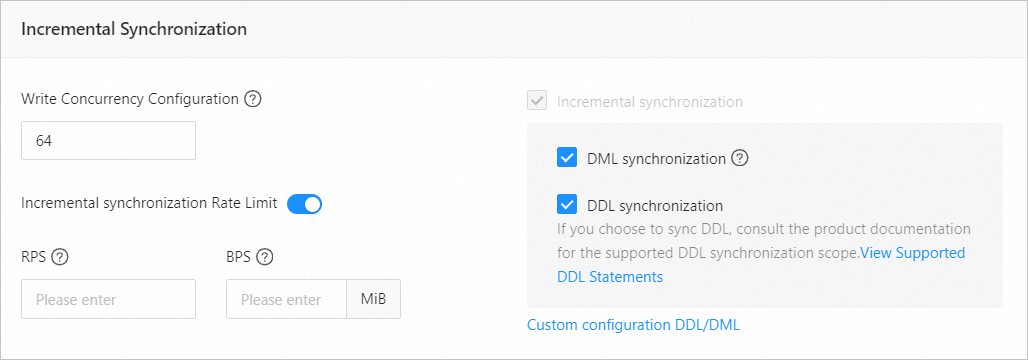
Write concurrency configuration
This parameter specifies the number of concurrent threads for writing data to the destination during incremental synchronization. The maximum value is 512. A high concurrency may overload the destination and affect your business.
Incremental synchronization rate limit
You can enable a rate limit for incremental synchronization as needed. If you enable this feature, set the RPS (maximum number of data rows synchronized to the destination per second) and BPS (maximum data volume in bytes synchronized to the destination per second).
NoteThe RPS and BPS settings only serve as rate limits. The actual performance of incremental synchronization is affected by factors such as the source, the destination, and the instance specifications.
Incremental synchronization
Incremental Synchronization includes DML Synchronization and DDL Synchronization. You can customize the settings as needed. For more information, see Customize DDL/DML settings.
After you make the changes, click OK.