Release an instance
You can release an instance from the Instance List page if your business needs change. This topic describes the procedure.
Prerequisites
If the target instance is a cluster instance, it must have no running tenants and use the pay-as-you-go billing method.
NoteOceanBase does not support releasing subscription cluster instances.
The target instance is running.
Procedure
You can release an instance in one of the following two ways:
Method 1: Log on to the OceanBase console. In the instance list, click More in the row of the target instance and select Release.
Method 2: Log on to the OceanBase console. In the instance list, click the instance name to go to the Instance Workspace page. In the upper-right corner of the page, click the
 icon and select Release.
The following steps use Method 1 as an example.
Log on to the OceanBase console.
In the navigation pane on the left, click Instance List.
In the row that contains the target instance, click More and select Release.
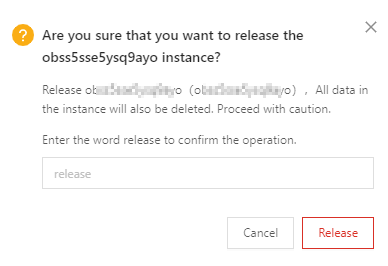
In the confirmation dialog box, enter release and click Release.
NoteReleasing an instance permanently deletes all of its data. Proceed with caution.