Virtual properties let you derive new property values from existing ones by using SQL expressions, without modifying raw tracking data.
1. Function overview
Virtual properties are computed from existing property values through SQL expressions.
2. Create a virtual property
2.1: Manual creation
-
Hover over the "New Attribute" box to display the virtual property creation panel.
The New Property drop-down provides three options: Create General Property, Create Virtual Property, and Batch Import Create.
Both event properties and global properties support virtual property creation.
General properties and virtual properties have separate creation entries. You cannot change the property type after creation.
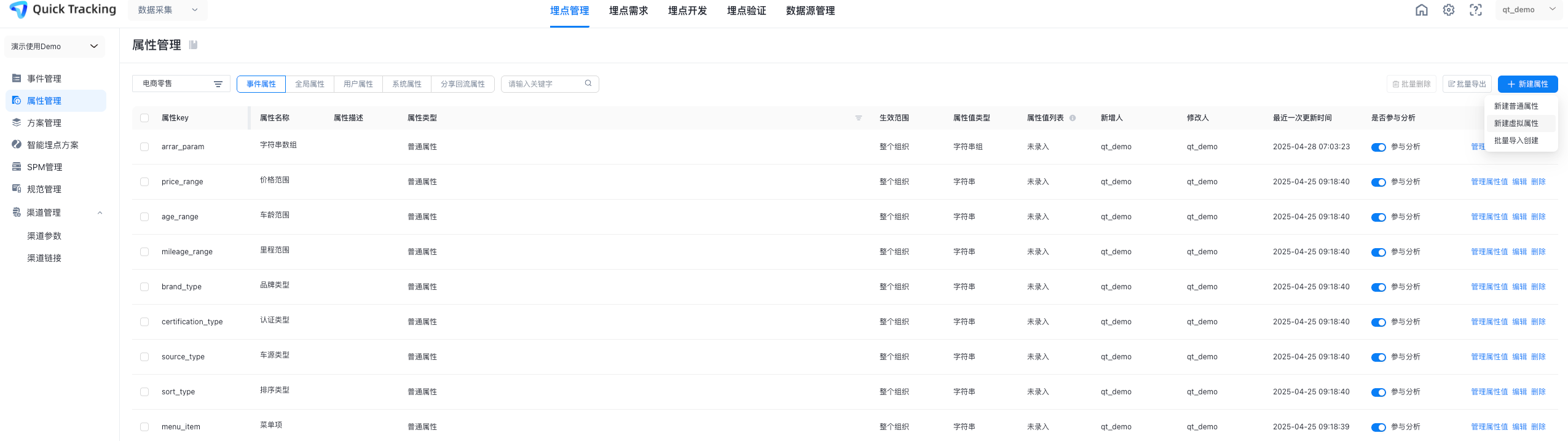
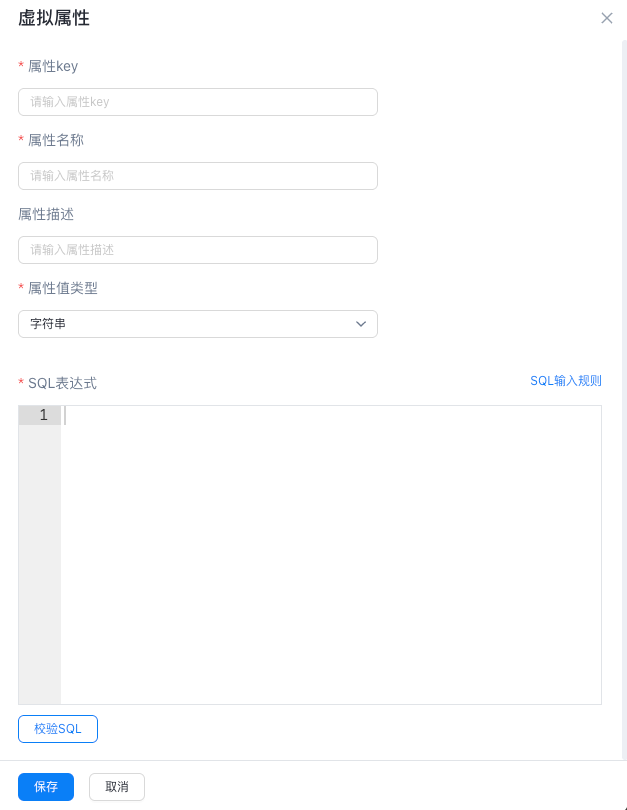
Click "New Virtual Attribute" to open the configuration form. The required fields are described below.
-
Basic Information: It contains the property key, property name, and property description.
-
Attribute value type: The value type returned by an expression of three types: numeric value, string, and string group must be the same as the configuration
-
Click Verify SQL to verify the expression. Click Save to automatically verify the SQL statement. If the verification passes, the SQL statement is successfully saved. If the verification fails, the SQL statement cannot be saved. For more information about the verification rules, see the SQL input rules in the Create Virtual Property page.
-
The default value is the entire organization. After you turn off the switch, all applications in the current organization are displayed. You can select an application.
-
After you complete the fields, click "Save" to create the virtual property.
-
A newly created property does not take effect immediately. It becomes active only after verification completes and the "!" icon disappears.
2.2: Batch Import
Virtual properties support batch import. Fill in the template with the same fields required for manual creation. The template format is shown below:

-
During bulk import, the SQL expression for a virtual property must reference a field. Otherwise, the import fails.
-
The property value type must match the return type of the SQL expression. Otherwise, verification fails.
2.3: Virtual property management
-
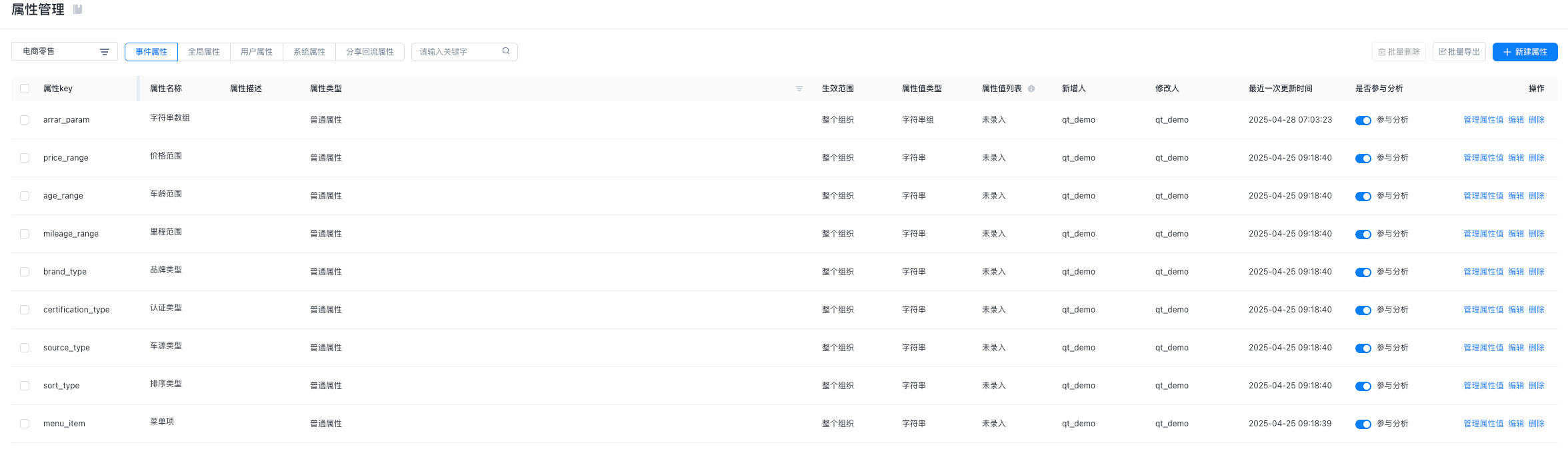
You can edit or delete virtual properties.
-
Virtual properties support property value management.
-
Use the Participate in Analysis button to control whether the virtual property participates in analysis.
3. Scenario examples
-
Examples 3.1, 3.3, 3.4, and 3.5 use the event_kv_json field in the view_dwd_aplus_log_event_ri table. This field stores property keys and values as KV pairs. Prefixes indicate the property scope: $sys_ for system properties, $channel_utm_ for channel properties, $global_ for global properties, and all others are event properties.
-
Example 3.2 uses the sys_url field in the view_dwd_aplus_log_event_ri table, which stores the full page URL (protocol + domain + path).
3.1 attribute calculation
Example 1: Assume that a tracking event has the following attributes:< Sales Qty_> and < Sales Unit Price >. Both the attributes are numeric. To calculate the revenue, use the following expression: Sales Qty × Sales Unit Price. Unit_selling_price
toInt32OrZero(JSONExtractString(event_kv_json,'$sales_volume'))*toInt32OrZero(JSONExtractString(event_kv_json, '$Unit_selling_price'))
3.2 Attribute Value Extraction
Example 2: The sys_url system property stores the full URL (protocol + domain + path), for example, https://yuming.com/path1/path2/
To extract the /path1/path2/ path, use the following expression:
extract(sys_url, '/[^/]+(/.*)')
3.3 Attribute Value Merge
Example 3: Assume a tracking event has the properties <Country>, <City>, and <Street>. To concatenate them into "country-city-street", use the following expression:
CONCAT(JSONExtractString(event_kv_json,'$Country'),'-',JSONExtractString(event_kv_json, '$City'),'-',JSONExtractString(event_kv_json,'$Street'))
3.4 Time Date Reprocessing
Example 4: If the <time date> property stores values like 2023-04-01 and you need the format 20230401, use the following expression:
replaceOne(JSONExtractString(event_kv_json,'date'),'-','')
3.5 data type conversion
Example 5: To convert the <millisecond> property (int type) from milliseconds to minutes, use the following expression:
CAST(JSONExtractInt(event_kv_json, 'millisecond') / 1000 / 60 AS Nullable(Int))