HTTP API
Server-side tracking parameters
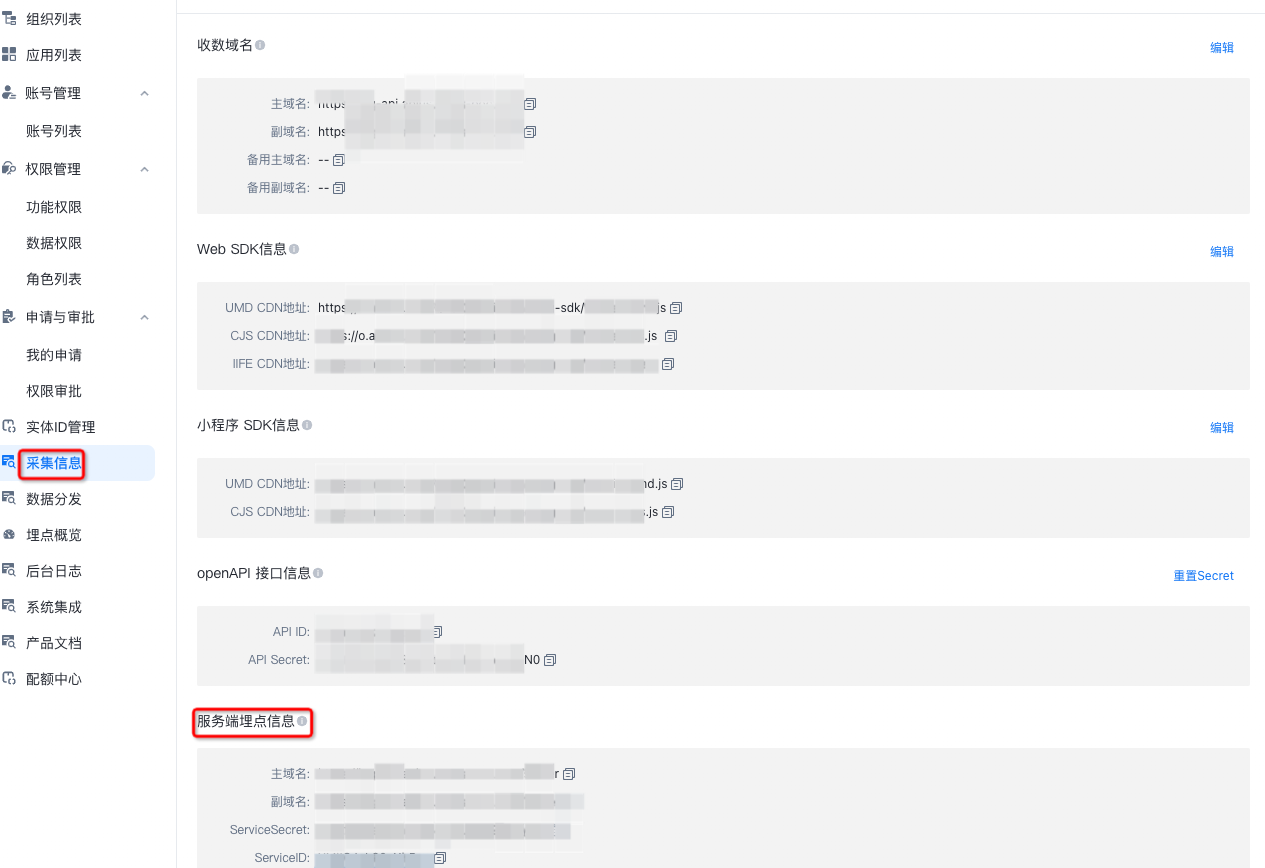
Go to the
management consoleand click Collection Information.primary domain name: The endpoint for reporting data from
server-side data tracking.secondary domain name: By default, this is the same as the primary domain name. Customers using a
private deploymentcan provide a secondary domain name as a backup.ServiceSecretandServiceIDare verification parameters. Keep them confidential.
Note: This information is security-sensitive and is only visible to users with administrator permissions.
Request
Endpoint: https://<your-ingestion-domain:port>/server
The Content-Type request header must be application/json.
Request parameters
JSON parameters for event reporting
Parameter (case-sensitive) | Type | Required | Description | Example |
sign | string | Yes | A | f564cae6a8ad458648id9d607a124322 |
app_id | string | Yes | Your | OA8kI9Jis7YJNh5uh |
appkey | string | Yes | The application key. Obtain this from the QT | 9moqdsuia8hvxm7k8shf82n |
id | string | Yes | The event code you configured when creating the event in the QT console. | click |
umid | string | Required for all event types except | The | djajdjdk1 |
puid | string | Required for | The | user_001 |
page_name | string | No | The | page_index |
ts | string | Yes | The | 1659493170125 |
cusp | object | No | Contains custom | {"foo": "bar"} |
gp | object | No | Contains | {"foo": "bar"} |
sdk_type | string | Yes | The SDK type. Must be | httpapi |
server_ts | string | No. The QT server generates this automatically. If provided, this value overrides the one generated by the server. | The server-side | 1659493170125 |
uuid | string | No. Used to generate the | Provide a unique | 1234567890 |
log_id | string | No. Automatically generated by the QT server. | The | 1234567890 |
Event message protocol
{
  "sign":"27c95768438645138cfb010ded871091",  // Required. The signature.


  "app_id":"xxxxxxxxx",                       // Corresponds to the ServiceID in your server-side data tracking information.

  "appkey":"1344444",                         // Required. The application appkey.
  "id" : "get_coupons",                       // Required. The event code.
  "umid" : "edfafs",                          // The device ID. Required, except for $$_user_profile events.
  "puid" : "123456",                          // The user ID. Required for $$_user_profile events; recommended otherwise.


  "page_name":"home_page",                    // Optional. The page code.
  "ts" : "1614667799165",                     // Required. The event's millisecond timestamp.
  "cusp" : {                                  // Custom event properties.
    "p1" : "1",
    "p2" : "2",
    "p3" : "3"
  },

  "sdk_type":"httpapi",                       // Fixed value. This field is added automatically by the collection service.
  "server_ts":"1614667799165",               // Optional. If provided, this value is used. Otherwise, the server uses the log ingestion timestamp.
  "_id":'123344'                              // Unique log ID. The collection service generates this field automatically.
}
JSON parameters for user property reporting
Parameter (case-sensitive) | Type | Required | Description | Example |
sign | string | Yes | A | f564cae6a8ad458648id9d607a124322 |
app_id | string | Yes | Your | OA8kI9Jis7YJNh5uh |
appkey | string | Yes | The application key. Obtain this from the QT | 9moqdsuia8hvxm7k8shf82n |
id | string | Yes | The event code for reporting user properties. Must be | $$_user_profile |
umid | string | No | The | djajdjdk1 |
puid | string | Yes | The | user_001 |
ts | string | Yes | The | 1659493170125 |
cusp | object | Yes | Contains the | {"name": "tom", "gender": "1"} |
sdk_type | string | Yes | The SDK type. Must be | httpapi |
server_ts | string | No. The QT server generates this automatically. If provided, this value overrides the one generated by the server. | The server-side | 1659493170125 |
uuid | string | No. Used to generate the | Provide a unique | 1234567890 |
log_id | string | No. Automatically generated by the QT server. | The | 1234567890 |
User property message protocol
{
  "sign":"27c95768438645138cfb010ded871091",  // Required. The signature.
  "app_id":"xxxxxxxxx",                       // Required. Your ServiceID, found in the server-side data tracking information.


  "appkey":"1344444",                         // Required. The application appkey.
  "id" : "$$_user_profile",                   // Required. Identifies the request as a user property update.
  "umid" : "edfafs",                          // Optional. The device ID.
  "puid" : "123456",                          // Required. The user ID.
  "ts" : "1614667799165",                     // Required. The event's millisecond timestamp.
  "cusp" : {                                  // Required. The user properties to set.
    "gender" : "1",                           // Example: Gender
    "birthday" : "1988-12-24"                 // Example: Date of birth
  },


  "sdk_type" : "httpapi",                     // Fixed value. This field is added automatically by the collection service.
  "server_ts":"1614667799165",             // Optional. If provided, this value is used. Otherwise, the server uses the log ingestion timestamp.
  "_id":'123344'                           // Unique log ID. The collection service generates this field automatically.
}
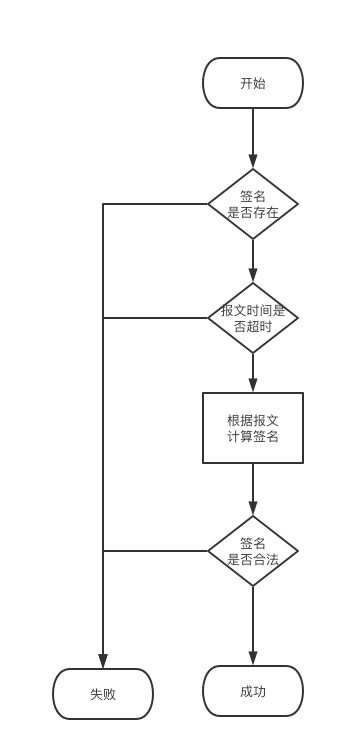
sign generation
Create a map object containing all key-value pairs from the request, excluding the
signfield.Serialize the map to a compact JSON string, with keys sorted in natural ASCII order. Ensure there are no spaces between fields. For Java, you can use
JSONObject.toJSONString(mapObject, SerializerFeature.MapSortField).Retrieve your
ServiceSecret.Concatenate the sorted JSON string with your
ServiceSecretand compute the MD5 hash of the result:sign = MD5(sorted_json_string + ServiceSecret).Add the
signvalue to the map, then serialize it to create the final request payload.
Signature verification flow
Responses
The response Content-Type is application/json.
The response body is a JSON string containing two fields: code and message.
Code | Message | Description |
Httpapi_300_200 | Request successful | The request was successful. |
Httpapi_300_101 | Invalid signature | Signature verification failed. See the section on generating the |
Httpapi_300_102 | Invalid JSON format | The request payload is not in a valid JSON format. |
Httpapi_300_103 | A required field is missing | A required parameter is missing. Check the request parameter tables. |
Httpapi_300_104 | A required field for user properties is missing | A required parameter for user properties is missing. Check the request parameter tables. |
Httpapi_300_105 | Invalid event ID | The provided event ID is incorrect. |
Httpapi_300_106 | Incorrect | The |
Java demo
package com.aliyun.app.quickaplus.mock.once_mock;
import com.alibaba.fastjson.JSON;
import com.alibaba.fastjson.JSONObject;
import com.alibaba.fastjson.serializer.SerializerFeature;
import com.aliyun.app.quickaplus.mock.util.MD5Util;
import okhttp3.*;
import java.io.IOException;
/**
* Server-side API demo.
*
* @author chengtao
*/
public class ServiceApiDemo {
    /**
    * Primary domain name.
    */
    private static final String API_URL = "*****";
    /**
    * Corresponds to the ServiceID in your server-side data tracking information.
    */
    private static final String SERVICE_ID = "*******";
    /**
    * Corresponds to the ServiceSecret in your server-side data tracking information.
    */
    private static final String SERVICE_SECRET = "*******";
    /**
    * HTTP client for sending logs.
    */
    private static final OkHttpClient client = new OkHttpClient();
/**
* Main function.
*
* @param args Arguments.
*/
    public static void main(String[] args) {
        String srcJsonString = getMockData();
        JSONObject json = JSON.parseObject(srcJsonString);
        // Add the service ID to the payload.
        json.put("app_id",SERVICE_ID);
        // Add the timestamp to the payload.
        json.put("ts", String.valueOf(System.currentTimeMillis()));
        // Calculate the signature.
        String sign = MD5Util.md5(JSONObject.toJSONString(json,
        SerializerFeature.MapSortField) + SERVICE_SECRET);
        json.put("sign", sign);
        String desJsonString = JSON.toJSONString(json,
        SerializerFeature.DisableCircularReferenceDetect);
        Request request = new Request.Builder()
        .url(API_URL + "/server")
        .post(RequestBody.create(desJsonString,
        MediaType.parse("application/json")))
        .build();
        try {
            Response response = client.newCall(request).execute();
            if (!response.isSuccessful()) {
                System.out.printf("[DEMO] Failed to send log: %s%n", response);
            } else {
                System.out.printf("[DEMO] Send successful: %s%n",
                response.body().string());
            }
        } catch (IOException e) {
            e.printStackTrace();
        }
    }
/**
* Gets mock data.
*
* @return A JSON string of mock data.
*/
    private static String getMockData() {
        return "{\n" +
        " \"appkey\": \"1344444\",\n" +
        " \"id\": \"get_coupons\",\n" +
        " \"umid\": \"uuid()\",\n" +
        " \"puid\": \"puid1\",\n" +
        " \"page_name\": \"home_page\",\n" +
        " \"cusp\": {\n" +
        " \"p1\": \"1\",\n" +
        " \"p2\": \"2\",\n" +
        " \"p3\": \"3\"\n" +
        " },\n" +
        " \"gp\": {\n" +
        " \"p1\": \"1\",\n" +
        " \"p2\": \"2\",\n" +
        " \"p3\": \"3\"\n" +
        " },\n" +
        " \"sdk_type\": \"httpapi\"\n" +
        "}";
    }
}
Python demo
# Correctly formatted string for signing (compact, sorted keys)
{"appkey":"4b6G49PAkLUb4212","cusp":{"p1":"1","p2":"2","p3":"3"},"gp":{"p1":"1","p2":"2","p3":"3"},"id":"get_coupons","page_name":"home_page","puid":"puid1","sdk_type":"httpapi","umid":"uuid()"}tEkNnx8VDuR0mwEl3hXd7aozYh8Q2qS4
# Incorrectly formatted string for signing (contains spaces)
{"appkey": "your_app_key", "cusp": {"p1": "1", "p2": "2", "p3": "3"}, "gp": {"p1": "1", "p2": "2", "p3": "3"}, "id": "get_coupons", "page_name": "home_page", "puid": "puid1", "sdk_type": "httpapi", "umid": "uuid()"}tEkNnx8VDuR0mwEl3hXd7aozYh8Q2qS
import json
import hashlib
import http.client
import ssl
import time
# Replace with your service ID
service_id = "your_service_id"
# Replace with your service secret
service_secret = "your_service_secret"
# Replace with your data ingestion service endpoint
qlc_end_point = "https://your_endpoint.com"
def get_millisecond_timestamp():
# Get a 13-digit millisecond timestamp
return str(int(round(time.time() * 1000)))
ts1 = get_millisecond_timestamp()
print(ts1)
# Mock payload
data = {
# For debugging only. Must be an empty string or removed in production.
# Must match the DebugKey entered in "Tracking Verification > Server-side Verification".
"dk":"",
# Replace with your appkey
"appkey":"your_appkey",
"app_id": service_id,
"id": "get_coupons",
"umid": "uuid1",
"puid": "puid2",
"page_name": "home_page",
"ts": ts1,
"cusp": {
"card_type": "experience",
"scene": "purchase",
"card_level": "trial",
"carrier": "YourApp",
"card_no": "d7tyk",
"user_id": "zsfMzsvHyA==",
"card_name": "7-day-trial",
"resource_id": "eedf17067cf64be299a844bbc8101426"
},
"gp": {
"p1": "1",
"p2": "2",
"p3": "3"
},
"sdk_type": "httpapi"
}
def sort_dict_keys(d):
# Recursively sort dictionary keys
return {k: sort_dict_keys(v) if isinstance(v, dict) else v for k, v in sorted(d.items())}
# Sort keys in alphabetical (lexicographical) order
sorted_data = sort_dict_keys(data)
# Create the string to sign: a compact JSON string (no spaces) + service_secret
string_to_sign = json.dumps(sorted_data, ensure_ascii=False, separators=(',', ':')) + service_secret
print("String to sign:", string_to_sign)
# Add the MD5 signature to the original data payload
data['sign'] = hashlib.md5(string_to_sign.encode('utf-8')).hexdigest()
# The final payload to send is the full JSON object
final_payload = json.dumps(data)
protocol, domain = qlc_end_point.split('://')
conn = None
if protocol == 'http':
conn = http.client.HTTPConnection(domain)
elif protocol == 'https':
conn = http.client.HTTPSConnection(domain)
if conn:
conn.request("POST", "/server", body=final_payload, headers={"Content-Type": "application/json"})
response = conn.getresponse()
print("Response:", response.read().decode())
conn.close()
MD5Util class code
package com.aliyun.app.quickaplus.mock.util;

import java.security.MessageDigest;

/**
 * MD5 hashing utility class.
 *
 * @author zheng.zhang
 */
public class MD5Util {

    public static String md5(String s) {
        char hexDigits[] = {'0', '1', '2', '3', '4', '5', '6', '7', '8', '9', 'a', 'b', 'c', 'd', 'e', 'f'};
        try {
            byte[] btInput = s.getBytes();
            // Get a MessageDigest object that implements the MD5 algorithm.
            MessageDigest mdInst = MessageDigest.getInstance("MD5");
            // Update the digest using the specified byte array.
            mdInst.update(btInput);
            // Get the hash's bytes.
            byte[] md = mdInst.digest();
            // Convert the byte array into a hexadecimal string.
            int j = md.length;
            char str[] = new char[j * 2];
            int k = 0;
            for (int i = 0; i < j; i++) {
                byte byte0 = md[i];
                str[k++] = hexDigits[byte0 >>> 4 & 0xf];
                str[k++] = hexDigits[byte0 & 0xf];
            }
            return new String(str);
        } catch (Exception e) {
            return null;
        }
    }

    /**
     * Unit test.
     */
    public static void main(String[] args) {
        StringBuilder dtskey = new StringBuilder("abc12390");
        dtskey.append('\0').append("~!@#$%^&*()_+");
        System.out.println(MD5Util.md5(dtskey.toString()));
        System.out.println(MD5Util.md5("20121221"));
        System.out.println(MD5Util.md5("Encrypt"));
    }
}