This code was tested in Python 3.11.9. Test the code thoroughly before you use it in a production environment.
API Open Platform code example: Obtain an access credential
Paging data with a cursor
Example: Fetch 300 data records (0-299):
Fetch records 0-99:
Request:
"cursor": "0",
"size": 100
Returns
"nextCursor": 100
Fetch records 100-199:
"cursor": "100",
"size": 100
Returns:
"nextCursor": 200
Fetch records 200-299:
"cursor": "200",
"size": 100
Returns:
"nextCursor": 300
And so on.
A better approach is to retrieve the `nextCursor` value from the previous call's response. Use this value for the `cursor` parameter in your next request.
For example, to batch fetch group information in an organization:
Python code example
# -*- coding: utf-8 -*-
import requests
# Import the function to get the access token. Modify the path as needed, or directly assign a value to access_token for testing.
from api_demo.get_access_token import access_token


def list_mail_group(cursor):
    """
    API name: Batch fetch group information in an organization. You can fetch up to 30 data records at a time.
    Document: https://mailhelp.aliyun.com/openapi/index.html#/operations/alimailpb_ud_GroupService_ListGroups

    Parameters:
    cursor (str): The cursor for paging.

    Returns:
    A JSON response that contains group information.
    """
    url = "https://alimail-cn.aliyuncs.com/v2/groups"

    querystring = {"cursor": cursor, "size": "100", "orderby": "DES"}

    headers = {'Content-Type': 'application/json', 'Authorization': 'bearer ' + access_token}

    response = requests.request("GET", url, headers=headers, params=querystring)

    print('##########################################################################')
    print('Request parameters:', querystring)
    print('Response parameters:', response.status_code, response.text)
    print('##########################################################################')
    return response.json()


def get_all_mail_group():
    """
    Gets the basic information of mail groups.

    Returns:
    A list of basic information about mail groups.
    """
    records = []
    cursor = ""
    # Define the type mapping.
    type_mapping = {
        "STATIC": "Static group",
        "DEPARTMENT": "Department group",
        "DYNAMIC": "Dynamic group",
        "USERGROUP": "Audience group",
        "DING": "DingTalk group"
    }
    # Define the status mapping.
    status_mapping = {
        "NORMAL": "Normal",
        "FREEZE": "Freeze"
    }
    while True:
        # Get data.
        parsed_data = list_mail_group(cursor)
        print(f'hasMore={parsed_data["hasMore"]}')

        # Extract the required fields.
        for group in parsed_data['groups']:
            record = {
                'Group name': group['name'],
                'Group email': group['email'],
                'Group type': type_mapping.get(group['type'], group['type']),  # If no mapping exists, keep the initial value.
                'Status': status_mapping.get(group['status'], group['status'])
            }
            records.append(record)
        # Update the cursor.
        cursor = parsed_data["nextCursor"]
        print(f'nextCursor={cursor}')
        if not parsed_data["hasMore"]:
            print(f'No more data.')
            break
    return records


all_data = get_all_mail_group()
print(f'Basic mail group information: {all_data}')
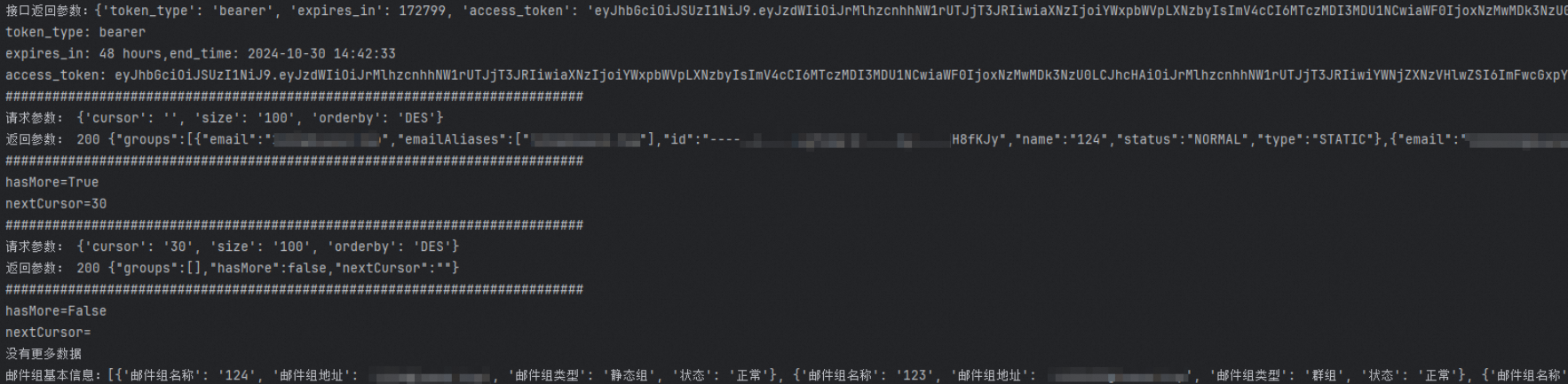
Result
Paging data with offset and limit
In the first call, the initial `offset` is 0 and `limit` is the step size. The next request starts from the value of `offset` + `limit`.
For example, to retrieve user information by ID or email:
Python code example
# -*- coding: utf-8 -*-
import requests

# Import the function to get the access token. Modify the path as needed, or directly assign a value to access_token for testing.
from api_demo.get_access_token import access_token


def get_department_members(offset, limit, v_depart_id):
    """
    Gets department members by department ID.
    https://mailhelp.aliyun.com/openapi/index.html?spm=a2c4g.11186623.0.0.1fdf1742qtp0cA#/operations/alimailpb_ud_UserService_GetUser
    :param offset: The starting position for the paged query.
    :param limit: The number of members to query per page.
    :param v_depart_id: The department ID.
    :return: A list of members and the total number of members.
    """
    url = "https://alimail-cn.aliyuncs.com/v2/departments/" + v_depart_id + "/users"

    querystring = {"offset": offset, "limit": limit}

    headers = {'Content-Type': 'application/json', 'Authorization': 'bearer ' + access_token}

    response = requests.request("GET", url, headers=headers, params=querystring)

    v_members = response.json()
    v_total_member = v_members["total"]
    v_member_items = v_members["users"]
    return v_member_items, v_total_member


offset = 0
limit = 100
department_id = '-----J----.LgfiSm:2:----.MNjFBE'
total_member_items = []
print('##########################################################################')
print(f'Start query: {department_id}')
while True:
    member_items, total_members = get_department_members(offset, limit, department_id)
    print(f'Members: Page {(offset // limit) + 1}: {member_items}')

    # Add the members of the current page to the total list.
    total_member_items.extend(member_items)
    if len(total_member_items) >= total_members:
        break
    # Update the starting position for the paged query.
    offset += limit

print(f'Total: {total_members} members')
print(f'Summary of member information: {total_member_items}')
Result
