Introduction to the Alibaba Mail IMAP command set
Alibaba Mail IMAP command set
CAPABILITY: Retrieves a list of features that the server supports.
LOGIN: Logs in a user with a username and password.
SELECT: Selects a mailbox as the target for the current operation.
NOOP: Performs no operation. This command is often used to keep a connection active.
CREATE: Creates a new mailbox.
DELETE: Deletes a mailbox.
RENAME: Renames a mailbox.
SUBSCRIBE: Subscribes to a mailbox. This makes the mailbox appear in the user's list of mailboxes.
UNSUBSCRIBE: Unsubscribes from a mailbox.
LIST: Lists mailboxes or sub-mailboxes.
LSUB: Lists subscribed mailboxes.
STATUS: Retrieves the status of a specified mailbox, such as the number of messages and unread messages.
APPEND: Appends a message to a specified mailbox.
FETCH: Retrieves a message or part of a message.
STORE: Modifies the flags for a message.
COPY: Copies a message to another mailbox.
SEARCH: Searches for messages that meet specific conditions.
UID: Executes a command using a unique identifier (UID), such as UID FETCH and UID STORE.
LOGOUT: Disconnects from the server.
Python code example
Warning: The following code was tested in Python 3.11.9. Test this code thoroughly before using it in a production environment.
# -*- coding: utf-8 -*-
import imaplib
import sys

# Configure the IMAP server
imap_server = 'imap.qiye.aliyun.com'
username = 'xxxxxx'
password = 'xxxxxx'
port = 993


def test_imap_commands():
    try:
        # Connect to the IMAP server
        # mail = imaplib.IMAP4(imap_server, 143)  # Use a non-encrypted connection
        mail = imaplib.IMAP4_SSL(imap_server, port)  # Use an SSL-encrypted connection
        print(f"Connected to {imap_server}")

        # Send the CAPABILITY command to retrieve the features supported by the server
        response = mail.capability()
        print(f"CAPABILITY Response: {response}")
        print(response)

        # Log on to the server
        response = mail.login(username, password)
        print(f"Login Response: {response}")

        # Select the INBOX mailbox
        response = mail.select('INBOX')
        print(f"SELECT Response: {response}")

        # Test the NOOP command to keep the connection active
        response = mail.noop()
        print(f"NOOP Response: {response}")

        # Test the CREATE command to create a new folder
        response = mail.create('test_folder')
        print(f"CREATE Response: {response}")

        # Test the RENAME command to rename the folder
        response = mail.rename('test_folder', 'new_folder')
        print(f"RENAME Response: {response}")

        # Test the DELETE command to delete a folder
        response = mail.delete('new_folder')
        print(f"DELETE Response: {response}")

        # Test the SUBSCRIBE command to subscribe to a folder
        response = mail.subscribe('test_folder')
        print(f"SUBSCRIBE Response: {response}")

        # Test the UNSUBSCRIBE command to unsubscribe from a folder
        response = mail.unsubscribe('test_folder')
        print(f"UNSUBSCRIBE Response: {response}")

        # Test the LIST command to list all folders
        response = mail.list()
        print(f"LIST Response: {response}")

        # Test the LSUB command to list subscribed folders
        response = mail.lsub()
        print(f"LSUB Response: {response}")

        # Test the STATUS command to retrieve the status of the mailbox
        response = mail.status('INBOX', '(MESSAGES UNSEEN)')
        print(f"STATUS Response: {response}")

        # Test the APPEND command to append an email to the specified mailbox
        message = b'Subject: Test Email\r\n\r\nThis is a test email.\r\n'
        response = mail.append('INBOX', None, None, message)
        print(f"APPEND Response: {response}")

        # Test the FETCH command to retrieve the email body
        response = mail.fetch('1', '(BODY[HEADER.FIELDS (SUBJECT)])')
        print(f"FETCH Response: {response}")

        # Test the STORE command to modify the email flags
        response = mail.store('1', '+FLAGS', '\\Seen')  # Mark as read. Other options include \\Deleted to permanently delete.
        print(f"STORE Response: {response}")

        # Test the COPY command to move an email to another folder, not replicate it
        response = mail.copy('2', 'folderA/11/111')
        print(f"COPY Response: {response}")

        # Test the UID COPY command to move an email using a unique identifier, not replicate it
        response = mail.uid('COPY', '2', 'folderA')
        print(f"UID COPY Response: {response}")

        # Test the SEARCH command to search for emails that meet the conditions
        response = mail.search(None, 'ALL')
        print(f"SEARCH Response: {response}")

        # Test the UID command to retrieve the email body using a unique identifier
        response = mail.uid('FETCH', '1', '(BODY[HEADER.FIELDS (SUBJECT)])')
        print(f"UID FETCH Response: {response}")

        # Disconnect
        response = mail.logout()
        print(f"LOGOUT Response: {response}")

    except imaplib.IMAP4.error as e:
        print(f"IMAP Error: {e}")
        sys.exit(1)


# Test the IMAP server commands
test_imap_commands()
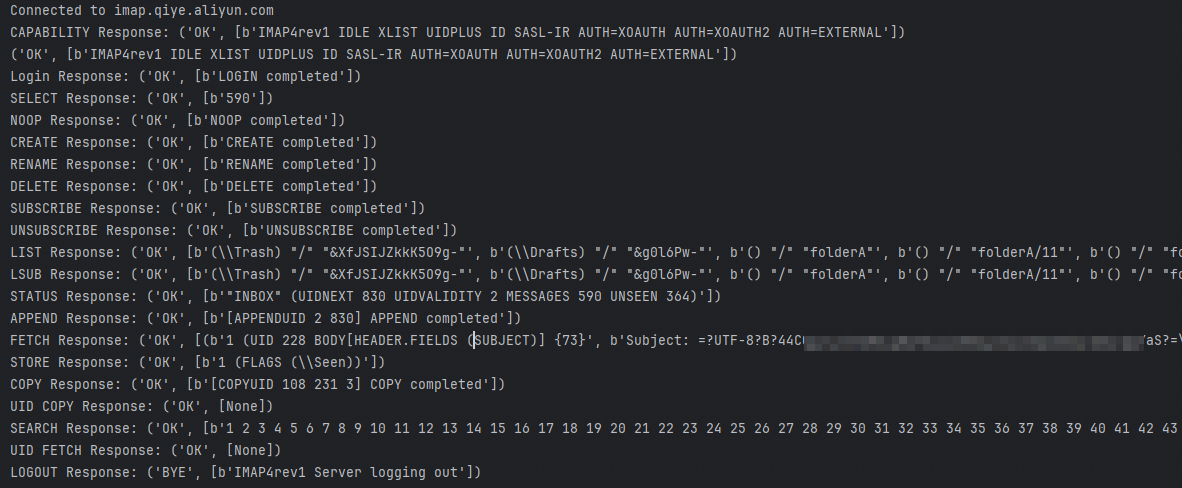
Results