ACCL-P best practices
Cross-node communication: Use RDMA in PAI-PPU
The ml.gp7vf.16.40xlarge and ml.gp7vf.16.46xlarge instance types in PAI use proprietary RDMA network interface cards. To use the RDMA network for cross-node communication, set the following environment variables in your container environment:
export NCCL_SOCKET_IFNAME=eth0
export NCCL_IB_HCA=
export NCCL_DEBUG=INFO
export NCCL_IB_DISABLE=1
Parameter | Description |
NCCL_SOCKET_IFNAME | Specifies the interface that the communication library uses to establish connections. This value varies by instance type and tenancy model (multi-tenancy or single-tenancy). If this variable is not set or is configured incorrectly, the communication library may fail to connect. |
NCCL_DEBUG | Typically set to |
NCCL_IB_HCA | Specifies the network interface cards for RDMA communication. The number of IB devices and their naming conventions vary by instance type. If you leave this variable empty, the library automatically uses all available network interface cards. |
NCCL_IB_DISABLE | The default value is |
The environment variables listed above are built into the PAI-PPU official image. Do not modify them.
Intra-node communication: Use the optimal ICN-Link topology
PAI-PPU instance types feature a unique 16-GPU ICN-Link intra-node interconnect, as shown in the figure below. To achieve optimal performance, you must set the appropriate CUDA device order with an environment variable that corresponds to your model's parallelism strategy.
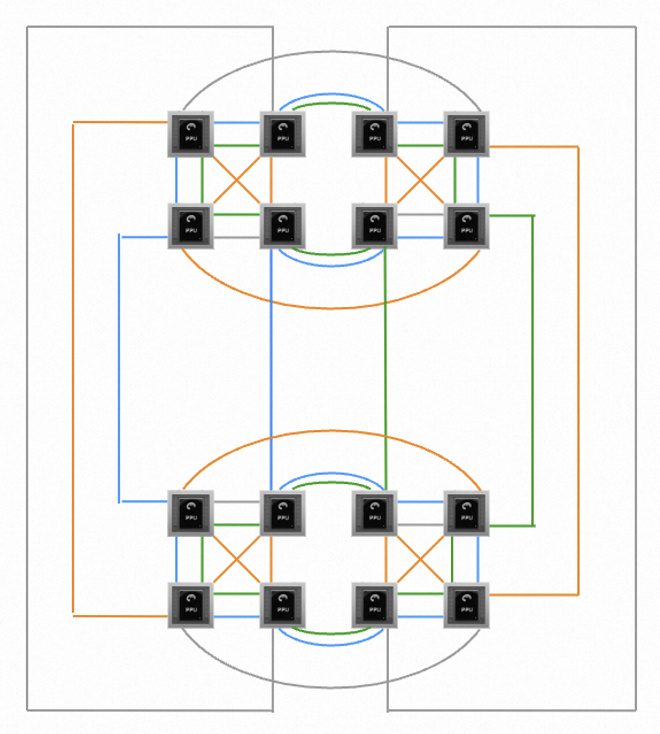
Because tensor parallelism (TP) is more sensitive to communication bandwidth, you should set the CUDA device order based only on the degree of TP.
Parallelism strategy | Setting |
TP 2 | export CUDA_VISIBLE_DEVICES=4,7,5,6,1,2,0,3,12,15,13,14,9,10,8,11 |
TP 4 | export CUDA_VISIBLE_DEVICES=4,5,7,6,0,1,3,2,9,8,10,11,13,12,14,15 |
TP 8 | export CUDA_VISIBLE_DEVICES=4,5,7,6,2,3,1,0,13,12,14,15,11,10,8,9 |
TP 1 / TP 16 | No configuration required. |
For complex 5D parallelism strategies, consider only the degree of TP, treating models without TP as TP=1. If you encounter abnormal execution or performance degradation in an edge case, submit a ticket to technical support.