training-xpu-pytorch:24.11
These release notes cover the updates for training-xpu-pytorch:24.11.
Main features and bug fixes
Main features
Upgraded the PPU SDK to 1.3.4 and CUDA to 12.4.1.
Upgraded PyTorch to 2.5.1.6 and deepspeed to 0.15.4+ali, which integrates features and bug fixes from the corresponding community versions.
Upgraded ACCL-P to 1.3.0-5-hotfix, which includes new features and bug fixes.
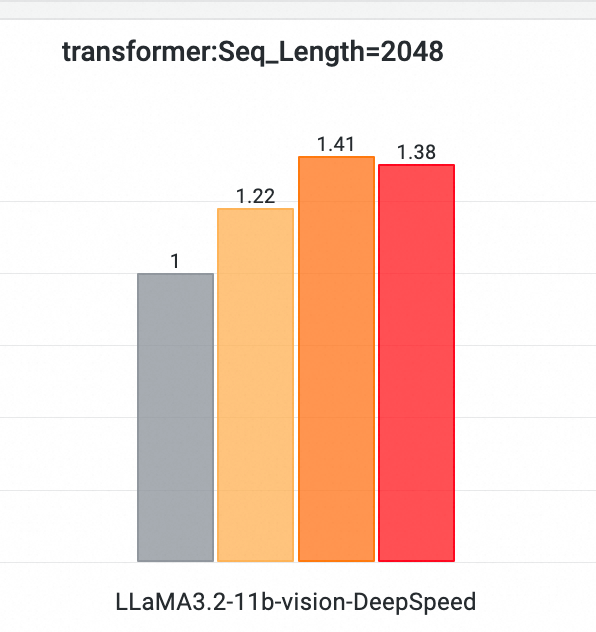
Integrated an optimized transformers library (version 4.46.2+ali) for VLM models, achieving over 40% end-to-end performance improvement for LLaMA3.2-11b-vision training on a PPU cluster.
Bundled common debugging tools, including Perf v5.4.30, GDB, pystack, and py-spy.
Updated
lingjun-perf-toolkit:Expanded benchmark support to include Vision Language Models (VLMs) such as LLaMA3.2-11b-vision and Qwen2-VL-7B. Upgraded the Megatron model to use
megatron-core0.9.0.Integrated
pytorch-dynamic-profilerfor non-intrusivetorch.profileand out-of-memory (OOM) snapshot collection.Integrated Healthcheck to support node health checks for PPU (beta).
Resolved issues
Upgraded the PPU SDK to 1.3.4 to resolve a performance issue when running the Open-Sora model.
Optimized the PyTorch memory management mechanism to reduce high memory usage.
Upgraded the PPU SDK to 1.3.4, fixing an issue where garbled text appeared during vLLM inference with Qwen2-72B-Instruct when the prompt exceeded 4,000 tokens.
Upgraded ACCL-P to 1.3.0-5-hotfix to resolve an intermittent error that could occur during an 8-card broadcast.
Software stack
Application scenario | Training / inference |
Framework | PyTorch |
Requirements | PPU SDK 1.3.4 |
Core components |
|
Assets
Official release
Public image
egslingjun-registry.cn-wulanchabu.cr.aliyuncs.com/egslingjun/training-xpu-pytorch:24.11
Other versions
24.11.post1 assets
Fixed a Boost installation error.
Fixed a
torch.profilercrash issue in PyTorch 2.5.1.6.
Public image
egslingjun-registry.cn-wulanchabu.cr.aliyuncs.com/egslingjun/training-xpu-pytorch:24.11.post1
[Preview] 24.11-nightly-20241127 assets
Added support for FFmpeg 6.0, Open3D 0.18.0, and pillow-simd 9.5.0.post2.
Upgraded PyTorch to 2.4.0.5.post3 to resolve an OOM issue from the 24.10 image.
Public image
egslingjun-registry.cn-wulanchabu.cr.aliyuncs.com/egslingjun/training-xpu-pytorch:24.11-nightly-20241127
VPC images
acs-registry-vpc.{region-id}.cr.aliyuncs.com/egslingjun/{image:tag}
{region-id}is the ID of the region where your Container Service for Kubernetes (ACK) cluster is located, such ascn-beijingorcn-wulanchabu.{image:tag}is the actual image name and tag.
Driver requirements
Driver version >= 1.1.0
Key features and enhancements
PyTorch compiler optimization
The compiler optimization introduced in PyTorch 2.0 typically provides significant benefits in small-scale, single-card scenarios. However, because LLM training requires memory optimization and distributed frameworks such as FSDP and Deepspeed, torch.compile() may not provide benefits or may even have a negative impact.
Control communication granularity within the deepspeed framework, allowing the compiler to capture a more complete computation graph for broader optimization.
Enhanced the PyTorch compiler:
Improved the compiler front end to ensure successful compilation even when graph breaks occur.
Strengthened pattern matching and dynamic shape capabilities to boost the performance of compiled code.
With these optimizations, 8B LLM training typically achieves about a 20% end-to-end throughput gain.
Recomputation for memory optimization
After analyzing extensive performance data, including system metrics like memory utilization across various models, clusters, and training parameters, we built a predictive model for memory overhead and integrated a feature into PyTorch that automatically recommends the optimal layers for activation checkpointing. This feature is compatible with the deepspeed framework, enabling you to easily leverage memory optimization for performance gains.
ACCL communication library
ACCL is a high-performance network communication library developed by Alibaba for Lingjun products. It is fully compatible with the NVIDIA Collective Communications Library (NCCL), fixes bugs found in official NCCL versions, and provides performance and stability optimizations. ACCL-P is a collective communication library based on the open-source T-Head pccl library. It is deeply customized and redeveloped with Alibaba's proprietary components for high-performance networking.
End-to-end performance evaluation
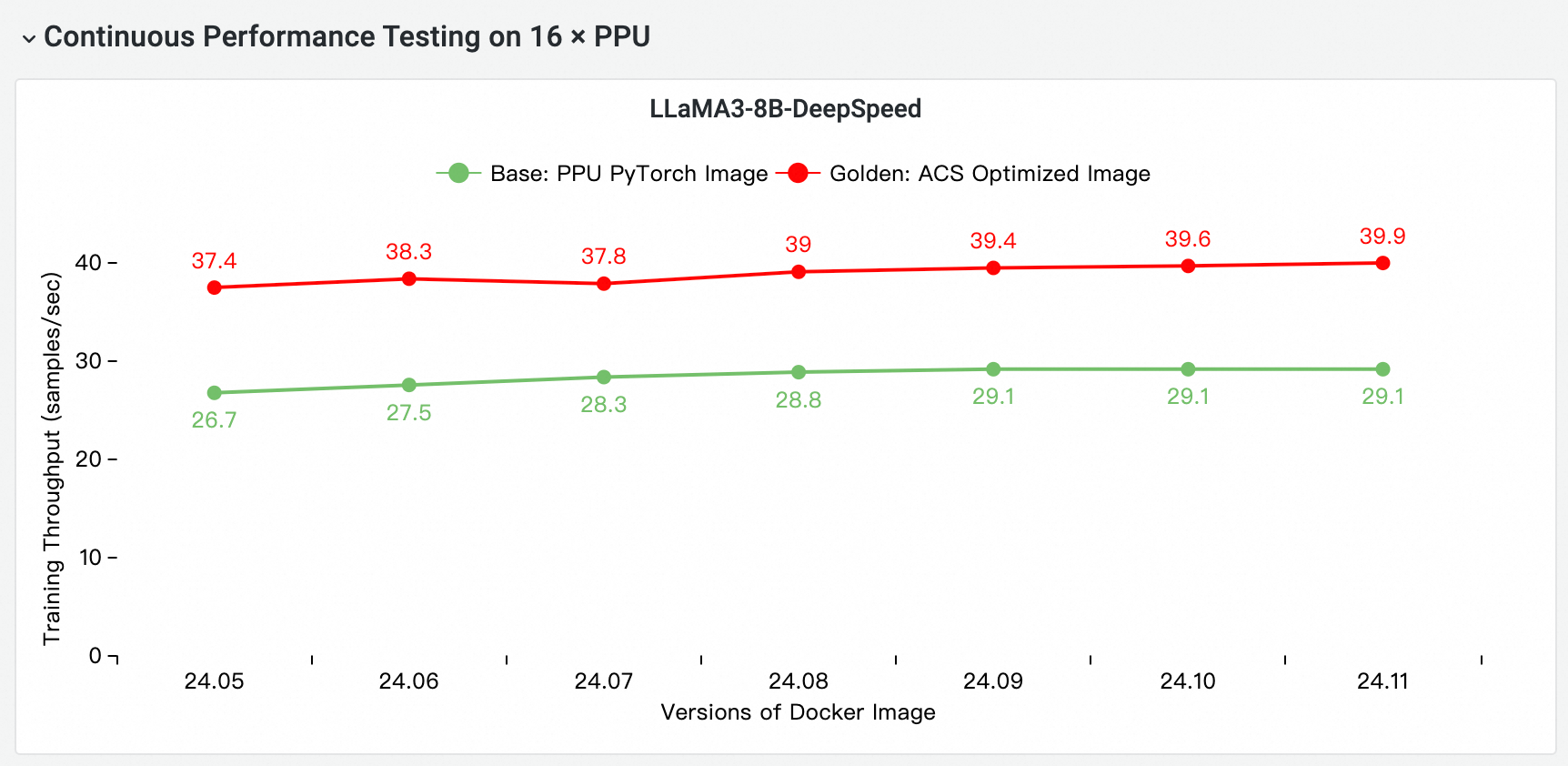
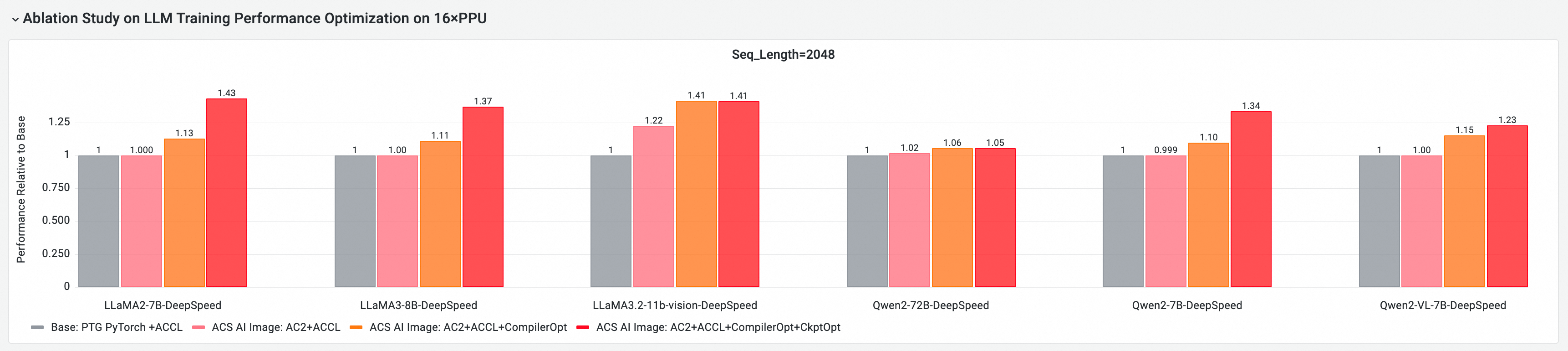
Using CNP, a cloud-native AI performance analysis tool, we conducted a comprehensive end-to-end performance comparison against the standard base image with mainstream open-source models and framework configurations. We also performed ablation studies to evaluate the contribution of each optimization component to the overall model training performance.
Image comparison: Base vs. iterative releases
Core component end-to-end performance contribution
The following tests are based on version 24.11 and evaluate the end-to-end performance on multi-node GPU/PPU clusters. The comparison items include:
Base: The standard PPU PyTorch image.
ACS AI Image (Base + ACCL): The base image with the ACCL communication library.
ACS AI Image (AC2 + ACCL): The golden image on AC2 BaseOS, with no optimizations enabled.
ACS AI Image (AC2 + ACCL + CompilerOpt): The golden image on AC2 BaseOS, with only the
torch.compileoptimization enabled.ACS AI Image (AC2 + ACCL + CompilerOpt + CkptOpt): The golden image on AC2 BaseOS, with both
torch.compileand selective activation checkpointing optimizations enabled.
The following tests are based on version 24.11 and evaluate the end-to-end training performance for the VLM model LLaMA3.2-11b-vision on a two-node PPU cluster. The comparison items include:
Base: The standard PPU PyTorch image.
ACS AI Image (Base + ACCL): The base image with the ACCL communication library.
ACS AI Image (AC2 + ACCL + Transformer): The golden image on AC2 BaseOS, using the VLM-optimized Transformer.
ACS AI Image (AC2 + ACCL + CompilerOpt): The golden image on AC2 BaseOS (with the VLM-optimized Transformer), with only the
torch.compileoptimization enabled.ACS AI Image (AC2 + ACCL + CompilerOpt + CkptOpt): The golden image on AC2 BaseOS (with the VLM-optimized Transformer), with both
torch.compileand selective activation checkpointing optimizations enabled.

Quick start
The following examples show how to pull the training-xpu-pytorch image by using Docker.
To use the training-xpu-pytorch image in ACS, select it from the Artifacts Center page when you create a workload in the console, or specify the image reference in a YAML file.
Step 1: Log in to the registry
docker login egslingjun-registry.cn-wulanchabu.cr.aliyuncs.comStep 2: Enable optimizations
Enable compilation optimization
Use the Transformers Trainer API:

Enable memory optimization with activation checkpointing
export CHECKPOINT_OPTIMIZATION=true
Step 3: Start the container
The image includes a built-in model training tool, ljperf. The following steps describe how to start the container and run a training task by using this tool.
For Alibaba Cloud services, use a YAML file to reference the image.
LLM workloads
# Start the container and go to the command line
docker run --rm -it --ipc=host --net=host  --privileged egslingjun-registry.cn-wulanchabu.cr.aliyuncs.com/egslingjun/training-xpu-pytorch:[tag]

# Run a training demo
ljperf benchmark --model deepspeed/llama3-8b
Step 4: Usage recommendations
The image contains modifications to libraries such as PyTorch and DeepSpeed that will be upstreamed. Do not reinstall these libraries.
In your DeepSpeed configuration, leave
zero_optimization.stage3_prefetch_bucket_sizeempty or set it toauto.
Known issues
The PPU-compatible cuDNN version does not support the FMA feature. As a result, the PPU-compatible TransformerEngine cannot use FusedAttention (cuDNN). We recommend using FlashAttention instead by setting the following environment variables:
export NVTE_FLASH_ATTN=1 && export NVTE_FUSED_ATTN=0.