Integrate the HTTPDNS SDK for iOS
Overview
Integrate the HTTPDNS SDK into your iOS project and configure domain name resolution.
-
CocoaPods is recommended for dependency management.
-
Requires
iOS Deployment Target 10.0or later. -
The SDK is packaged as a static library.
-
Supports
x86_64andarm64for simulators, andarm64for physical devices.
Prerequisites
-
HTTPDNS is activated and target domain names are added to the domain name list per the Product usage flow.
Step 1: Add the SDK to your application
Add the SDK using CocoaPods or local dependencies.
1. Add dependencies using CocoaPods (recommended)
1.1 Specify the Master and Alibaba Cloud repositories
The HTTPDNS SDK and other EMAS SDKs are published to the Alibaba Cloud EMAS GitHub repository. Add the repository address to your Podfile.
source 'https://github.com/CocoaPods/Specs.git'
source 'https://github.com/aliyun/aliyun-specs.git'
1.2 Add dependencies
Add the following dependency to the target that requires HTTPDNS.
use_framework!

pod 'AlicloudHTTPDNS', 'x.x.x'Replace the version number with the latest version from the release notes.
1.3 Install dependencies
In your terminal, navigate to the Podfile directory and run the following command.
pod install --repo-updateAfter installation, reopen the project using the .xcworkspace file.
2. Manually add local dependencies
2.1 Download the dependency file
Download the iOS version of HTTPDNS from the EMAS SDK list and extract the xcframework file.

Starting from version 3.2.0, the HTTPDNS SDK for iOS no longer depends on AlicloudUtils or UTDID, simplifying integration and reducing potential conflicts.
2.2 Add the xcframework file to the project
In Finder, drag the xcframework file to your target and select Copy items if needed.
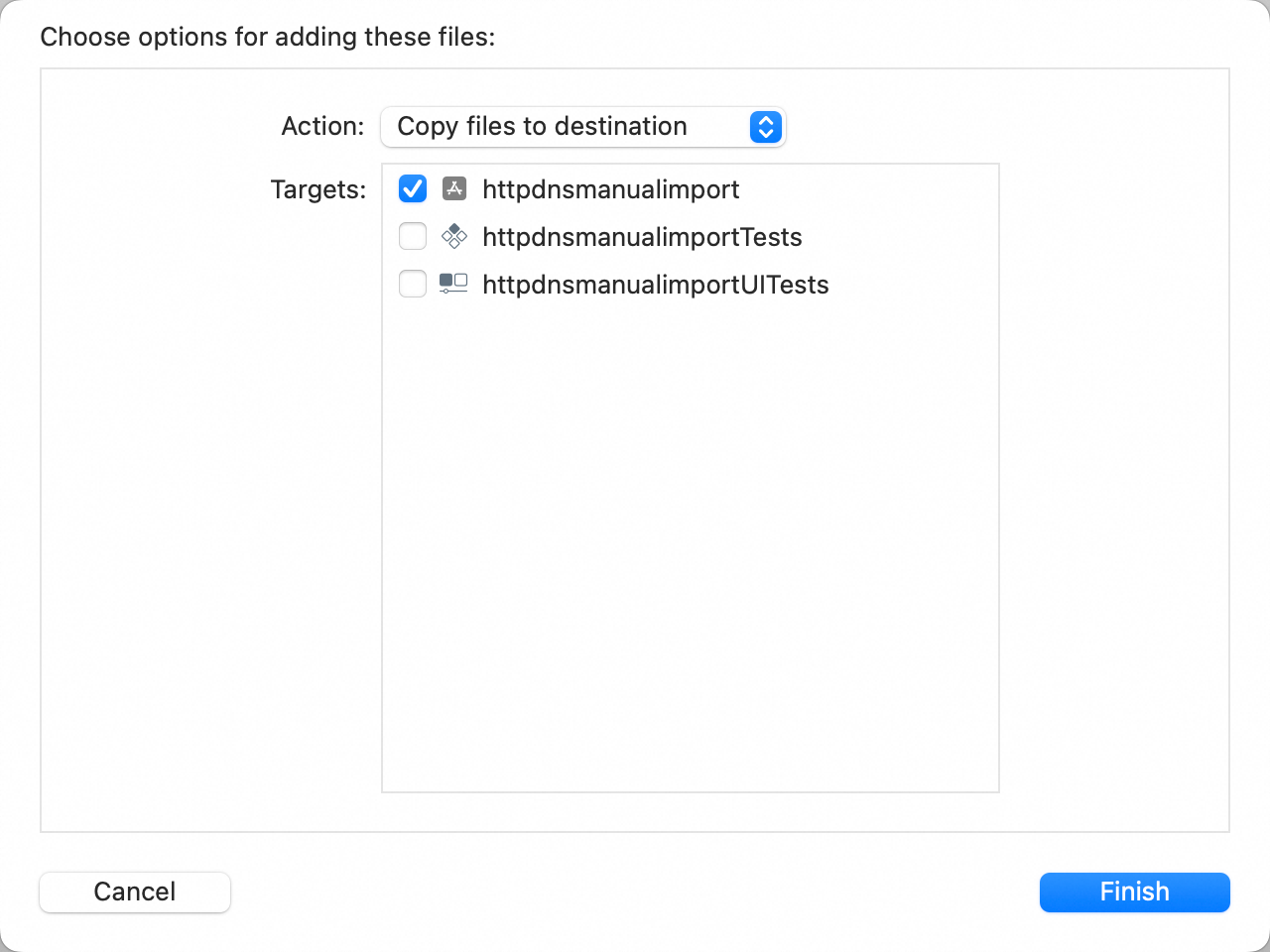
2.3 Add system library dependencies
Go to Build Phases > Link Binary With Libraries and add the following dependencies.
libsqlite3.0.tbd
libresolv.tbd
CoreTelephony.framework
SystemConfiguration.framework
Expected result:
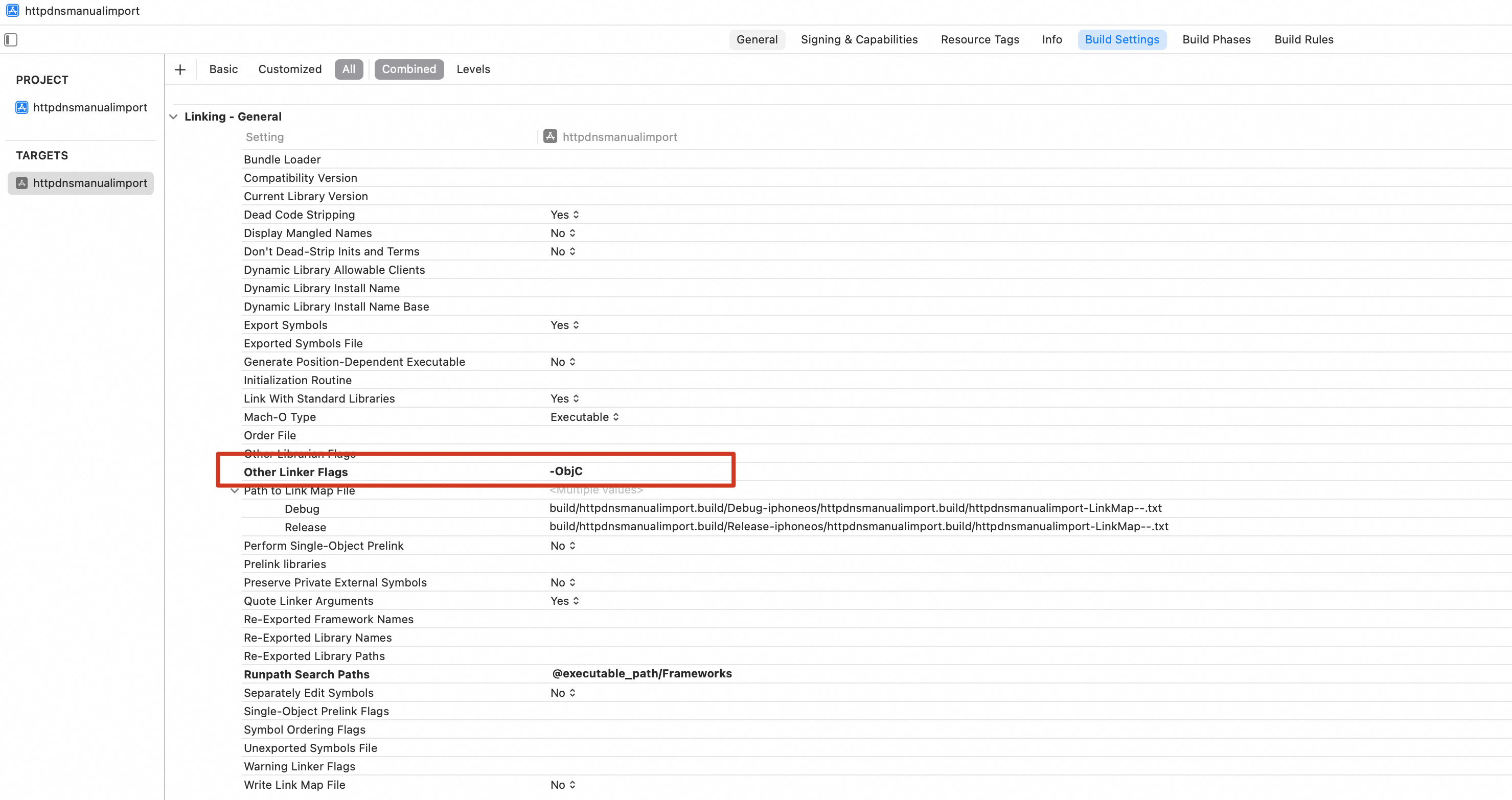
2.4 Configure Objective-C
Configure the -ObjC linker flag. Go to TARGETS > Build Settings > Linking > Other Linker Flags and add -ObjC.
Step 2: Use the SDK
1. Import the header file
Import the header file in source files that use HTTPDNS.
#import <AlicloudHttpDNS/AlicloudHttpDNS.h>import AlicloudHttpDNS2. Create and configure an HTTPDNS instance
Initialize a global HTTPDNS instance in -[AppDelegate application:didFinishLaunchingWithOptions:].
- (BOOL)application:(UIApplication *)application didFinishLaunchingWithOptions:(NSDictionary *)launchOptions {
    // Override point for customization after application launch.

    // Create a global instance using the AccountId assigned in the Alibaba Cloud HTTPDNS console.
    // The instance needs to be initialized only once globally. Obtain the authentication key from the console and configure the secretKey during initialization.
    HttpDnsService *httpdns = [[HttpDnsService alloc] initWithAccountID:<Your AccountId> secretKey:@"<Your SecretKey>"];

    // Enable logging for debugging and troubleshooting.
    [httpdns setLogEnabled:NO];

    // Specify whether to use HTTPS for domain name resolution requests.
    [httpdns setHTTPSRequestEnabled:YES];

    // Set the startup node. Select a startup node based on your scenario.
    [httpdns setRegion:ALICLOUD_HTTPDNS_DEFAULT_REGION_KEY];

    // Enable persistent cache so that the app can reuse the IP addresses cached locally from the last active session. This speeds up the retrieval of domain name resolution results after the app starts.
    [httpdns setPersistentCacheIPEnabled:YES];

    // Allow the use of expired IP addresses. You can enable this feature to improve resolution efficiency if the IP configuration of the domain name is stable.
    [httpdns setReuseExpiredIPEnabled:YES];

    // Set the timeout period for underlying HTTPDNS network requests. Unit: seconds.
    [httpdns setNetworkingTimeoutInterval:2];

    return YES;
}func application(_ application: UIApplication, didFinishLaunchingWithOptions launchOptions: [UIApplication.LaunchOptionsKey: Any]?) -> Bool {
// Override point for customization after application launch.
// Create a global instance using the AccountId assigned in the Alibaba Cloud HTTPDNS console.
// The instance needs to be initialized only once globally. Obtain the authentication key from the console and configure the secretKey during initialization.
let httpdns = HttpDnsService(accountID: <Your AccountId>, secretKey: "<Your SecretKey>")
// Enable logging for debugging and troubleshooting.
httpdns.setLogEnabled(false)
// Specify whether to use HTTPS for domain name resolution requests.
httpdns.setHTTPSRequestEnabled(true)
// Set the startup service node. Select a startup node based on your scenario.
httpdns.setRegion(ALICLOUD_HTTPDNS_DEFAULT_REGION_KEY)
// Enable persistent cache so that the app can reuse the IP addresses cached locally from the last active session. This speeds up the retrieval of domain name resolution results after the app starts.
httpdns.setPersistentCacheIPEnabled(true)
// Allow the use of expired IP addresses. You can enable this feature to improve resolution efficiency if the IP configuration of the domain name is stable.
httpdns.setReuseExpiredIPEnabled(true)
// Specify whether to support IPv6 address resolution. Only when this switch is turned on can the resolution interface resolve and return the IPv6 address of the domain name.
httpdns.setIPv6Enabled(true)
return true
}-
Enable
setPersistentCacheIPEnabled:YESandsetReuseExpiredIPEnabled:YESto implement optimistic DNS caching. This stores resolution results locally and reuses expired IPs, so most resolutions complete without network calls. Recommended for domain names with stable IP configurations. Configure through the Enable persistent cache and Allow the use of expired IP addresses interfaces. -
If you set the setHTTPSRequestEnabled parameter to `true`, your costs will increase. Pricing is covered in the Product Billing.
-
To encrypt domain name or SDNS parameters, set `aesSecretKey` through the initialization interface. After you enable content encryption, your costs will increase. Pricing is covered in the Product Billing.
-
Use the pre-resolution interface to pre-resolve domain names. This increases the DNS cache hit rate, returning most resolutions from local cache. Pre-resolution increases request volume, so enable it only for core business domain names or frequently accessed domain names to balance performance and cost.
-
By default,
setRegionuses Chinese mainland service nodes. For HTTPDNS outside China, set the startup service node explicitly. Set the region node.
3. Obtain the service instance
Retrieve the global HTTPDNS service instance as follows.
HttpDnsService *httpdns = [HttpDnsService sharedInstance];let httpdns = HttpDnsService.sharedInstance()4. Resolve a domain name
HTTPDNS supports pre-resolution, synchronous, asynchronous, and synchronous non-blocking resolution. The following example uses synchronous non-blocking resolution.
HttpDnsService *httpdns = [HttpDnsService sharedInstance];
HttpdnsResult *result = [httpdns resolveHostSyncNonBlocking:@"www.aliyun.com" byIpType:HttpdnsQueryIPTypeAuto];
if (result) {
    // Use the domain name resolution result.
} else {
    // The synchronous non-blocking interface immediately returns null if no valid resolution result is found in the cache to ensure the fastest resolution speed. A new resolution request is initiated in the background.
    // Therefore, you must prepare to fall back to LocalDNS resolution or pass the full domain name directly to the network library.
    // You can use a synchronous interface or a callback-based interface to ensure that you obtain the HTTPDNS resolution result.
}let httpdns = HttpDnsService.sharedInstance()
if let result = httpdns.resolveHostSyncNonBlocking("www.aliyun.com", by: HttpdnsQueryIPType.auto) {
// Use the domain name resolution result.
} else {
// The synchronous non-blocking interface immediately returns null if no valid resolution result is found in the cache to ensure the fastest resolution speed. A new resolution request is initiated in the background.
// Therefore, you must prepare to fall back to LocalDNS resolution or pass the full domain name directly to the network library.
// You can use a synchronous interface or a callback-based interface to ensure that you obtain the HTTPDNS resolution result.
}Choose a resolution method based on your use case.
-
If the result is always
nil, verify that the domain name is added in the HTTPDNS console. -
When the result is
nildue to network exceptions, fall back toLocalDNSresolution.
5. Use the domain name resolution result
The resolution result varies depending on network and configuration:
-
Empty result — returned by the synchronous non-blocking interface when no cache exists, or during network exceptions.
-
IPv4 only — returned in IPv4 single-stack networks or when only an IPv4 address is configured.
-
IPv6 only — returned when IPv6 is enabled and IPv6 resolution is specified. Uncommon given current IPv6 adoption rates.
-
Both IPv4 and IPv6 — returned in dual-stack environments when both address types are configured and dual-stack or auto detection is enabled.
In this example, IPv6 resolution is enabled, and the requested IP type is set to Both. If both IPv4 and IPv6 addresses are configured, the result includes both. To prioritize IPv4, process the result as follows.
HttpDnsService *httpdns = [HttpDnsService sharedInstance];
HttpdnsResult *result = [httpdns resolveHostSyncNonBlocking:@"www.aliyun.com" byIpType:HttpdnsQueryIPTypeAuto];
if (!result) {
    // No valid IP address. Fall back to the default logic.
}

if (result.hasIpv4Address) {
    NSString *ip = result.firstIpv4Address;
    // Use the IP address.

    NSArray<NSString *> *ips = result.ips;
    // Use the IP address list.
} else if (result.hasIpv6Address) {
    NSString *ip = result.firstIpv6Address;
    // Use the IP address.

    NSArray<NSString *> *ips = result.ipv6s;
    // Use the IP address list.
} else {
    // No valid IP address. Fall back to the default logic.
}let httpdns = HttpDnsService.sharedInstance()
if let result = httpdns.resolveHostSyncNonBlocking("www.aliyun.com", by: HttpdnsQueryIPType.auto) {
if (result.hasIpv4Address()) {
let ip = result.firstIpv4Address()
// Use the IP address.
let ipList = result.ips
// Use the IP address list.
} else if (result.hasIpv6Address()) {
let ip = result.firstIpv6Address()
// Use the IP address.
let ipList = result.ipv6s
// Use the IP address list.
} else {
// No valid IP address. Fall back to the default logic.
}
} else {
// No valid IP address. Fall back to the default logic.
}Sample code
Sample integration project: HTTPDNS iOS Demo.
Notes
-
Write fallback code
When HTTPDNS fails to return a result, fall back to LocalDNS by passing the original domain name to the network library for standard DNS resolution.
-
Record the IP address and sessionId retrieved from HTTPDNS
Record the IP address and sessionId from HTTPDNS in your logs for troubleshooting. How to use the session tracing solution to troubleshoot resolution exceptions.
-
Set the HOST field in the HTTP request header
When you replace the domain name in the URL with an IP from HTTPDNS, the network library sets the `HOST` header to the IP address. The server expects a domain name in `HOST`, causing parsing errors.
To fix this, explicitly set the `HOST` header in the HTTP request:
- (void)sampleRequestUsingHttpdns { HttpDnsService *httpdns = [HttpDnsService sharedInstance]; NSString *originalUrlStr = @"http://www.aliyun.com/"; NSURL* url = [NSURL URLWithString:originalUrlStr]; // Obtain the IP address using the synchronous interface. HttpdnsResult* result = [httpdns resolveHostSyncNonBlocking:url.host byIpType:HttpdnsQueryIPTypeAuto]; NSLog(@"resolve result: %@", result); NSString *validIp = nil; if (result) { if (result.hasIpv4Address) { validIp = result.firstIpv4Address; } } NSMutableURLRequest *request; if (validIp) { // The IP address is obtained from HTTPDNS. Replace the URL and set the Host header. NSRange hostFirstRange = [originalUrlStr rangeOfString:url.host]; NSString* newUrl = [originalUrlStr stringByReplacingCharactersInRange:hostFirstRange withString:validIp]; request = [[NSMutableURLRequest alloc] initWithURL:[NSURL URLWithString:newUrl]]; // Set the HOST field of the request. [request setValue:url.host forHTTPHeaderField:@"host"]; } else { // This shows how to handle the fallback. // The IP address cannot be obtained from HTTPDNS. Use the original URL to make the network request. request = [[NSMutableURLRequest alloc] initWithURL:url]; } // Send the request. NSURLSession *session = [NSURLSession sharedSession]; NSURLSessionDataTask *task = [session dataTaskWithRequest:request completionHandler:^(NSData * _Nullable data, NSURLResponse * _Nullable response, NSError * _Nullable error) { if (error) { NSLog(@"error: %@", error); } else { NSLog(@"response: %@", response); } }]; [task resume]; }func sampleRequestUsingHttpdns() { let httpdns = HttpDnsService.sharedInstance() let originalUrlStr = "http://www.aliyun.com/" let url = URL(string: originalUrlStr)! // Obtain the IP address using the synchronous interface. let result = httpdns.resolveHostSyncNonBlocking(url.host!, by: HttpdnsQueryIPType.auto) print("resolve result: \(result?.description ?? "")") var validIp: String? if let result = result { if result.hasIpv4Address() { validIp = result.firstIpv4Address() } } var request: URLRequest if let validIp = validIp { // The IP address is obtained from HTTPDNS. Replace the URL and set the Host header. let hostFirstRange = originalUrlStr.firstRange(of: url.host!)! let newUrl = originalUrlStr.replacingCharacters(in: hostFirstRange, with: validIp) request = URLRequest(url: URL(string: newUrl)!) // Set the HOST field of the request. request.setValue(url.host!, forHTTPHeaderField: "host") } else { // This shows how to handle the fallback. // The IP address cannot be obtained from HTTPDNS. Use the original URL to make the network request. request = URLRequest(url: url) } // Send the request. let session = URLSession.shared let task = session.dataTask(with: request) { (data, response, error) in if let error = error { print("error: \(error)") } else { print("response: \(response?.description ?? "")") } } task.resume() }ImportantNote the following about this example:
-
This example covers only successful resolution without fallback logic.
-
This example uses HTTP. Configure
NSAllowsArbitraryLoadsinInfo.plistto allow access. -
For HTTPS, follow the HTTPS scenario guidance below.
-
-
Cookie field
Some network libraries store the IP address from the URL as the cookie domain instead of the `HOST` header value, causing cookie management issues. Disable automatic cookie management (disabled by default).
-
HTTPS, WebView, and SNI scenarios
HTTPS scenarios: Use HTTPDNS in native scenarios on iOS.
For WebView scenarios, use Use HTTPDNS in WebView scenarios on iOS.
-
Usage with a proxy
With an HTTP proxy, the proxy uses the IP address from the request URL as the origin `HOST`, causing the server to reject the request. Mobile Gateway provides the
X-Online-Hostproprietary protocol field to resolve this issue. For example:Destination URL: http://www.aliyun.com/product/oss/ IP address of www.aliyun.com resolved by HTTPDNS: X.X.X.X Proxy: 10.0.0.172:80 Your HTTP request header: GET http://X.X.X.X/product/oss/ HTTP/1.1 # The request line of an HTTP request initiated through a proxy is an absolute path. Host: www.aliyun.com # This header is ignored by the proxy gateway. The proxy gateway uses the host field in the absolute path of the request line as the host of the origin server, which is X.X.X.X. X-Online-Host: www.aliyun.com # This header is a private header added by Mobile Gateway to transmit the real Host. The origin server needs to be configured to recognize this private header to obtain the real Host information.Set the
X-Online-Hostheader as follows, and configure the server to parse it.[request setValue:url.host forHTTPHeaderField:@"X-Online-Host"];NoteIn most cases, detect whether a proxy is enabled on the device. If so, skip HTTPDNS and use standard DNS resolution.