Getting Started
Spring Cloud SOFA DRM provides externalized configuration support for your applications. It uses SOFA DRM (Distributed Resource Management) to provide real-time, consistent, and dynamic configuration management. This lets you dynamically refresh application configurations through the DRM service without restarting your application.
Add the Spring Cloud SOFA DRM dependency to your project:
Do not configure the version. The version is controlled by dependencyManagement.
<dependency>
     <groupId>com.alipay.cloud</groupId>
     <artifactId>spring-cloud-starter-sofa-drm</artifactId>
</dependency>
Bootstrap mode
Import the dependency.
Spring Cloud Hoxton and earlier versions load configurations in Bootstrap mode by default. For Spring Cloud 2020 and later versions, import the following dependency to use Bootstrap mode for configuration management.
<dependency>
     <groupId>com.alipay.cloud</groupId>
     <artifactId>spring-cloud-starter-bootstrap</artifactId>
</dependency>
Configure the
bootstrap.propertiesfile.For Bootstrap mode, create a
bootstrap.propertiesfile (or its YAML equivalent) in your project. Place this file in the same folder as yourapplication.properties(orapplication.yml) file and add the following content:spring.application.name={your project name} spring.cloud.sofa.instanceid={sofa middleware instance id} spring.cloud.sofa.acvip.endpoint={sofa acvip lb address} spring.cloud.sofa.mw.access={sofa middleware ak, optional} spring.cloud.sofa.mw.secret={sofa middleware sk, optional}For more information about these configurations, see Add common configurations. If you enable Bootstrap dynamic configuration and add these settings to the
bootstrap.propertiesfile, do not add them again to theapplication.propertiesfile.Add the RefreshScope annotation.
In your project, use the Spring Cloud programming model and add the RefreshScope annotation to the beans that require dynamic configuration changes.
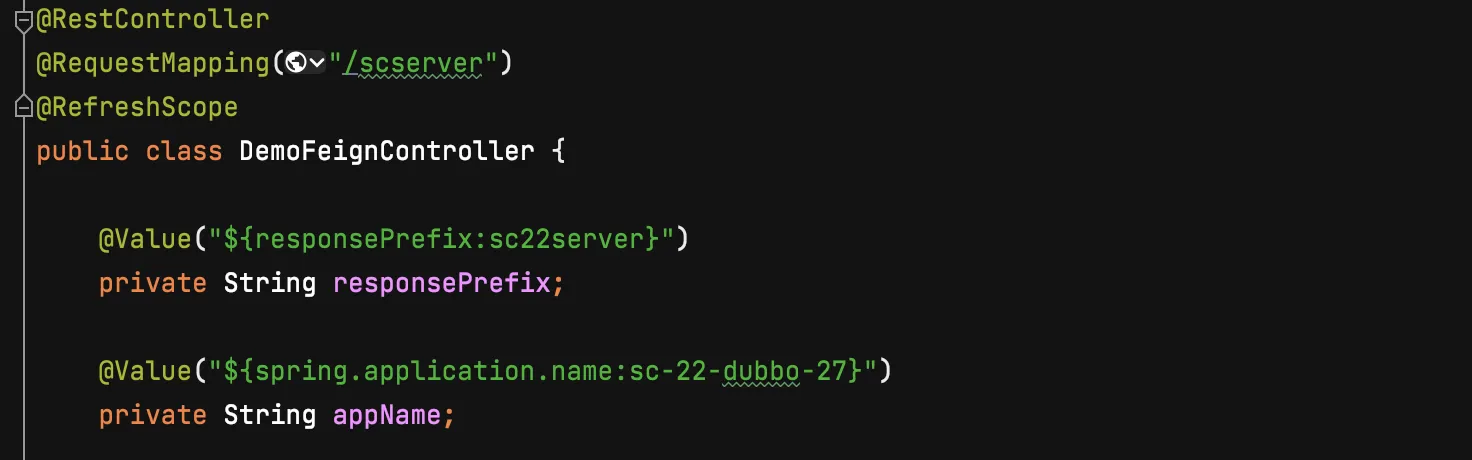
Add a dynamic configuration.
After you complete the setup, add a dynamic configuration in the microservice console. For more information, see Add a dynamic configuration.
Push the dynamic configuration.
For more information about how to push a dynamic configuration, see Push a dynamic configuration. In the Push Value text box, enter the configuration in the
propertiesformat. Click Push Configuration to modify the application configuration.The @Value properties in beans that have the RefreshScope annotation are automatically updated.
Config Data mode
Configure the
application.ymlfile.In Spring Cloud 2020 and later versions, Config Data mode is used by default to load configurations. This mode is enabled automatically if the project does not reference
spring-cloud-starter-bootstrap. In this mode, you do not need an additionalbootstrap.propertiesfile. You only need to configure Spring inapplication.yml(or in the properties format). The following example uses the YAML format:spring: application: name: {your project name} config: import: "drm:"You must also add the common configurations for Alibaba Finance Cloud middleware. For more information, see Add common configurations.
Add the RefreshScope and Value annotations to the properties that require dynamic configuration in the application.
This step is identical to the one in Bootstrap mode.
Add a dynamic configuration.
NoteThe class identity configured in this mode is different from the one in Bootstrap mode. It does not include the properties suffix. For more information about the configuration, see Configuration description.
Push the configuration.
The process is the same as in Bootstrap mode. Create a new configuration property and set its value using the properties format.