Video Codec/Image使用指南 (v1.4.1)
1. Overview
The PPU is compatible with NVIDIA's hardware acceleration libraries for video and image codecs, pre-processing, and post-processing. These libraries include:
Video Codec SDK: Provides hardware acceleration for cuvid decode and nv encode. Current version: 12.2.
nvJPEG: Provides hardware acceleration for JPEG decoding and encoding. Current version: 12.3.
NPP: Provides hardware acceleration for 2D image post-processing. Current version: 11.6.
2. Ecosystem
The following applications and frameworks can easily use hardware acceleration.
FFmpeg: Compile FFmpeg with cuvid, nvenc, and libnpp enabled to support hardware acceleration. When performing video encoding, decoding, or transcoding, you can specify cuvid, nvenc, or NPP filters. FFmpeg is widely used, and most applications for video encoding or decoding depend on it, including PyAV (the backend for torchvision).
DALI: An accelerated, parallel data loader framework from NVIDIA. It supports hardware acceleration for JPEG and video codecs.
In addition to these popular frameworks, you can use the following libraries to directly access codec and JPEG interfaces:
nvImageCodec: An NVIDIA wrapper library that reads various types of image resources and converts them into tensor data. It also supports hardware-accelerated JPEG encoding and provides a Python interface.
Official Website: https://docs.nvidia.com/cuda/nvimagecodec/
Source Code: https://github.com/NVIDIA/nvImageCodec
VPF: A Video Processing Framework (VPF) wrapper library from NVIDIA. It encapsulates the capabilities of the Video Codec SDK and provides a Python interface.
3. Compile and run
Video Codec SDK
The PPU is compatible with the NVIDIA Video Codec SDK. Official Website: https://developer.nvidia.com/nvidia-video-codec-sdk/download
We recommend downloading a version of the Video Codec SDK that is compatible with the CUDA version of the PPU SDK. The known version compatibilities are as follows:
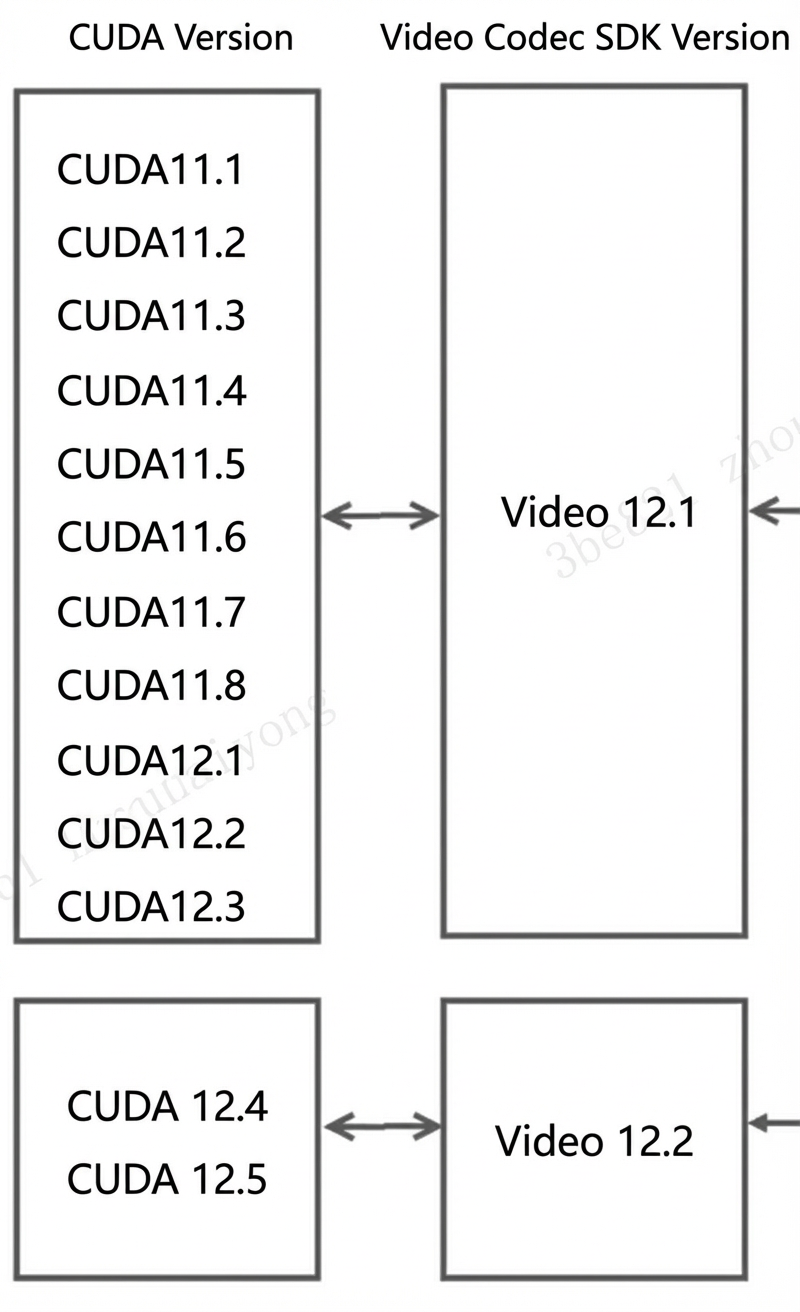
Prerequisites
Because the PPU does not support OpenGL or Vulkan, you must modify the
Samples/CMakeLists.txtfile before compiling. Remove the unsupported projects and keep only the commonly used codec projects:# Keep the following and comment out the others. add_subdirectory(AppEncode/AppEncCuda) add_subdirectory(AppEncode/AppEncPerf) add_subdirectory(AppEncode/AppEncMultiInstance) add_subdirectory(AppEncode/AppEncDec) add_subdirectory(AppTranscode/AppTrans) add_subdirectory(AppTranscode/AppTransPerf) add_subdirectory(AppDecode/AppDec) add_subdirectory(AppDecode/AppDecMultiFiles) add_subdirectory(AppDecode/AppDecPerf)The Video Codec SDK depends on FFmpeg for demuxing capabilities, so you must first install FFmpeg. Although the SDK only requires demuxing capabilities and does not necessarily require a hardware-accelerated version of FFmpeg, we recommend that you compile and install FFmpeg with hardware acceleration support to prevent potential conflicts (see the Video FFMPEG User Guide).
If FFmpeg is installed in the
FFMPEG_PATHdirectory, runpkg-config --modversion libavcodecto display the version number. If the version number is not displayed, runexport PKG_CONFIG_PATH=$FFMPEG_PATH/lib/pkgconfig:$PKG_CONFIG_PATH, and then run thepkg-configcommand again.NoteIf you do not specify a directory during compilation, the default is /usr/local. Otherwise, the content of FFmpeg's
include,lib, andbindirectories is copied to$FFMPEG_PATH/include,$FFMPEG_PATH/lib, and$FFMPEG_PATH/binrespectively.Specify
CUDA_PATH.export CMAKE_LIBRARY_PATH=${CUDA_HOME}/lib64Here,
CUDA_HOMEpoints to theCUDA_SDKdirectory within the PPU SDK directory.If the version of the downloaded Video Codec SDK is incompatible with the CUDA version specified in the PPU SDK, a compilation error may occur. To resolve this, run the following command:
cp Interface/* ${CUDA_HOME}/includeHere,
Interfacerefers to theInterfacedirectory within the downloaded Video Codec SDK.
Compile
cd Samples  # Sample folder of the video-codec-sdk download path
mkdir build
cd build
cmake ..
make
Run
# To decode, run 12 threads simultaneously to maximize performance.
./AppDecode/AppDecPerf/AppDecPerf -thread 12 -i test_1920x1080_yuv420p_50fps_h264.mp4

# To encode, run 4 threads simultaneously to maximize performance.
./AppEncode/AppEncPerf/AppEncPerf -i crowd_run_1920x1088_nv12_8bit_50.0fps_n500.yuv -s 1920x1088 -if nv12 -fps 30 -preset p4 -gop 60 -rc cbr -bitrate 10000000 -codec h265 -thread 4The PPU has 12 video decode cores, so theoretically, 12 threads can achieve optimal performance. Adding more threads provides minimal performance improvement. Optimal performance is achieved with up to seven PPU processes, and using more provides no additional benefit. The PPU has 4 video encode cores, so theoretically, 4 threads can achieve optimal performance.
nvJPEG
The PPU SDK is fully compatible with nvJPEG. You can test JPEG functionality directly using the nvJPEG samples. Official website: https://developer.nvidia.com/nvjpeg
nvJPEG samples: https://github.com/NVIDIA/CUDALibrarySamples/tree/master/nvJPEG/
Compile
The decoding and encoding samples are in the nvJPEG-Decoder and nvJPEG-Encoder directories, respectively.
$ mkdir build
$ cd build
$ cmake ..
$ make
Run
# Decode. Assume the JPEG dataset is in the 1080p directory and the batch size is 128.
./nvjpegDecoder -i 1080p/ -b 128

# Encode (the sample decodes first and then encodes).
./nvJPEG_encoder -i input.jpg  -o output.jpg
Note:
The PPU has 4 JPEG encode cores, so theoretically, 4 threads can achieve optimal performance. It has 8 JPEG decode cores, and batch mode automatically enables 8 internal threads to achieve optimal performance.
4. Specifications
Video decoding
Supports the cuvid decoder.
Codecs:
HEVC (H.265) - ITU-T Rec. H.265 (04/2013), ISO/IEC 23008-2
Main Profile, Level 5.1, High Tier
Main10 Profile, Level 5.1, High Tier
Main Still Profile
VP9 - vp9-bitstream-specification-v0.6-20160331-draft
Profile 0, 8-bit
Profile 2, 10-bit
AVC (H.264) - ITU-T Rec. H.264 (03/2010) / ISO/IEC 14496-10
Main Profile, levels 1 - 5.2
High Profile, levels 1 - 5.2
High 10 Profile, levels 1 - 5.2
Baseline Profile, levels 1 - 5.2
AV1 Bitstream & Decoding Process Specification Version 1.0.0 with Errata 1
Main Profile, Level 5.1
AVS2
Supports resolutions up to 8192x8192
Supports up to 192 FHD streams
Video encoding
Supports nvenc
Codecs:
AVC(H.264): Spec Version 12:ISO/IEC 14496-10 / ITU-T Rec. H.264 (03/2010)
Baseline Profile, levels 1 – 5.2
Main Profile, levels 1 - 5.2
High Profile, levels 1 – 5.2
High 10 Profile, levels 1 - 5.2
HEVC(H.265): ITU-T Rec. H.265 (04/2013), ISO/IEC 23008-2
Main Profile, Level 5.1, High Tier
Main10 profile, Level 5.1, High Tier
Main Still Profile
AV1 Bitstream Specification Version 1.0.0 with Errata 1
Main Profile, Level 5.1
Supports resolutions up to 4K
Supports RGB input format (converted to YUV420 via inlinePP)
Supports crop, scale, and rotate operations with inlinePP
Supports up to 32 FHD streams
JPEG
Supports the nvJPEG decoder and encoder
Supports resolutions up to 32Kx32K
Supports RGB format input and output with inlinePP
Supports crop, scale, and rotate operations with inlinePP
Up to 960 FPS at UHD resolution
Image processing
Supports NVIDIA's 2D Image NPP.
5. Known issues
Video decoding
Only cuvid decode mode is supported; raw nvdec mode is not. Although both modes provide hardware acceleration, cuvid decode is simpler to use.
Legacy formats such as MPEG-1, MPEG-2, MPEG-4, VC-1, and VP8 are not supported.
Video encoding
YUV444 12-bit is not supported.
JPEG
Lossless JPEG is not supported.
JPEG 2000 is not supported.
2D image
NPP supports the Image Process interface but not the Signal Process interface.