PPU runtime environment check
Asight Systems provides a PPU runtime environment check. Use the following command:
asys status [--ppu-env] [app] [app args]
This command supports two check modes: static environment check and runtime environment check.
1. Static environment check
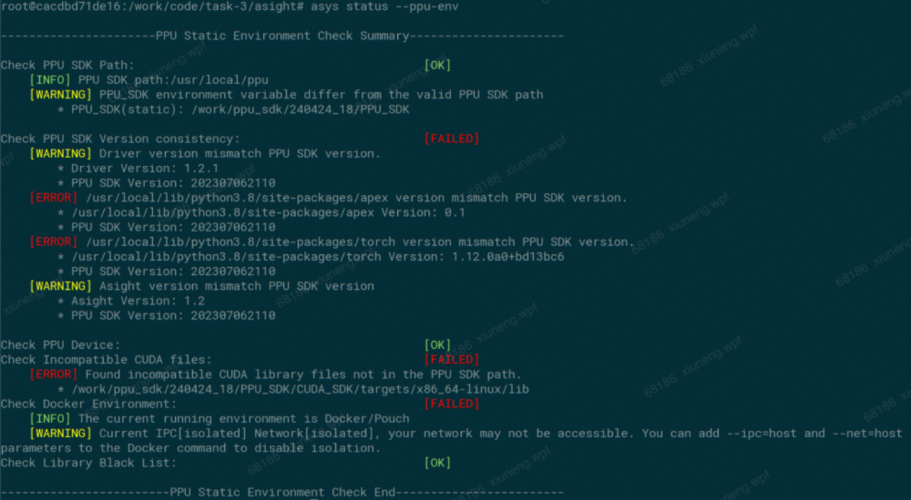
asys status --ppu-envThe static environment check does not require a target application and can be run independently. It only checks the execution environment of the asys status command.
The output is similar to the following:
2. Runtime environment check
asys status --ppu-env <app> <app args>
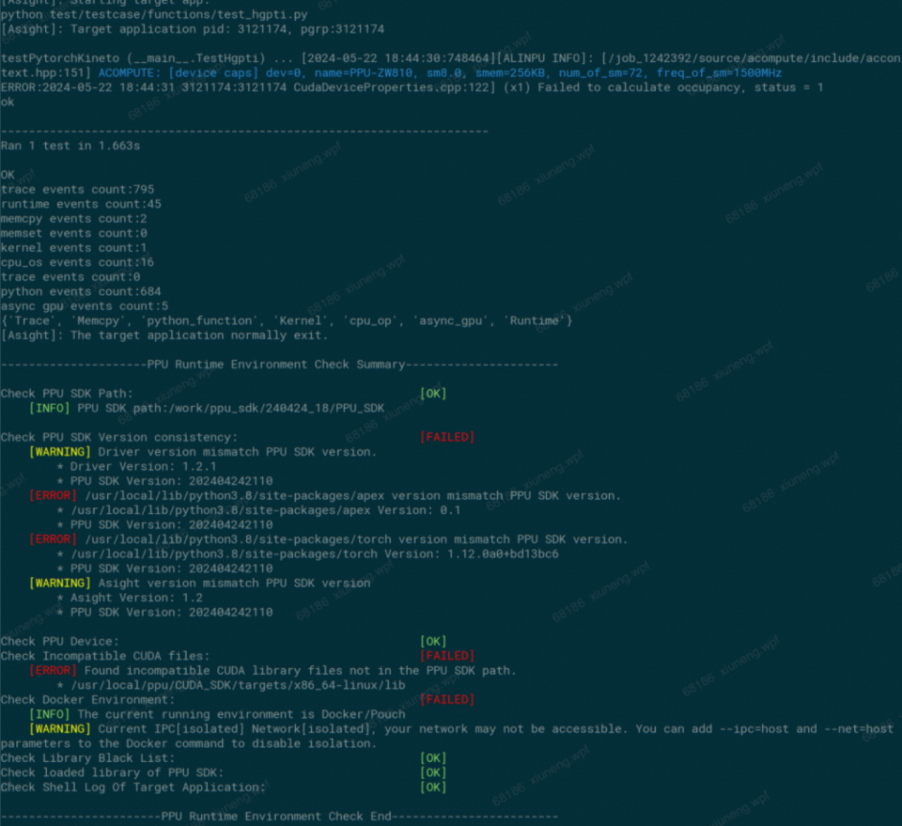
The runtime environment check requires you to specify a target application. The asys status command launches the target application and injects a check library into its process to collect environment information. This allows you to identify runtime anomalies in PPU programs caused by the target application modifying the PPU environment during execution, for example, a model program launched by a shell script.
The output of a runtime environment check is similar to the following:
3. Check categories
The PPU environment check tool includes eight check categories:
PPU SDK validity and path check (static and runtime).
PPU SDK software stack version match check (static and runtime).
PPU device validity check (static and runtime).
CUDA residual file check (static and runtime).
Docker environment check (static and runtime).
Blacklisted library file check (static and runtime).
Validity check for PPU SDK library files loaded by the target application (runtime only).
Shell log check for the target application (runtime only).