training-xpu-pytorch 25.04, training-xpu-pytorch 25.04
This document provides the release notes for training-xpu-pytorch 25.04.
Key features and bug fixes
Main features
Upgraded the base image to include PPU SDK 1.5.0.
Upgraded ACCL-P to v1.5.0-9 and EIC to 1.3.7.1-v2504, incorporating features and bug fixes from these versions.
Upgraded PyTorch and its related components to 2.6.0.7 and Triton to 3.2.0.
Upgraded vLLM to v0.7.3+ppu1.5.0.oe with support for flashMLA, flashinfer_python to 0.2.2.post1+ppu1.5.0.oe, and transformers to 4.51.2+ali.
Upgraded accelerate to 1.6.0+ali, datasets to 3.1.0, and bitsandbytes to 0.45.3+ppu1.5.0.ce.
Bug fixes
None for this release.
Contents
Image tag | 25.04 |
Scenario | Training/inference |
Framework | PyTorch |
Requirements | PPU SDK 1.5.0 |
Core components |
|
Assets
To pull ACS AI container images over the public network, you first need to obtain Authentication for PPU AI container images. We recommend that you use Use VPC to accelerate AI container image pulling to reduce image pull time.
25.04
Public image
egslingjun-registry.cn-wulanchabu.cr.aliyuncs.com/egslingjun/training-xpu-pytorch:25.04
VPC images
acs-registry-vpc.{region-id}.cr.aliyuncs.com/egslingjun/{image:tag}
{region-id}is the ID of the region where your Container Service for Kubernetes (ACK) cluster is located, such ascn-beijingorcn-wulanchabu.{image:tag}is the actual image name and tag.
Driver requirements
Driver version >= 1.1.0
Key features and enhancements
PyTorch compiler optimization
The compilation optimization feature introduced in PyTorch 2.0 usually provides significant benefits in small-scale, single-GPU scenarios, but in LLM training, the need to incorporate memory optimization and distributed frameworks such as FSDP and Deepspeed makes it difficult for torch.compile() to provide benefits and can even cause performance degradation:
This optimization controls communication granularity within the DeepSpeed framework, allowing the compiler to capture a more complete computation graph and apply broader optimizations.
This release includes an optimized version of PyTorch with the following enhancements:
An optimized PyTorch compiler frontend that ensures successful compilation even when arbitrary graph breaks occur.
Enhanced pattern matching and dynamic shape capabilities to improve the performance of compiled code.
With these optimizations, you can typically achieve an end-to-end (E2E) throughput gain of around 20% when training an 8B LLM.
Memory optimization with gradient checkpointing
A model to predict memory overhead was built using extensive benchmark data from various models, clusters, and training configurations—along with system metrics like memory utilization. This allows the system to recommend the optimal number of activation checkpointing layers. Integrated into PyTorch and compatible with the DeepSpeed framework, this feature helps users optimize memory usage.
ACCL communication library
ACCL is a high-performance network communication library developed by Alibaba for Lingjun products. It is available in three versions: ACCL-N for NVIDIA GPUs, ACCL-P for PPUs, and ACCL-R for AMD accelerators. ACCL-N is based on NVIDIA NCCL, offering full compatibility and including bug fixes and optimizations for performance and stability. ACCL-P is a collective communication library built upon T-Head's open-source pccl. ACCL-R is built upon AMD's open-source ROCm rccl. This release ports key features from ACCL and ACCL-N to pccl, resolves known issues, and is deeply customized for integration with Alibaba Cloud's proprietary networking components.
E2E performance gains
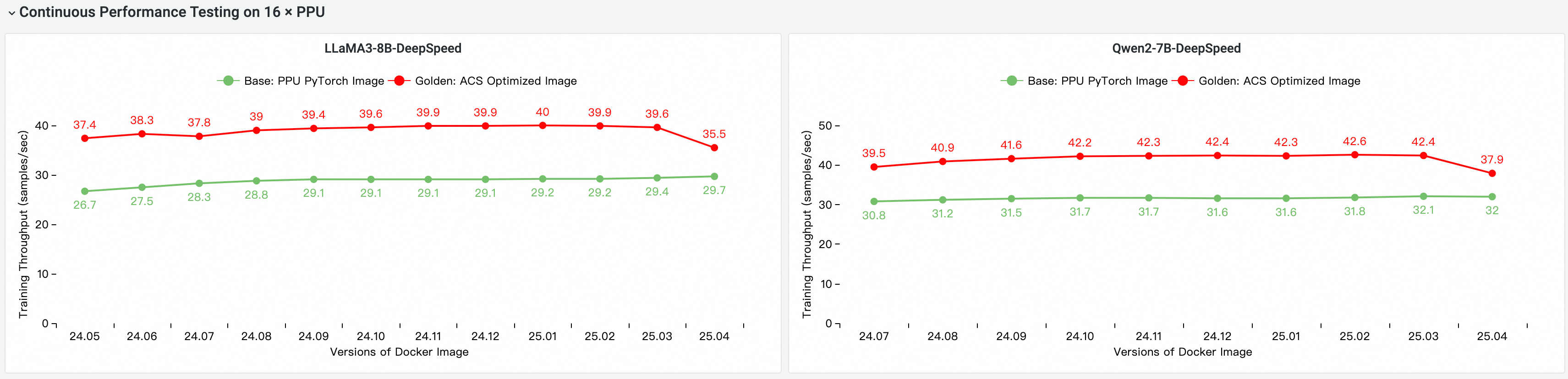
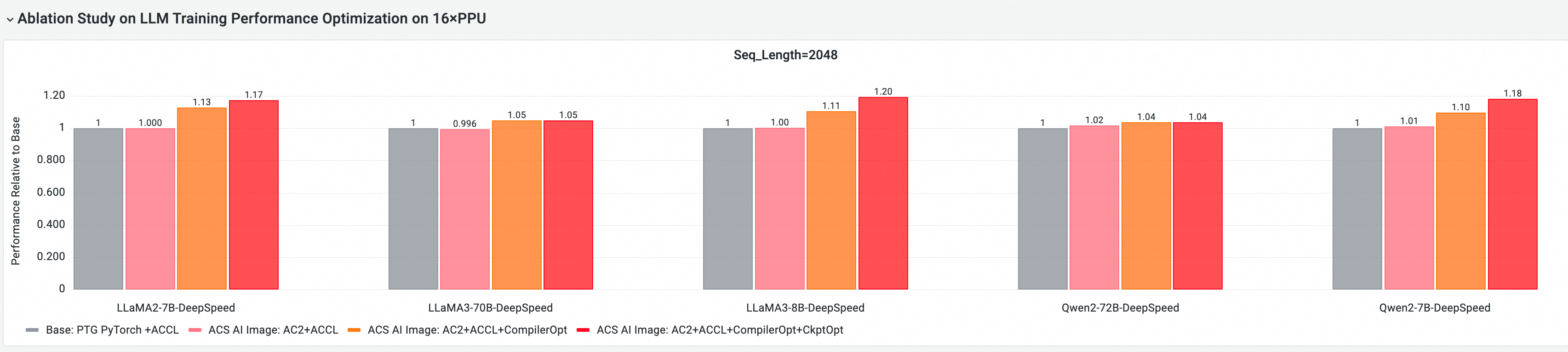
We used the CNP cloud-native AI performance analysis tool to compare the end-to-end performance of this image against the standard base image across mainstream open-source models and framework configurations. We also performed ablation studies to evaluate the performance contribution of each optimized component.
Image comparison: base image vs. iterative improvements
E2E performance contribution of PPU core components
The following tests were conducted on a multi-node PPU/GPU cluster using the Golden-25.04 image. The comparison items include:
Base: The standard PPU PyTorch image.
ACS AI Image: Base+ACCL: The base image with the ACCL communication library.
ACS AI Image: AC2+ACCL: The Golden image using AC2 BaseOS with no optimizations enabled.
ACS AI Image: AC2+ACCL+CompilerOpt: The Golden image using AC2 BaseOS with only
torch.compileoptimization enabled.ACS AI Image: AC2+ACCL+CompilerOpt+CkptOpt: The Golden image using AC2 BaseOS with both
torch.compileand selective gradient checkpointing optimizations enabled.
Quick start
The following example shows how to pull the training-xpu-pytorch image using Docker.
To use the training-xpu-pytorch image in ACS, select it from the Artifact Center page when you create a workload in the console, or specify the image reference in a YAML file.
1. Select the image
To pull ACS AI container images over the public network, you must first obtain the credentials as described in Authentication for PPU AI container images. To reduce the image pull time, we recommend using the method described in Use VPC to accelerate AI container image pulling.
docker login egslingjun-registry.cn-wulanchabu.cr.aliyuncs.com2. Enable compiler and gradient checkpointing
Enable compiler optimization
Using the transformers Trainer API:

Enable gradient checkpointing
export CHECKPOINT_OPTIMIZATION=true
3. Start the container
This topic uses the built-in model training tool ljperf to describe how to start a container and run a training task.
For ACS workloads, use a YAML file to specify the image.
LLM models
# Start and enter the container
docker run --rm -it --ipc=host --net=host  --privileged egslingjun-registry.cn-wulanchabu.cr.aliyuncs.com/egslingjun/training-xpu-pytorch:25.04

# Run the training demo
ljperf --action train --model_name deepspeed/llama3-8b
Known issues
VLLM
Quantization issues
By default, vLLM uses the Marlin kernel to accelerate inference for GPTQ, AWQ, W8A8, and WOQ quantization. You can explicitly specify a quantization method, such as
gptq_acextorawq_acext, to use other quantization kernels. However,acextdoes not currently support quantization withact_order=Trueor GPTQ-Int8 quantized weights. This limitation will be addressed in a future release.VLLM FP8 quantization depends on the SM89/90 architecture and has not been adapted or optimized for PPUs. A support plan is not yet determined.
VLLM A8W8 quantization for dense layers is implemented using the
acextlibrary, and its performance is slated for future optimization. W8A8 quantization for Mixture of Experts (MoE) is not currently supported but is planned for the next release.vLLM supports loading DPSK FP8 weights and performing W8A16 quantized inference, with performance comparable to BF16.
By default, vLLM uses vllm-flash-attn as the attention backend. Its performance on PPUs is lower than the GPU version and will be optimized in a future release.
Stability issues
When you perform multi-GPU inference with VLLM, you may encounter an error related to
mp_distributed_executor. To avoid this issue, setVLLM_WORKER_MULTIPROC_METHOD=spawn. For more information, see the GitHub issue [Bug]: When tensor_parallel_size>1, RuntimeError: Cannot re-initialize CUDA in forked subprocess. #6152.After multi-GPU inference, vLLM may randomly exit with an error. This is a known community issue. For details, see the open-source community issue [Bug]: When using tp for inference, an error occurs: Worker VllmWorkerProcess pid 3283517 died, exit code: -15. #6145.
flashinfer
Compatibility unit test failure categories:
Its performance requires further optimization compared to the GPU version.
Some unit tests have precision issues.
After upgrading to PyTorch 2.6 on PPUs, the performance gain from gradient checkpointing for LLM models is less effective than in previous image versions. This is being actively optimized.
The PPU-compatible version of cuDNN does not support the FMA feature. Therefore, the PPU-compatible TransformerEngine (TE) cannot use FusedAttention (cuDNN). As a workaround, prioritize FlashAttention by setting
export NVTE_FLASH_ATTN=1 && export NVTE_FUSED_ATTN=0.