acext User Guide (v1.5.1)
This document retains internal network links from the source code to preserve logical consistency. External users cannot access these links. If you have questions, contact your account manager (PDSA).
acext provides high-performance operator implementations for PPU, including quantization algorithms. It is distributed with the PPU SDK and is also released as open source for customers and partners. You can apply these operators to your business during PPU adaptation.
Open-source code path:
https://code.alibaba-inc.com/ppu_open_source/acext1. Using acext
1.1 Supported APIs
acext is released with the PPU SDK and provides quantization algorithm functionality through header files and libraries. The header file structure supports fpAintB mixed-precision quantization, w8a8 quantization, and Mixture of Experts (MoE) General Matrix Multiplication (GEMM). To use acext, you must include the acext.h header file and link against libacext.so.
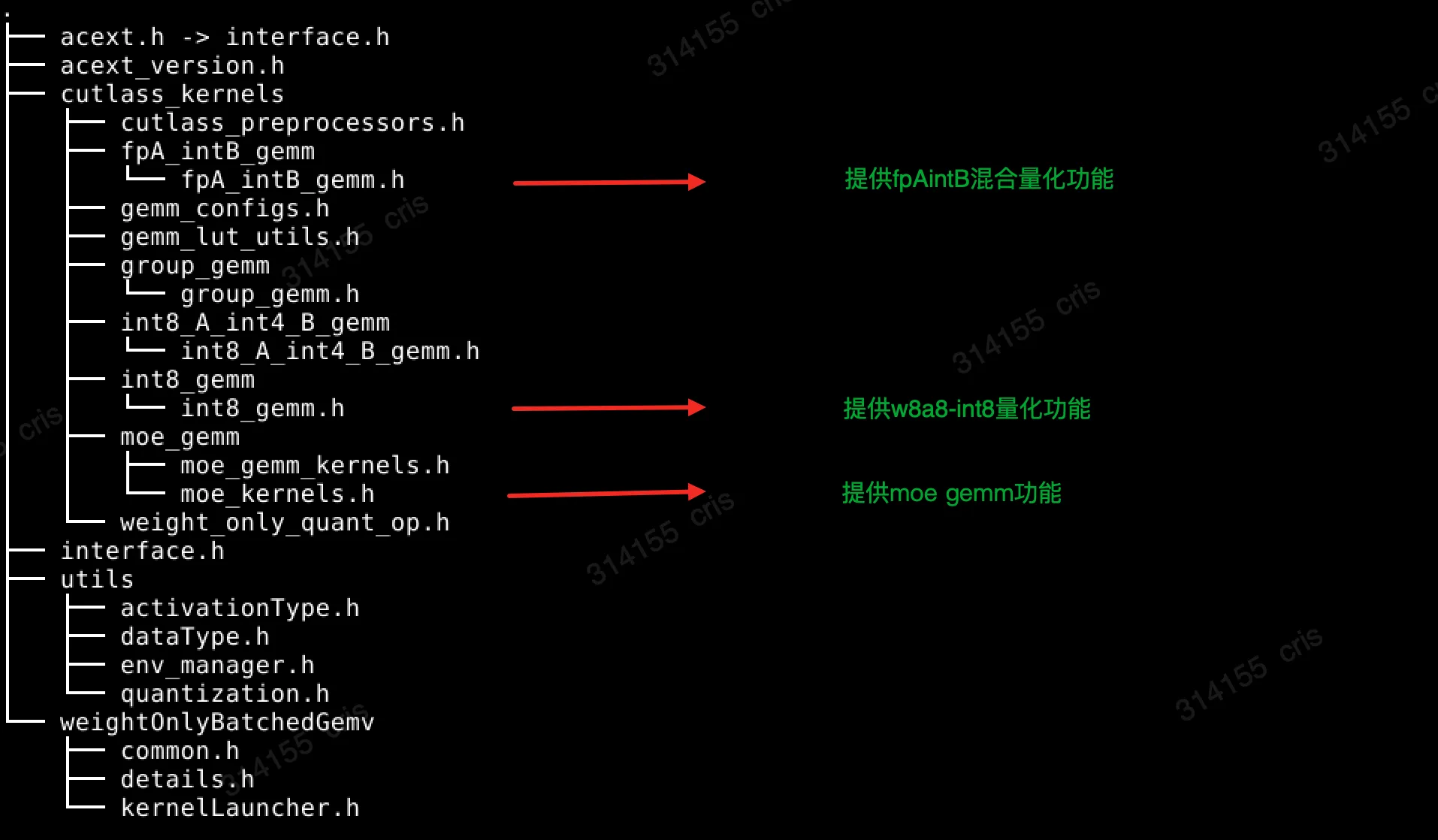
1.1.1 fpAintB GEMM
The fpA_intB_gemm.h header file implements fpAintB mixed-precision quantization. In this method, A is a floating-point type and B is an integer type. Three template parameters are used to define the specific types of A and B, and the quantization algorithm.
template <typename T, typename WeightType, cutlass::WeightOnlyQuantOp QuantOp>
class CutlassFpAIntBGemmRunner : public virtual CutlassFpAIntBGemmRunnerInterface
{
public:
    CutlassFpAIntBGemmRunner();
    ~CutlassFpAIntBGemmRunner();

    void gemm(const void* A, const void* B, const void* weight_scales, void* C, int m, int n, int k,
        tkc::CutlassGemmConfig gemmConfig, char* workspace_ptr, const size_t workspace_bytes,
        cudaStream_t stream) override;

    void gemm(const void* A, const void* B, const void* weight_scales, const void* weight_zero_points,
        const void* biases, void* C, int m, int n, int k, const int group_size, tkc::CutlassGemmConfig gemmConfig,
        char* workspace_ptr, const size_t workspace_bytes, cudaStream_t stream) override;

    // Returns desired workspace size in bytes.
    size_t getWorkspaceSize(const int m, const int n, const int k) override;

    tkc::CutlassGemmConfig getChosenConfig(const void*          A,
                                           const void* B,
                                           const void*          weight_scales,
                                           const void*          weight_zero_points,
                                           const void*          biases,
                                           void*                C,
                                           int               m,
                                           int               n,
                                           int               k,
                                           const int         group_size,
                                           char*             workspace_ptr,
                                           const size_t      workspace_bytes,
                                           cudaStream_t      stream) override;
};

template <typename ActType, WeightOnlyQuantType QType, cutlass::WeightOnlyQuantOp QuantOp>
std::shared_ptr<CutlassFpAIntBGemmRunnerInterface> createFpAIntBGemmRunner();
1.1.2 w8a8 GEMM
The int8_gemm.h header file provides a quantization algorithm where both A and B are integers. The template parameter T specifies the output data type.
template <typename T>
class CutlassInt8GemmRunner : public virtual CutlassInt8GemmRunnerInterface
{
public:
    CutlassInt8GemmRunner();
    ~CutlassInt8GemmRunner();

    void gemm(const void* A, const void* B, tk::QuantMode quantOption, const float* alphaCol, const float* alphaRow,
        void* C, int m, int n, int k, tkc::CutlassGemmConfig gemmConfig, char* workspacePtr,
        const size_t workspaceBytes, cudaStream_t stream) override;

    // Returns desired workspace size in bytes.
    size_t getWorkspaceSize(const int m, const int n, const int k) override;

    std::vector<tkc::CutlassGemmConfig> getConfigs() const override;

    tkc::CutlassGemmConfig getChosenConfig(const void* A, const void* B, tk::QuantMode quantOption,
        const float* alphaCol, const float* alphaRow, void* C, int m, int n, int k, char* workspacePtr,
        const size_t workspaceBytes, cudaStream_t stream);
};
1.1.3 MoE GEMM
The moe_kernel.h header file defines the Application Programming Interface (API) required to call MoE GEMM.
template<typename T,          /*The type used for activations/scales/compute*/
         typename WeightType, /* The type for the MoE weights */
         cutlass::WeightOnlyQuantOp QuantOp,
         typename Enable = void>
class CutlassMoeFCRunner: public CutlassMoeFCRunnerInterface {
public:
    CutlassMoeFCRunner()           = default;
    ~CutlassMoeFCRunner() override = default;
    //for rtp-llm
    void runMoe(const void* input_activations_void, const float* gating_output, const float *gating_output_with_bias,
        const void* fc1_expert_weights_void, const void* fc1_scales_void, const void* fc1_zeros_void, const void* fc1_expert_biases_void,
        ActivationType fc1_activation_type, const void* fc2_expert_weights_void, const void* fc2_scales_void, const void* fc2_zeros_void,
        const void* fc2_expert_biases_void, const int num_rows, const int hidden_size, const int inter_size,
        const int num_experts, const int k, const int group_size, char* workspace_ptr, void* final_output_void, void* fc2_result_void,
        const bool* finished, const int active_rows, void* expert_scales_void,
        int* expanded_source_row_to_expanded_dest_row, int* expert_for_source_row, MOEParallelismConfig parallelism_config,
        MOEExpertScaleNormalizationMode normalization_mode, cudaStream_t stream) override;
    // for vllm
    void fused_moe(const void* input_activations_void, const float* gating_output, const float* gating_output_with_bias,
                   const void* fc1_expert_weights_void, const void* fc1_scales_void, const void* fc1_zeros_void, const void* fc1_expert_biases_void,
                   void* a1_scale_void, ActivationType fc1_activation_type, const void* fc2_expert_weights_void, const void* fc2_scales_void,
                   const void* fc2_zeros_void, const void* fc2_expert_biases_void, void* a2_scale_void, const int num_tokens, const int hidden_size,
                   const int inter_size, const int num_experts, const int k, const int group_size, char* workspace_ptr, void* final_output_void,
                   void* fc2_result_void, const bool* finished, const int active_rows, const void* expert_scales_void,
                   int* expanded_source_row_to_expanded_dest_row, const int* expert_for_source_row, MOEParallelismConfig parallelism_config,
                   MOEExpertScaleNormalizationMode normalization_mode, cudaStream_t stream) override;
acext also provides the following MoE-related PyTorch ops:
torch.ops.moe_unit_ops.gating_softmax
torch.ops.moe_unit_ops.grouped_gemm_bias
torch.ops.moe_unit_ops.run_moe_fc
For usage examples, see acext/tests/th_moe.py.
1.2 Supported Quantization Algorithms
Quantization algorithms reduce memory usage and improve performance by quantizing model weights (W) and inputs (A) before matrix multiplication. Different kernels support different data precisions for W and A. The following section provides a brief overview of these algorithms and their support status in acext.
The following code snippets assume a matrix multiplication where A is M × K, W is K × N, and the result is M × N.
1.2.1 Int8 Weight-only (W8A16)
Int8 weight-only is the most basic quantization algorithm. It quantizes the weight matrix column-wise, which converts weights from a floating-point format to int8. Each column is assigned a scaling factor. If the original weights are in fp16 format, memory usage is reduced by half. Performance improves in memory-bound scenarios compared to native fp16 computation because fewer weight values need to be loaded.
Example code:
// Prepare data: act, weight, scales, and output
......

// Create FpAIntBGemmRunner with A=half, B=Int8, and PER_COLUMN_SCALE_ONLY quantization
auto runner = createFpAIntBGemmRunner<half, WeightOnlyQuantType::Int8b, cutlass::WeightOnlyQuantOp::PER_COLUMN_SCALE_ONLY>();

// Preprocess weights offline for mixed-precision GEMM
preprocess_weights_for_mixed_gemm(preprocessed_quantized_weight, row_major_quantized_weight, {k, n}, QuantType::INT8_WEIGHT_ONLY);

// Allocate workspace
char* ws_ptr = nullptr;
const int ws_bytes = runner->getWorkspaceSize(m, n, k);
cudaMalloc(&ws_ptr, ws_bytes);

// Select kernel configuration
gemmConfig = runner->getChosenConfig(p_act, p_weight, p_scales, nullptr, nullptr,
                                    p_out, m, n, k, k, reinterpret_cast<char*>(ws_ptr),
                                    ws_bytes, stream);

// Run quantization algorithm; store result in out
runner->gemm(p_act, p_weight, p_scales, p_out, m, n, k, gemmConfig, ws_ptr, ws_bytes, stream);
1.2.2 Int4 Weight-only (W4A16)
Int4 weight-only uses the same algorithm as Int8 weight-only but stores weights using only 4 bits. This method significantly reduces precision but also reduces memory usage to one-quarter of the original and further boosts performance.
Example code:
// Prepare data: act, weight, scales, and output
......

// Create FpAIntBGemmRunner with A=half, B=Int4, and PER_COLUMN_SCALE_ONLY quantization
auto runner = createFpAIntBGemmRunner<half, WeightOnlyQuantType::Int4b, cutlass::WeightOnlyQuantOp::PER_COLUMN_SCALE_ONLY>();

// Preprocess weights offline for mixed-precision GEMM
preprocess_weights_for_mixed_gemm(preprocessed_quantized_weight, row_major_quantized_weight, {k, n}, QuantType::PACKED_INT4_WEIGHT_ONLY);

// Allocate workspace
char* ws_ptr = nullptr;
const int ws_bytes = runner->getWorkspaceSize(m, n, k);
cudaMalloc(&ws_ptr, ws_bytes);

// Select kernel configuration
gemmConfig = runner->getChosenConfig(p_act, p_weight, p_scales, nullptr, nullptr,
                                    p_out, m, n, k, k, reinterpret_cast<char*>(ws_ptr),
                                    ws_bytes, stream);

// Run quantization algorithm; store result in out
runner->gemm(p_act, p_weight, p_scales, p_out, m, n, k, gemmConfig, ws_ptr, ws_bytes, stream);
1.2.3 Int4 Groupwise (W4A16)
Although Int4 weight-only significantly reduces memory and improves performance, its low precision of only 4 bits leads to large quantization errors compared to fp16. Groupwise quantization addresses this issue by dividing each column into groups of a fixed size, such as 64 or 128, and assigning one scale per group instead of one per column.
In practice, for algorithms such as AutoQuant (AWQ) or Generative Pre-trained Transformer Quantization (GPTQ), models require fine-tuning on a dataset to produce quantized int4 weights. Asymmetric quantization may also introduce zero-point offsets, also known as zeros and bias.
Example code:
// Prepare data: act, weight, scales, and output
......

// Create FpAIntBGemmRunner with A=half, B=Int8, and FINEGRAINED_SCALE_ONLY quantization
auto runner = createFpAIntBGemmRunner<half, WeightOnlyQuantType::Int8b, cutlass::WeightOnlyQuantOp::FINEGRAINED_SCALE_ONLY>();

// Preprocess weights offline for mixed-precision GEMM
preprocess_weights_for_mixed_gemm(preprocessed_quantized_weight, row_major_quantized_weight, {k, n}, QuantType::PACKED_INT4_WEIGHT_ONLY);

// Allocate workspace
char* ws_ptr = nullptr;
const int ws_bytes = runner->getWorkspaceSize(m, n, k);
cudaMalloc(&ws_ptr, ws_bytes);

// Select kernel configuration
gemmConfig = runner->getChosenConfig(p_act, p_weight, p_scales, p_zeros, p_bias,
                                    p_out, m, n, k, groupsize, reinterpret_cast<char*>(ws_ptr),
                                    ws_bytes, stream);

// Run quantization algorithm; store result in out
runner->gemm(p_act, p_weight, p_scales, p_zeros, p_bias, p_out, m, n, k, groupsize, gemmConfig, ws_ptr, ws_bytes, stream);
1.2.4 SmoothQuant (W8A8)
fpAintB is a mixed-precision algorithm. Although the weights are integers, they must be dequantized to a floating-point format before matrix operations, which still rely on floating-point Tensor Cores. W8A8 uses integer weights and integer inputs, which enables integer Tensor Core operations for better compute throughput.
SmoothQuant is a quantization algorithm that uses the W8A8 kernel. https://github.com/mit-han-lab/smoothquant
W8A8 variants depend on whether per-token quantization or per-channel quantization is applied to A and B. Per-token quantization uses one set of quantization parameters per row and defaults to one set for the entire matrix. Per-channel quantization uses one set per column and defaults to one set for the entire matrix. This results in four variants: PerTensorPerTensor, PerTensorPerChannel, PerTokenPerTensor, and PerTokenPerChannel.
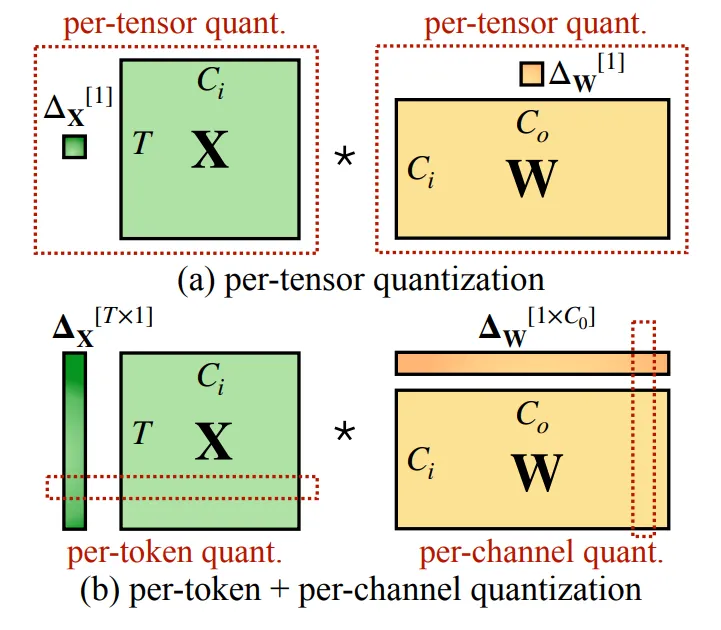
acext implements all four W8A8 quantization kernels. You can use them as follows:
// Choose one of the following W8A8 variants:
QuantMode quant_mode = QuantMode::fromDescription(false, false, false, false);  // A_PerTensor_W_PerTensor
QuantMode quant_mode = QuantMode::fromDescription(false, false, false, true); // A_PerTensor_W_PerChannel
QuantMode quant_mode = QuantMode::fromDescription(false, false, true, false); // A_PerToken_W_PerTensor
QuantMode quant_mode = QuantMode::fromDescription(false, false, true, true); // A_PerToken_W_PerChannel

// Prepare data: act, weight, scales, out
......

// Create W8A8 runner
auto runner = std::make_shared<acext::kernels::cutlass_kernels::CutlassInt8GemmRunner<half>>();

// Allocate workspace
int ws_bytes = runner->getWorkspaceSize(m, n, k);
char* ws_ptr = nullptr;
if (ws_bytes)
    cudaMalloc(&ws_ptr, ws_bytes);

// Select kernel configuration
const auto gemmConfig = runner->getChosenConfig(p_act, p_weight, quant_mode,
                    reinterpret_cast<const float*>(p_scales_channels),
                    reinterpret_cast<const float*>(p_scales_tokens),
                    p_out, m, n, k, ws_ptr, ws_bytes, stream);

// Execute kernel; store result in out
runner->gemm(p_act, p_weight, quant_mode,
                    reinterpret_cast<const float*>(p_scales_channels),
                    reinterpret_cast<const float*>(p_scales_tokens),
                    p_out, m, n, k, gemmConfig, ws_ptr, ws_bytes, stream);
1.3 Quantization Kernel Performance
We tested 22 large language models (LLMs) across various N and K dimensions. For each (N, K) pair, we varied M and measured the GEMM time. The acceleration ratios are reported relative to the baseline cuBLAS fp16.
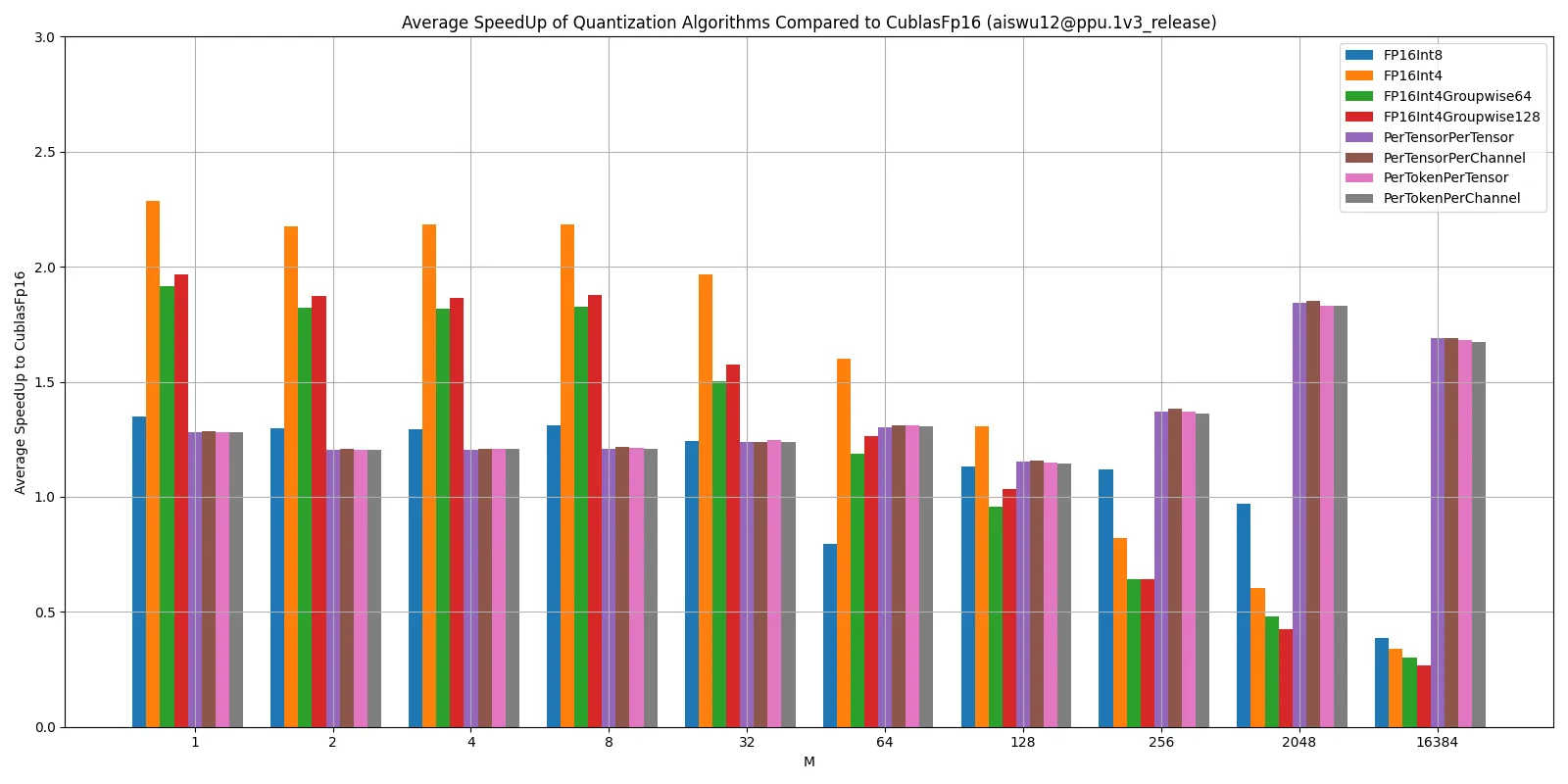
Performance notes:
FpAintB is a weight-only quantization algorithm that reduces weight memory bandwidth, which improves performance in memory-bound scenarios. However, it adds a dequantization step that is not part of a standard GEMM. At large batch sizes, the workload becomes compute-bound, and the quantized performance may be lower than the non-quantized performance.
W8A8 uses int8 Tensor Cores. At large batch sizes, this method leverages the full compute power of int8 Tensor Cores.
2. acext Quantization Integration (vLLM)
We integrated acext into vLLM to support multiple quantization algorithms.
vLLM 0.4.2 implementation:
https://code.alibaba-inc.com/ppu_open_source/vllm/tree/v0.4.2/vLLM 0.3.3 implementation:
https://code.alibaba-inc.com/ppu_open_source/vllm/tree/v0.3.3/All performance and accuracy results in the following sections were obtained by running large language models on vLLM 0.4.2.
2.1 Adding Int8 Weight-Only Quantization Support
2.1.1 AutoWOQ
To use quantization, you must convert the large model weights from fp16 or bf16 format to int8 format.
We use our AutoWOQ tool for this conversion. The components of the tool are:
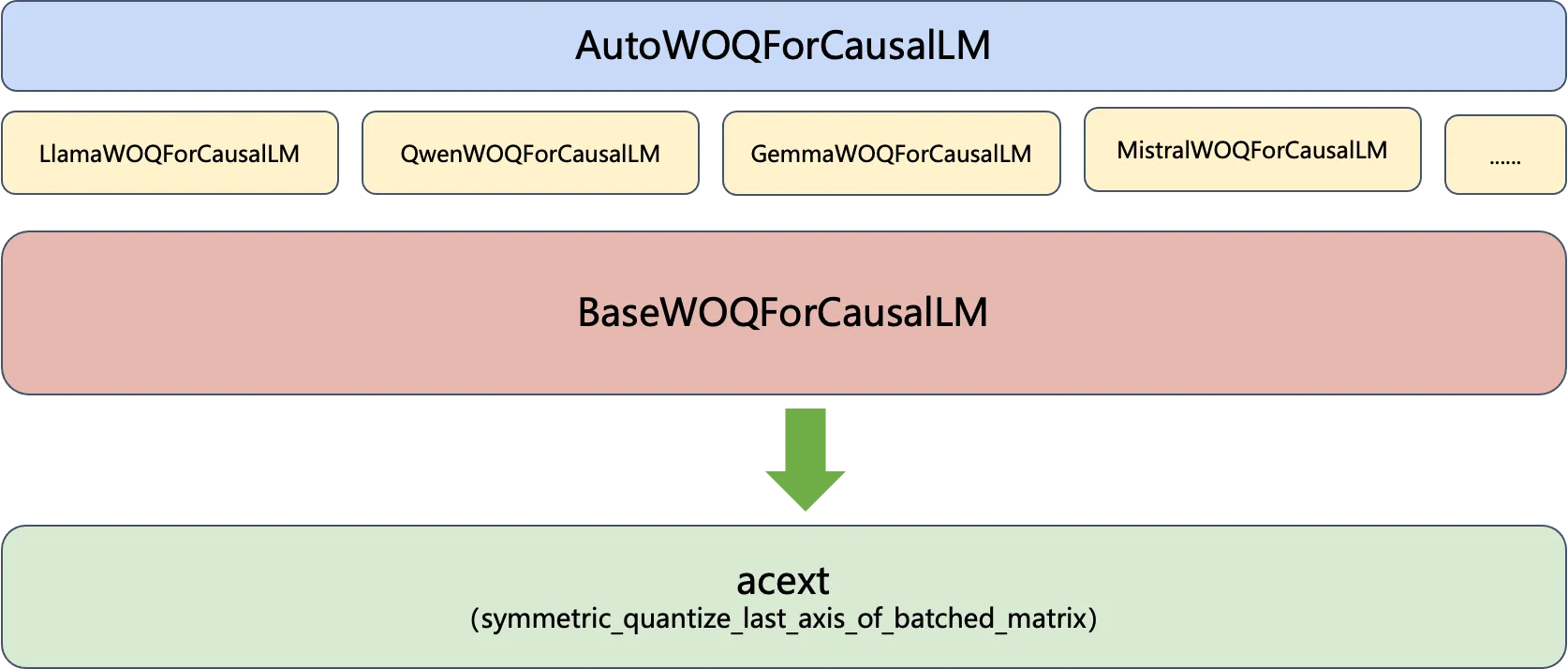
AutoWOQForCausalLM serves as a unified entry point for all large models, similar to the Auto classes in Hugging Face. It accepts the model weight path and automatically detects the model type to initialize the appropriate WOQForCausalLM instance. All instances inherit from BaseWOQForCausalLM. The quantization logic resides in BaseWOQForCausalLM and primarily calls symmetric quantization algorithms that are implemented in acext.
You can use AutoWOQ to quantize a model as follows:
# Set quantization parameters: 8-bit or 4-bit
quantize_config = BaseQuantizeConfig(
    bits=8,  # Quantize model to 8-bit
)

# Load unquantized weights (Hugging Face format). By default, loads onto CPU.
model = AutoWOQForCausalLM.from_pretrained(model_path, quantize_config, trust_remote_code=args.trust_remote_code)
tokenizer = AutoTokenizer.from_pretrained(model_path, trust_remote_code=True)

# Quantize the model. Applies symmetric quantization to linear layers based on model type.
model.quantize()

# Save quantized model and tokenizer to specified location.
quant_path = args.output
model.save_quantized(quant_path)
tokenizer.save_pretrained(quant_path)
2.1.2 Supporting WOQ Quantization
After you generate WOQ-quantized weights, you can add weight-only quantization to vLLM. When you use WOQ weights, you must explicitly specify `quantization="weightonly"` when you create the LLM object.
# Create an LLM.
llm = LLM(model=model_path, quantization="weightonly")
vLLM automatically creates quantized tensor parameters for linear layers and calls mixed-precision quantization at runtime.
As shown in the following figure, a Transformer block in vLLM contains green linear layers that use the WeightOnlyQuant algorithm.
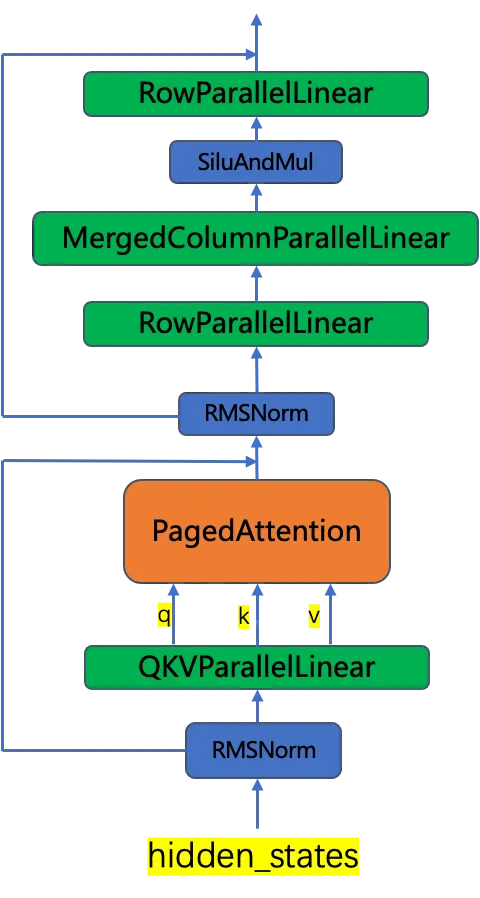
These linear layers use WeightOnlyLinearMethod to initialize weights, load quantized weights, and invoke acext quantization algorithms at runtime. Because acext uses CUTLASS for kernel acceleration, the weights must be pre-reordered. Currently, this reordering occurs once at system startup and accounts for the number of GPUs.
class WeightOnlyLinearMethod(LinearMethodBase):
    # Set quantization configuration
    def __init__(self, quant_config: WeightOnlyConfig):
        self.quant_config = quant_config

    # Initialize weights: create int-type weight parameters and load WOQ-processed weights
    def create_weights(self, input_size_per_partition: int,
                       output_size_per_partition: int, input_size: int,
                       output_size: int,
                       params_dtype: torch.dtype) -> Dict[str, Any]:
        qweight = Parameter(
            torch.empty(
                input_size_per_partition,
                output_size_per_partition,
                device="cuda",
                dtype=torch.int8,
            ),
            requires_grad=False,
        )
        scales = Parameter(
            torch.empty(
                output_size_per_partition,
                device="cuda",
                dtype=params_dtype,
            ),
            requires_grad=False,
        )

        # Instantiate acext's WeightOnlyQuantMatmul class to call mixed-precision kernels later
        try:
            self.weightOnlyMatmul = ops.WeightOnlyQuantMatmul()
        except AttributeError as e:
            raise AttributeError(
                "WeightOnlyQuantMatmul kernels could not be imported. If you built vLLM "
                "from source, make sure BUILD_WEIGHTONLY_KERNELS=1 env var "
                "was set.") from e
        woq_state = WOQState.UNINITIALIZED
        ......

    # Apply weights at runtime using acext quantization algorithm
    def apply_weights(self,
                      weights: Dict[str, torch.Tensor],
                      x: torch.Tensor,
                      bias: Optional[torch.Tensor] = None) -> torch.Tensor:
        # Online weight preprocessing; done once at system startup
        if weights["woq_state"] == WOQState.UNINITIALIZED:
            qweight_cpu = weights["qweight"].cpu()
            qweight_cpu = preprocess_weights_for_mixed_gemm(qweight_cpu, torch.int8, False, False)
            weights["qweight"] = qweight_cpu.cuda()
            weights["woq_state"] = WOQState.READY
        qweight = weights["qweight"]
        scales = weights["scales"]
        return self.weightOnlyMatmul.weightonly_gemm(x, qweight, scales, bias)
2.1.3 Running WOQ Model Inference
To enable weight-only quantization, compile vLLM with BUILD_WEIGHTONLY_KERNELS=1.
# Compile vLLM
cd vllm
BUILD_WEIGHTONLY_KERNELS=1 python setup.py develop

# Run vLLM inference. Assume model is already quantized.
python examples/offline_inference.py --model /path/to/Llama-2-7b-hf-woq/ -q weightonly --trust-remote-code
Results:

2.2 AWQ/GPTQ Quantization Support (Optimization)
2.2.1 Optimizing AWQ/GPTQ Inference
AWQ and GPTQ are two int4 quantization algorithms that are natively supported by vLLM.
https://docs.vllm.ai/en/latest/quantization/auto_awq.html
However, the current AWQ/GPTQ implementation in vLLM is inefficient. Although it reduces the memory footprint, its performance may be worse than fp16.
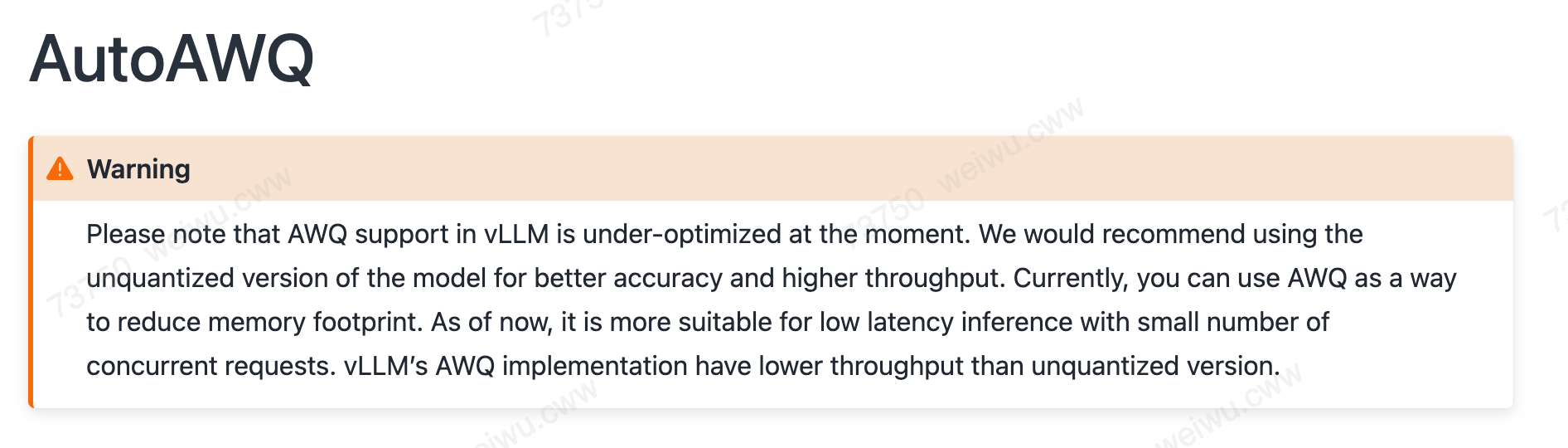
Using the mixed-precision quantization of acext, we can achieve more efficient kernels and higher performance than the native AWQ/GPTQ. Because acext has strict weight layout requirements, the original AWQ weights must be preprocessed before they can be used.
By adding the `weightonly_groupwise_gemm` backend of acext to vLLM, we can accelerate AWQ inference while retaining the original AWQ weights. Preprocessing occurs just before the first use. The workflow is as follows:
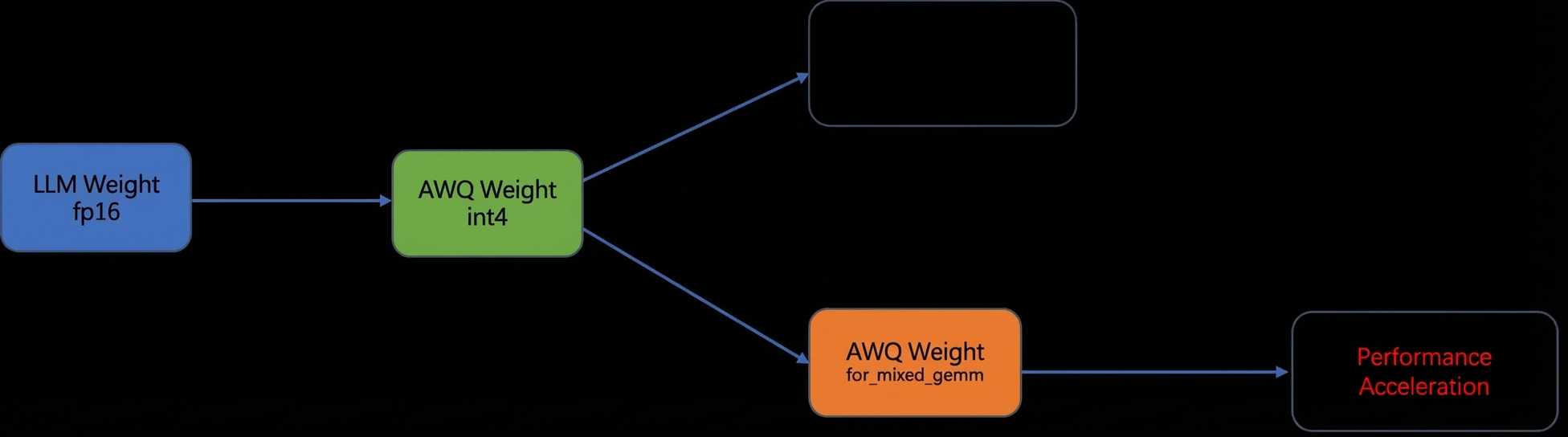
GPTQ follows the same workflow.
Currently, preprocessing runs online when vLLM starts, which causes latency. Support for offline preprocessing will be added in a future release.
2.2.2 Fast AWQ/GPTQ Inference
This optimization is under active development. By default, vLLM does not use acext-accelerated AWQ/GPTQ. To enable this feature, you can set the `USE_FAST_AWQ=1` or `USE_FAST_GPTQ=1` environment variable. If you do not set these variables, vLLM uses its native quantization.
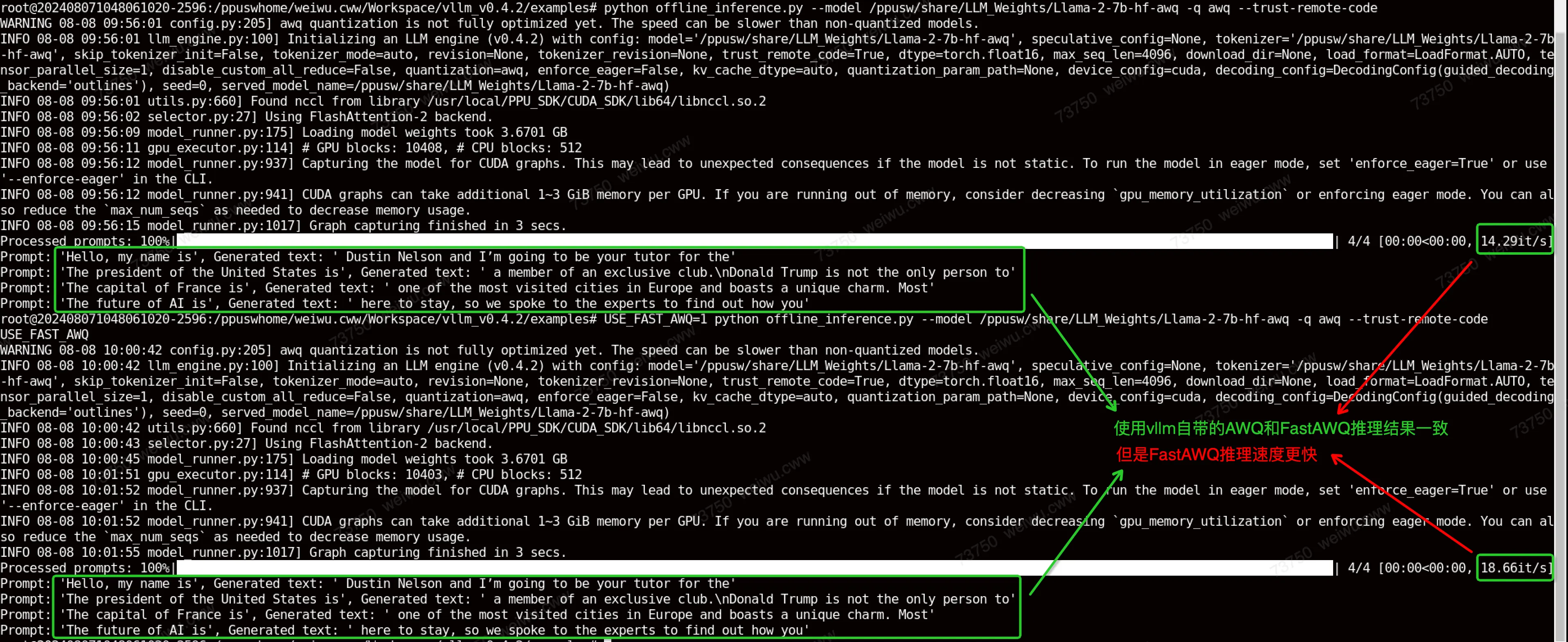
To invoke the FastAWQ flow and accelerate AWQ quantization with acext, you can use the following command line.
USE_FAST_AWQ=1 python offline_inference.py --model /ppusw/share/LLM_Weights/Llama-2-7b-hf-awq -q awq --trust-remote-codeFastAWQ produces the same inference results as AWQ but runs faster.
2.3 acext Supports fused_moe
We added acext backend support to vLLM 0.8.3 and 0.8.5 to support bf16 and w8a8-int8-channel modes. For more information, see:
https://code.alibaba-inc.com/ppu_open_source/vllm/tree/v0.8.5_ppu_1v5.1_releaseThis change includes the following three modifications:
2.3.1 Construct acext Backend
In acext_moe_func.cu, we added an acext backend that uses the AcextFusedMoe class to call the APIs of the acext library. We then registered it as a Python API through csrc/moe/moe_ops.h and csrc/torch_bindings.cpp.
API | Function |
acext_fusedmoe_warpper | Call acext backend to execute fusedmoe |
get_acext_fusedmoe_status_wrapper | Check if current model config supports acext backend. Returns 0 if supported. |
acext_get_version | Return acext library version (int). Current version is 1050100. |
2.3.2 Modify fused MoE Layer
In the fused_moe.py file, add a call to `acext` within the `fused_experts_impl` implementation. First, use ops.get_acext_fusedmoe_status() to check whether the current model configuration is suitable for the `acext` backend. If it is not suitable, the `triton` backend is called. If the return value is acext_fusedmoe_status = 0, use ops.acext_fusedmoe_warpper() to call the `acext` implementation of `fused_moe`.
2.3.3 Add W8A8Int8MoEMethod (for w8a8-int8-channel)
Add the CompressedTensorsW8A8Int8MoEMethod method to the `compressed_tensors_moe.py` file to load the weights of the w8a8-int8-channel model and execute the corresponding MoE layer.
2.4 Supported Large Language Models
Model | WeightOnly | AWQ | GPTQ | N_K Shape |
Llama-2-7b-hf | Y | Y | Y | 12288 4096 4096 11008 22016 4096 4096 4096 |
Llama-2-13b-hf | Y | Y | Y | 5120 5120 27648 5120 5120 13824 15360 5120 |
Llama-2-70b-hf (8GPUS) | Y | Y | Y | 8192 3584 8192 1024 1280 8192 7168 8192 |
Meta-Llama-3-8B | Y | Y | Y | 6144 4096 4096 14336 28672 4096 4096 4096 |
Meta-Llama-3-70B (8GPUS) | N | Y | N | 8192 3584 8192 1024 1280 8192 7168 8192 |
Baichuan-7b | Y | Y | Y | 12288 4096 4096 11008 22016 4096 4096 4096 |
Baichuan-13b | Y | Y | Y | 5120 5120 5120 13696 27392 5120 15360 5120 |
Baichuan2-7b | Y | Y | Y | 12288 4096 4096 11008 22016 4096 4096 4096 |
Baichuan2-13b | Y | Y | Y | 5120 5120 5120 13696 27392 5120 15360 5120 |
ChatGLM2-6b | Y | N | N | 4608 4096 4096 13696 27392 4096 4096 4096 |
ChatGLM3-6b | Y | N | N | 4608 4096 4096 13696 27392 4096 4096 4096 |
Qwen-7b | Y | Y | Y | 12288 4096 4096 11008 22016 4096 4096 4096 |
Qwen-14b | Y | Y | Y | 5120 5120 5120 13696 27392 5120 15360 5120 |
Qwen-72b (8GPUS) | Y | Y | Y | 6144 8192 8192 1024 8192 3072 3072 8192 |
Falcon-7b | Y | N | N | 4544 4544 4672 4544 18176 4544 4544 18176 |
Falcon-40b (8GPUS) | Y | N | Y | 8192 4096 8192 1024 1152 8192 4096 8192 |
Gemma-7b | Y | N | N | 49152 3072 12288 3072 3072 24576 3072 4096 |
Mistral-7b | Y | Y | Y | 6144 4096 4096 14336 28672 4096 4096 4096 |
Mpt-7B | Y | N | Y | 12288 4096 4096 16384 4096 4096 16384 4096 |
Mixtral-8x7b (8GPUS) | Y | Y | N | 4096 512 8 4096 768 4096 |
Mixtral-8x22b (8GPUS) | Y | Y | N | 8 6144 1024 6144 6144 768 |
2.4.1 Known Issues
2.4.1.1 Weight Conversion Issues
The following issues may occur during WOQ model conversion:
model | Comments |
ChatGLM2-6b | When AutoWOQ quantizes ChatGLM weights, the generated tokenizer_config.json file must be replaced with the original model’s tokenizer_config.json to avoid compatibility issues. This is a known community issue. Manually replace after conversion. |
ChatGLM3-6b |
The following issues may occur during AWQ model conversion:
model | Comments |
ChatGLM2-6b | TypeError: chatglm isn't supported yet. |
ChatGLM3-6b | TypeError: chatglm isn't supported yet. |
Falcon-7b | TypeError: FalconDecoderLayer.forward() missing 1 required positional argument: 'alibi' |
Falcon-40b | TypeError: FalconDecoderLayer.forward() missing 1 required positional argument: 'alibi' |
Mpt-7B | AttributeError: 'NoneType' object has no attribute 'bool' |
The following issues may occur during GPTQ model conversion:
model | Comments |
ChatGLM2-6b | TypeError: chatglm isn't supported yet. |
ChatGLM3-6b | TypeError: chatglm isn't supported yet. |
Falcon-7b | AssertionError assert infeatures % self.group_size == 0 |
Meta-Llama-3-70B | torch._C._LinAlgError: linalg.cholesky: The factorization could not be completed because the input is not positive-definite (the leading minor of order 27024 is not positive-definite). |
Mixtral-8x7b | ZeroDivisionError: float division by zero |
Mixtral-8x22b | ZeroDivisionError: float division by zero |
2.4.1.2 Runtime Issues
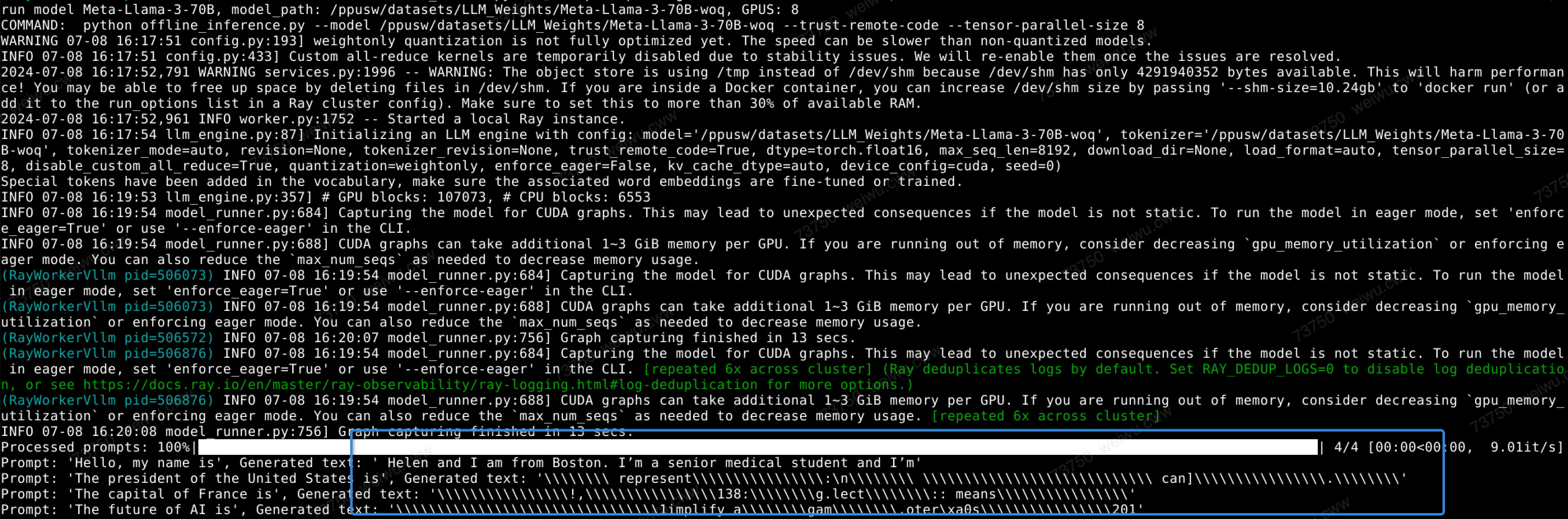
Unexpected behavior occurs when you run Meta-Llama-3-70B-woq.
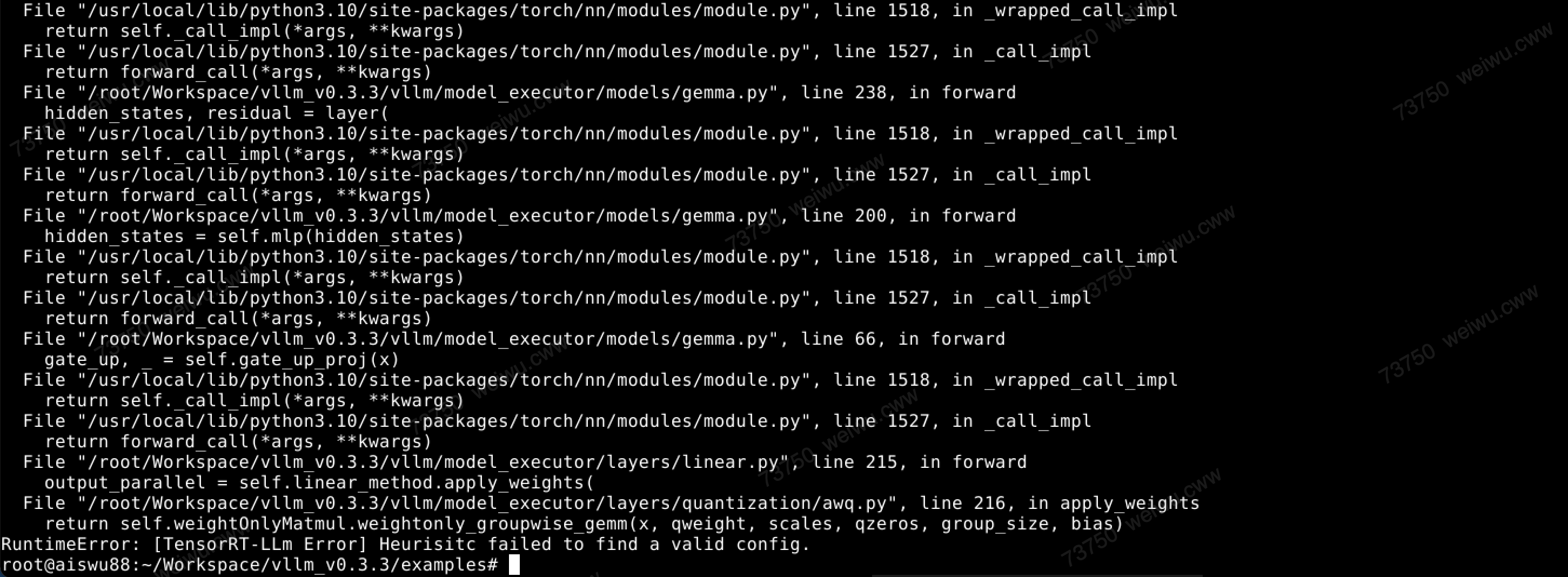
The Gemma-7b-awq model fails to run.
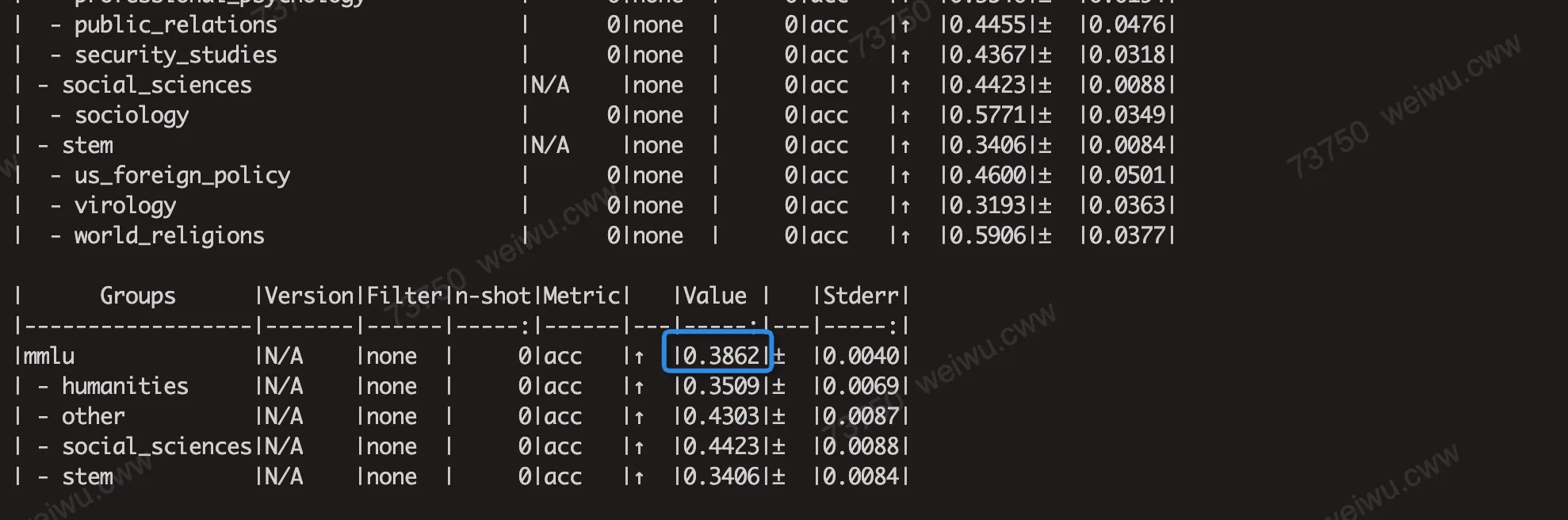
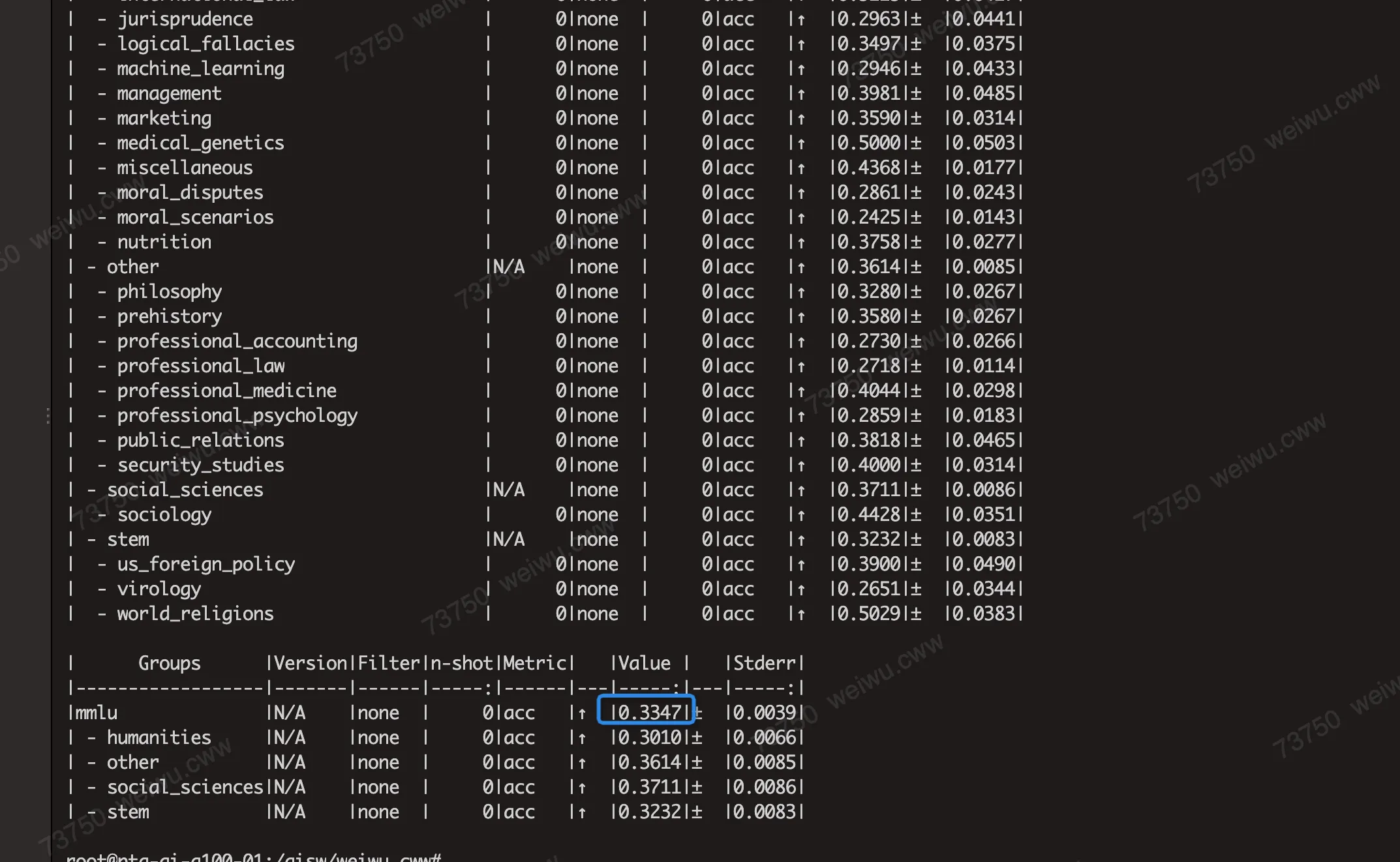
Some models show a significant loss in the MMLU score after AWQ/GPTQ quantization. For example, LLaMA2-7B shows the following results:

Validation on an A100 shows this is caused by the poor performance of the AWQ and GPTQ quantization algorithms on these models. This finding is supported by the MMLU scores measured on the A100. For example, the MMLU scores from running Llama-2-7b with AWQ and GPTQ on an A100 are consistent with the PPU scores.
2.5 Model Quantization Performance
The inference performance of large language models can be measured in several ways.
We measure the throughput during the generation phase for specific inputs. The inputs include batch sizes of 1, 2, 4, and 8, input lengths of 32, 512, 1024, and 2048, and an output length of 128. This measurement reflects potential real-world performance gains, for example, in latency-sensitive online inference.
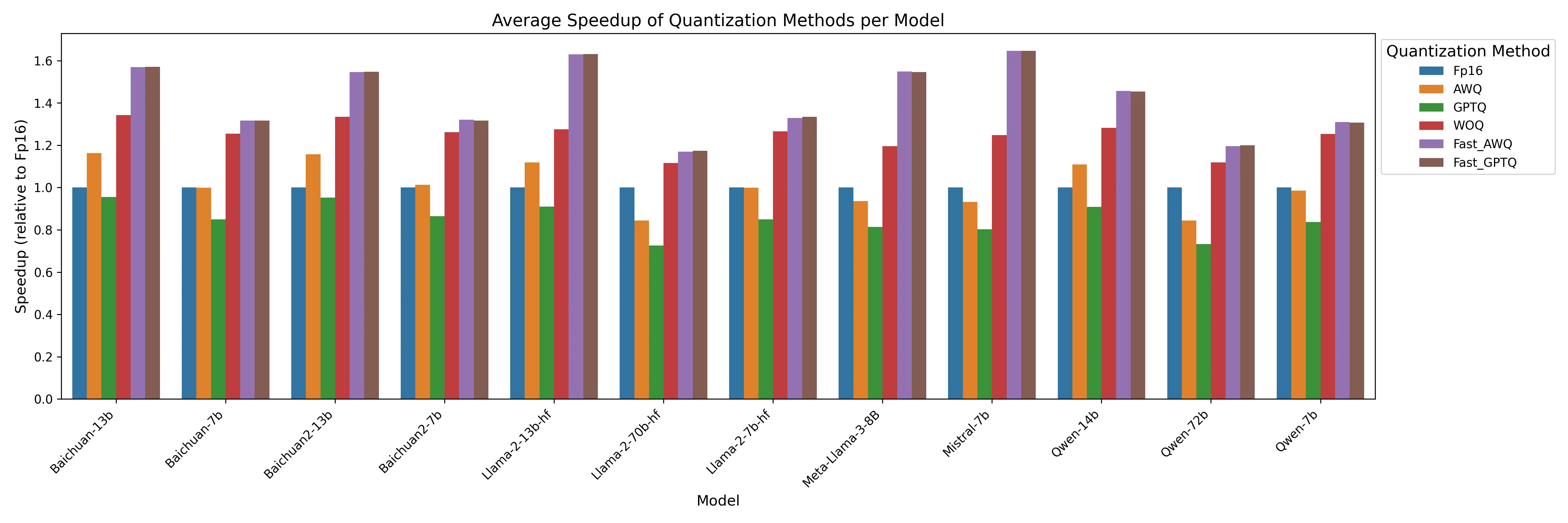
The following figure shows the throughput acceleration ratios for the generation phase, relative to fp16, across different models and quantization methods.
2.5.1 Detailed Performance Data
2.6 Model Quantization Accuracy (MMLU)
We use the lm-evaluation-harness framework to run large model inference and test the scores on the MMLU dataset. This process evaluates the accuracy of our quantized models.
https://github.com/EleutherAI/lm-evaluation-harness
2.6.1 Steps
# If your setuptools version is too low, upgrade it.
#pip3 install --upgrade pip setuptools
# Due to the following issue, you must use setuptools version 69.5.1.
#https://github.com/vllm-project/vllm/issues/4961

git clone https://github.com/EleutherAI/lm-evaluation-harness
# If you have issues running the MMLU test, it may be version-related. Try switching to this tested commit:
# git reset --hard e5e5ee0cb629c9c88165292d1b4bf34623392d33
cd lm-evaluation-harness
pip install -e .

# Use a Hugging Face proxy.
export HF_ENDPOINT=https://hf-mirror.com

# Use lm_eval for MMLU inference.
lm_eval --model vllm --model_args pretrained=/ppusw/datasets/huggingface/Llama-2-7b-hf --tasks mmlu --batch_size auto --num_fewshot 5

# If you still have issues downloading the dataset after using the proxy, it is because the following file hardcodes the Hugging Face download URL.
#/root/.cache/huggingface/modules/datasets_modules/datasets/hails--mmlu_no_train/b7d5f7f21003c21be079f11495ee011332b980bd1cd7e70cc740e8c079e5bda2/mmlu_no_train.py
# Modify the URL in this file to point to hf-mirror.
2.6.2 Inference results
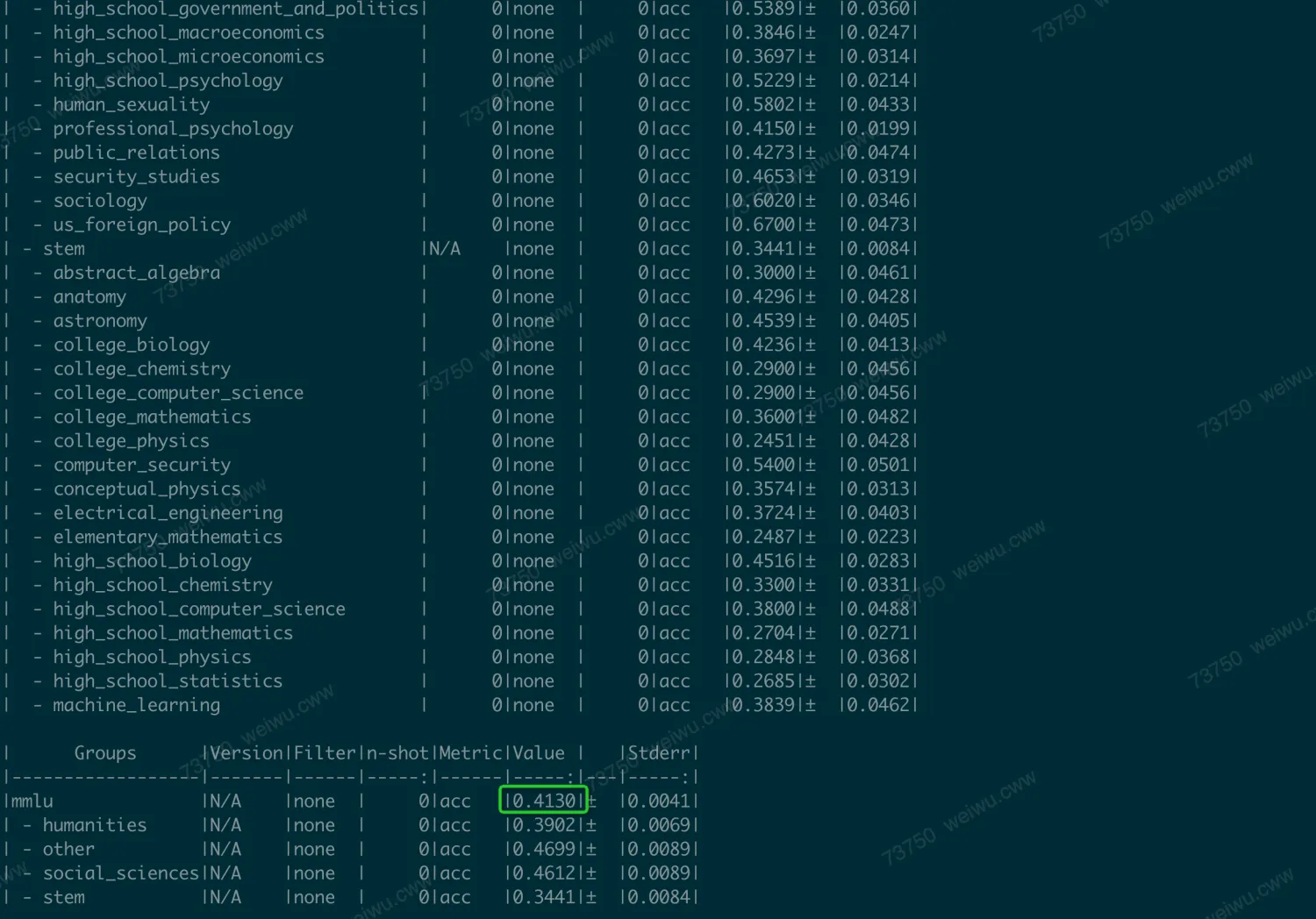
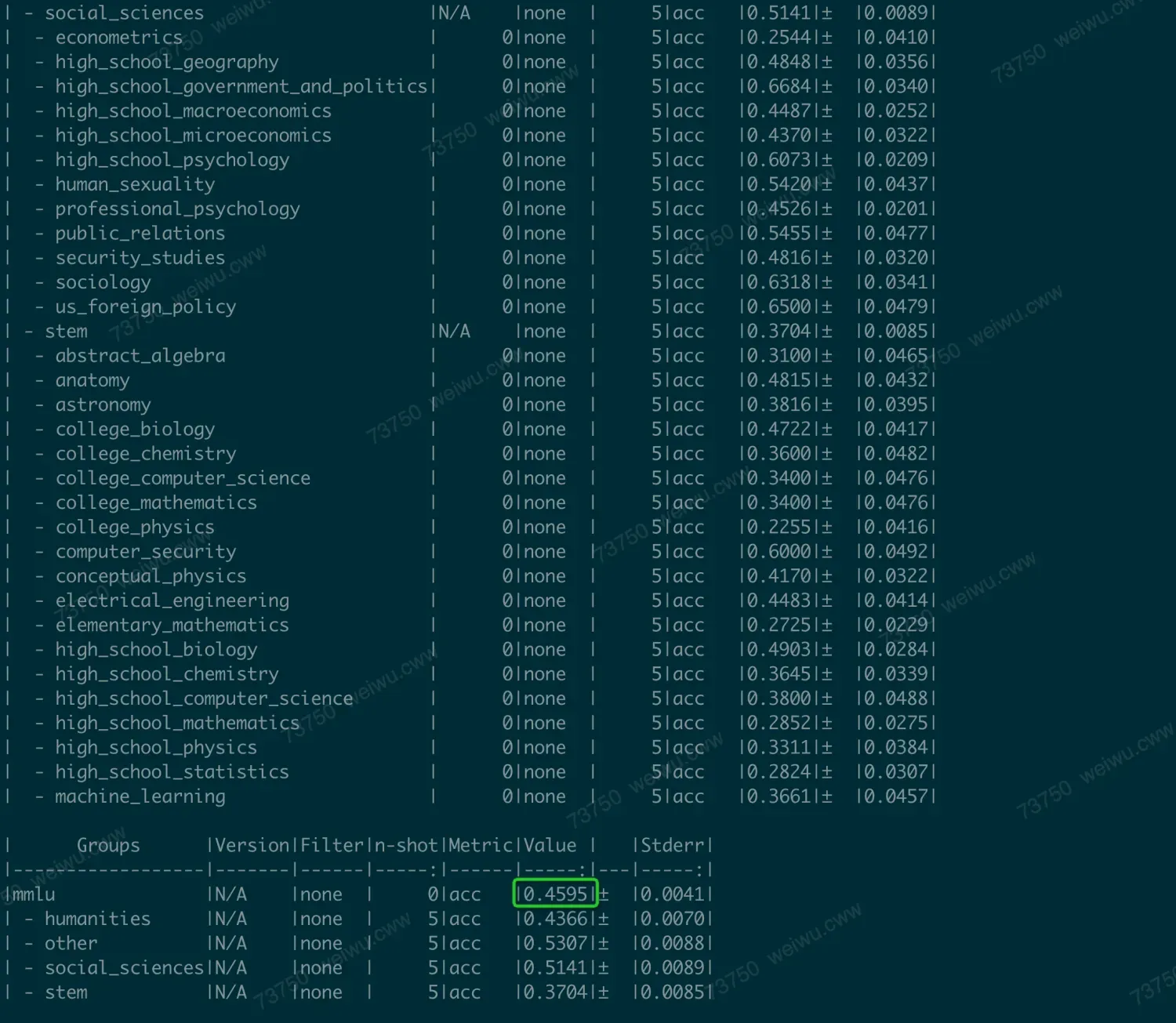
You can set `num-fewshot` to control the few-shot parameter. A higher value results in a longer runtime but may also yield a higher score.
If you do not set `num_fewshot`, the run is faster (minutes), and the result is 41.3.
If you set `num_fewshot=5`, the run is slower (hours), but the score is higher, at 45.9.
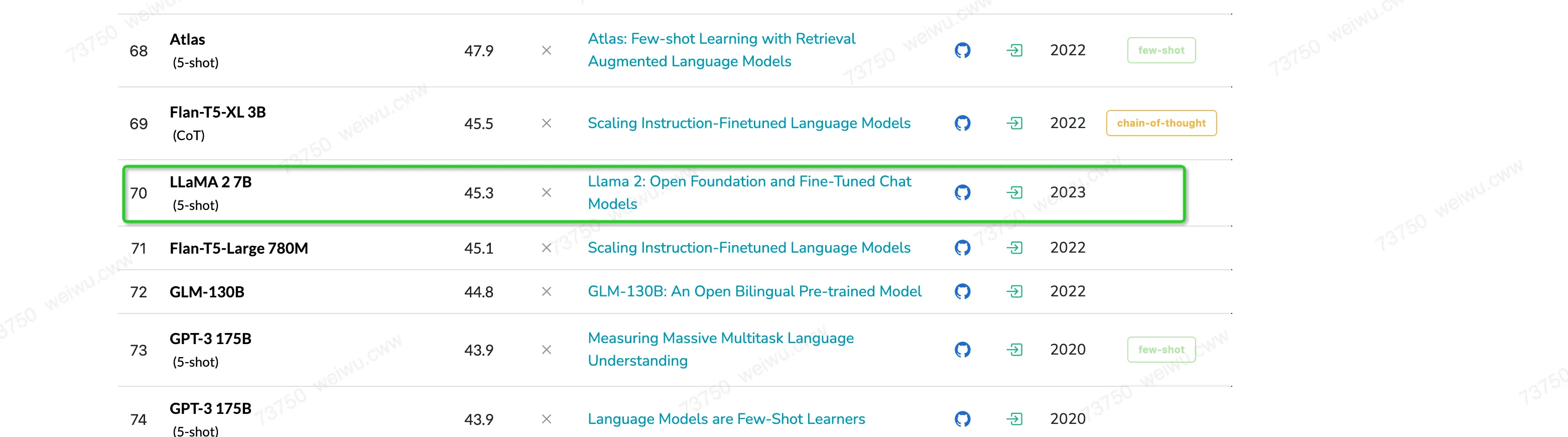
This result is consistent with the results on the website.
2.6.3 MMLU accuracy for different quantization methods
The MMLU score from the fp16 inference on the unquantized model serves as the baseline. You can set different quantization methods during inference to obtain the MMLU scores for the quantized models. You can then compare these scores with the baseline to determine the MMLU quantization loss.
The following table shows the MMLU scores (few-shot 0) and quantization loss relative to fp16 for different models and quantization methods.
Gray indicates quantization methods that are not supported in the current version (PPU Release 1.3). Red indicates methods that have buggy inference results.
3. Building and Running from Source Code
3.1 Build
acext depends on the PPU version of CUTLASS. After you download acext, you must also download the PPU version of CUTLASS.
# fetch code from ppu_open_source
git clone -b ppu_1v5_release https://code.alibaba-inc.com/ppu_open_source/acext
cd acext
git clone -b ppu_1v5_release https://code.alibaba-inc.com/ppu_open_source/cutlass

# compile & install
rm -rf build && mkdir build && cd build
cmake .. -DCMAKE_BUILD_TYPE=Release -DBUILT_PYT=ON
cmake --build . -- -j${nproc}
cmake --build . --target install -j${nproc}
3.2 Run
3.2.1 Run Unit Tests
cd build

# Unit tests for a16w8/a16w4 quantized GEMM
python ../tests/test_woq_gemm.py

# Unit tests for a8w8 quantized GEMM
python ../tests/th_int8_gemm.py

# Unit tests for MoE
python ../tests/th_moe.py
3.2.2 Run Performance Tests
cd build
# Run fpAintB benchmark separately. Default MNK is (1, 5120, 5120). Specify M N K in command-line arguments.
./benchmark/benchmark_fpAintB

# Run w8a8 benchmark separately. Default MNK is (1, 5120, 5120). Specify M N K in command-line arguments.
./benchmark/benchmark_w8a8

# Run benchmarks for all M N K combinations and generate a unified CSV report.
cd benchmark
python run_benchmark.py