Dify is a platform for visually orchestrating generative AI applications. You can connect large models or AI applications deployed on the Dify platform to Guardrails to provide comprehensive security for your models. This topic describes how to integrate Guardrails with Dify platform workflows and Agents.
Tutorial overview
The Dify platform supports multiple integration methods for Agent and workflow scenarios. You can use a plugin or extend the content moderation API.
-
Workflow - Plugin integration: Install the Guardrails plugin locally to control the input and output of large models.
-
Agent - Extend content moderation API: Extend the content moderation API using an API extension. You must deploy a local service that adapts Guardrails to the Dify content moderation API standard protocol.
-
Workflow - Extend content moderation API: The process differs between the Community Edition and the cloud service. For more information, see the Agent - Extend content moderation API method.
| Integration method |
Supported scenarios |
Streaming support |
Supported Dify versions |
Connection method |
| Plugin integration |
Workflow |
No |
Cloud service, Dify Community Edition |
Zero-code, one-click integration |
| Extend content moderation API |
Agent, chatflow workflow |
Yes |
Cloud service, Dify Community Edition |
Deploy a forwarding service locally. Requires a small amount of code development. |
Prerequisites
Before you integrate Guardrails with the Dify platform, complete the following prerequisites:
-
Enable Guardrails. Click Enable pay-as-you-go for Guardrails.
-
Create a Resource Access Management (RAM) user, grant the required system policy permission to the RAM user, and obtain the AccessKey pair of the RAM user.
Grant permissions to a RAM user
Log on to the RAM console using your Alibaba Cloud account.
Create a RAM user. For details, see Create a RAM user.
Grant the
AliyunYundunGreenWebFullAccesssystem policy to the RAM user. This policy grants full access to Content Moderation. For details, see Manage RAM user permissions.The RAM user can now call the Content Moderation API.
Integration method 1: Workflow plugin integration
The screenshots and instructions in this tutorial are based on the Dify cloud service. The procedure is the same for users of Dify Community Edition or Dify Premium, but the UI may be slightly different.
-
Download the plugin
-
Plugin name: Guardrails-Dify Plugin
-
Version number: 1.0.2
-
Release date: 2025-08-05
-
Download link: ai_guardrails.difypkg
-
-
Install the plugin
On the plugin page, click Install Plugin and select Local Plugin. Upload the downloaded Guardrails plugin.
-
Use the plugin in a workflow
Large model input threat detection: Before the large language model (LLM) node, add an Guardrails plugin node. Set the content to detect to input, the modality type to text, and the detection type to input.
Large model output threat detection: After the LLM node, add an Guardrails node. Set the content to detect to the LLM's text, the modality type to text, and the detection type to output.
Output variable: _finalSuggestion is the overall mitigation suggestion for all check items. The possible values are block, pass, watch, and mask. You can perform subsequent processing for different suggestions as needed.
-
Configure Guardrails in the console
Before you run the workflow, you must configure the protection features in the Guardrails console. These features include sensitive data detection and prompt attack detection. You can also configure detailed check items for each protection type. For more information about configuration, see Configure check items.
-
Examples
After you integrate the plugin and configure the check items, you can use the mitigation capabilities of Guardrails on the Dify platform. The following video shows how to detect abnormal results from a large model.
Integration method 2: Extend the content moderation API for an Agent
You can also integrate Guardrails into Dify applications by extending the content moderation API for an Agent. The following demo uses the Dify Community Edition. The overall integration flow is similar for other versions, such as the cloud service and Dify Premium.
-
Deploy the forwarding service
The Guardrails API supports a maximum of 2,000 characters per input. If the input length exceeds this limit, you must adapt the input. The processing methods are as follows:
-
Input moderation: Chunk the input into multiple segments. Each segment must not exceed 2,000 characters. Then, call the Guardrails API concurrently for each segment.
-
Output moderation: Dify calls the content moderation API for approximately every 300 characters. For each call, the last 2,000 characters of the output are used.
-
The following code provides an example of the processing logic and the startup script:
-
from fastapi import FastAPI, Body, HTTPException, Header
from pydantic import BaseModel
import base64
from collections.abc import Generator
from typing import Any
import hmac
import hashlib
from urllib.parse import quote
import requests
from datetime import datetime
from datetime import timezone
import uuid
import json
import re
import concurrent.futures

# You can call the service in different regions as needed. Supported regions include Shanghai (cn-shanghai), Beijing (cn-beijing), Hangzhou (cn-hangzhou), and Shenzhen (cn-shenzhen).
SERVICE_URL = "https://green-cip.cn-shanghai.aliyuncs.com"
# Chunk the text when it exceeds this length.
MAX_LENGTH = 2000
# The ServiceCode for calling the input and output detection of Guardrails.
SERVICE_INPUT = "query_security_check"
SERVICE_OUTPUT = "response_security_check"
ENCODING = "UTF-8"
ISO8601_DATE_FORMAT = "%Y-%m-%dT%H:%M:%SZ"
ALGORITHM = "HmacSHA1"


def format_iso8601_date():
    return datetime.now(timezone.utc).strftime(ISO8601_DATE_FORMAT)


def percent_encode(value):
    if value is None:
        return ""
    return (
        quote(value.encode(ENCODING), safe="~").replace("+", "%20").replace("*", "%2A")
    )


def create_signature(string_to_sign, secret):
    secret = secret + "&"
    signature = hmac.new(
        secret.encode(ENCODING), string_to_sign.encode(ENCODING), hashlib.sha1
    ).digest()
    return base64.b64encode(signature).decode(ENCODING)


def create_string_to_sign(http_method, parameters):
    sorted_keys = sorted(parameters.keys())
    canonicalized_query_string = ""

    for key in sorted_keys:
        canonicalized_query_string += (
            "&" + percent_encode(key) + "=" + percent_encode(parameters[key])
        )

    string_to_sign = (
        http_method
        + "&"
        + percent_encode("/")
        + "&"
        + percent_encode(canonicalized_query_string[1:])
    )
    return string_to_sign


def split_text(text: str, max_length: int = 1950) -> list[str]:
    """Chunk the text by max_length, trying to keep sentences intact (recognizes multiple punctuation marks)."""
    segments = []
    while len(text) > max_length:
        # Extract a substring within the current maximum length.
        chunk = text[:max_length]

        # Use regex to find the position of the last sentence-ending punctuation, such as a period, exclamation mark, or question mark.
        match = None
        for pattern in [r"[。!?;:\.?!]+"]:  # Match multiple end symbols.
            matches = list(re.finditer(pattern, chunk))
            if matches:
                match = matches[-1]  # Take the last matching item.

        if match:
            cut_point = match.end()  # Include the punctuation mark.
        else:
            cut_point = max_length  # If not found, force a cut.

        segments.append(text[:cut_point])
        text = text[cut_point:]

    if text:
        segments.append(text)
    return segments


def request(content_segment, type, aliyun_access_key, aliyun_access_secret):
    print(datetime.now(), f" [{type} request content]-> {content_segment}")
    # 3.1. Construct the request parameters.
    parameters = {
        "Action": "MultiModalGuard",
        "Version": "2022-03-02",
        "AccessKeyId": aliyun_access_key,
        "Timestamp": format_iso8601_date(),
        "SignatureMethod": "HMAC-SHA1",
        "SignatureVersion": "1.0",
        "SignatureNonce": str(uuid.uuid4()),
        "Format": "JSON",
        "Service": (
            SERVICE_INPUT if type == "input" else SERVICE_OUTPUT
        ),
        "ServiceParameters": json.dumps(
            {"content": content_segment}, ensure_ascii=False
        ),
    }

    string_to_sign = create_string_to_sign("POST", parameters)
    signature = create_signature(string_to_sign, aliyun_access_secret)
    parameters["Signature"] = signature

    # 3.2. Send the request.
    response = requests.post(SERVICE_URL, data=parameters)
    body = response.json()
    print(datetime.now(), " [response body]-> ", body)

    if response.status_code != 200:
        raise Exception(
            f"response http status_code not 200. status_code: {response.status_code}, body: {body}"
        )

    if body.get("Code") != 200:
        raise Exception(
            f"response code not 200. code: {body.get('Code')}, body: {body}"
        )

    return body


app = FastAPI()


class InputData(BaseModel):
    point: str
    params: dict = {}


@app.post("/api/dify/receive")
async def dify_receive(data: InputData = Body(...), authorization: str = Header(None)):
    """
    Receive API query data from Dify.
    """
    #print(data)

    auth_scheme, _, api_key = authorization.partition(" ")

    if auth_scheme.lower() != "bearer":
        raise HTTPException(status_code=401, detail="Unauthorized")

    # Decode the api_key.
    try:
        decoded_bytes = base64.b64decode(api_key)
        decoded_str = decoded_bytes.decode("utf-8")
        ak, sk = decoded_str.split(":", 1)
    except Exception as e:
        # If the call fails, throw an exception.
        raise HTTPException(status_code=401, detail=f"Base64 Decode AK/SK fail: {e}")

    point = data.point

    if point == "ping":
        return {"result": "pong"}
    if point == "app.moderation.input":
        return handle_app_moderation_input(params=data.params, ak=ak, sk=sk)
    elif point == "app.moderation.output":
        return handle_app_moderation_output(params=data.params, ak=ak, sk=sk)

    raise HTTPException(status_code=400, detail="Not implemented")


def handle_app_moderation_input(params: dict, ak: str, sk: str):
    app_id = params.get("app_id")
    inputs = params.get("inputs", {})
    query = params.get("query")

    contents = (
        [query] if len(query) <= MAX_LENGTH else split_text(query, MAX_LENGTH - 50)
    )

    # Execute concurrently.
    bodys = []
    with concurrent.futures.ThreadPoolExecutor(max_workers=5) as executor:
        futures = [executor.submit(request, seg, "input", ak, sk) for seg in contents]
        for future in concurrent.futures.as_completed(futures):
            bodys.append(future.result())

    contentModerationSuggestion=""
    sensitiveDataSuggestion=""
    promptAttackSuggestion=""
    maliciousUrlSuggestion=""
    _finalSuggestion="pass"
    desensitization=""

    # Traverse the bodys to parse the suggestions for each check item.
    for body in bodys:
        finalSuggestion = body.get("Data", {}).get("Suggestion", "")
        detailList = body.get("Data", {}).get("Detail", [])
        if finalSuggestion and _finalSuggestion!="block" :
            _finalSuggestion = finalSuggestion
        for detail in detailList:
            suggestion = detail.get("Suggestion", "")
            type = detail.get("Type", "")
            if type == "contentModeration":
                if suggestion and contentModerationSuggestion!="block" :
                    contentModerationSuggestion = suggestion
            elif type == "sensitiveData":
                desensitization = detail.get("Result",[])[0].get("Ext",{}).get("Desensitization","")
                if suggestion and sensitiveDataSuggestion!="block" :
                    sensitiveDataSuggestion = suggestion
            elif type == "promptAttack":
                if suggestion and promptAttackSuggestion!="block" :
                    promptAttackSuggestion = suggestion
            elif type == "maliciousUrl":
                if suggestion and maliciousUrlSuggestion!="block" :
                    maliciousUrlSuggestion = suggestion

    # You can return different responses for different scenarios.
    output_response = "Your content violates our usage policy."

    if contentModerationSuggestion=="block":
        output_response = "Your content involves content security."
    elif sensitiveDataSuggestion=="block" or sensitiveDataSuggestion=="mask":
        output_response = "Your content involves sensitive data."
    elif promptAttackSuggestion=="block":
        output_response = "Your content involves prompt attack."
    elif maliciousUrlSuggestion=="block":
        output_response = "Your content involves malicious url."

    flagged = False
    action = "direct_output"

    if _finalSuggestion == "block" :
        flagged = True
    elif sensitiveDataSuggestion=="mask":
        flagged = True
        action = "overridden"
        query = desensitization

    response = {"flagged": flagged, "action": action}

    if flagged:
        if action == "direct_output":
            response["preset_response"] = output_response
        elif action == "overridden":
            response["inputs"] = inputs
            response["query"] = query

    print(response)
    return response


def handle_app_moderation_output(params: dict, ak: str, sk: str):
    app_id = params.get("app_id")
    text = params.get("text", "")
    print(f"handle_app_moderation_output length:{len(text)}")

    # Get the last 2,000 characters. Adjust the size as needed. The size should be larger than the Dify window size.
    if len(text) > MAX_LENGTH:
        content = text[-MAX_LENGTH:]
    else:
        content = text

    # Execute detection.
    body = request(content, "output", ak, sk)

    contentModerationSuggestion=""
    sensitiveDataSuggestion=""
    promptAttackSuggestion=""
    maliciousUrlSuggestion=""
    desensitization=""
    _finalSuggestion=body.get("Data", {}).get("Suggestion", "")
    detailList = body.get("Data", {}).get("Detail", [])
    for detail in detailList:
        suggestion = detail.get("Suggestion", "")
        type = detail.get("Type", "")
        if type == "contentModeration":
            contentModerationSuggestion = suggestion
        elif type == "sensitiveData":
            desensitization = detail.get("Result",[])[0].get("Ext",{}).get("Desensitization","")
            sensitiveDataSuggestion = suggestion
        elif type == "promptAttack":
            promptAttackSuggestion = suggestion
        elif type == "maliciousUrl":
            maliciousUrlSuggestion = suggestion

    # You can return different responses for different scenarios.
    output_response = "Your content violates our usage policy."

    if contentModerationSuggestion=="block":
        output_response = "Your content involves content security."
    elif sensitiveDataSuggestion=="block":
        output_response = "Your content involves sensitive data."
    elif promptAttackSuggestion=="block":
        output_response = "Your content involves prompt attack."
    elif maliciousUrlSuggestion=="block":
        output_response = "Your content involves malicious url."

    flagged = False
    action = "direct_output"

    if _finalSuggestion == "block":
        flagged = True
    elif sensitiveDataSuggestion=="mask":
        flagged = True
        action = "overridden"

    response = {"flagged": flagged, "action": action}

    if flagged:
        if action == "direct_output":
            response["preset_response"] = output_response
        elif action == "overridden":
            response["text"] = desensitization

    print(response)
    return response


if __name__ == "__main__":
    import uvicorn
    # You can select a custom open port.
    uvicorn.run(app, host="0.0.0.0", port=8000, reload=True)
Save the preceding Python code to a file named main.py and use the following command to start it:
# Example startup script

pip install fastapi uvicorn

uvicorn main:app --reload --host 0.0.0.0-
In the preceding example code for output content moderation, the default action is to reply with a rejection. You can change the returned action field to switch to content replacement mode. This mode replaces hit keywords or sensitive data with asterisks (*).
-
For more information, see API guide and the Dify platform's Guardrails documentation.
-
Add an API extension
Go to the Settings > API Extension page to add an API extension.
-
API Endpoint: Enter the accessible endpoint after you deploy the forwarding service script.
-
API-Key: Enter the Base64 string that is generated by concatenating your Alibaba Cloud AccessKey ID and AccessKey secret with a colon (:). For example: base64({aliyun_accessKey_id}:{aliyun_accessKey_secret}).
-
import base64

# AccessKey ID and AccessKey secret
access_key_id = ""
access_key_secret = ""

# Concatenate and encode
auth_str = f"{access_key_id}:{access_key_secret}"
encoded_auth = base64.b64encode(auth_str.encode('utf-8')).decode('utf-8')

print(encoded_auth)-
Configure the API extension in the Agent
You must configure the API extension in the Agent to complete the integration.
-
In the lower-right corner of the Agent page, select Manage to configure content moderation.
-
Select API Extension.
-
Select the API extension that you created for Guardrails.
-
Enable or disable the switches for input and output content as needed.
-
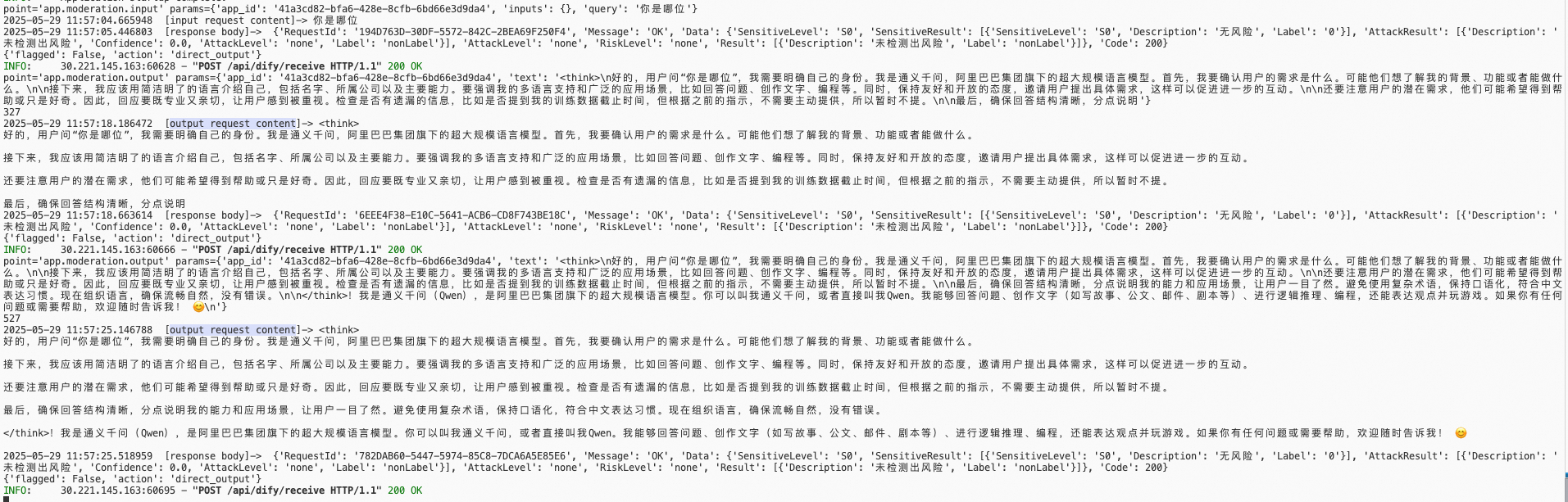
During output, Dify accumulates approximately 300 characters before it performs a content moderation check.
-
-
Examples
The following example illustrates how Guardrails work when integrated with an Agent:
FAQ
-
Dify Community Edition installation fails
If you encounter the following error when you install Dify Community Edition or other private versions, you can resolve it by disabling signature verification or using a signed version.
-
Solution 1: Disable signature verification
cd ${dify_path}/docker
# Stop
docker compose down
vi .env
# Change FORCE_VERIFYING_SIGNATURE to false
FORCE_VERIFYING_SIGNATURE=false
# Restart
docker compose up -d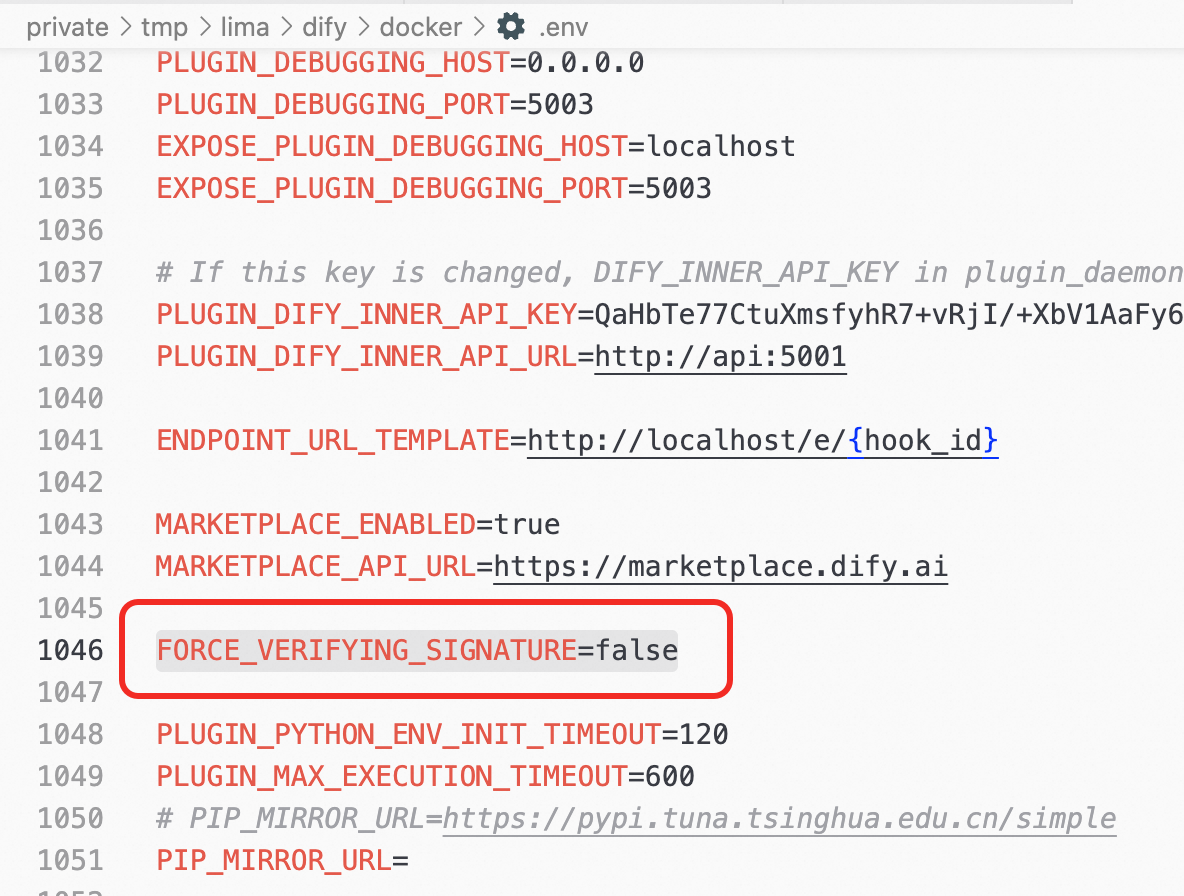
Solution 2: Use the signed version
For more information, see the Third-party signature topic in the official Dify platform documentation.
-
Download the signed version and the public key used for signing.
-
Place the public key in a location that the plugin daemon can access.
For example, create a
public_keysfolder underdocker/volumes/plugin_daemonand copy the public key file to the corresponding path:mkdir docker/volumes/plugin_daemon/public_keys cp dify_sign.public.pem docker/volumes/plugin_daemon/public_keys -
Modify
docker-compose.yaml.services: plugin_daemon: environment: FORCE_VERIFYING_SIGNATURE: true THIRD_PARTY_SIGNATURE_VERIFICATION_ENABLED: true THIRD_PARTY_SIGNATURE_VERIFICATION_PUBLIC_KEYS: /app/storage/public_keys/dify_sign.public.pemNotedocker/volumes/plugin_daemonis mounted to/app/storagein theplugin_daemoncontainer. Make sure that the path specified inTHIRD_PARTY_SIGNATURE_VERIFICATION_PUBLIC_KEYScorresponds to the path inside the container. -
Restart the container.
cd docker
docker compose down
docker compose up -d
After the service is restarted, the third-party signature verification feature is enabled in the current Community Edition environment.