inference-xpu-pytorch 25.07, inference-nv-pytorch 25.07
This topic provides the release notes for inference-xpu-pytorch 25.07.
Main features and bug fixes
Main features
The PPU SDK in the base image is upgraded to v1.5.3.
Support for vLLM v0.9.1.
Support for sglang v0.4.7.
Support for flashinfer v0.2.6.post1.
Optimized sailSHMEM performance.
Bug fixes
Fixed an accuracy issue in the w8a8-int8 gemm interface of acext caused by passing a bias, and resolved a crash in the int8_gemm API during CUDA graph capture.
Fixed an issue where Torch Profiler reported abnormal performance data in the PyTorch 2.6 environment.
Fixed inference accuracy issues for the Qwen3-235B-A22B and Llama-4-Scout-17B-16E-Instruct models.
Contents
inference-xpu-pytorch | inference-xpu-pytorch | |
Image tag | 25.07-v1.5.3-vllm0.9.1-torch2.6-cu126-20250721 | 25.07-v1.5.3-sglang0.4.7-torch2.6-cu126-20250717 |
Use case | large model inference | large model inference |
Framework | pytorch | pytorch |
Requirements | PPU SDK V1.5.3 | PPU SDK V1.5.3 |
System components |
|
|
Image assets
We recommend using a VPC to accelerate image pulls and reduce pull times.
Public image
egslingjun-registry.cn-wulanchabu.cr.aliyuncs.com/egslingjun/inference-xpu-pytorch:25.07-v1.5.3-vllm0.9.1-torch2.6-cu126-20250721
egslingjun-registry.cn-wulanchabu.cr.aliyuncs.com/egslingjun/inference-xpu-pytorch:25.07-v1.5.3-sglang0.4.7-torch2.6-cu126-20250717
VPC images
acs-registry-vpc.{region-id}.cr.aliyuncs.com/egslingjun/{image:tag}
{region-id}is the ID of the region where your Container Service for Kubernetes (ACK) cluster is located, such ascn-beijingorcn-wulanchabu.{image:tag}is the actual image name and tag.
E2E performance evaluation
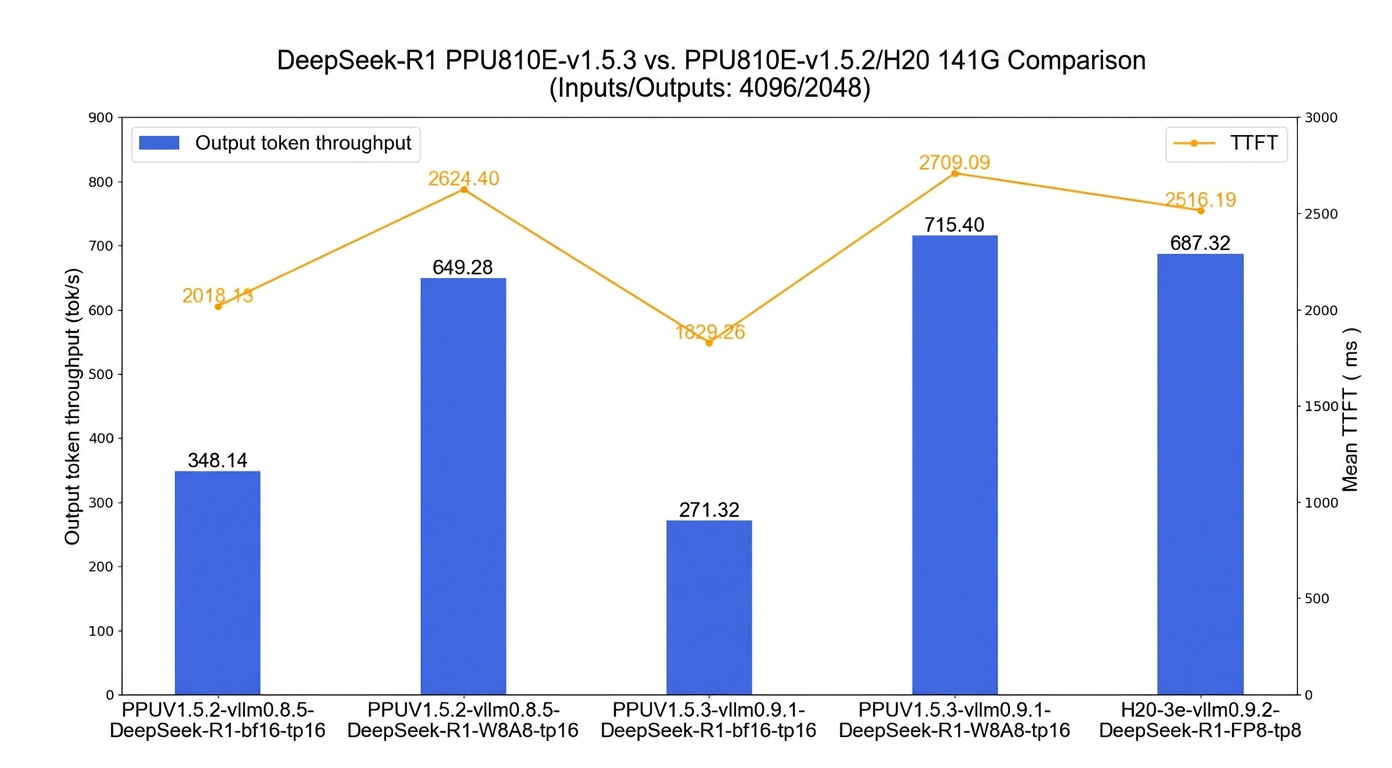
In vLLM online inference mode, the test measures the maximum concurrency with a TTFT of <3 s and a TPOT of <100 ms to compare throughput.
vllm0.9.1:
The single-machine Output Token Throughput of the DeepSeek-R1-bf16 model decreased slightly. For more information, see Known Issues.
The single-machine Output Token Throughput of the DeepSeek-R1-W8A8 model is 260% that of the bf16 model.
Quick start
The following example shows how to pull the inference-xpu-pytorch image using Docker and test the inference service with the Qwen2.5-7B-Instruct model.
To use the inference-xpu-pytorch image in Container Service for Kubernetes (ACK), you can select it from the artifact center page when you create a workload in the Console, or specify the image reference in a YAML file.
For instructions on using XPU large model inference images in an ACK environment, see Guide to using LLM large model inference images in ACK clusters.
For instructions on deploying the DeepSeek inference service in an ACK environment, see Quickly deploy DeepSeek V3/R1 inference service on PPU in ACK.
Pull the inference image.
docker pull egslingjun-registry.cn-wulanchabu.cr.aliyuncs.com/egslingjun/inference-xpu-pytorch:[tag]Download the open-source model in ModelScope format.
pip install modelscope
cd /mnt
modelscope download --model Qwen/Qwen2.5-7B-Instruct --local_dir ./Qwen2.5-7B-Instruct
Run the following command to start and enter the container.
docker run -d -t --network=host --privileged --init --ipc=host \
--ulimit memlock=-1 --ulimit stack=67108864  \
-v /mnt/:/mnt/ \
egslingjun-registry.cn-wulanchabu.cr.aliyuncs.com/egslingjun/inference-xpu-pytorch:[tag]
Run an inference test to verify the conversational inference feature of vLLM.
Start the server.
python3 -m vllm.entrypoints.openai.api_server \
--model /mnt/Qwen2.5-7B-Instruct \
--trust-remote-code --disable-custom-all-reduce \
--tensor-parallel-size 1
Run a test on the client.
curl http://localhost:8000/v1/chat/completions \
    -H "Content-Type: application/json" \
    -d '{
    "model": "/mnt/Qwen2.5-7B-Instruct",
    "messages": [
    {"role": "system", "content": "You are a friendly AI assistant."},
    {"role": "user", "content": "Tell me about deep learning."}
    ]}'
The following output is returned:

For more information about using vLLM, see the vLLM documentation.
Recommendations
Quantization capabilities in SDK 1.5.3
vllm 0.9.1 and sglang 0.4.7, released in SDK 1.5.3, support a8w8_int8 quantization. However, they are not adapted for Activation-aware Weight Quantization (AWQ) or Generative Pre-trained Transformer Quantization (GPTQ) and have performance issues. For AWQ/GPTQ, use vLLM 0.8.5 or wait for the SDK 1.6 image release.
DeepSeek R1 (671B):
vLLM 0.9.1 (SDK 1.5.3): Supports per-token/per-channel a8w8 (int8) quantization. Does not support AWQ (w4a16) or GPTQ (w4a16, w8a16). These methods are not adapted and have significant performance issues.
sglang 0.4.7 (SDK 1.5.3): Supports per-token/per-channel a8w8 (int8) quantization. To run an a8w8 (int8) quantized model, add the
--quantization w8a8_int8option. Does not support AWQ (w4a16) or GPTQ (w4a16, w8a16). These methods are not adapted and have significant performance issues.To use AWQ (w4a16) or GPTQ (w4a16, w8a16) quantization on vLLM, use the SDK 1.5.2 image (inference-xpu-pytorch 25.06:
inference-xpu-pytorch:25.06-v1.5.2-vllm0.8.5-torch2.6-cu126-20250610).To use AWQ (w4a16) or GPTQ (w4a16, w8a16) quantization on SGLang, use the SDK 1.5.3 sglang image (
inference-xpu-pytorch:25.07-v1.5.3-sglang0.4.7-torch2.6-cu126-20250717) and downgrade thesglang 0.4.6post1package.To run a native DeepSeek-R1-FP8 precision model on vLLM, add the
--quantization moe_wna16option.
Qwen3:
vLLM 0.9.1 (SDK 1.5.3): Supports per-token/per-channel a8w8 (int8) quantization. Does not support AWQ (w4a16) or GPTQ (w4a16, w8a16). These methods are not adapted and have significant performance issues.
sglang 0.4.7 (SDK 1.5.3): Supports per-token/per-channel a8w8 (int8) quantization. To run an a8w8 (int8) quantized model, add the
--quantization w8a8_int8option. Does not support AWQ (w4a16) or GPTQ (w4a16, w8a16). These methods are not adapted and have significant performance issues.To use AWQ (w4a16) or GPTQ (w4a16, w8a16) quantization, use the SDK 1.5.2 image (inference-xpu-pytorch 25.06).
For optimal performance, use this image with driver version 1.5.1 or later. For setup instructions, see Specify GPU models and driver versions for ACS GPU Pods and GPU driver version notes.
Adjust the built-in
NCCL_SOCKET_IFNAMEenvironment variable in this image based on the usage scenario:When a single pod requests 1, 2, 4, or 8 cards for an inference task: Set
NCCL_SOCKET_IFNAME=eth0. This is the default configuration in this inference image.When a single pod requests all 16 cards on a machine for an inference task: Set
NCCL_SOCKET_IFNAME=hpn0. You can use the High Performance Network (HPN) in this scenario.
Known issues
SGLang-v0.4.7 returns incorrect inference responses when you use the
generateinterface. Use the OpenAI-compatible interface instead.vLLM-v0.9.1 estimates less available KV cache space compared to v0.8.5. This reduces concurrency and degrades performance in scenarios constrained by the KV cache, such as running DeepSeek-R1-bf16 on a single 810e machine.
ImportantTo avoid performance degradation, run the A8W8 quantized model on the Zhenwu 810E.
When running DeepSeek-R1 or DeepSeek-V3 A8W8-INT8 models, SGLang-v0.4.7 uses shared experts by default, which results in lower performance compared to SGLang-v0.4.6.post1. To achieve comparable performance, use the
--disable-shared-experts-fusionoption to disable shared experts.In the SGLang-v0.4.7 image, setting the
--mem-fraction-staticparameter to a high value can cause adecode out of memoryerror when the GPU memory on a single machine is insufficient. This is a known community issue.