Video Codec/Image (v1.7)
1. Overview
PPU is compatible with hardware acceleration library interfaces for mainstream video and image codecs, as well as pre- and post-processing. Key components include:
-
Video Codec SDK: Provides hardware acceleration for
cuviddecode andnvencencode. The current version is 13.0. -
nvJPEG: Provides hardware acceleration for JPEG decode and encode. The current version is 12.4.
-
npp: Provides hardware acceleration for 2D image post-processing. The current version is 12.9.
2. Ecosystem
You can use hardware acceleration in the following applications and frameworks.
-
FFmpeg: Enable hardware acceleration by including the
cuvid,nvenc, andlibnppoptions at compile time. When encoding, decoding, or transcoding video, you can specify thecuvid,nvenc, ornppfilter. FFmpeg is widely used, and most video codec applications, including PyAV (the backend for torchvision), depend on it. -
DALI: An NVIDIA-provided parallel acceleration framework for data loading. It supports hardware-accelerated JPEG and video codecs.
You can also use the following libraries to access the codec/JPEG interfaces directly:
-
nvImageCodec: A wrapper library from NVIDIA that reads various image formats and converts them into tensor data. It also supports hardware-accelerated JPEG encoding and provides a Python interface.
-
Official Website: https://docs.nvidia.com/cuda/nvimagecodec/
-
Project Source Code: https://github.com/NVIDIA/nvImageCodec
-
-
VideoProcessingFramework (VPF): A wrapper library from NVIDIA that wraps the Video Codec SDK and provides a Python interface.
-
Official Website: https://developer.nvidia.com/blog/vpf-hardware-accelerated-video-processing-framework-in-python/
-
Project Source Code: https://github.com/NVIDIA/VideoProcessingFramework
-
VPF may have compilation compatibility issues with recent FFmpeg versions. If you encounter this, apply the following patch:
On some Docker containers, the
pip install . -vcommand may hang when you run it in the VideoProcessingFramework (VPF) directory. If you encounter this issue, you can runpip uninstall ninjato uninstall ninja and then reinstall it. Note: NVIDIA has frozen updates for VPF and now supports PyNvCodec. The PPU Video Codec is also directly supported.
-
3. Build and run
Video Codec SDK
The PPU Video Codec is compatible with mainstream video codec toolchains. Download from the official NVIDIA website: https://developer.nvidia.com/nvidia-video-codec-sdk/download
Download the Video Codec SDK version that corresponds to the toolchain version included in the PPU SDK. The known version mappings are as follows:
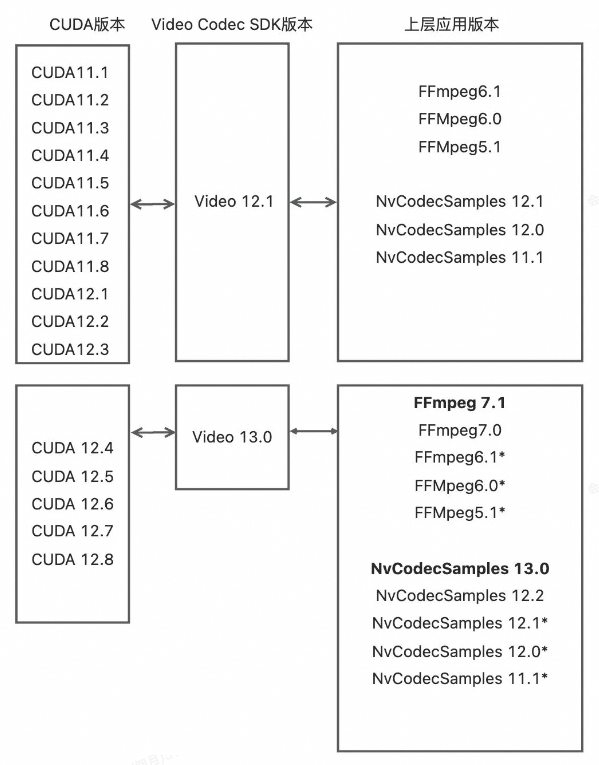
Prerequisites
-
Because the PPU does not support OpenGL or Vulkan, you must modify the
Samples/CMakeLists.txtfile before building to remove unsupported projects. We recommend keeping only the following commonly used codec projects:# Keep the following and comment out all others add_subdirectory(AppEncode/AppEncCuda) add_subdirectory(AppEncode/AppEncPerf) add_subdirectory(AppEncode/AppEncMultiInstance) add_subdirectory(AppEncode/AppEncDec) add_subdirectory(AppTranscode/AppTrans) add_subdirectory(AppTranscode/AppTransPerf) add_subdirectory(AppDecode/AppDec) add_subdirectory(AppDecode/AppDecMultiFiles) add_subdirectory(AppDecode/AppDecPerf) -
The Video Codec SDK depends on FFmpeg for demuxing, so you must install FFmpeg beforehand. Although only the demuxer is required (which does not require an FFmpeg version with hardware acceleration—see the Video FFMPEG User Guide), we recommend compiling and installing a version with hardware acceleration to avoid confusion.
Assume the FFmpeg installation directory is
FFMPEG_PATH.If a directory is not specified during compilation, the default is the /usr/local directory. Otherwise, the specified directory is used. The contents of the
lib,include, andbindirectories of FFmpeg are copied to$FFMPEG_PATH/include,$FFMPEG_PATH/lib, and$FFMPEG_PATH/bin.Run the
pkg-config --modversion libavcodeccommand to view the version number. If the version number is not displayed, run theexport PKG_CONFIG_PATH=$FFMPEG_PATH/lib/pkgconfig:$PKG_CONFIG_PATHcommand and then try to run thepkg-configcommand again. -
Specify
CUDA_PATH.export CMAKE_LIBRARY_PATH=${CUDA_HOME}/lib64Here,
CUDA_HOMEpoints to theCUDA_SDKdirectory within the PPU SDK directory. -
If the downloaded Video Codec SDK version does not match the accelerated toolchain version specified for the PPU SDK, the build may fail. If this happens, run the following command:
cp Interface/* ${CUDA_HOME}/includeHere,
Interfacerefers to theInterfacedirectory within the downloaded Video Codec SDK.
Build
cd Samples  # Sample folder of the video-codec-sdk download path
mkdir build
cd build
cmake ..
make
Run
# Decode. Run 12 threads to reach peak performance.
./AppDecode/AppDecPerf/AppDecPerf -thread 12 -i test_1920x1080_yuv420p_50fps_h264.mp4

# Encode. Run 4 threads to reach peak performance.
./AppEncode/AppEncPerf/AppEncPerf -i crowd_run_1920x1088_nv12_8bit_50.0fps_n500.yuv -s 1920x1088 -if nv12 -fps 30 -preset p4 -gop 60 -rc cbr -bitrate 10000000 -codec h265 -thread 4-
The PPU has 12 video decode cores (the Zhenwu 810E has 10). Theoretically, 12 threads can achieve optimal performance. Increasing the thread count may offer a slight, but not significant, improvement. Up to 7 PPU processes can achieve ideal performance; using more than 7 processes provides no further performance gain.
-
The PPU has 4 video encode cores, so theoretically, 4 threads can achieve optimal performance.
nvJPEG:
The PPU SDK is fully compatible with nvJPEG. You can use the nvJPEG samples to test JPEG functionality directly. Official nvJPEG website: https://developer.nvidia.com/nvjpeg
nvJPEG samples: https://github.com/NVIDIA/CUDALibrarySamples/tree/master/nvJPEG/
Build:
(The decoder and encoder samples are in the nvJPEG-Decoder and nvJPEG-Encoder directories, respectively.)
$ mkdir build
$ cd build
$ cmake ..
$ make
Run:
# Decode. Assumes the JPEG image set is in the 1080p/ directory with a batch size of 128.
./nvjpegDecoder -i 1080p/ -b 128

# Encode (the sample decodes first and then encodes).
./nvJPEG_encoder -i input.jpg  -o output.jpg
Notes:
The PPU has 4 JPEG encode cores, so theoretically, 4 threads can achieve optimal performance.
The PPU has 8 JPEG decode cores. In batch mode, it automatically enables 8 internal threads to reach peak performance.
4. Specifications
Video decode
-
Supports the
cuviddecoder. -
Codecs:
-
HEVC (H.265) - ITU-T Rec. H.265 (04/2013), ISO/IEC 23008-2
-
Main Profile, Level 5.1, High Tier
-
Main10 Profile, Level 5.1, High Tier
-
Main Still Profile
-
-
VP9 - vp9-bitstream-specification-v0.6-20160331-draft
-
Profile 0, 8-bit
-
Profile 2, 10-bit
-
-
AVC (H.264) - ITU-T Rec. H.264 (03/2010) / ISO/IEC 14496-10
-
Main Profile, levels 1 - 5.2
-
High Profile, levels 1 - 5.2
-
High 10 Profile, levels 1 - 5.2
-
Baseline Profile, levels 1 - 5.2
-
-
AV1 Bitstream & Decoding Process Specification Version 1.0.0 with Errata 1
-
Main Profile, Level 5.1
-
-
AVS2
-
-
Resolution up to 8192x8192
-
Up to 192 FHD streams
Video encode
-
Supports the
nvencencoder. -
Codecs:
-
AVC (H.264): Spec Version 12: ISO/IEC 14496-10 / ITU-T Rec. H.264 (03/2010)
-
Baseline Profile, levels 1–5.2
-
Main Profile, levels 1–5.2
-
High Profile, levels 1–5.2
-
High 10 Profile, levels 1–5.2
-
-
HEVC (H.265): ITU-T Rec. H.265 (04/2013), ISO/IEC 23008-2
-
Main Profile, Level 5.1, High Tier
-
Main10 profile, Level 5.1, High Tier
-
Main Still Profile
-
-
AV1 Bitstream Specification Version 1.0.0 with Errata 1
-
Main Profile, Level 5.1
-
-
-
Resolutions up to 4K
-
Supports RGB input format (converted to YUV420 via inlinePP)
-
Supports crop, scale, and rotate with inlinePP
-
Up to 32 FHD streams
JPEG
-
Supports
nvJPEGdecoder and encoder -
Resolution up to 32Kx32K
-
Supports RGB format input and output with inlinePP
-
Supports crop, scale, and rotate with inlinePP
-
Up to 960 FPS for UHD
Image processing
-
Supports the
npplibrary for 2D image processing.
5. Known issues
Video decode
-
The
cuviddecode mode is supported, but rawnvdecmode is not. Bothcuvidandnvdecmodes offer the same hardware acceleration capabilities, butcuvidmode is simpler to use. -
Legacy formats such as MPEG1, MPEG2, MPEG4, VC1, and VP8 are not supported.
Video encode
-
YUV444 12-bit is not supported.
JPEG
-
Lossless JPEG is not supported.
-
JPEG2000 is not supported.
2D image
-
The
npplibrary supports only Image Processing interfaces, not Signal Processing interfaces.