inference-xpu-pytorch 25.11
This document provides the release notes for inference-xpu-pytorch 25.11.
Before PPU SDK 1.7.0, the SDK-bundled approach for releasing Python packages resulted in long iteration cycles that could not keep pace with rapid community updates. Starting from PPU SDK 1.7.0, the PPU runtime environment decouples Python packages from the PPU SDK. The PPU SDK is now released only for major feature enhancements or updates, ending the monthly release cycle. Agile releases of Python packages now support new models and frameworks from the community.
Due to the change in the PPU SDK release cadence, PPU container images are also no longer released monthly. PPU container images are updated in sync with PPU SDK releases and serve as the base runtime environment for subsequent SDK versions. On the latest base runtime, you can upgrade packages to support new models and frameworks.
Main features and bug fixes
Main features
For the 25.11-v1.7.0-vllm0.10.2-torch2.8-cu129-20251113 and 25.11-v1.7.0-sglang0.5.2-torch2.8-cu129-20251113 images:
Upgraded PPU SDK to 1.7.0 and CUDA to 12.9.
Upgraded PyTorch to 2.8.0.
Upgraded vLLM to 0.10.2. To run Qwen3-VL or DeepSeek V3.2 models, you must manually upgrade vLLM to version 0.11.0.
Upgraded SGLang to 0.5.2, FlashInfer to 0.3.1, and Flash Attention to 2.8.2. To run the Qwen3-VL model, you must manually upgrade SGLang to version 0.5.3 or manually upgrade SGLang to version 0.5.5.
For the 25.11-v1.7.0.post1-sglang0.5.5-torch2.8-cu129-20251216 image:
Upgraded PPU SDK to V1.7.0_hotfix.
Upgraded SGLang to 0.5.5 and FlashInfer to 0.4.0rc3.
For the 25.11-v1.7.0.post1-vllm0.11.1-torch2.8-cu129-20260105 image:
Upgraded PPU SDK to V1.7.0_hotfix.
Upgraded vLLM to 0.11.1.
Upgraded transformers to 4.57.0.
Bug fixes
The 25.11-v1.7.0.post1-sglang0.5.5-torch2.8-cu129-20251216 image fixes a crash that occurred in multi-node scenarios. An incorrect orchestration of proxy parameters (sub args) during the fusion of multiple PCCL P2P operations caused the issue.
Contents
Image name | inference-xpu-pytorch | |||
Image tag | 25.11-v1.7.0-vllm0.10.2-torch2.8-cu129-20251113 | 25.11-v1.7.0-sglang0.5.2-torch2.8-cu129-20251113 | 25.11-v1.7.0.post1-sglang0.5.5-torch2.8-cu129-20251216 | 25.11-v1.7.0.post1-vllm0.11.1-torch2.8-cu129-20260105 |
Application scenario | large model inference | large model inference | large model inference | large model inference |
Framework | pytorch | pytorch | pytorch | pytorch |
Requirements | PPU SDK V1.7.0 | PPU SDK V1.7.0 | PPU SDK V1.7.0_hotfix | PPU SDK V1.7.0_hotfix |
System components |
|
|
|
|
Image assets
Public images
egslingjun-registry.cn-wulanchabu.cr.aliyuncs.com/egslingjun/inference-xpu-pytorch:25.11-v1.7.0-vllm0.10.2-torch2.8-cu129-20251113
egslingjun-registry.cn-wulanchabu.cr.aliyuncs.com/egslingjun/inference-xpu-pytorch:25.11-v1.7.0-sglang0.5.2-torch2.8-cu129-20251113
egslingjun-registry.cn-wulanchabu.cr.aliyuncs.com/egslingjun/inference-xpu-pytorch:25.11-v1.7.0.post1-sglang0.5.5-torch2.8-cu129-20251216
egslingjun-registry.cn-wulanchabu.cr.aliyuncs.com/egslingjun/inference-xpu-pytorch:25.11-v1.7.0.post1-vllm0.11.1-torch2.8-cu129-20260105
VPC images
Replace the AI container image asset URI egslingjun-registry.cn-wulanchabu.cr.aliyuncs.com/egslingjun/{image:tag} with acs-registry-vpc.{region-id}.cr.aliyuncs.com/egslingjun/{image:tag} for accelerated pulling of PPU AI container images from within your VPC.
{region-id}: The region ID of the available region for your ACS product (including Finance Cloud, Government Cloud, and others). For example:cn-beijing,cn-wulanchabu, orcn-shanghai-finance-1.{image:tag}: The name and tag of the AI container image. For example:inference-xpu-pytorch:25.11-v1.7.0-vllm0.10.2-torch2.8-cu129-20251113ortraining-xpu-pytorch:25.11.
End-to-end performance evaluation
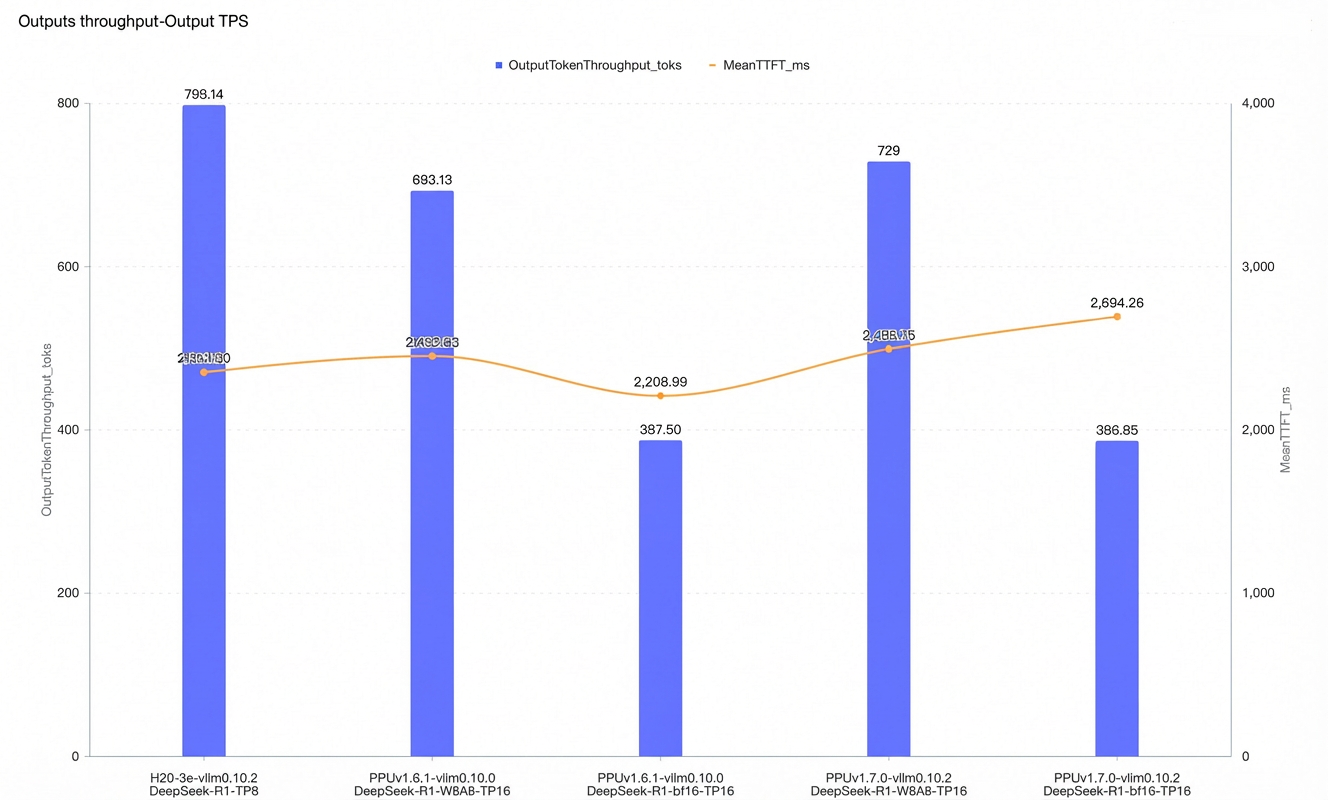
In vLLM online inference mode, we tested the maximum concurrency and compared throughput under the following conditions: an input and output token length of 4096/2048, a Time to First Token (TTFT) of less than 3s, and a Time Per Output Token (TPOT) of less than 100ms.
The DeepSeek-R1-bf16 and DeepSeek-R1-W8A8 models show slightly improved single-node output token throughput compared to version 25.09.
Quick start
The following example shows how to pull the inference-xpu-pytorch image by using Docker and test an inference service with the Qwen2.5-7B-Instruct model.
To use the inference-xpu-pytorch image in ACS, you can specify the image address when you create a workload in the console or by referencing the image in a YAML file.
For instructions on how to use the large model inference image in an ACS cluster, see Use the LLM inference image in an ACS cluster.
For instructions on how to deploy the DeepSeek inference service in ACS, see Quickly deploy the DeepSeek V3/R1 inference service by using PPU in ACS.
Pull the inference container image.
Notedocker pull egslingjun-registry.cn-wulanchabu.cr.aliyuncs.com/egslingjun/inference-xpu-pytorch:[tag]Download the open-source model from ModelScope.
pip install modelscope
cd /mnt
modelscope download --model Qwen/Qwen2.5-7B-Instruct --local_dir ./Qwen2.5-7B-Instruct
Run the following command to start and enter the container.
docker run -d -t --network=host --privileged --init --ipc=host \
--ulimit memlock=-1 --ulimit stack=67108864  \
-v /mnt/:/mnt/ \
egslingjun-registry.cn-wulanchabu.cr.aliyuncs.com/egslingjun/inference-xpu-pytorch:[tag]
Run an inference test for the vLLM conversational feature.
Start the server.
python3 -m vllm.entrypoints.openai.api_server \
--model /mnt/Qwen2.5-7B-Instruct \
--trust-remote-code --disable-custom-all-reduce \
--tensor-parallel-size 1
Run a test on the client.
curl http://localhost:8000/v1/chat/completions \
    -H "Content-Type: application/json" \
    -d '{
    "model": "/mnt/Qwen2.5-7B-Instruct",
    "messages": [
    {"role": "system", "content": "You are a friendly AI assistant."},
    {"role": "user", "content": "Tell me about deep learning."}
    ]}'
The following output is displayed:

For more information about how to use vLLM, see vLLM.
Recommendations
Standard quantization capabilities supported by each framework in SDK 1.7.0:
vLLM 0.10.2 (built-in) or 0.11.0 (upgraded via pip): Supports per-token/per-channel a8w8 (int8), AWQ (w4a16), and GPTQ (w4a16, w8a16) quantization schemes.
SGLang 0.5.2 (built-in), 0.5.3 (upgraded via pip), or 0.5.5 (upgraded via pip): Supports per-token/per-channel a8w8 (int8), AWQ (w4a16), and GPTQ (w4a16, w8a16) quantization schemes.
To run an a8w8 (int8) quantized model, add the
--quantization w8a8_int8option.The following quantized models are compatible with SDK 1.7.0. System login credentials reuse the PTG PIP credentials (contact your PDSA for access):
DeepSeek-R1: Supports per-token/per-channel a8w8 (int8) quantization.
DeepSeek V3.2: Supports per-token/per-channel a8w8 (int8) quantization.
Kimi-K2-Instruct: Supports per-token/per-channel a8w8 (int8) quantization.
Qwen3-235B-A22B: Supports per-token/per-channel a8w8 (int8) quantization.
For optimal performance, we recommend using this image with driver version 1.5.1 or later. For configuration instructions, see Specify GPU models and driver versions for ACS GPU Pods and GPU driver version notes.
To use AcclEP-P (the PPU version of DeepEP) in an ACS environment, you must set the environment variable
export EIC_VSOLAR=1. This setting is required for the current image, but we plan to remove this limitation in a future release.You must adjust the built-in
NCCL_SOCKET_IFNAMEenvironment variable based on your use case:When a single Pod requests 1, 2, 4, or 8 cards for an inference task, set
NCCL_SOCKET_IFNAME=eth0(the default configuration in this inference image).When a single Pod requests all 16 cards on an entire machine for an inference task (which allows you to use HPN), set
NCCL_SOCKET_IFNAME=hpn0.
We recommend using this image with the Alibaba Cloud PPU PIP service in ACS. It provides one-stop, password-free access to the PIP service within an ACS VPC, eliminating the need to use other PIP sources. The image includes the required pip configuration, but you must still configure it for your specific use case as described in the documentation.
Known issues
vLLM 0.10.2 performance issue
For Qwen models, performance has regressed compared to previous versions because
fused_topkin the fused Mixture-of-Experts (MoE) layer is not wrapped withtorch.compile. A patch has been submitted to the open-source community and is slated for inclusion in vLLM 0.11.1. For more information, see the GitHub community content.In a two-node vLLM scenario, if the container image has transformers version 4.56.0 or later and torchao is also installed, the run fails. The same issue exists on GPUs. Uninstalling torchao is a valid workaround.
SGLang
DeepGemm compiles at runtime. Ensure a sufficient warm-up period when you benchmark performance.
DeepSeek V3.2 currently requires dp-attention to be enabled and does not yet support tensor parallelism (TP).
Qwen-235B-A22B shows a performance regression with short outputs (output_len=400).
In the DeepSeek-R1 SLA test scenario with an input length of 900 and an output length of 400, the maximum concurrency does not achieve maximum throughput.
In the DeepSeek-R1 PD separation scenario, SGLang 0.5.5 performance regresses by 20% compared to SGLang 0.5.2. This regression occurs because the SGLang community removed support for the
load_balance_method = "minimum_tokens"option in version 0.5.3 and later. In theory, H20 also experiences this performance regression. For more information, see the GitHub community PR.
Appendix
Appendix 1: Upgrade vLLM to 0.11.0
The provided vLLM 0.11.0 is a preview version and may have potential stability risks.
Prerequisites
You must complete the prerequisite steps, including configuring the PPU PIP source, enabling password-free access for PPU PIP, adding a ServiceAccount to the Pod YAML, and installing the password-free plugin. For detailed instructions, see Use the PPU PIP service on ACS.
Procedure
pip uninstall vllm -y
pip install vllm==0.11.0+ppu1.7.0
# Do not use numpy 2.x
pip install numpy==1.26.4
# Upgrade transformers
pip install transformers==4.57.0

# Optional step if running the DeepSeek v3.2 model
# pip install scikit-learn==1.7.1
Verify the environment
pip list | grep vllm
pip list | grep transformers
pip list | grep numpy
Appendix 2: Upgrade SGLang to 0.5.3
The provided SGLang 0.5.3 is a preview version and may have potential stability risks.
Because this is a forced upgrade, you may see error messages during the process. These messages are expected. Verify that the components are installed successfully after the upgrade.
Prerequisites
You must complete the prerequisite steps, including configuring the PPU PIP source, enabling password-free access for PPU PIP, adding a ServiceAccount to the Pod YAML, and installing the password-free plugin. For detailed instructions, see Use the PPU PIP service on ACS.
Procedure
# Uninstall sglang and sgl-kernel
pip uninstall -y sglang sgl-kernel
# Install sgl-kernel
pip install sgl_kernel==0.3.14.post1+ppu1.7.0 --force-reinstall
# Install sglang
pip install sglang==0.5.3+ppu1.7.0 --no-deps --force-reinstall

# Install transformers
pip install -U transformers==4.57.1 openai_harmony --force-reinstall
# Install fast_hadamard_transform and numpy
pip install fast_hadamard_transform numpy==1.26.0

# Optional: Upgrade flashinfer. If you do not upgrade flashinfer, you can use the Triton backend by adding the --attention-backend triton option to the command.
# pip install flashinfer_python==0.4.0rc3+ppu1.7.0.oe --force-reinstall --no-deps
Verify the environment
pip list | grep sgl
pip list | grep transformer
Appendix 3: Upgrade SGLang to 0.5.5
The provided SGLang 0.5.5 is a preview version and may have potential stability risks.
Because this is a forced upgrade, you may see error messages during the process. These messages are expected. Verify that the components are installed successfully after the upgrade.
Prerequisites
You must complete the prerequisite steps, including configuring the PPU PIP source, enabling password-free access for PPU PIP, adding a ServiceAccount to the Pod YAML, and installing the password-free plugin. For detailed instructions, see Use the PPU PIP service on ACS.
Procedure
# Upgrade SGLang
## Uninstall sgl-kernel, sglang-router, and sglang
pip uninstall -y sgl-kernel sglang-router sglang
pip install sgl-kernel==0.3.16.post5+ppu1.7.0.post1 --force-reinstall --no-deps
pip install sglang-router==0.2.2+ppu1.7.0.post1 --force-reinstall --no-deps
pip install sglang==0.5.5+ppu1.7.0.post1 --force-reinstall --no-deps

# Upgrade DeepGemm
pip install deep_gemm==1.0.0+ppu1.7.0.post1 --force-reinstall --no-deps

# Upgrade DeepEP
pip install deep_ep==1.0.0+ppu1.7.0.post1 --force-reinstall --no-deps

# Upgrade Flash Attention 2.8.2
pip install flash_attn==2.8.2+ppu1.7.0.post1 --force-reinstall --no-deps
pip install flash_attn_3==2.8.2+ppu1.7.0.post1 --force-reinstall --no-deps

# Upgrade FlashMLA
pip install flash_mla==1.0.0+ppu1.7.0.post1 --force-reinstall --no-deps

# Upgrade xgrammar and transformers
pip install -U xgrammar==0.1.25 transformers==4.57.1 numpy==1.26.0 --force-reinstall --no-deps

# Upgrade FlashInfer
pip install flashinfer_python==0.4.0rc3+ppu1.7.0.oe --force-reinstall --no-deps
Verify the environment
pip list | grep sglang
# Expected output
sglang                            0.5.5+ppu1.7.0.post1
sglang-router                     0.2.2+ppu1.7.0.post1
pip list | grep flash
# Expected output
flash-attn 2.8.2+ppu1.7.0.post1
flash-attn-3 2.8.2+ppu1.7.0.post1
flash_mla 1.0.0+ppu1.7.0.post1
flashinfer-python 0.4.0rc3+ppu1.7.0.oepip list | grep transformers
# Expected output
transformers 4.57.1