acext User Guide (v2.0)
To preserve logical consistency, internal network links in the source code remain unchanged. These links are not accessible to external users. If you have any questions, contact your account manager (PDSA).
acext provides high-performance operator implementations for PPU, including various quantization algorithms. It is distributed as a Python wheel package and is also open-sourced for customers and partners. You can use these operators during PPU adaptation to accelerate your workloads.
Open-source code path:
https://code.alibaba-inc.com/ppu_open_source/acext1. Using acext
1.1. Use acext with vLLM or SGLang
Starting with PPU SDK version 1.6, acext is no longer published with the PPU SDK. Instead, it is published as a Python wheel package. For frameworks that depend on acext, such as vLLM and SGLang, you can use acext in one of the following two ways after you install the acext wheel package (pip install acext):
SGLang ≥ 0.4.10 and vLLM ≥ 0.10.0 automatically load acext. No additional steps are required.
SGLang < 0.4.10 or vLLM < 0.10.0 requires you to set environment variables to locate shared libraries. You must set the following four environment variables:
### Append shared library load path
export LD_LIBRARY_PATH="${LD_LIBRARY_PATH}:$(python -c "import sysconfig; print(sysconfig.get_path('purelib'))")/lib"
### Config ACEXT LUT path
export ACEXT_GEMM_CONFIG_DIR="$(python -c "import sysconfig; print(sysconfig.get_path('purelib'))")/include/acext/lut/"
### For vLLM versions earlier than 0.10.0
export ACEXT_OP_PATH="$(python -c "import sysconfig; print(sysconfig.get_path('purelib'))")/lib/libacext_op.so"
### For SGLang versions earlier than 0.4.10
export ACEXT_THOP_LIB_PATH="$(python -c "import sysconfig; print(sysconfig.get_path('purelib'))")/lib/th_op/libth_op.so"
Note: For backward compatibility, current PTG images still include acext dynamic libraries and header files in the PPU SDK. Therefore, using acext, vLLM, or SGLang on PTG images works without any issues. However, future releases may switch entirely to a wheel-based installation.
1.2 Supported APIs
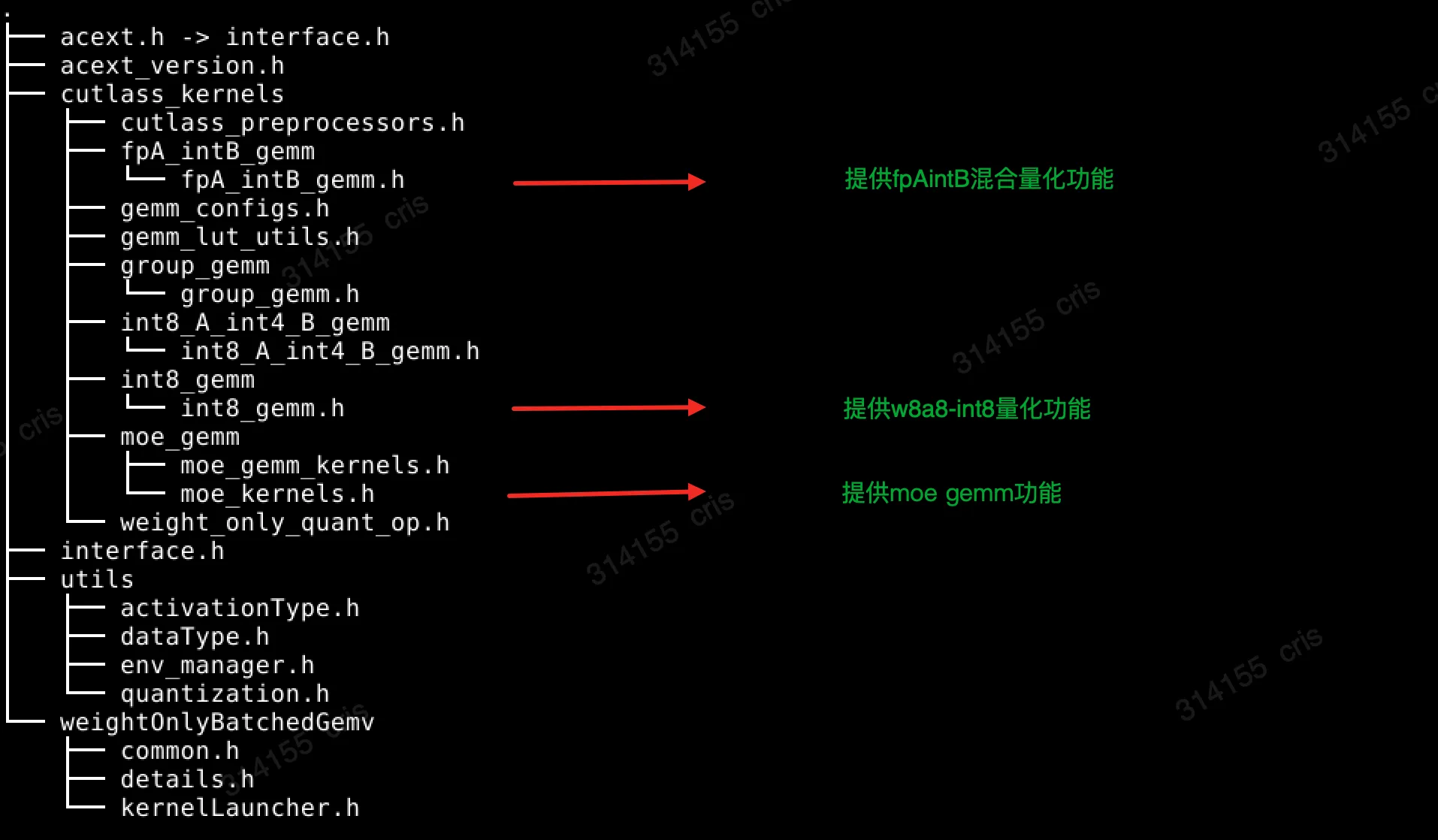
acext delivers quantization functionality through header files and libraries. Its header file structure supports fpAintB mixed-precision quantization, w8a8 quantization, and Mixture of Experts (MoE) GEMM. To use acext, you must include the header file acext.h and link against libacext.so.
1.2.1 fpAintB GEMM
The header fpA_intB_gemm.h implements mixed-precision quantization where matrix A is a floating-point type and matrix B is an integer type. Three template parameters allow you to specify the exact data types for A and B, and the quantization algorithm to use.
template <typename T, typename WeightType, cutlass::WeightOnlyQuantOp QuantOp>
class CutlassFpAIntBGemmRunner : public virtual CutlassFpAIntBGemmRunnerInterface
{
public:
    CutlassFpAIntBGemmRunner();
    ~CutlassFpAIntBGemmRunner();

    void gemm(const void* A, const void* B, const void* weight_scales, void* C, int m, int n, int k,
        tkc::CutlassGemmConfig gemmConfig, char* workspace_ptr, const size_t workspace_bytes,
        cudaStream_t stream) override;

    void gemm(const void* A, const void* B, const void* weight_scales, const void* weight_zero_points,
        const void* biases, void* C, int m, int n, int k, const int group_size, tkc::CutlassGemmConfig gemmConfig,
        char* workspace_ptr, const size_t workspace_bytes, cudaStream_t stream) override;

    // Returns desired workspace size in bytes.
    size_t getWorkspaceSize(const int m, const int n, const int k) override;

    tkc::CutlassGemmConfig getChosenConfig(const void*          A,
                                           const void* B,
                                           const void*          weight_scales,
                                           const void*          weight_zero_points,
                                           const void*          biases,
                                           void*                C,
                                           int               m,
                                           int               n,
                                           int               k,
                                           const int         group_size,
                                           char*             workspace_ptr,
                                           const size_t      workspace_bytes,
                                           cudaStream_t      stream) override;
};

template <typename ActType, WeightOnlyQuantType QType, cutlass::WeightOnlyQuantOp QuantOp>
std::shared_ptr<CutlassFpAIntBGemmRunnerInterface> createFpAIntBGemmRunner();
1.2.2 w8a8 GEMM
The header int8_gemm.h implements quantization where both matrices A and B are integers. The template parameter T specifies the output data type.
template <typename T>
class CutlassInt8GemmRunner : public virtual CutlassInt8GemmRunnerInterface
{
public:
    CutlassInt8GemmRunner();
    ~CutlassInt8GemmRunner();

    void gemm(const void* A, const void* B, tk::QuantMode quantOption, const float* alphaCol, const float* alphaRow,
        void* C, int m, int n, int k, tkc::CutlassGemmConfig gemmConfig, char* workspacePtr,
        const size_t workspaceBytes, cudaStream_t stream) override;

    // Returns desired workspace size in bytes.
    size_t getWorkspaceSize(const int m, const int n, const int k) override;

    std::vector<tkc::CutlassGemmConfig> getConfigs() const override;

    tkc::CutlassGemmConfig getChosenConfig(const void* A, const void* B, tk::QuantMode quantOption,
        const float* alphaCol, const float* alphaRow, void* C, int m, int n, int k, char* workspacePtr,
        const size_t workspaceBytes, cudaStream_t stream);
};
1.2.3 MoE GEMM
The header moe_kernel.h defines the API for MoE GEMM operations.
template<typename T,          /*The type used for activations/scales/compute*/
         typename WeightType, /* The type for the MoE weights */
         cutlass::WeightOnlyQuantOp QuantOp,
         typename Enable = void>
class CutlassMoeFCRunner: public CutlassMoeFCRunnerInterface {
public:
    CutlassMoeFCRunner()           = default;
    ~CutlassMoeFCRunner() override = default;
    //for rtp-llm
    void runMoe(const void* input_activations_void, const float* gating_output, const float *gating_output_with_bias,
        const void* fc1_expert_weights_void, const void* fc1_scales_void, const void* fc1_zeros_void, const void* fc1_expert_biases_void,
        ActivationType fc1_activation_type, const void* fc2_expert_weights_void, const void* fc2_scales_void, const void* fc2_zeros_void,
        const void* fc2_expert_biases_void, const int num_rows, const int hidden_size, const int inter_size,
        const int num_experts, const int k, const int group_size, char* workspace_ptr, void* final_output_void, void* fc2_result_void,
        const bool* finished, const int active_rows, void* expert_scales_void,
        int* expanded_source_row_to_expanded_dest_row, int* expert_for_source_row, MOEParallelismConfig parallelism_config,
        MOEExpertScaleNormalizationMode normalization_mode, cudaStream_t stream) override;
    // for vLLM
    void fused_moe(const void* input_activations_void, const float* gating_output, const float* gating_output_with_bias,
                   const void* fc1_expert_weights_void, const void* fc1_scales_void, const void* fc1_zeros_void, const void* fc1_expert_biases_void,
                   void* a1_scale_void, ActivationType fc1_activation_type, const void* fc2_expert_weights_void, const void* fc2_scales_void,
                   const void* fc2_zeros_void, const void* fc2_expert_biases_void, void* a2_scale_void, const int num_tokens, const int hidden_size,
                   const int inter_size, const int num_experts, const int k, const int group_size, char* workspace_ptr, void* final_output_void,
                   void* fc2_result_void, const bool* finished, const int active_rows, const void* expert_scales_void,
                   int* expanded_source_row_to_expanded_dest_row, const int* expert_for_source_row, MOEParallelismConfig parallelism_config,
                   MOEExpertScaleNormalizationMode normalization_mode, cudaStream_t stream) override;
acext also provides the following MoE-related PyTorch operations:
torch.ops.moe_unit_ops.gating_softmax
torch.ops.moe_unit_ops.grouped_gemm_bias
torch.ops.moe_unit_ops.run_moe_fc
For usage examples, see acext/tests/th_moe.py.
1.2.4 DeepGEMM
PyTorch operations:
torch.ops.moe_unit_ops.grouped_gemm_nt_contiguous
torch.ops.moe_unit_ops.grouped_gemm_nt_masked
For usage examples, see acext/tests/th_group_gemm.py.
For the C++ interface, see the corresponding Python implementation.
1.3 Supported Quantization Algorithms
Quantization algorithms reduce memory usage and improve performance by compressing model weights (W) and activations (A) before matrix multiplication. Different kernels apply different quantization algorithms based on the precision of W and A. The following sections provide a brief overview of each algorithm and its support status in acext.
All code snippets assume a matrix multiplication where matrix A is M×K, matrix W is K×N, and the result is M×N.
1.3.1 Int8 Weight-only (W8A16)
Int8 weight-only is the simplest quantization method. It quantizes weights column-wise, converting them from FP16 to INT8. Each column receives a single scale factor. This method reduces weight memory by half compared to FP16 and improves performance in memory-bound scenarios because less weight data needs to be loaded.
Example code:
// Prepare data: act, weight, scales, and output
......

// Create an FpAIntBGemmRunner with A=half, B=INT8, and PER_COLUMN_SCALE_ONLY quantization
auto runner = createFpAIntBGemmRunner<half, WeightOnlyQuantType::Int8b, cutlass::WeightOnlyQuantOp::PER_COLUMN_SCALE_ONLY>();

// Preprocess weights for mixed-precision GEMM
preprocess_weights_for_mixed_gemm(preprocessed_quantized_weight, row_major_quantized_weight, {k, n}, QuantType::INT8_WEIGHT_ONLY);

// Allocate workspace
char* ws_ptr = nullptr;
const int ws_bytes = runner->getWorkspaceSize(m, n, k);
cudaMalloc(&ws_ptr, ws_bytes);

// Choose kernel config
gemmConfig = runner->getChosenConfig(p_act, p_weight, p_scales, nullptr, nullptr,
                                    p_out, m, n, k, k, reinterpret_cast<char*>(ws_ptr),
                                    ws_bytes, stream);

// Run quantized kernel; result stored in out
runner->gemm(p_act, p_weight, p_scales, p_out, m, n, k, gemmConfig, ws_ptr, ws_bytes, stream);
1.3.2 Int4 Weight-only (W4A16)
Int4 weight-only uses the same logic as Int8 weight-only but stores weights using only 4 bits. This method further reduces memory to one-quarter of the FP16 size and boosts performance, but at the cost of lower accuracy.
Example code:
// Prepare data: act, weight, scales, and output
......

// Create an FpAIntBGemmRunner with A=half, B=INT4, and PER_COLUMN_SCALE_ONLY quantization
auto runner = createFpAIntBGemmRunner<half, WeightOnlyQuantType::Int4b, cutlass::WeightOnlyQuantOp::PER_COLUMN_SCALE_ONLY>();

// Preprocess weights for mixed-precision GEMM
preprocess_weights_for_mixed_gemm(preprocessed_quantized_weight, row_major_quantized_weight, {k, n}, QuantType::PACKED_INT4_WEIGHT_ONLY);

// Allocate workspace
char* ws_ptr = nullptr;
const int ws_bytes = runner->getWorkspaceSize(m, n, k);
cudaMalloc(&ws_ptr, ws_bytes);

// Choose kernel config
gemmConfig = runner->getChosenConfig(p_act, p_weight, p_scales, nullptr, nullptr,
                                    p_out, m, n, k, k, reinterpret_cast<char*>(ws_ptr),
                                    ws_bytes, stream);

// Run quantized kernel; result stored in out
runner->gemm(p_act, p_weight, p_scales, p_out, m, n, k, gemmConfig, ws_ptr, ws_bytes, stream);
1.3.3 Int4 Groupwise (W4A16)
Although Int4 weight-only saves memory and speeds up computation, its low precision can cause large quantization errors. Groupwise quantization addresses this issue by splitting each column into groups, such as groups of size 64 or 128, where each group shares its own scale factor.
In practice, for methods such as AutoQuant (AWQ) or GPTQ, you fine-tune the model on a dataset to produce quantized INT4 weights. If asymmetric quantization is used, zero points and bias terms are also required.
Example code:
// Prepare data: act, weight, scales, and output
......

// Create an FpAIntBGemmRunner with A=half, B=INT8, and FINEGRAINED_SCALE_ONLY quantization
auto runner = createFpAIntBGemmRunner<half, WeightOnlyQuantType::Int8b, cutlass::WeightOnlyQuantOp::FINEGRAINED_SCALE_ONLY>();

// Preprocess weights for mixed-precision GEMM
preprocess_weights_for_mixed_gemm(preprocessed_quantized_weight, row_major_quantized_weight, {k, n}, QuantType::PACKED_INT4_WEIGHT_ONLY);

// Allocate workspace
char* ws_ptr = nullptr;
const int ws_bytes = runner->getWorkspaceSize(m, n, k);
cudaMalloc(&ws_ptr, ws_bytes);

// Choose kernel config
gemmConfig = runner->getChosenConfig(p_act, p_weight, p_scales, p_zeros, p_bias,
                                    p_out, m, n, k, groupsize, reinterpret_cast<char*>(ws_ptr),
                                    ws_bytes, stream);

// Run quantized kernel; result stored in out
runner->gemm(p_act, p_weight, p_scales, p_zeros, p_bias, p_out, m, n, k, groupsize, gemmConfig, ws_ptr, ws_bytes, stream);
1.3.4 SmoothQuant (W8A8)
fpAintB is a mixed-precision method where weights are dequantized to floats before being processed by Tensor Cores. In contrast, W8A8 keeps both weights and activations as integers, which enables faster integer Tensor Core execution.
SmoothQuant is the quantization algorithm that uses W8A8 kernels. For more information, see https://github.com/mit-han-lab/smoothquant.
W8A8 supports four variants based on whether per-token or per-channel scaling is applied to matrices A and B:
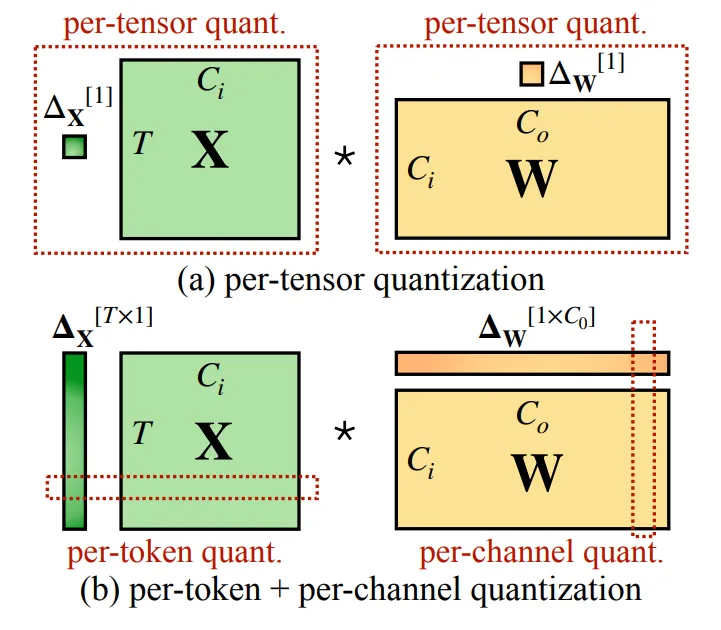
acext implements all four W8A8 kernels. The following code snippet shows how to call them:
// Choose one of the four W8A8 variants:
QuantMode quant_mode = QuantMode::fromDescription(false, false, false, false);  // A_PerTensor_W_PerTensor
QuantMode quant_mode = QuantMode::fromDescription(false, false, false, true); // A_PerTensor_W_PerChannel
QuantMode quant_mode = QuantMode::fromDescription(false, false, true, false); // A_PerToken_W_PerTensor
QuantMode quant_mode = QuantMode::fromDescription(false, false, true, true); // A_PerToken_W_PerChannel

// Prepare data: act, weight, scales, and output
......

// Create W8A8 runner
auto runner = std::make_shared<acext::kernels::cutlass_kernels::CutlassInt8GemmRunner<half>>();

// Allocate workspace
int ws_bytes = runner->getWorkspaceSize(m, n, k);
char* ws_ptr = nullptr;
if (ws_bytes)
    cudaMalloc(&ws_ptr, ws_bytes);

// Choose kernel config
const auto gemmConfig = runner->getChosenConfig(p_act, p_weight, quant_mode,
                    reinterpret_cast<const float*>(p_scales_channels),
                    reinterpret_cast<const float*>(p_scales_tokens),
                    p_out, m, n, k, ws_ptr, ws_bytes, stream);

// Run kernel; result stored in out
runner->gemm(p_act, p_weight, quant_mode,
                    reinterpret_cast<const float*>(p_scales_channels),
                    reinterpret_cast<const float*>(p_scales_tokens),
                    p_out, m, n, k, gemmConfig, ws_ptr, ws_bytes, stream);
1.4 Quantization Kernel Performance
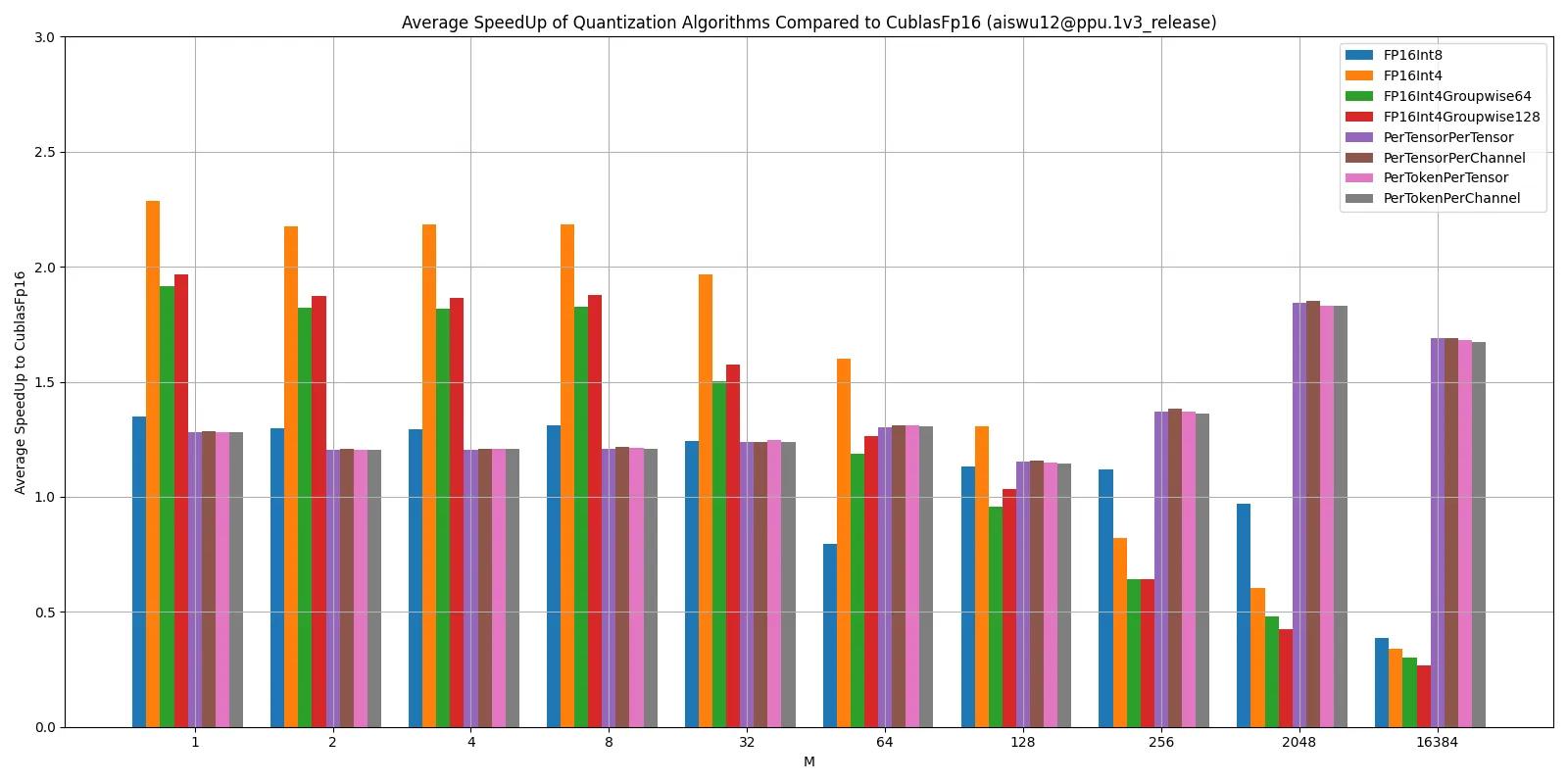
We measured the performance across 22 Large Language Models (LLMs) using various N and K dimensions. We ran matrix multiplications with different batch sizes (M) and compared the speedups over the baseline cuBLAS FP16.
Performance notes:
FpAintB is a weight-only quantization method. It reduces the memory bandwidth required for weights, which improves performance in memory-bound cases. However, it adds a dequantization step. For large batch sizes where compute becomes the bottleneck, this overhead can make quantized kernels slower than non-quantized ones.
W8A8 uses INT8 Tensor Cores. For large batch sizes, it leverages the full compute power of INT8 Tensor Cores.
2. acext Quantization Support in vLLM
vLLM integrates acext to support multiple quantization algorithms on PPU.
vLLM 0.4.2 source code:
https://code.alibaba-inc.com/ppu_open_source/vllm/tree/v0.4.2/vLLM 0.3.3 source code:
https://code.alibaba-inc.com/ppu_open_source/vllm/tree/v0.3.3/All performance and accuracy results in the following sections were obtained by running LLMs on vLLM 0.4.2.
2.1 Add Int8 Weight-only Support
2.1.1 AutoWOQ
To use quantization, you must convert the original FP16 or BF16 model weights to the INT8 format.
We use our AutoWOQ tool to perform the transformation. WOQ consists of the following components:
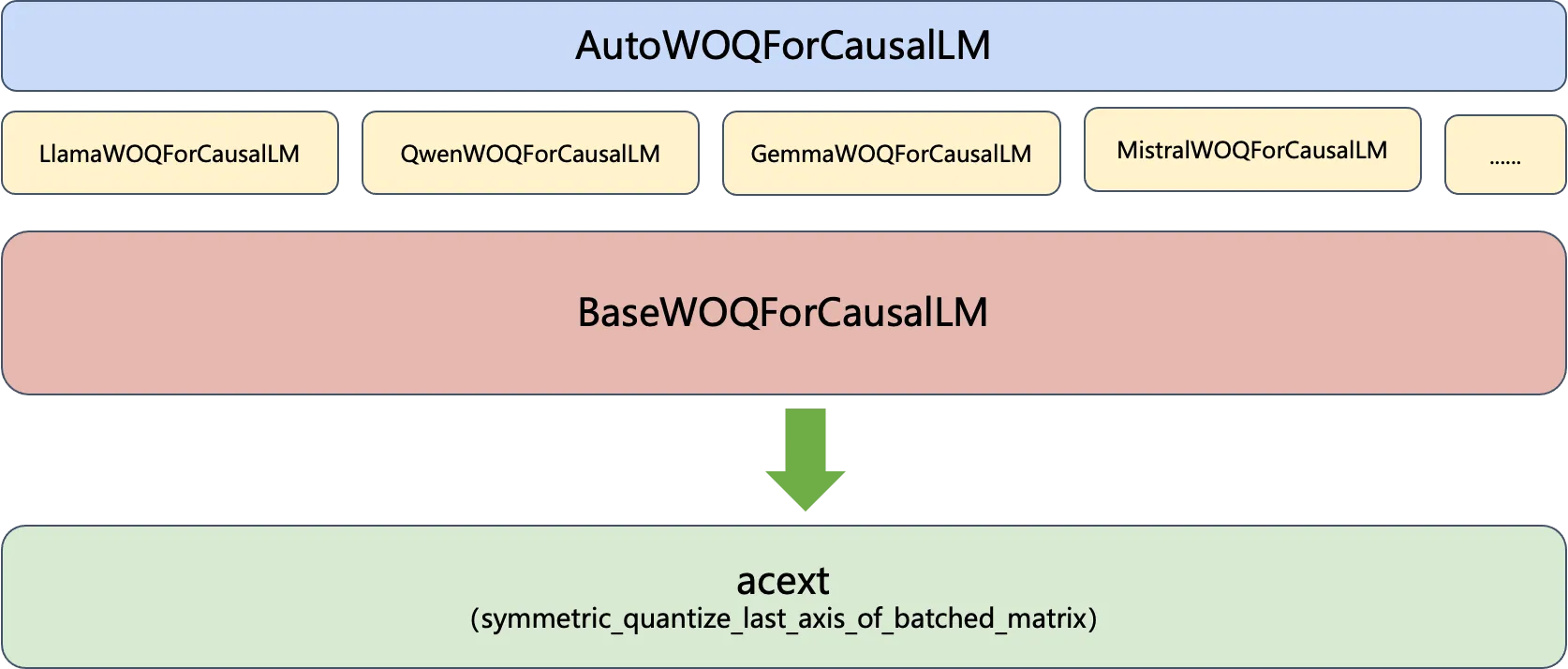
AutoWOQForCausalLM serves as a unified entry point for all LLMs, similar to the Auto classes in Hugging Face. It accepts a model path and automatically detects the model type to instantiate the correct WOQForCausalLM subclass. All subclasses inherit from BaseWOQForCausalLM, which implements the core quantization flow, including symmetric quantization using acext.
The following code snippet shows how to use AutoWOQ:
# Set quantization config (8-bit or 4-bit)
quantize_config = BaseQuantizeConfig(
    bits=8,  # quantize model to 8-bit
)

# Load unquantized weights (Hugging Face format)
model = AutoWOQForCausalLM.from_pretrained(model_path, quantize_config, trust_remote_code=args.trust_remote_code)
tokenizer = AutoTokenizer.from_pretrained(model_path, trust_remote_code=True)

# Quantize model. Applies symmetric quantization to linear layers.
model.quantize()

# Save quantized model and tokenizer
quant_path = args.output
model.save_quantized(quant_path)
tokenizer.save_pretrained(quant_path)
2.1.2 Enable WOQ Quantization
After you generate WOQ-quantized weights, you can add weight-only quantization support to vLLM. When you use WOQ weights, you must explicitly set the quantization argument to weightonly:
# Create an LLM.
llm = LLM(model=model_path, quantization="weightonly")
When loading a quantized model, vLLM automatically creates quantized parameter Tensors for the quantized linear layers and calls the mixed quantization algorithm at runtime.
As shown in the following figure, a Transformer block in vLLM contains green linear layers that use the WeightOnlyQuant algorithm.
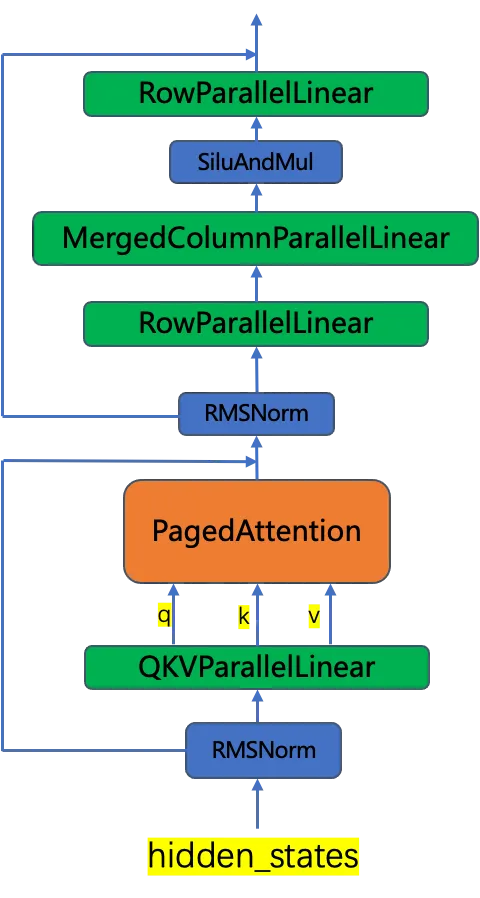
These linear layers use the WeightOnlyLinearMethod to initialize weights, load quantized weights, and invoke acext kernels. Because acext relies on CUTLASS for kernel acceleration, the weights must be pre-reordered. Currently, this reordering occurs once at system startup.
class WeightOnlyLinearMethod(LinearMethodBase):
    # Set quantization config
    def __init__(self, quant_config: WeightOnlyConfig):
        self.quant_config = quant_config

    # Initialize weights: create INT8 weight tensor and load quantized weights
    def create_weights(self, input_size_per_partition: int,
                       output_size_per_partition: int, input_size: int,
                       output_size: int,
                       params_dtype: torch.dtype) -> Dict[str, Any]:
        qweight = Parameter(
            torch.empty(
                input_size_per_partition,
                output_size_per_partition,
                device="cuda",
                dtype=torch.int8,
            ),
            requires_grad=False,
        )
        scales = Parameter(
            torch.empty(
                output_size_per_partition,
                device="cuda",
                dtype=params_dtype,
            ),
            requires_grad=False,
        )

        # Instantiate acext's WeightOnlyQuantMatmul class for mixed-precision kernels
        try:
            self.weightOnlyMatmul = ops.WeightOnlyQuantMatmul()
        except AttributeError as e:
            raise AttributeError(
                "WeightOnlyQuantMatmul kernels could not be imported. If you built vLLM "
                "from source, ensure BUILD_WEIGHTONLY_KERNELS=1 was set.") from e
        woq_state = WOQState.UNINITIALIZED
        ......

    # Apply weights at runtime using acext quantization kernels
    def apply_weights(self,
                      weights: Dict[str, torch.Tensor],
                      x: torch.Tensor,
                      bias: Optional[torch.Tensor] = None) -> torch.Tensor:
        # Online weight preprocessing (done once at startup)
        if weights["woq_state"] == WOQState.UNINITIALIZED:
            qweight_cpu = weights["qweight"].cpu()
            qweight_cpu = preprocess_weights_for_mixed_gemm(qweight_cpu, torch.int8, False, False)
            weights["qweight"] = qweight_cpu.cuda()
            weights["woq_state"] = WOQState.READY
        qweight = weights["qweight"]
        scales = weights["scales"]
        return self.weightOnlyMatmul.weightonly_gemm(x, qweight, scales, bias)
2.1.3 Run WOQ Models
To enable weight-only quantization support, compile vLLM with BUILD_WEIGHTONLY_KERNELS=1.
# Compile vLLM
cd vllm
BUILD_WEIGHTONLY_KERNELS=1 python setup.py develop

# Run offline inference with a quantized model
python examples/offline_inference.py --model /path/to/Llama-2-7b-hf-woq/ -q weightonly --trust-remote-code
Execution results:

2.2 Add AWQ/GPTQ Support (Optimized)
2.2.1 Optimize AWQ/GPTQ Inference
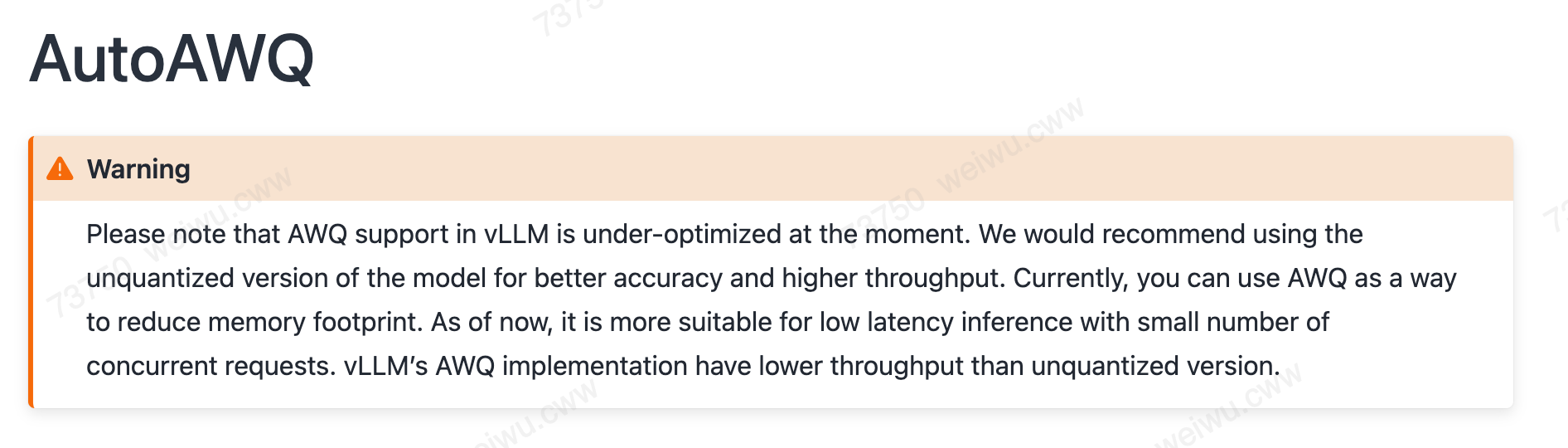
AWQ and GPTQ are native vLLM quantization methods. Both methods use INT4 quantization.
https://docs.vllm.ai/en/latest/quantization/auto_awq.html
However, the native AWQ/GPTQ implementation in vLLM only reduces memory usage and does not always match FP16 performance.
Using acext's mixed precision quantization on vLLM provides more efficient quantization kernels, resulting in a performance boost compared to the original AWQ and GPTQ methods. However, because acext's mixed quantization requires a specific weight arrangement, you must pre-process the original AWQ weights before calling acext.
In other words, by adding support for acext weightonly_groupwise_gemm to vLLM, you can accelerate the quantized inference of AWQ. This process uses the original AWQ weights, but a pre-processing step is required before their first use. The specific process is as follows:
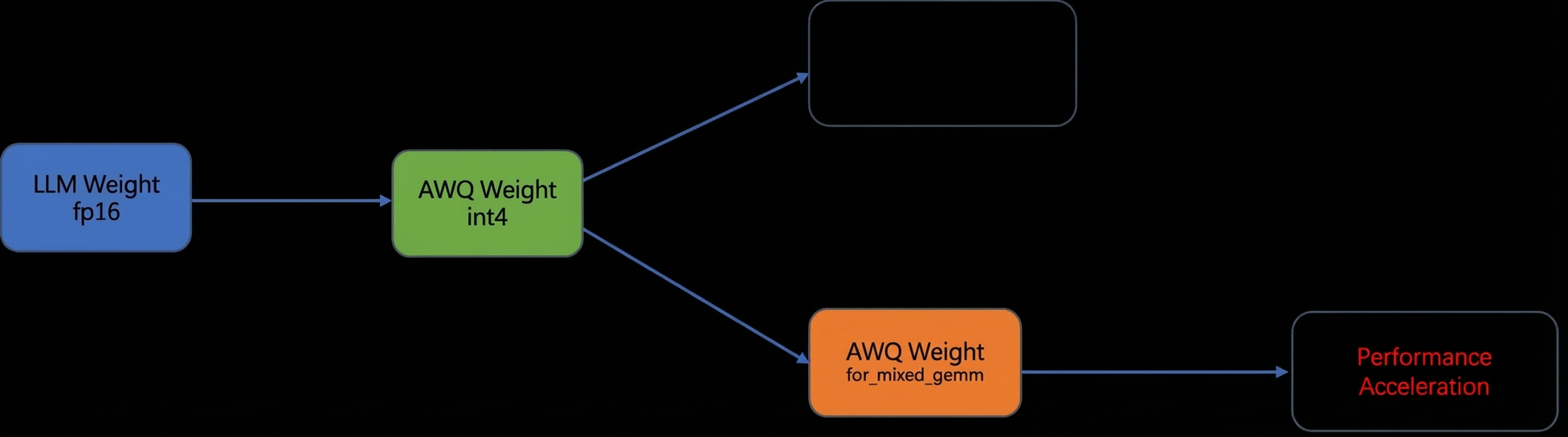
The same flow applies to GPTQ.
Currently, preprocessing runs online at startup, which causes latency. Support for offline preprocessing will be added in a future release.
2.2.2 Fast AWQ/GPTQ Inference
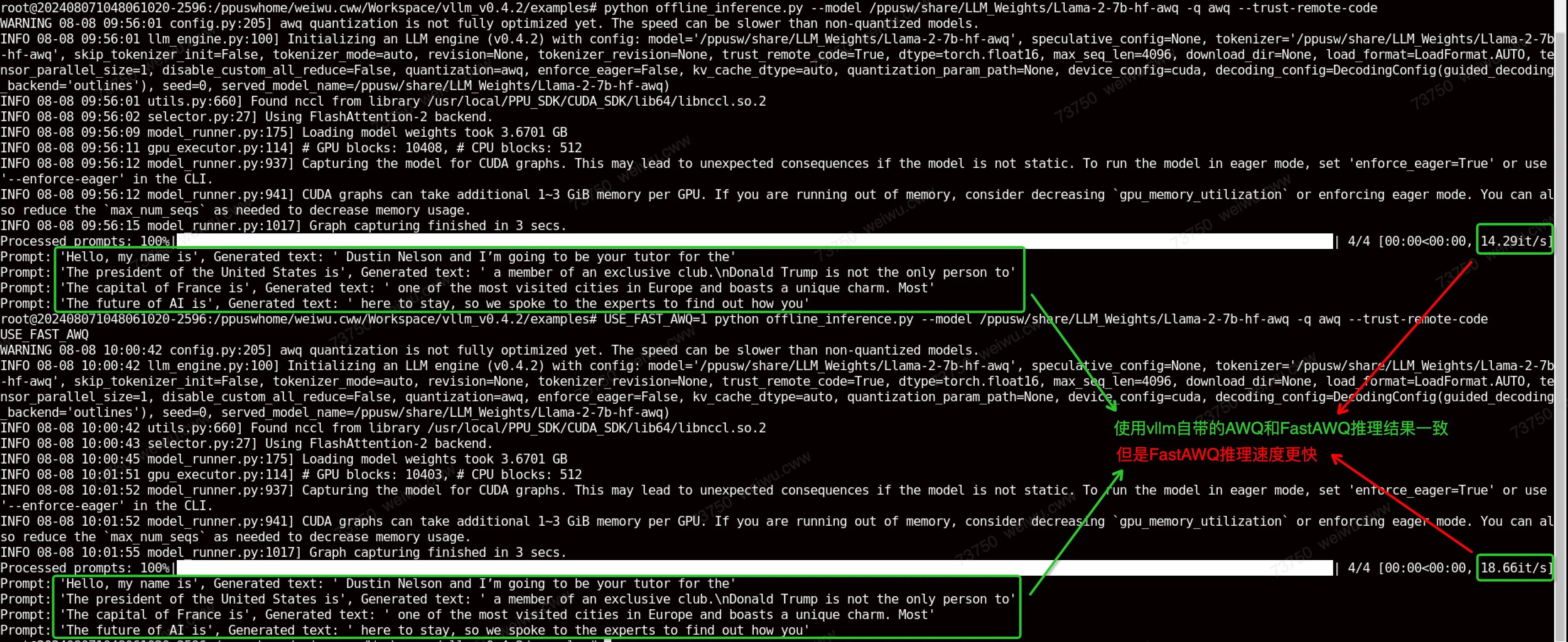
This optimization is still under active development. By default, vLLM does not use acext for AWQ or GPTQ acceleration. To enable this feature, set the USE_FAST_AWQ=1 or USE_FAST_GPTQ=1 environment variable. If you do not set these variables, vLLM falls back to its native implementation.
You can use the following command line to call the FastAWQ flow and accelerate AWQ quantization with acext.
USE_FAST_AWQ=1 python offline_inference.py --model /ppusw/share/LLM_Weights/Llama-2-7b-hf-awq -q awq --trust-remote-codeFastAWQ produces the same output as AWQ but with faster performance.
2.3 acext Supports fused MoE
The acext backend is supported in vLLM 0.8.3 and 0.8.5 for two data types: bf16 and w8a8-int8-channel. For a code reference:
https://code.alibaba-inc.com/ppu_open_source/vllm/tree/v0.8.5_ppu_1v5.1_releaseThe changes fall into the following three categories:
2.3.1 Build the acext Backend
In acext_moe_func.cu, we define the AcextFusedMoe class to wrap the acext APIs. We then register it as a Python API through csrc/moe/moe_ops.h and csrc/torch_bindings.cpp.
API | Features |
acext_fusedmoe_warpper | Call acext backend to execute fused MoE |
get_acext_fusedmoe_status_wrapper | Check if current model config supports acext backend. Returns 0 if supported. |
acext_get_version | Return acext library version (int). Current version: 1050100. |
2.3.2 Modify fused MoE Layer
In fused_moe.py, we add acext calls inside fused_experts_impl. First, you must check for support using ops.get_acext_fusedmoe_status(). If the feature is unsupported, the system falls back to Triton. If acext_fusedmoe_status = 0, call ops.acext_fusedmoe_warpper().
2.3.3 Add W8A8Int8MoEMethod (for w8a8-int8-channel)
In compressed_tensors_moe.py, add the CompressedTensorsW8A8Int8MoEMethod to load w8a8-int8-channel weights and run MoE layers.
2.4 Supported Large Language Models
Model | WeightOnly | AWQ | GPTQ | N_K Shape |
Llama-2-7b-hf | Y | Y | Y | 12288 4096 4096 11008 22016 4096 4096 4096 |
Llama-2-13b-hf | Y | Y | Y | 5120 5120 27648 5120 5120 13824 15360 5120 |
Llama-2-70b-hf (8GPUS) | Y | Y | Y | 8192 3584 8192 1024 1280 8192 7168 8192 |
Meta-Llama-3-8B | Y | Y | Y | 6144 4096 4096 14336 28672 4096 4096 4096 |
Meta-Llama-3-70B (8GPUS) | N | Y | N | 8192 3584 8192 1024 1280 8192 7168 8192 |
Baichuan-7b | Y | Y | Y | 12288 4096 4096 11008 22016 4096 4096 4096 |
Baichuan-13b | Y | Y | Y | 5120 5120 5120 13696 27392 5120 15360 5120 |
Baichuan2-7b | Y | Y | Y | 12288 4096 4096 11008 22016 4096 4096 4096 |
Baichuan2-13b | Y | Y | Y | 5120 5120 5120 13696 27392 5120 15360 5120 |
Chatglm2-6b | Y | N | N | 4608 4096 4096 13696 27392 4096 4096 4096 |
Chatglm3-6b | Y | N | N | 4608 4096 4096 13696 27392 4096 4096 4096 |
Qwen-7b | Y | Y | Y | 12288 4096 4096 11008 22016 4096 4096 4096 |
Qwen-14b | Y | Y | Y | 5120 5120 5120 13696 27392 5120 15360 5120 |
Qwen-72b (8GPUS) | Y | Y | Y | 6144 8192 8192 1024 8192 3072 3072 8192 |
Falcon-7b | Y | N | N | 4544 4544 4672 4544 18176 4544 4544 18176 |
Falcon-40b (8GPUS) | Y | N | Y | 8192 4096 8192 1024 1152 8192 4096 8192 |
Gemma-7b | Y | N | N | 49152 3072 12288 3072 3072 24576 3072 4096 |
Mistral-7b | Y | Y | Y | 6144 4096 4096 14336 28672 4096 4096 4096 |
Mpt-7B | Y | N | Y | 12288 4096 4096 16384 4096 4096 16384 4096 |
Mixtral-8x7b (8GPUS) | Y | Y | N | 4096 512 8 4096 768 4096 |
Mixtral-8x22b (8GPUS) | Y | Y | N | 8 6144 1024 6144 6144 768 |
2.4.1 Known Issues
2.4.1.1 Weight Conversion Issues
WOQ weight conversion issues:
Model | Comments |
Chatglm2-6b | When AutoWOQ quantizes ChatGLM weights, the generated tokenizer_config.json must be replaced with the original file. Otherwise, compatibility issues occur. This is a known issue in the community. Manually replace the file after conversion. |
Chatglm3-6b |
AWQ weight conversion issues:
Model | Comments |
Chatglm2-6b | TypeError: chatglm isn't supported yet. |
Chatglm3-6b | TypeError: chatglm isn't supported yet. |
Falcon-7b | TypeError: FalconDecoderLayer.forward() missing 1 required positional argument: 'alibi' |
Falcon-40b | TypeError: FalconDecoderLayer.forward() missing 1 required positional argument: 'alibi' |
Mpt-7B | AttributeError: 'NoneType' object has no attribute 'bool' |
GPTQ weight conversion issues:
Model | Comments |
Chatglm2-6b | TypeError: chatglm isn't supported yet. |
Chatglm3-6b | TypeError: chatglm isn't supported yet. |
Falcon-7b | AssertionError assert infeatures % self.group_size == 0 |
Meta-Llama-3-70B | torch._C._LinAlgError: linalg.cholesky: The factorization could not be completed because the input is not positive-definite (the leading minor of order 27024 is not positive-definite). |
Mixtral-8x7b | ZeroDivisionError: float division by zero |
Mixtral-8x22b | ZeroDivisionError: float division by zero |
2.4.1.2 Runtime Issues
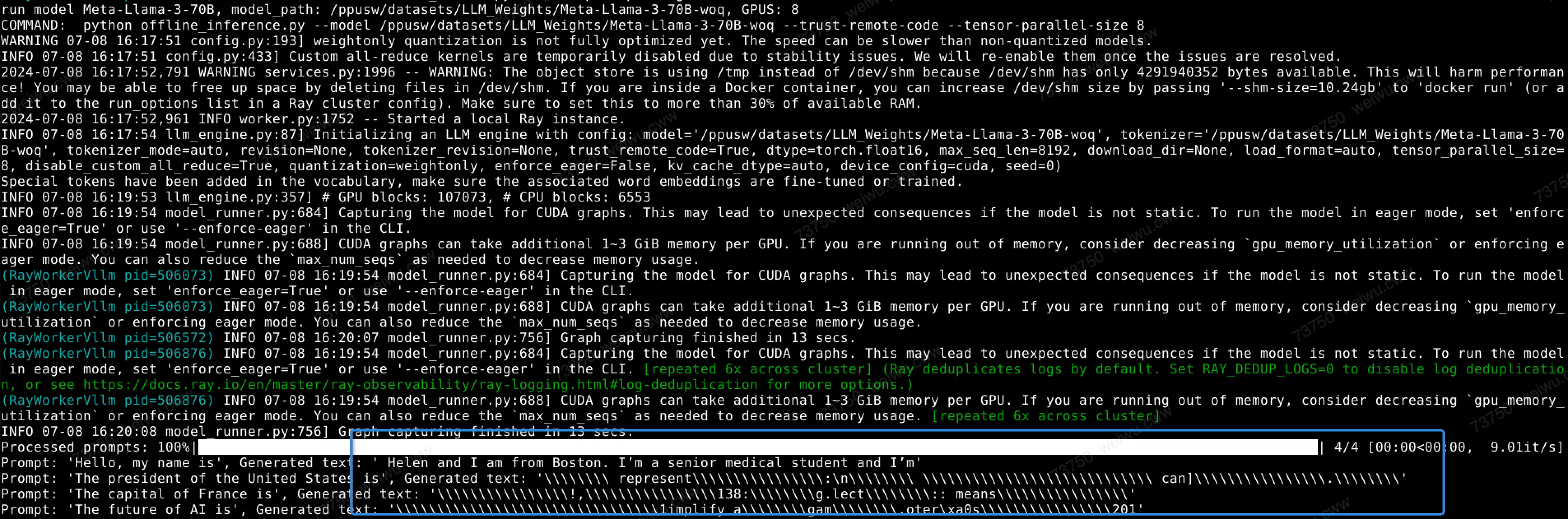
Running Meta-Llama-3-70B-woq produces unexpected results.
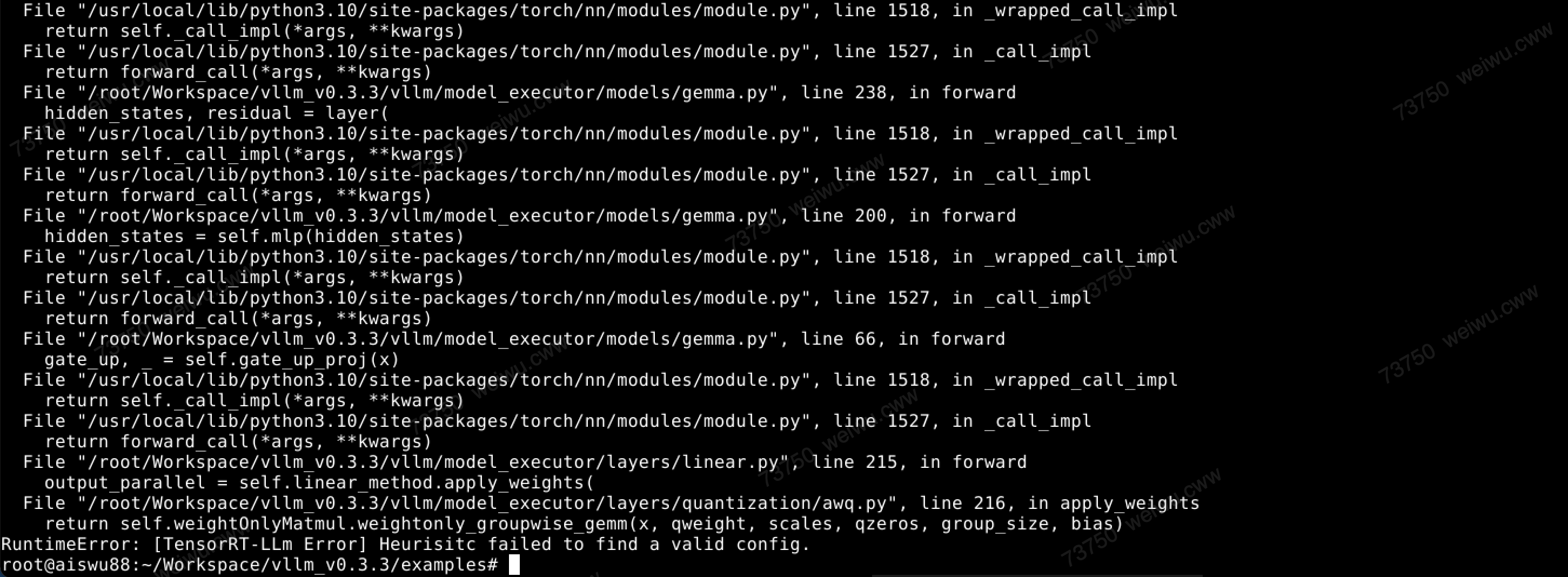
Running Gemma-7b-awq fails.
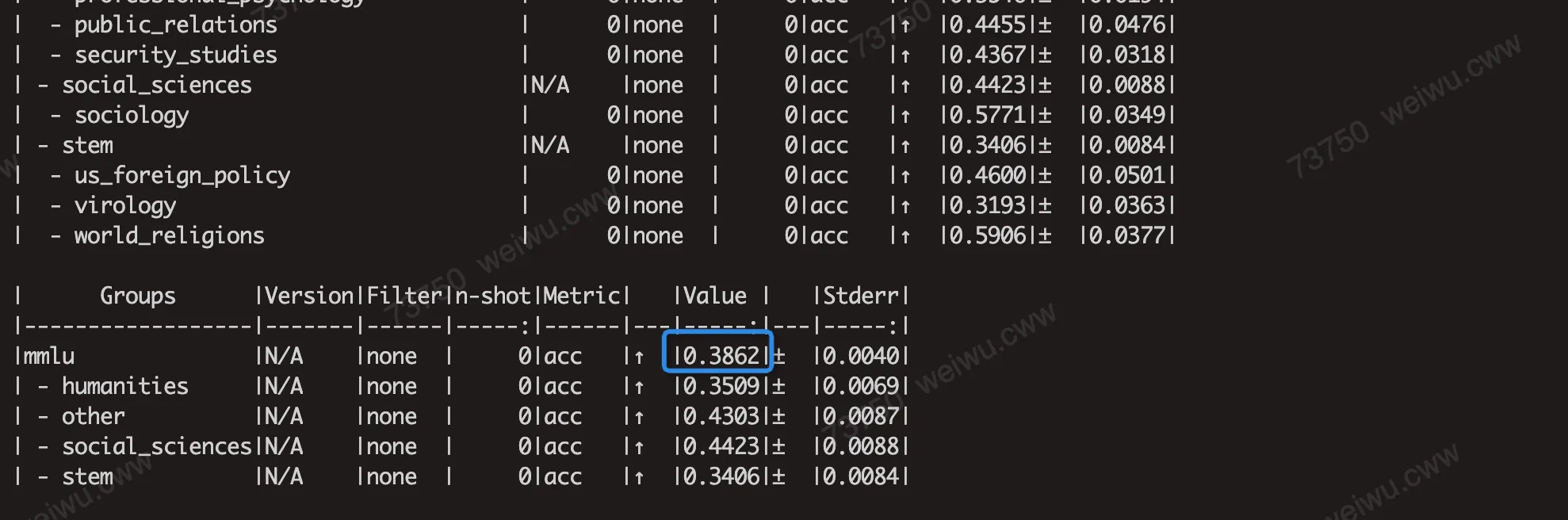
Some models show a large MMLU accuracy loss with AWQ or GPTQ quantization. For example, Llama-2-7b:

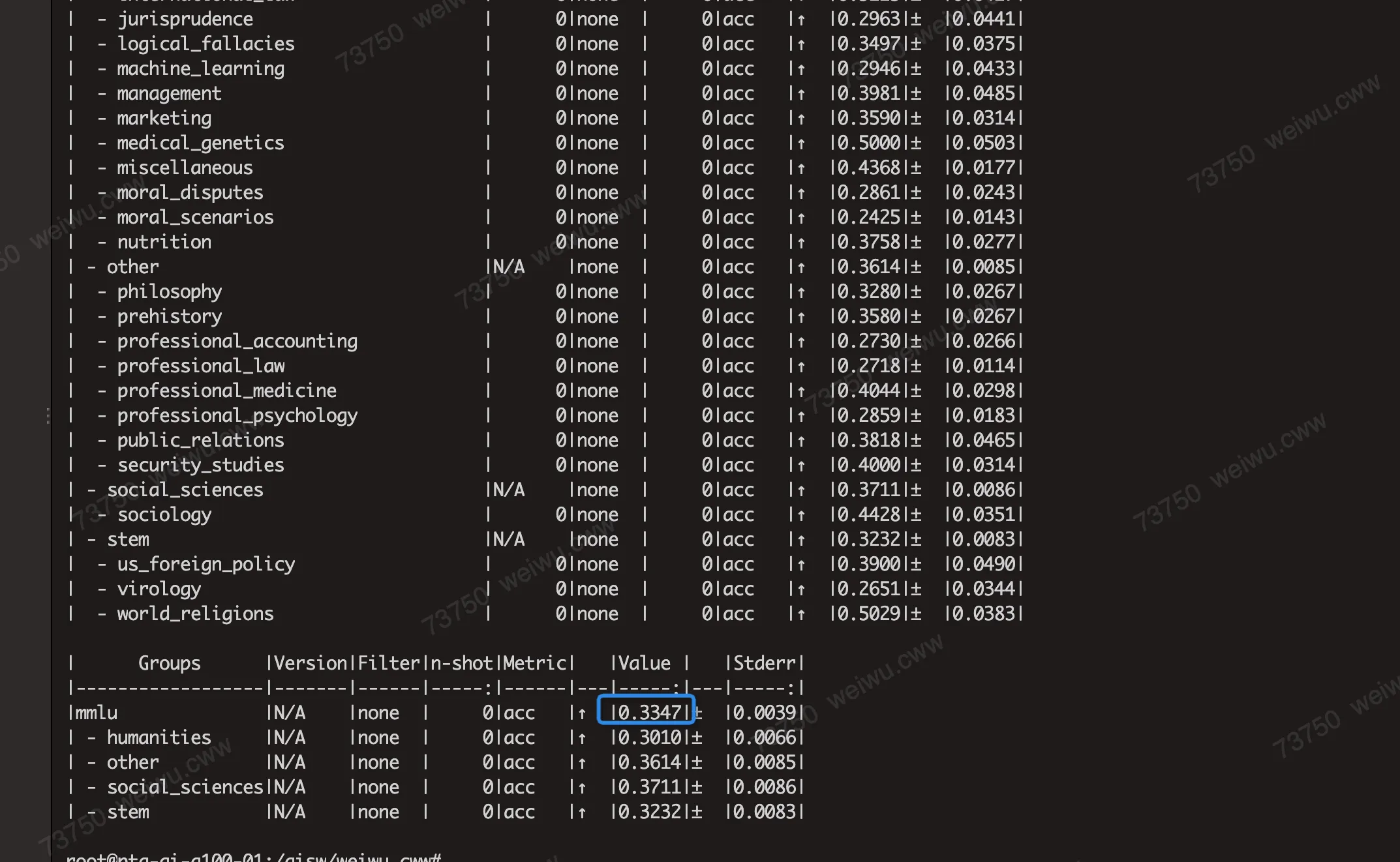
We verified on an A100 GPU that this loss is due to poor AWQ or GPTQ behavior on these models. The MMLU scores on the A100 match those on the PPU. For example, the following figures show the MMLU scores for Llama-2-7b on an A100 using AWQ and GPTQ:
2.5 Model Quantization Performance
You can measure the inference performance of LLMs using multiple methods and metrics.
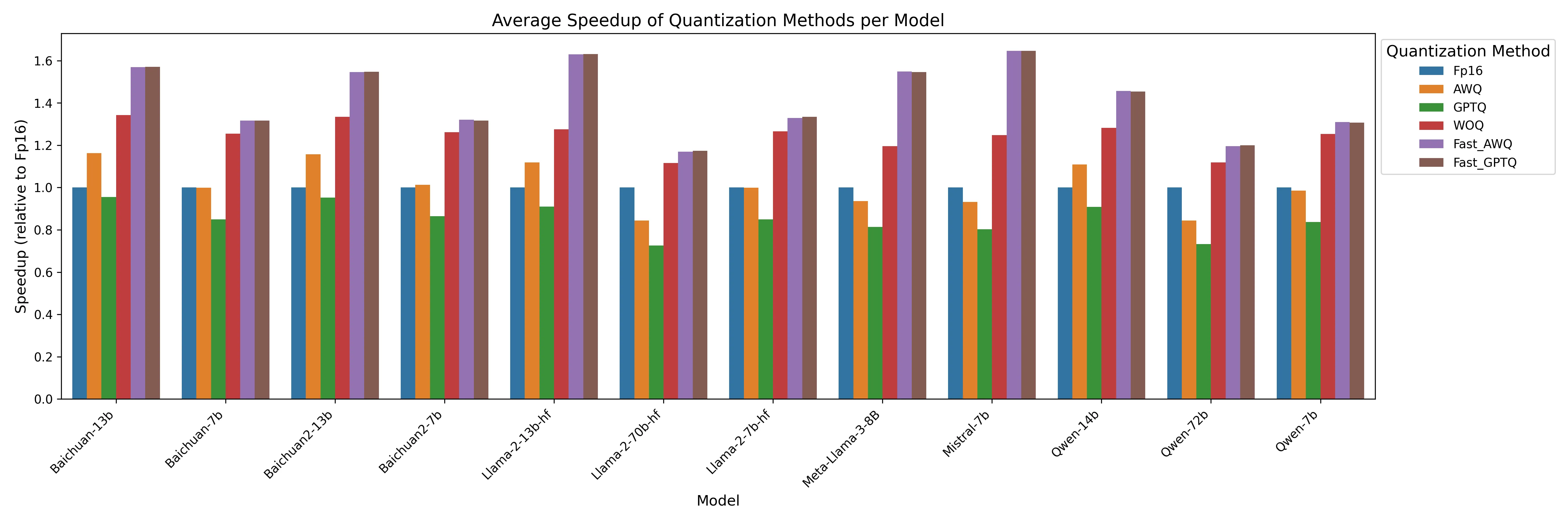
We test generation throughput during inference with fixed inputs: batch sizes of 1, 2, 4, and 8, input lengths of 32, 512, 1024, and 2048, and an output length of 128. Throughput reflects real-world gains, for example, in latency-sensitive online inference scenarios.
The following shows the throughput acceleration ratio for various models and quantization algorithms, measured at the model output stage using the inputs described above, relative to an FP16 baseline.
2.5.1 Detailed Performance Data
2.6 Model Quantization Accuracy (MMLU)
We use the lm-evaluation-harness framework to run LLM inference and test scores on the MMLU dataset. This process helps us evaluate the accuracy of our quantized models.
https://github.com/EleutherAI/lm-evaluation-harness
2.6.1 Running Steps
# If your setuptools version is too low, upgrade it first.
# pip3 install --upgrade pip setuptools
# Due to the following issue, we need to pin setuptools to 69.5.1:
# https://github.com/vllm-project/vllm/issues/4961

git clone https://github.com/EleutherAI/lm-evaluation-harness
# If you encounter issues running MMLU tests, it might be version-related.
# Try checking out this commit we tested:
# git reset --hard e5e5ee0cb629c9c88165292d1b4bf34623392d33
cd lm-evaluation-harness
pip install -e .

# Use Hugging Face proxy
export HF_ENDPOINT=https://hf-mirror.com

# Run MMLU inference with lm_eval
lm_eval --model vllm --model_args pretrained=/ppusw/datasets/huggingface/Llama-2-7b-hf --tasks mmlu --batch_size auto --num_fewshot 5

# If you still have trouble downloading the dataset after setting the proxy,
# it's because the following file hardcodes the Hugging Face download URL:
# /root/.cache/huggingface/modules/datasets_modules/datasets/hails--mmlu_no_train/b7d5f7f21003c21be079f11495ee011332b980bd1cd7e70cc740e8c079e5bda2/mmlu_no_train.py
# Modify the URL in this file to point to hf-mirror.
2.6.2 Inference Results
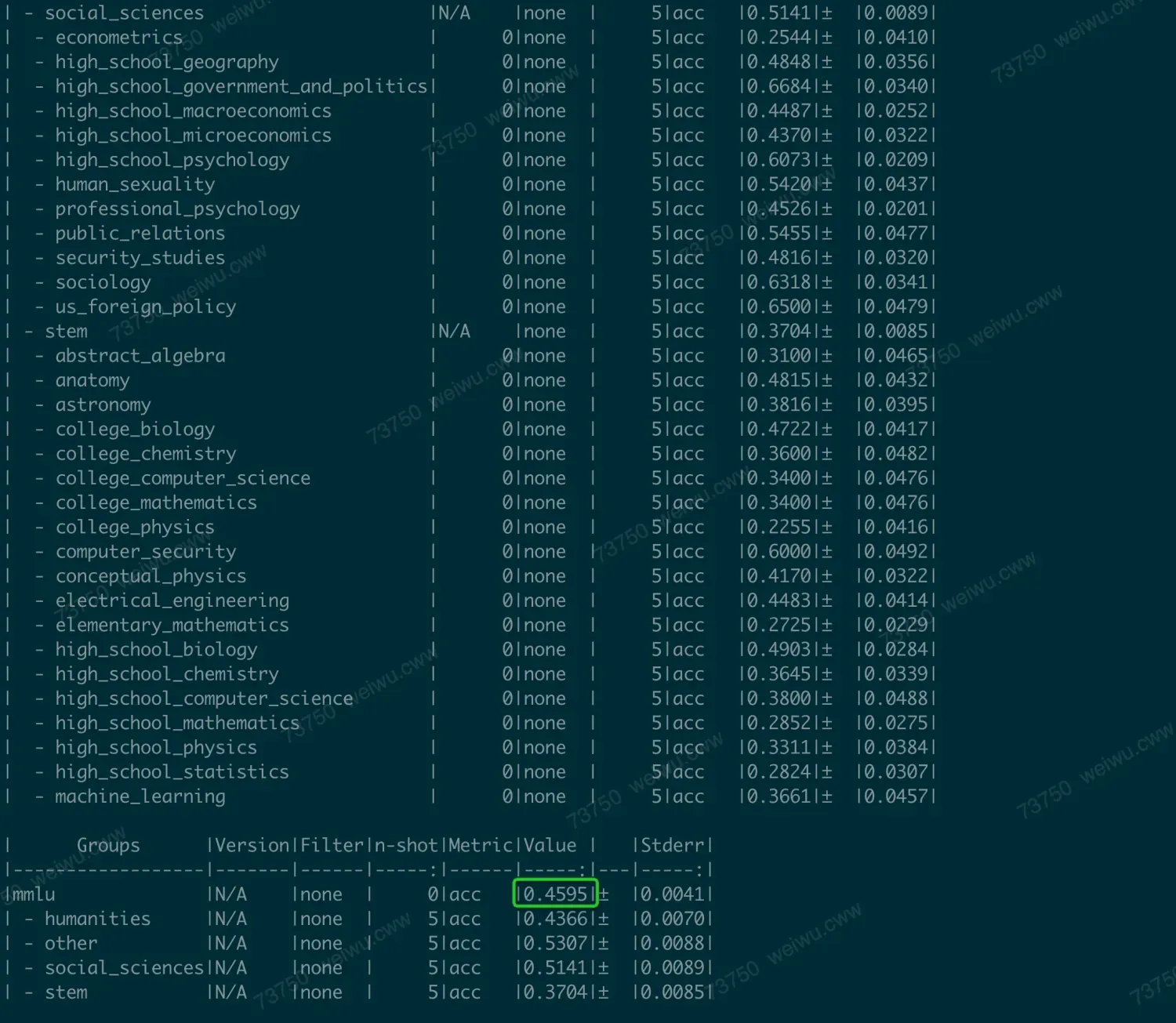
You can set the num-fewshot parameter to control few-shot learning. A higher value increases the runtime but may produce a higher score.
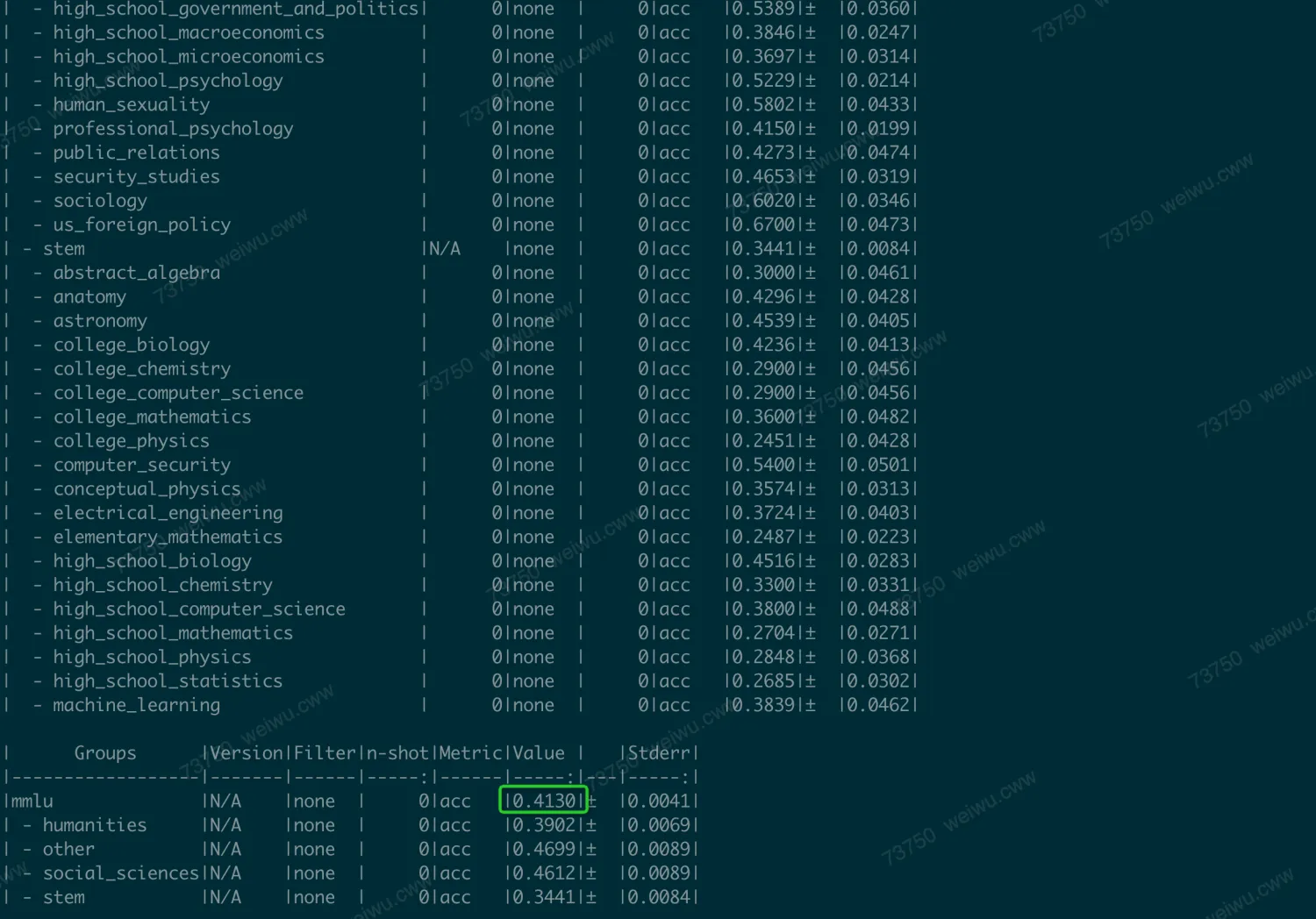
Without num_fewshot, the test runs quickly, typically in minutes, and achieves a score of 41.3.
With num_fewshot=5, the test runs slowly, typically for hours, but achieves a higher score of 45.9.
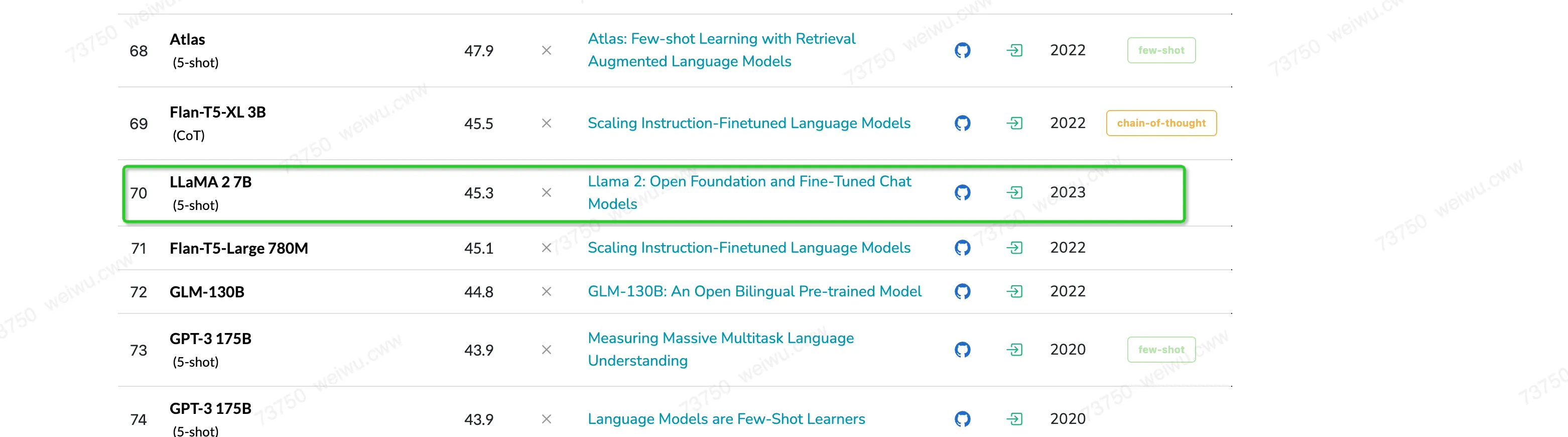
This matches the result on the website.
2.6.3 MMLU Accuracy for Different Quantization Methods
We use the FP16 MMLU score as a baseline. By running inference with different quantization methods, we can measure the MMLU score of the quantized model and calculate the accuracy loss.
The table below shows the MMLU scores (few-shot 0) and accuracy loss for different models and quantization methods.
Gray cells indicate methods that are not supported in the current version (PPU Release 1.3). Red cells indicate methods that have inference bugs.
3. Build and Run from Source
3.1 Build
acext depends on the PPU version of CUTLASS. You must first download acext, and then download the PPU version of CUTLASS.
# Fetch code from ppu_open_source
git clone -b sail_v1.6.1 https://code.alibaba-inc.com/ppu_open_source/acext
cd acext
git clone -b sail_v1.6.1 https://code.alibaba-inc.com/ppu_open_source/cutlass
You can use one of the following two methods to build and install acext.
Build and install acext directly.
# Compile & install in acext directory
rm -rf build && mkdir build && cd build
cmake .. -DCMAKE_BUILD_TYPE=Release -DBUILD_PYT=ON
cmake --build . -- -j${nproc}
cmake --build . --target install -j${nproc}
Build and install the acext wheel package.
python -m build --wheel --no-isolation -v
pip install dist/*.whl
If you choose to install the wheel package and need to compile vLLM or sgl_kernel later, you must copy the acext dynamic library and header files to the PPU_SDK directory. This step ensures that vLLM and SGLang can find the files during the CMake process:
cp $(python -c "import sysconfig; print(sysconfig.get_path('purelib'))")/lib/libacext.so $PPU_SDK/lib/
cp -r $(python -c "import sysconfig; print(sysconfig.get_path('purelib'))")/include/acext $PPU_SDK/include/
3.2 Run
3.2.1 Run unit tests
cd build

# Unit tests for a16w8/a16w4 quant GEMM
python ../tests/test_woq_gemm.py

# Unit tests for a8w8 quant GEMM
python ../tests/th_int8_gemm.py

# Unit tests for MoE
python ../tests/th_moe.py
3.2.2 Run performance tests
cd build
# Run fpAintB benchmark. Default M, N, K is (1, 5120, 5120).
# You can specify M, N, K as command-line arguments.
./benchmark/benchmark_fpAintB

# Run a8w8 benchmark. Default M, N, K is (1, 5120, 5120).
# You can specify M, N, K as command-line arguments.
./benchmark/benchmark_w8a8

# Run benchmarks for all M, N, K combinations and generate a CSV report.
cd benchmark
python run_benchmark.py