Performance and price analysis of Yitian edition (ARM architecture)
This topic describes how to use the Alibaba Cloud ApsaraDB console to quickly build an environment with equivalent resources. You can use this environment to run a Sysbench stress test on an RDS for MySQL instance (Yitian edition, ARM architecture) and a self-managed MySQL database on an ECS instance (x86 architecture). The performance, price, and cost-effectiveness results are displayed in real time.
Background
Alibaba Cloud provides two ways to try this solution:
Free trial: Alibaba Cloud provides a pre-configured environment with all the necessary stress testing resources. You do not need to create any resources. You can simply configure the stress testing parameters to start the free trial.
Dedicated trial: You can quickly deploy the required products, tools, and resources in the Alibaba Cloud ApsaraDB console. This method reduces the time required for deployment, environment setup, and data initialization, allowing you to quickly create a dedicated stress testing environment.
You can perform the following operations:
Configure resource specifications and stress testing parameters based on your requirements.
Launch all required resources with a single click. The system automatically creates resources, deploys tools, and prepares datasets. This saves a significant amount of time on environment deployment.
Log on to the ECS instance where the web UI is deployed to customize and verify parameters and scripts.
Prerequisites
If you use a Resource Access Management (RAM) user, the RAM user must have the permissions of the `AliyunServiceRoleForADAMYaoChiSolution` role.
Impacts
None.
Technical implementation
This analysis is part of the product-led growth (PLG) solution framework. It uses the Alibaba Cloud ApsaraDB console solution and Resource Orchestration Service (ROS) to automatically build, deploy, run, and release a proof-of-concept (PoC) testing platform. The following figure shows the architecture of the solution.
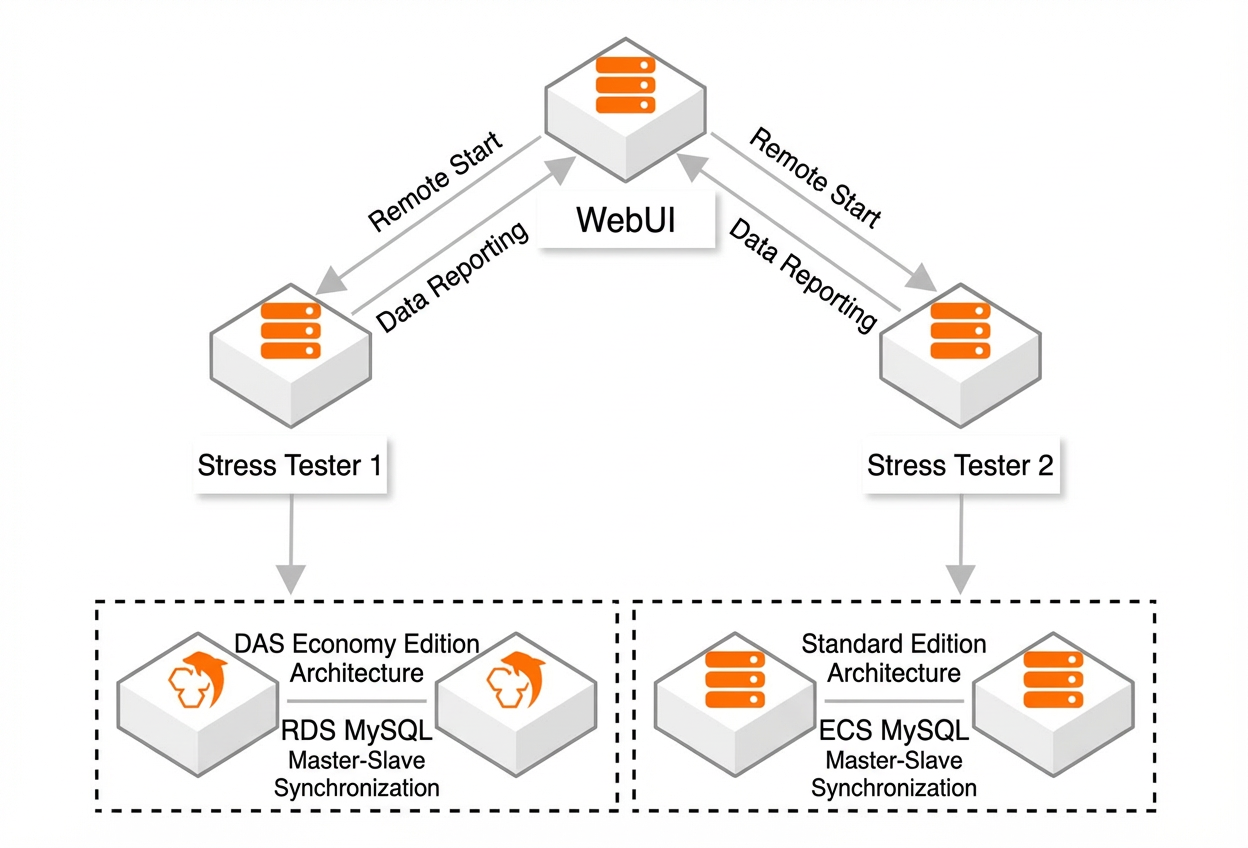
The products compared in this test are RDS for MySQL and MySQL on ECS. The RDS for MySQL instance is a high-availability (HA) dual-node database that uses the Yitian edition (ARM architecture). The MySQL on ECS instance is a self-managed primary/secondary replication database on a Standard Edition ECS instance that uses the x86 architecture. Two stress testing machines continuously test each database and forward the results. A web UI machine pushes the results to the frontend for a real-time display.
Costs
Free trial: The resources used in the trial are not part of your account, so no costs are incurred. You can proceed with the trial without being charged.
Dedicated trial: This trial incurs costs because an ECS instance and an RDS for MySQL cluster are created in your account. These resources use the pay-as-you-go billing method. Costs are based on the usage duration or storage capacity. The actual price is the price displayed in the Alibaba Cloud ApsaraDB console when you deploy the resources.
Procedure for the free trial
Create a stress testing task.
In the lower-right corner of the page, click Create Free Trial Task. Select the stress testing parameters based on your requirements, and then click OK.
View the stress testing results.
Click Trial Records > My Tasks.
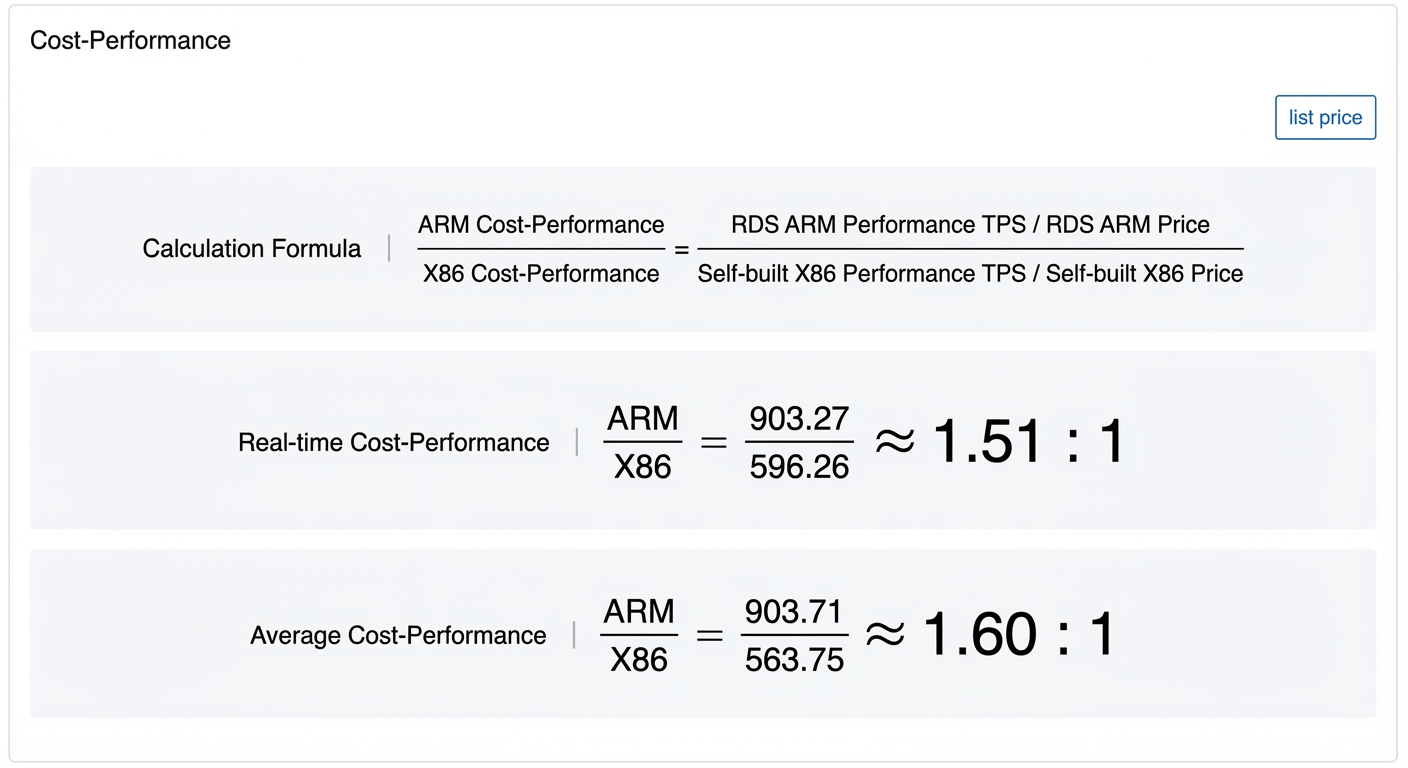
When the Status changes to Completed, click View Details to view the performance stress testing results, price comparison, and cost-effectiveness information for RDS for MySQL (ARM) and self-managed MySQL on ECS (x86).
 Note
NoteThe page displays the formula used to calculate cost-effectiveness and normalizes the final ratio. This helps you intuitively understand the cost-effectiveness information.
The results show that RDS for MySQL (ARM) is more cost-effective than self-managed MySQL on ECS (x86).
Procedure for the dedicated trial
Deploy resources.
In the lower-right corner of the page, click One-Click Deployment.
NoteStress Testing Product defaults to RDS MySQL, and Stress Testing Tool defaults to Sysbench.
In the panel that appears, configure the following parameters.
Item
Parameter
Description
Example
Common parameters
Region
The region where the stress testing resources (ECS and RDS instances) will be created.
Select a region as needed. You can select Hangzhou or Beijing.
Hangzhou
Zone
The zone where the stress testing resources (ECS and RDS instances) will be created.
Select a zone as needed.
Zone J
Stress testing environment
(ECS instance for deploying the Sysbench tool)
ECS instance password
The password for the ECS instance.
Test@******
Whitelist
The IP address whitelist for accessing the web UI trial page.
To allow access from all IP addresses, you can set this to 0.0.0.0/0, but this is not recommended.
We recommend that you set this to your local public IP address. You can obtain your public IP address by visiting ipconfig.me or myip.ipip.net in your browser.
127.X.X.X
Trial environment specifications
The ECS instance type.
Select an instance type as needed. You can select 8 vCPU, 16 GB or 8 vCPU, 32 GB.
8 vCPU, 16 GB
RDS for MySQL
(Yitian edition, ARM architecture)
Specifications
The specifications of the RDS for MySQL instance.
Select specifications as needed. You can select 8 vCPU, 16 GB; 8 vCPU, 32 GB; or 8 vCPU, 64 GB.
The specifications of the RDS instance must be the same as the specifications of the ECS instance where the self-managed MySQL database is deployed.
8 vCPU, 16 GB
Storage (GB)
The storage space of the RDS for MySQL instance.
20 GB
RDS username
The account for the RDS for MySQL instance.
root_******
RDS password
The password for the RDS for MySQL instance account.
Rds@******
Self-managed MySQL (ECS instance for deploying the self-managed MySQL database)
Node specifications
The specifications of the ECS instance.
Select specifications as needed. The specifications of the ECS instance must be the same as the specifications of the RDS instance.
8 vCPU, 16 GB
Storage (GB)
The storage space of the ECS instance.
20 GB
Database password
The password for the MySQL database deployed on the ECS instance.
Database@******
Configuration
Stress testing pattern
Select a pattern based on your testing scenario.
oltp_read_write
Stress testing concurrency
Select a value as needed.
16
Stress testing duration (seconds)
Select a value as needed.
600
Click Create Resources.
NoteAfter you click Create Resources, the page displays the progress of resource creation (such as creating ECS and RDS instances), stress testing tool deployment, and data initialization. Resource creation takes about 10 to 20 minutes. You can click the ROS Stack Console link on the page to view the detailed progress.
After the deployment is complete, a message appears on the page.
Stress testing
After the deployment is complete, the system automatically starts the stress test.
NoteDuring the stress test, you can click View Details to view the real-time progress.
If you want to restart the stress test, or if a previous test has finished and you want to start another one, click Start Now.
After the stress test is complete, a message appears in the upper-right corner of the page. You can view information such as the performance, cost-effectiveness of RDS for MySQL (ARM) versus self-managed MySQL on ECS (x86), and the cost of the trial.
Performance of RDS for MySQL (ARM) versus self-managed MySQL on ECS (x86):
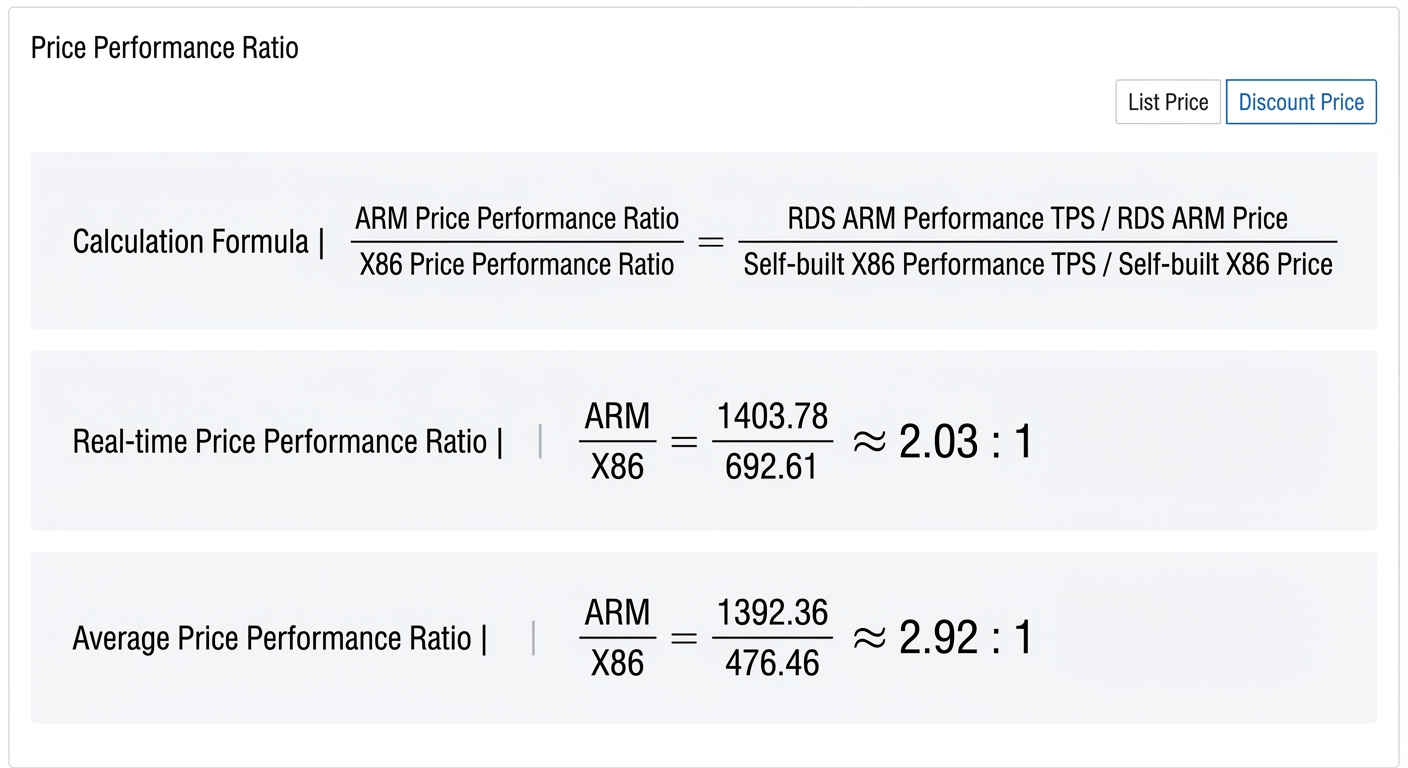
Cost-effectiveness of RDS for MySQL (ARM) versus self-managed MySQL on ECS (x86):
 Note
NoteThe page displays the formula used to calculate cost-effectiveness and normalizes the final ratio. This helps you intuitively understand the cost-effectiveness information.
Cost-effectiveness is shown from two dimensions: list price and discounted price. The list price is displayed by default. The discounted price is calculated based on the discount that applies to your account.
The results show that RDS for MySQL (ARM) is more cost-effective than self-managed MySQL on ECS (x86).
Release resources.
On the left side of the resource deployment page, click Release Resources. In the dialog box that appears, confirm the information and click One-Click Release.
NoteThe page then displays Releasing Resources.
You can click the ROS Stack Console link on the page to view the detailed progress.
When the Status on the Stack Information tab is Delete Succeeded, the resources have been released.
FAQ
Q: Resource deployment failed with the error message "The previous task failed to be deployed. Details: code: 400, The creation of resource ALIYUN::ECS::VPC exceeds the quota. Details: creation(1) + usage(10) > quota(10). request id: 7FD61193-4E8C-577D-98BF-DCAB68821CB5". How do I resolve this?
A: This error indicates that you have reached the VPC creation quota for your account in the current region and cannot create new VPCs. You must request a quota increase. For more information, see Request a quota increase.
When you request a quota increase, you must search for the quota parameter that corresponds to the region. For example, for the China (Hangzhou) region, you can search for `cn-hangzhou`, find the `vpc_quota_instances_num_cn-hangzhou` parameter, and then request an increase for this parameter's quota.