training-xpu-pytorch 26.04
This topic describes the release notes of training-xpu-pytorch 26.04 versions.
Main Features and Bug Fix Lists
Main Features
Upgrade CUDAto 13.0 and PPU SDKs to 2.1.0.
Upgrade deepspeed to 0.18.8, cupy to 14.0.1, and vllm to 0.18.0.
Bugs Fix
No.
Contents
Image Name | training-xpu-pytorch |
Image TAG | 26.04.post1 |
Application Scenarios | Training /Inference |
Framework | pytorch |
Requirements | PPU SDK 2.1.0 |
Supported Architectures | amd64 |
Core component |
|
Assets
We recommend that you accelerate AI container image pulls over VPC to reduce pull times.
Public Image
egslingjun-registry.cn-wulanchabu.cr.aliyuncs.com/egslingjun/training-xpu-pytorch:26.04.post1
VPC image
You can replace the asset URI egslingjun-registry.cn-wulanchabu.cr.aliyuncs.com/egslingjun/{image:tag} of the specified AI container image with a acs-registry-vpc.{region-id}.cr.aliyuncs.com/egslingjun/{image:tag} to pull the AI container image from a VPC.
{region-id}: the region ID of the ACS service, including Finance Cloud and Alibaba Gov Cloud. For example:cn-beijing,cn-wulanchabu,cn-shanghai-finance-1, etc.{image:tag}: the name and tag of the AI container image. For example:inference-xpu-pytorch:25.11-v1.7.0-vllm0.10.2-torch2.8-cu129-20251113,training-xpu-pytorch:25.11, etc.
Driver Requirements
Driver version >= 1.5.0
Key Features and Enhancements
PyTorch Compiler Optimization
The compiler optimization capability introduced by PyTorch 2.0 can usually achieve significant benefits on a small scale with a single card, but distributed frameworks such as video memory optimization and FSDP/Deepspeed need to be introduced in LLM training, resulting in torch.compile() that the benefits cannot be simply obtained or have negative benefits.
The granularity of communication is controlled under the DeepSpeed framework, which helps the compiler obtain a more complete computational graph and make a wider range of compilation optimizations.
Optimized version of PyTorch:
Optimize the front end of the PyTorch compiler to ensure that the compiler can still compile properly even if any graph break occurs in the computing graph.
Enhanced pattern matching and dynamic shape capabilities to improve the performance of compiled code.
Combined with the above optimization, E2E throughput gains of about 20% can usually be obtained under 8B LLM training.
Recompute memory optimization
Based on a large amount of performance evaluation data, including different models in different clusters and different training parameter configurations, as well as related system indicator data such as video memory utilization collected during evaluation, we conduct predictive modeling and analysis of the model's video memory overhead, and recommend the best activation value to recalect the number of layers, and integrate it into PyTorch, so that users can use the performance benefits brought by video memory optimization at a low threshold. This feature is supported in the DeepSpeed framework.
ACCL Communication Library
ACCL is a high-performance network communication library developed by Ali for Lingjun products. It provides three versions of ACCL-N, ACCL-P and ACCL-R for GPU, PPU and AMD. ACCL-N is a high-performance communication library customized by Alibaba Cloud based on NCCL. It is fully compatible with NCCL, fixes some bugs in the official NCCL version, and optimizes performance and stability. ACCL-P is a collection communication library based on pccl, an open source communication library for secondary development. ACCL-R is a collection communication library based on AMD Rocm open source communication library rccl for secondary development. This version mainly transplants the main features implemented on ACCL/ACCL-N to pccl, fixes some problems, and makes in-depth customization in combination with relevant self-developed product components of Gaowang.
E2E performance benefit evaluation
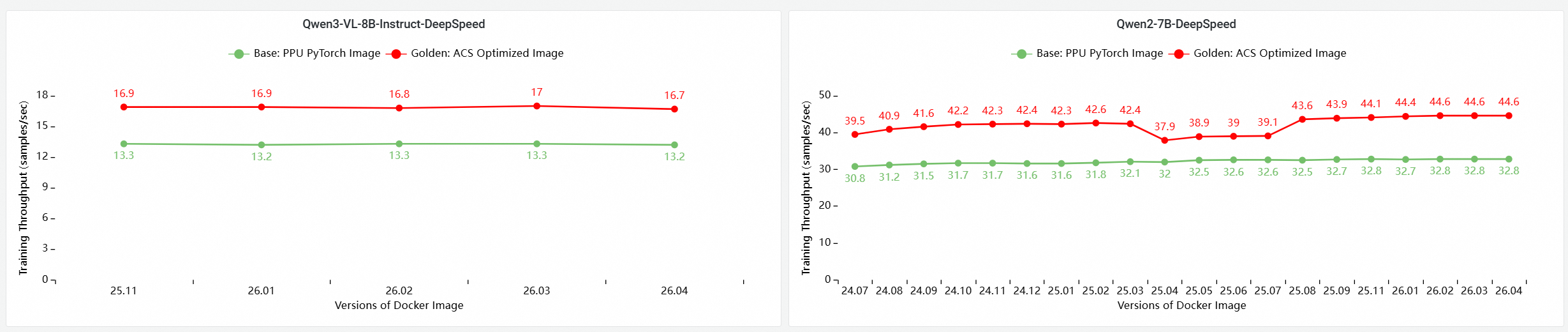
Using the cloud-native AI performance evaluation and analysis tool CNP, we used mainstream open source models and framework configurations to conduct a comprehensive end-to-end performance comparison analysis with standard base images, and further evaluated the contribution of each optimization component to the overall model training performance through ablation experimental analysis.
Compare basic images and iterative evaluation
E2E Performance Contribution Analysis of PPU and GPU Core Components
The following tests are based on images in this issue to evaluate and compare the E2E performance of training on a multi-node PPU cluster. The comparison items include:
Base: PPU PyTorch Image
Use the ACCL communication library for ACS AI Image:Base+ACCL: images
ACS AI Image:AC2+ACCL: Golden images use AC2 BaseOS and do not enable any optimization.
ACS AI Image:AC2+ACCL+CompilerOpt: Golden images use AC2 BaseOS and only enable torch compile optimization
ACS AI Image:AC2+ACCL+CompilerOpt+CkptOpt: Golden images use AC2 BaseOS with both torch compile and selective gradient checkpoint optimization enabled.

Quick Start
The following example pulls a training-xpu-pytorch image only by using Docker. To use a training-xpu-pytorch image in ACS, you can specify the image address when you create a workload in the console, or specify the image reference in a YAML file.
1. Call the API to enable the compiler and recompute memory optimization.
Enable Compiler Optimization
Use transformers Trainer API:

Enable memory optimization for recalculation
export CHECKPOINT_OPTIMIZATION=true
2. Start the container
The image contains the built-in model training tool ljperf. The following example shows how to start a container and run a training task.
LLM Class
# Start the container and enter the
docker run --rm -it --ipc=host --net=host  --privileged egslingjun-registry.cn-wulanchabu.cr.aliyuncs.com/egslingjun/training-xpu-pytorch:[tag]

# Run the training demo.
ljperf --action train --model_name deepspeed/llama3-8b
Usage suggestions
The changes in the image involve libraries such as PyTorch and DeepSpeed. Do not reinstall them.
The
zero_optimization.stage3_prefetch_bucket_sizein the DeepSpeed configuration is left blank orauto.The built-in environment variable
NCCL_SOCKET_IFNAMEof this image needs to be dynamically adjusted according to the usage scenario:If only 1/2/4/8 cards are applied to a single pod for training or inference tasks, you need to set
NCCL_SOCKET_IFNAME=eth0(the default configuration in this image).When a single pod applies for 16 cards of the whole machine (in this case, you can use the HPN high-speed network) to perform training or inference tasks: You need to set the
NCCL_SOCKET_IFNAME=hpn0.
We recommend that you use this image together with the PPU PIP service provided by Alibaba Cloud to support password-free PIP service in ACS VPCs. You do not need to use other PIP sources in combination. pip config is built into this image. you must configure pip config according to the instructions in this document.
In the ACS environment to use AcclEP-P (that is, PPU version of DeepEP), you need to set the environment variable
export EIC_VSOLAR=1(this image needs to be set, and it is expected that subsequent images will remove this limit).Standard quantization capabilities supported by various frameworks of SDK 2.1.0:
vLLM 0.18.0 (on SDK 2.1): per-token/per-channel w8a8(int8)
Precautions for quantization capability: Currently, SAIL vLLM has not adapted and optimized the Marlin kernel. The performance of AWQ(w4a16) and GPTQ(w4a16 and w8a16) is poor. Use the w8a8(int8) quantization scheme.
A8W8(INT8) quantitative demonstration model.
An example of a quantitative model adapted to SDK2.1 is provided. The system logs the ledger and uses the PTG PIP ledger (can be obtained by contacting your account manager):
DeepSeek-R1: support per-token/per-channel a8w8(int8) quantization scheme
DeepSeek v3.2: support per-token/per-channel a8w8(int8) quantization scheme
Kimi-K2-Instruct: support per-token/per-channel a8w8(int8) quantization scheme
Qwen3-235B-A22B: support per-token/per-channel a8w8(int8) quantization scheme
GLM-5: support per-token/per-channel w8a8(int8) quantization scheme
MiniMax-M2.5: support per-token/per-channel w8a8(int8) quantization scheme
Qwen3.5-397B-A17B: support per-token/per-channel w8a8(int8) quantization scheme
GLM-5.1: support per-token/per-channel w8a8(int8) quantization scheme
We recommend that you use this image with the latest driver to obtain the best performance. For more information, see Specify a GPU model and driver version for a ACS GPU Pod and GPU driver version description.
Known Issues
vLLM0.18.0 Image
GLM-5 model operation requires an upgrade
transformers==5.2.0.DP + EP + DeepEP low latency Question:
The first time you start the server, you must set the
export VLLM_ENGINE_READY_TIMEOUT_S=6000. Otherwise, the service may fail to start due to the timeout of the DeepGemm WarmUp compiler. The community has the same problem on the GU8TF card type.There is an accuracy issue for the Qwen3 MoE BF16 scenario. The community also has this accuracy problem. Do not use this combination of DP + EP + DeepEP low latency to launch Qwen3 MoE BF16 model weights.
If the MiniMax-M2.5 model TP=16 causes service startup failure, use TP=8 to run int8 quantization weights.
If the value of the
--gpu_memory_utilizationis higher than 0.96, the HGGC OOM problem may occur. Lower thegpu_memory_utilizationto avoid this problem.If you enable the Flashinfer Sampler feature, the performance can be improved. However, this feature may cause precision loss. By default, this feature is disabled. The community has the same problem. You can turn this feature on or off by
VLLM_USE_FLASHINFER_SAMPLERthe environment variable.If you use the DeepGemm backend, the warm up is automatically performed during the service startup phase, and the DeepGemm kernel is compiled. This may take a long time to warm up.
The warmup time is long. we recommend that you use environment variables to specify the deepgemm cache path
export DG_CACHE_DIR=<your path>to avoid repeated compilation.You can skip the DeepGemm warm up
export VLLM_DEEP_GEMM_WARMUP="skip". If it is not, the performance will be degraded.
In terms of quantization, the current SAIL vLLM version does not adapt and optimize the Marlin kernel. AWQ(w4a16), GPTQ (w4a16, w8a16), and mxfp4 have poor performance. Use the int8 w8a8 quantization scheme.